
ARMember Review 2026: Best WordPress Membership Plugin?
Are you serious about building a membership site, premium content platform or online community with WordPress? then you already know the biggest challenge: picking a membership plugin that’s powerful, flexible and actually easy to use.
If you’re considering ARMember for your membership website, you’re not alone!
ARMember is an all-in-one membership plugin that promises to handle everything from subscription plans and content restriction to payment and automation, all under one roof. On paper, it promises a lot.
But does it really live up to those claims?
As a result, we ended up testing tons of membership plugins, all claiming to be the “BEST”. Yet we already know there’s no “all-size-fit” in the market of WordPress plugins. Thus, our focus is to use a membership plugin which is:
- Easy to use
- Offers a robust set of features
- And money worth
Surprisingly, ARMember ticks all these boxes.
In this ARMember review, we’ve dove deeper into what makes ARMember different from the sea of other WordPress membership plugins.
So let’s find out if ARMember is worth the money or not in 2026.
Why ARMember Stands Out
ARMember is the most popular all-in-one WordPress membership plugin to create a complete membership site with no tech headaches.
ARMember stands out as it balances powerful features and usability; something many popular WordPress membership plugins struggle to offer.
While most plugins force you to choose between advanced features or ease of use, ARMember gives you both with perfection.
Plus, it’s built for WordPress site owners who want full control over memberships, subscriptions and content access without relying on multiple addons or custom development.
Here’s what truly sets ARMember apart:
All in one functionality
Membership plans, content restriction, payments, forms, online course creator, community boosting features and… even automation are included in this already. So you don’t need to piece together several plugins to get a working system.
Flexible Membership Logic
Create endless membership levels with one time payments, recurring subscriptions, free trials, drip content and multiple access rules which are perfect for creating online courses, communities and premium content sites alike.
Beginner Friendly
During hands-on testing, we realized setting up a membership site is super easy with ARMember’s membership setup wizard. Also, the interface is clean and well organized, allowing even non tech-savvy people to create and manage membership plans with ease.
Built for Real Business Use Cases
Whether you’re running a coaching program, selling digital content or managing a growing member community, ARMember is designed to grow alongside your business.
Getting Started with ARMember

Activating ARMember is super simple and straightforward, even if you’re new to WordPress membership plugins.
- First thing first, go to ARMember’s official site and download your preferred version.
- Next, go to your WordPress dashboard → Plugins → Add New → Upload
- Now simply upload the ARMember zip file you got and hit the “Install Now” and then “Activate Plugin”.
- And that’s it!
After this, ARMember walks you through the basics of setting up your membership system step by step.
Plus, ARMember’s dashboard is clean and easy to navigate. Thus, it is easy to understand how plans, members, content restrictions and drip content works together.
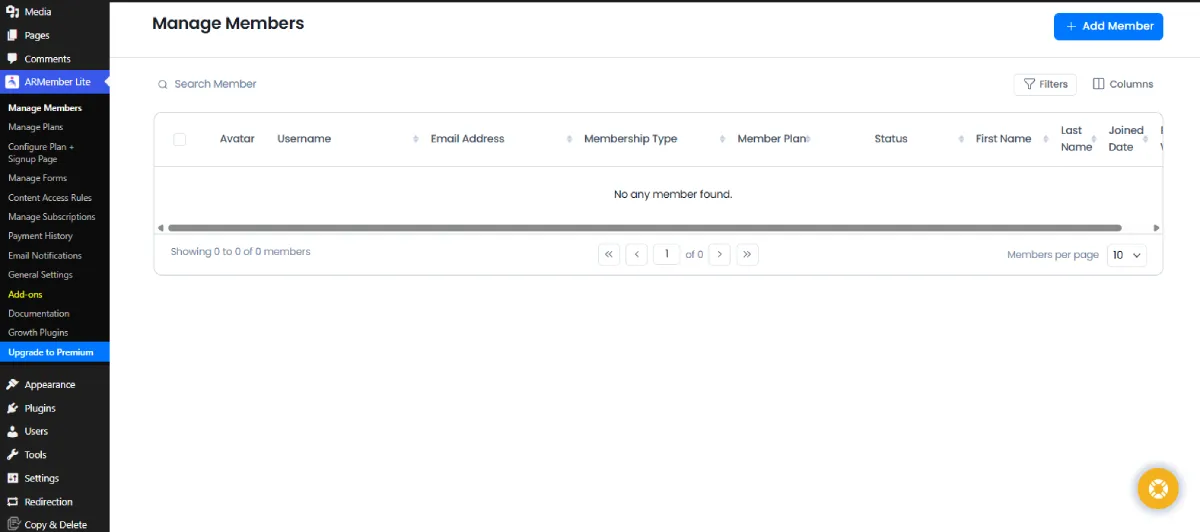
You can start by defining your membership goals whether that’s selling premium content, offering online courses or building a private community…and ARMember gives you all the tools to support each of these use cases from day one.
Quick Steps to Launch Your First Membership Plan
Launching your first membership plan with ARMember doesn’t take long.
Here’s how to create a membership plan using ARMember in simple, logical steps.
First of all, go to your WordPress Dashboard → Manage Membership Plans. By default, you can see a free membership plan is already made during the time of setup wizard.
Now if you wish to make some paid/premium membership plans as well, simply follow us.
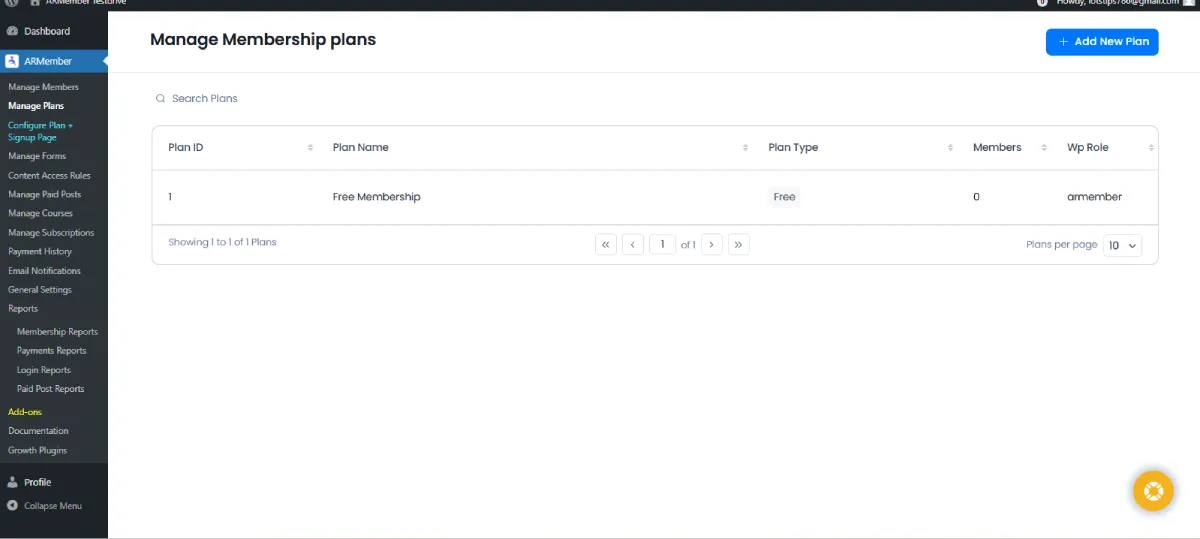
You have to click on the “Add New Plan” button on the top right corner and the “Add Membership Plan” section will slide up smoothly.
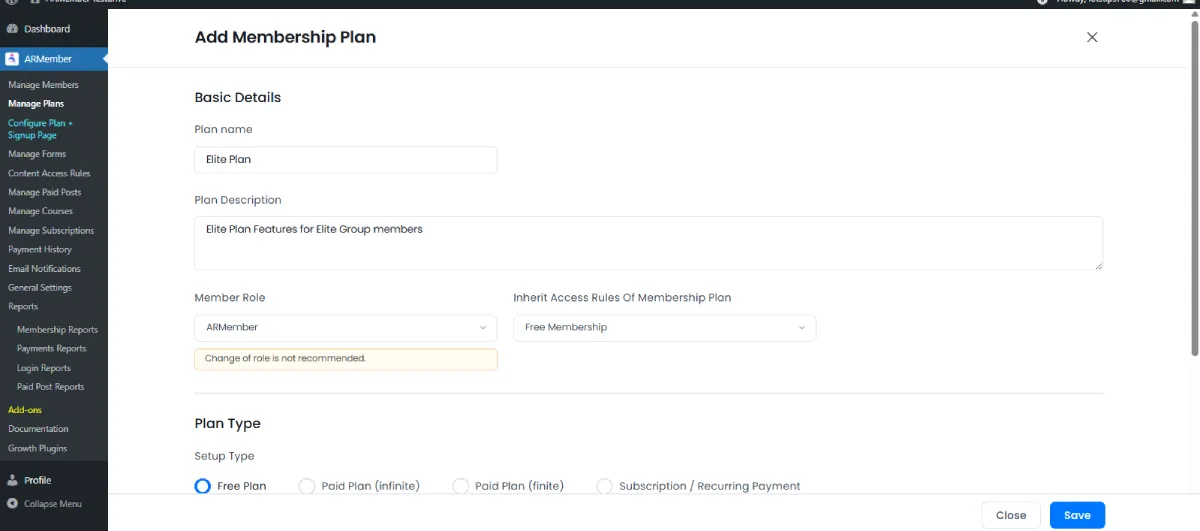
Here, you simply have to fill in all the details of the kind of membership plan you have in mind.
You can fill in basic details such as:
- Plan name
- Plan Description
- Member Role
- Inherit Access Rules Of Membership Plan
After that, select the type of membership plan you want to create such as:
- Free Plan
- Paid Plan (infinite)
- Paid Plan (finite)
- Subscription/recurring
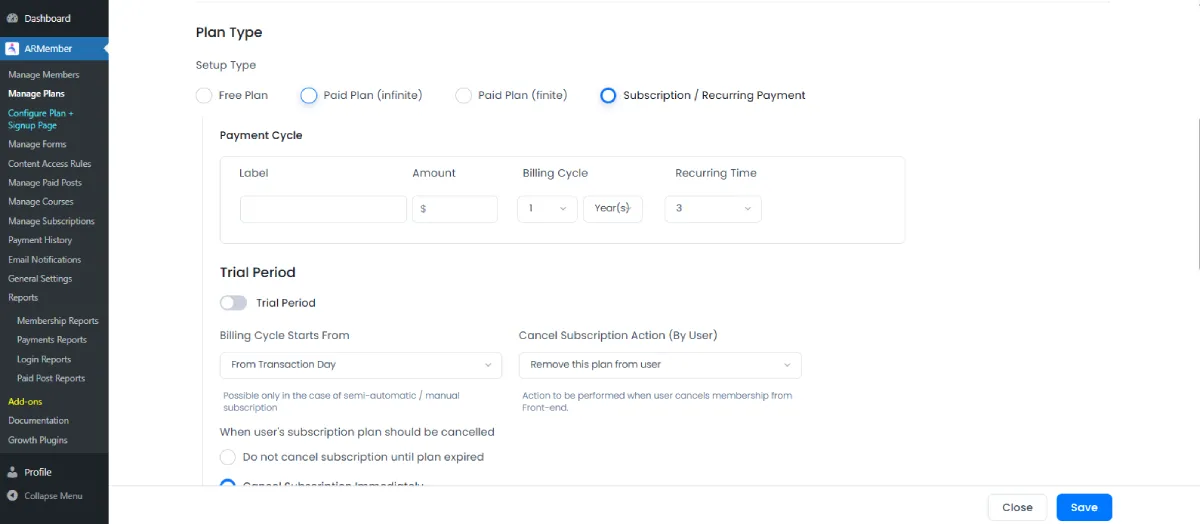
Next, assign the paid posts or online course to the respective membership plan. You can also enable affiliate referral from here if you want to create an affiliate marketing program later and assign commission to users who sign up with this plan.
And that’s done!
In the end, you simply click on the “Save” button and your membership plan is set to go!
Key Features Breakdown
Content Restriction & Paywalls
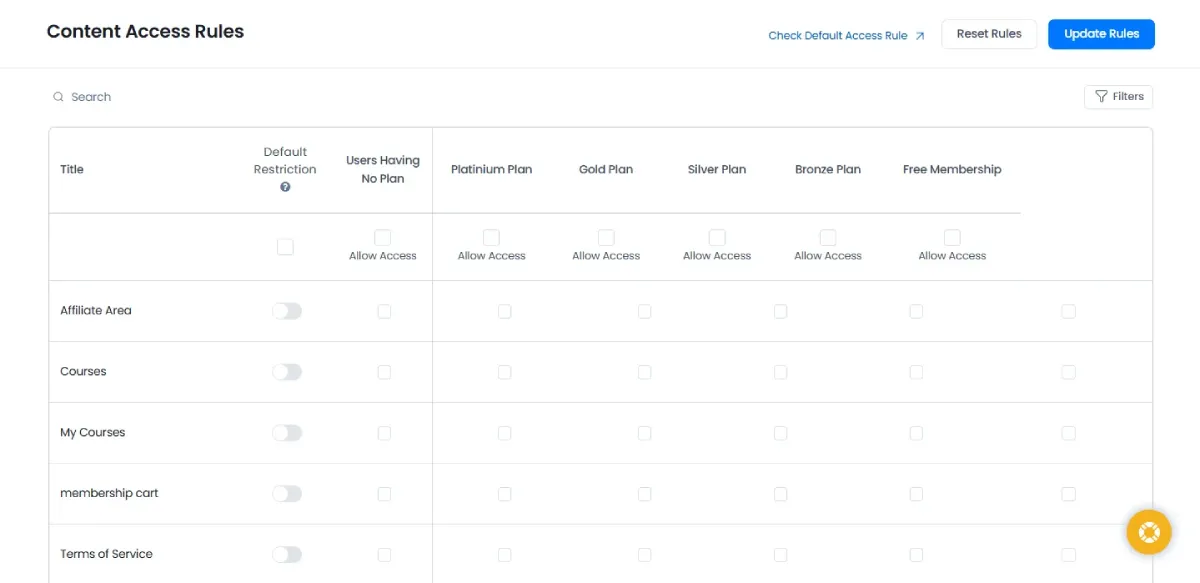
Content restriction is one of ARMember’s strongest areas. It allows you to protect content at multiple levels, giving you precise control over who can access what.
With ARMember, you can easily hide all these behind a Paywall:
- Individual pages and posts
- Categories and custom post types
- Specific URLs and menus
- Special archive pages (monthly, yearly, author-wise)
- And a LOT more!
ARMember makes it easy to add paywalls to existing exclusive content without redesigning your site.
The best part? Its content restriction dashboard makes it super easy to add paywall to your existing content based on different membership plans with just a simple toggle ON and tick box
Content Dripping (Content Scheduling)
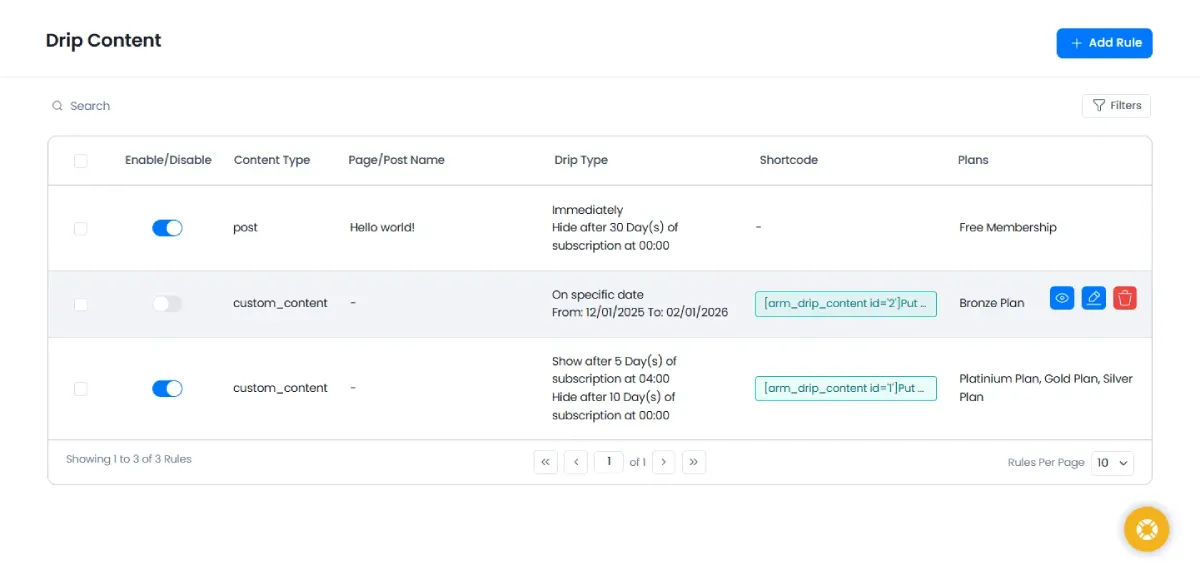
ARMember comes with smart content dripping to schedule full or partial content releases. It keeps your members engaged and coming back for more.
It allows you to release content gradually instead of all at once. This is particularly useful for online courses, training programs and long term memberships.
You can:
- Unlock content right after members subscribe
- Drip content based on days after signup
- Schedule releases by specific dates (or date range)
- Restrict access after content has been delivered
- Restrict access after content last modified
Best of all, you can also drip just the exact content you want (partial content drip) to give your members a tease show of your exclusive content.
In the end, ARMember’s content dripping feature keeps your members engaged while reducing content overload.
Membership Plans & Subscriptions
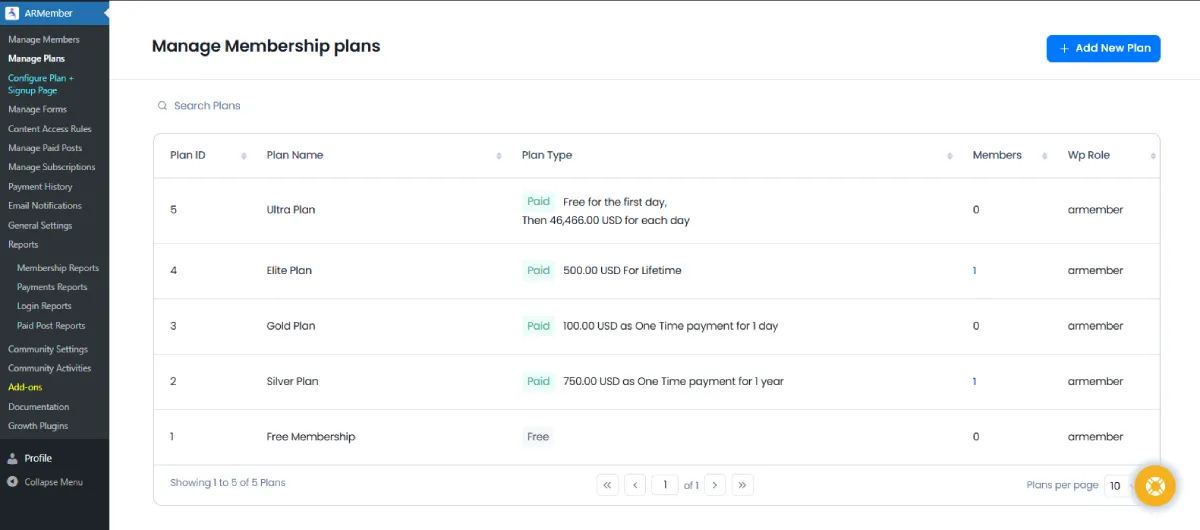
With ARMember’s Membership Subscription, you can create endless membership levels with no limit.
No matter whether you want to make weekly, monthly, yearly or lifetime membership levels, ARMember gets it done in just a few clicks with a friendly user interface to manage all your membership plans.
Thus, you can monetize your membership with multiple pricing models, giving you flexibility as your business evolves and grows.
You can create:
- Free and paid membership plans
- One time, recurring, lifetime, or finite memberships
- Parallel memberships subscriptions
- Group based memberships for family and friends
- Pay Per Post access for individual content
This flexibility makes ARMember perfect for blogs sites, online courses platforms, online communities and subscription based businesses.
Payment Gateways

ARMember offers native support for over 21+ popular and secured payment gateways such as PayPal, Stripe, Authorize.net and a lot more native global and local payment gateways.
You can accept online payments for your membership worldwide globally without third party connectors.
Moreover, you get to keep a track of all your revenue generated from a dedicated panel with detailed analytical reports.
With ARMember, you can also accept manual or offline payment and manage approvals directly. Also, if you deal internationally, it lets you define and use custom currencies to match your business, region and pricing structure.
In Built Form Builder & Email Automation
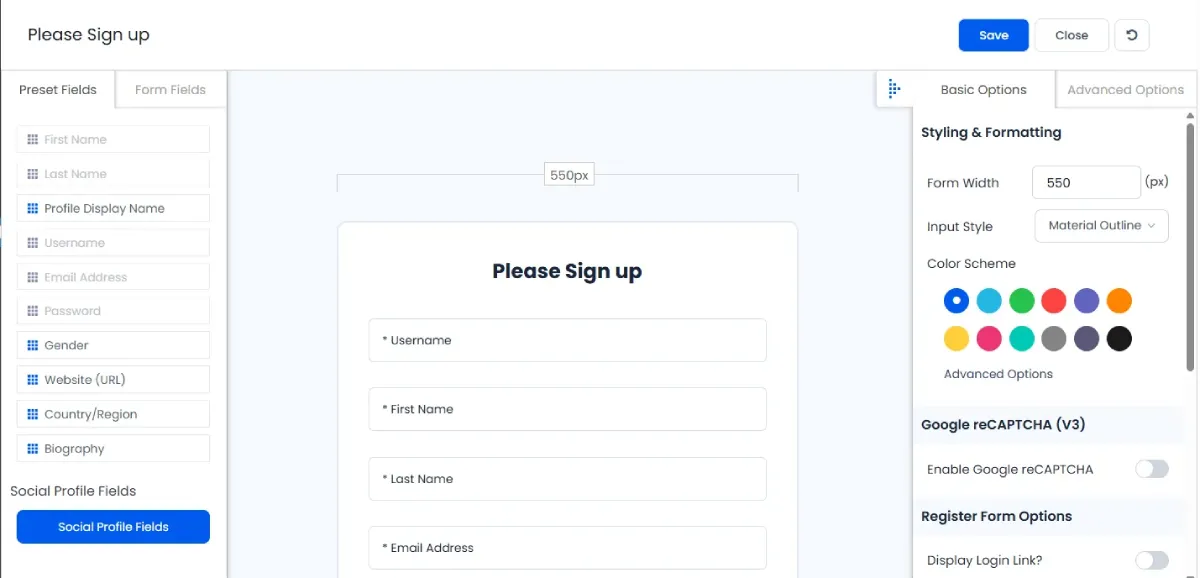
When using other membership plugins, you gotta install third party form builder plugins to create custom signup and login forms.
Well, not with ARMember.
It comes with it’s own built-in drag and drop live form builder for building custom registration and login forms with ease. Besides, it also comes with pre-built templates just like any form builder to kick start members onboarding right away.
With this, you can build:
- Custom registration forms
- Login and password reset forms
- Member profile forms
- Create organized directories and more with zero coding.
It also supports automated email notifications, such as:
- Welcome messages
- Membership renewal reminders
- Expiration and payment alerts
- And many more.
It sends automated personalized email, WhatsApp and SMS notifications, making new member onboarding smoother and easier while keeping existing members informed and engaged.
Community & Group Features
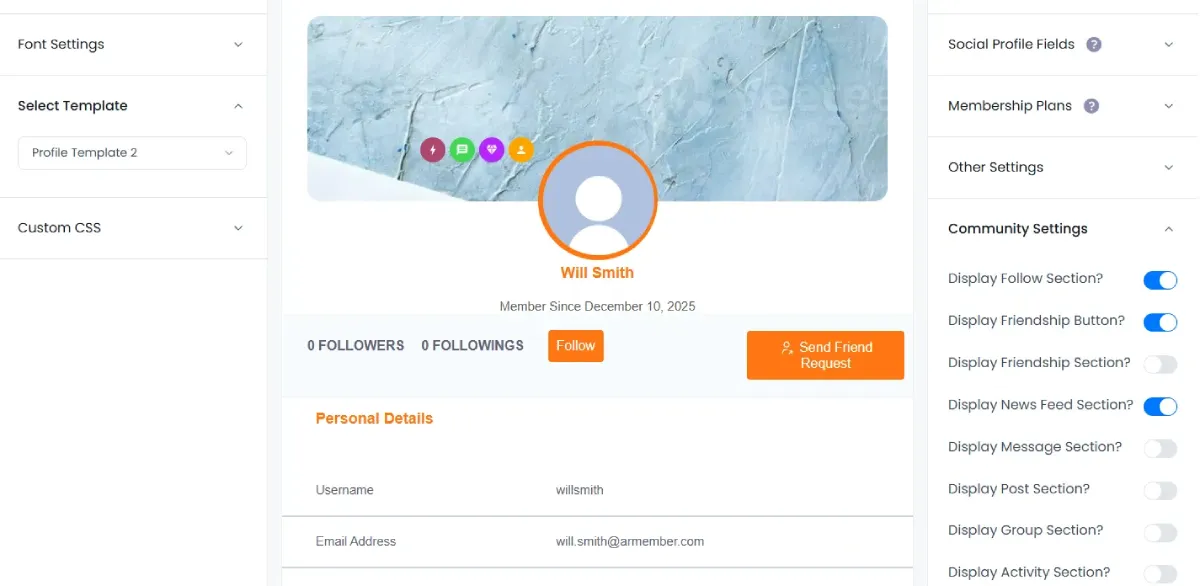
ARMember, marketed as an ‘All-In-One membership plugin for WordPress’, has the complete set of features you would want in a top membership plugin.
It allows you to create membership sites, online courses and even communities. So it goes beyond basic membership management by offering features designed for community driven sites.
These amazing community boosting features include:
- Public and private member profiles
- Searchable member directories
- Groups and social connections
- Awesome gamification elements like badges, rewards and points
- Smooth BuddyPress and BuddyBoss integration
These features make ARMember a strong choice for coaching programs, associations as well as private communities.
Aside from this, ARMember offers tons of premium addons to take its core community to the next level.
The ARMember Social Community Addon allows you to create your own on site social network of members, just like a complete social media platform.
By enabling it, your members can share their experience, connect, communicate and build long term friends and connections.
Security & Built‑In Protection
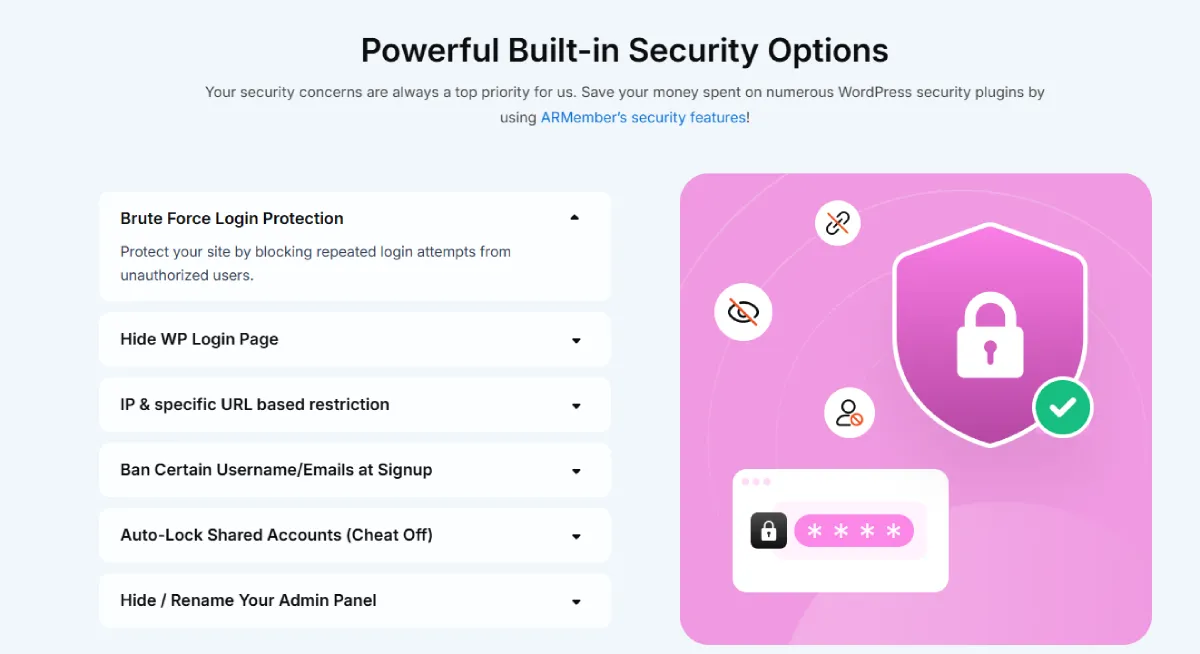
We have used many membership plugins but in the end, we can say you must have to install third party security plugins.
Well, not in ARMember’s watch. It proved itself as a truly “All-in-One” membership plugin with powerful built-in security options.
Here are the ARMember’s advanced security features:
- Brute force login protection by blocking repeated login attempts
- Hide WordPress login page to prevent unwanted access attempts
- IP and URL based access control
- Ban specific usernames and email domains at signup
- Automatic locking of shared accounts for security purposes
- Hidden or renamed login and admin URLs
Together, these features help safeguard premium content and protect your members’ data.
By adding these powerful security options in-built, ARMember clearly says,” Your security is our top priority”. Also, saving you hundreds of bucks which may be spent on a number of WordPress security plugins.
Pricing Made Simple
One thing we always look for in a membership plugin is transparent pricing and ARMember does a good job here.
Instead of forcing you into multiple upgrades or locking core features behind expensive addons, ARMember keeps its pricing straightforward and business friendly.
You pay once and you get access to almost everything you need to run a serious membership site.
With ARMember, there are:
- No surprise hidden fees!
- No paying extra just to unlock essential features!
- No renewal at a higher price!
This alone makes it attractive for creators and businesses who want predictable costs.
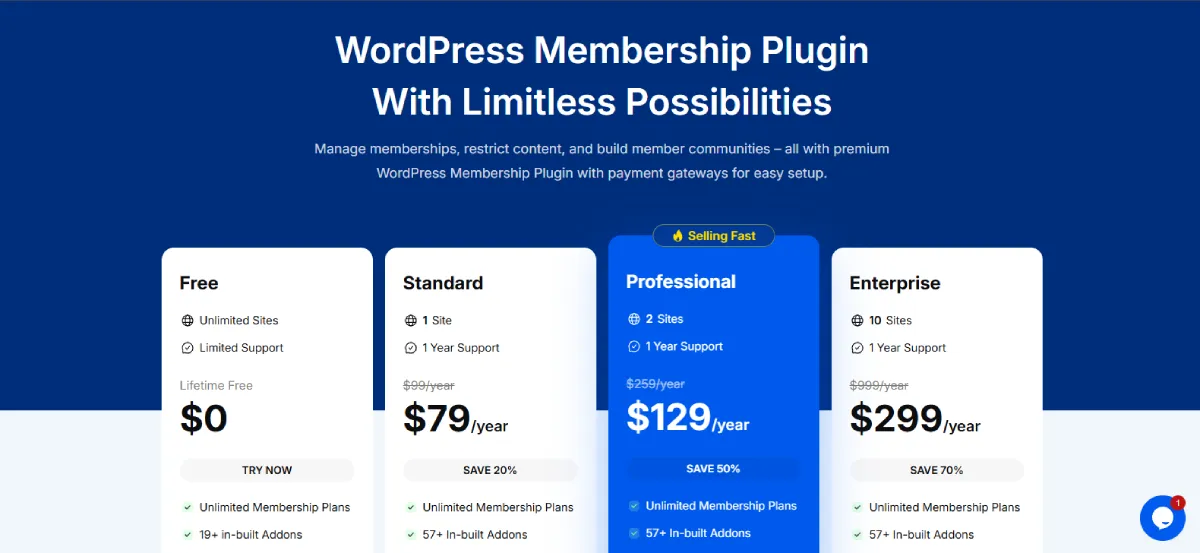
ARMember offers one free plan and three premium plans along with options to buy separate addons or integrations. All three premium plans come with yearly priority support.
- The Free Version: $0 for lifetime. This allows you to create unlimited membership plans alongside offer 19+ in-built addons and 2 payment gateways
- The standard Plan: $79/Year for 1 site. This comes with 57+ in-built addons, 5+ payment gateways, 17+ premium addons and membership proration while inheriting all features of free.
- The Professional Plan: $129/Year for 2 sites. It offers 21+ payment gateways and 46+ premium addons while inheriting all features of standard plan.
- The Enterprise Plan: $299/Year for 10 sites. It comes loaded with all features of previous plans and offers 52+ premium addons along with 6+ professional addons such as Online Courses, ARMember affiliate, Social Community, Group Membership and more.
Money Back Guarantee = Low Risk
To make the decision even easier for you, ARMember comes with a 14 day money back guarantee. This gives you enough time to test it on your site, explore features and see it’s amazing features yourself with zero risk.
Pros & Cons of ARMember : Real World Feedback
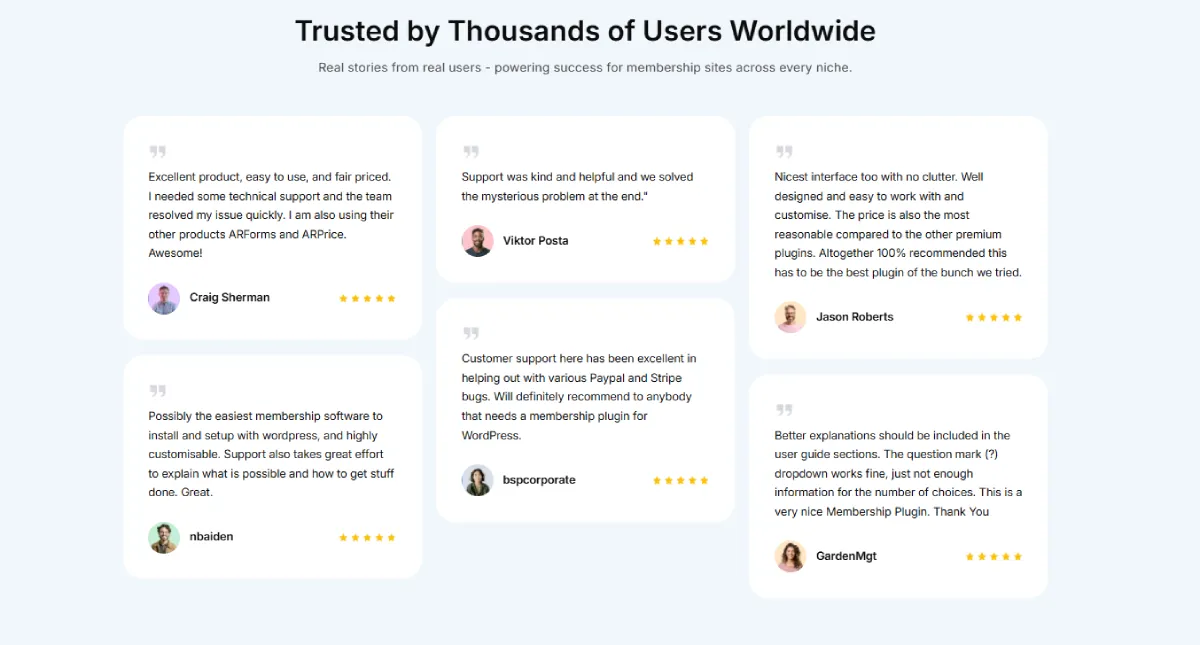
When evaluating any WordPress membership plugin, real user experiences matter just as much as feature lists and demos.
Below, we’ve distilled feedback from actual users, support threads and testing insights to give you a balanced look at where ARMember shines and where it needs work.
Pros of ARMember
- Easy to use for beginners
- All-in-one features
- Flexible membership models
- Over 21+ payment gateways
- 57+ in-built addons for free
- Awesome online community features
- Content dripping works well
- Strong and powerful security options
- Fair Pricing & money back guarantee
Cons of ARMember
- Fewer third party addons than some competitors
- Occasionally needs support for custom use cases (Yet it’s team of expert is always ready to assist so no worries)
The best part of ARMember that makes it better compared to other membership plugins is it’s open to suggestions and ready to take in ideas for features. Plus, it’s continuously working on the suggestions and ideas by its user, making it a top tier plugin that grows alongside your business.
Key Takeaways: Real World Verdict
With over 50,000+ happy customers and a rating of 4.8 out of 5 Stars, Its current users tend to agree on that:
- ARMember is a powerful, practical and all in one membership solution
- It’s perfect for small to large sized businesses, coaches, content creators and communities
- It saves money by minimizing addons and plugins
But…
- It’s not always the best fit if you need ultra advanced reporting, massive third party ecosystem support or complex SaaS level customization out of the box.
Quick Comparison: ARMember vs Other Competitors Membership Plugins
After seeing both sides of ARMember: Pros and Cons, deciding whether it’s truly worth it may be kind of confusing for some readers.
That’s why, we have gone extra miles and compared ARMember with some of the known and popular names in the world of WordPress membership plugins to find out the truth with side by side comparison.
So take a deep breath and….spare a quick glance at this feature by feature Comparison (What Actually Matters).
| Feature | ARMember | MemberPress | Paid Memberships Pro |
| Starting Price | $79 / year | $399 / year | $347 / year |
| Support | Professional support | Professional support | Good support |
| Unlimited Membership Levels | ✅ Yes | ✅ Yes | ✅ Yes |
| Parallel Memberships | ✅ Built-in | ❌ Higher plans only ($597/yr) | ❌ Addons required |
| Recurring & One-Time Billing | ✅ Built-in | ✅ Yes | ✅ Yes |
| Membership Proration (Pro-Rata) | ✅ Built-in | ❌ Higher plans only | ❌ Limited |
| Content Restriction & Paywalls | ✅ Advanced (posts, pages, CPTs, URLs, menus, shortcodes, feeds) | ✅ Advanced | ✅ Advanced (blocks, shortcodes, PHP rules) |
| Content Dripping | ✅ Flexible & granular | ❌ Plus plan only ($597/yr) | ⚠️ Limited |
| Built-in Form Builder | ✅ Yes (drag & drop) | ❌ No | ❌ No |
| Email Notifications | ✅ Built-in | ⚠️ Limited | ⚠️ Limited |
| Email Marketing Integrations | ✅ 15+ (Mailchimp, HubSpot, ConvertKit, ActiveCampaign, etc.) | ⚠️ Fewer, some paid | ⚠️ Limited |
| Community Integrations | ✅ BuddyPress, BuddyBoss, bbPress | ⚠️ BuddyPress (paid plan) | ✅ BuddyPress, BuddyBoss |
| Gamification (Badges, Points) | ✅ Built-in | ❌ No | ⚠️ Via MyCred |
| Security Features | ✅ Built-in (anti-spam, auto lock, login protection) | ⚠️ Basic | ⚠️ Basic |
| Payment Gateways Included | ✅ 21+ (Stripe, PayPal, Authorize.net, Woo, Bank Transfer) | ⚠️ Limited | ⚠️ Limited |
| Ease of Use | ⭐⭐⭐⭐⭐ | ⭐⭐⭐⭐ | ⭐⭐⭐ |
| Overall Value for Money | ? Best Overall | ❌ Very Expensive | ❌ Not Money Worth |
The outcome? We think the outcome of this side by side comparison is as clear as day.
ARMember is overall the best WordPress membership plugin for all types of business who wants to create a complete membership site with zero tech stress. Most importantly, it’s the most money worthy plugin around here.
While MemberPress and Paid Memberships Pro are powerful, they still lack many essential features that require higher plans or paid addons, significantly increasing total cost.
Conclusion: Is ARMember Worth It?
And the answer to your question after all these hands-on testing, analysis and comparison is simple and straightforward: ARMember is the best all-in-one membership plugin for WordPress.
Its user-friendly interface and powerful content restriction features are seriously praiseworthy. The plugin gives you all the features you could possibly ever ask for in one place.
No need to wrack your brain any longer.
We assure your ARMember is the membership plugin you’ll definitely love.
Afterall, it comes with a 14 days money back guarantee, making it 100% risk free. So check out ARMember right away and grow your membership site!
FAQS
What is ARMember?
ARMember is a WordPress membership plugin that allows you to create your own membership site in WordPress with ease. It has a friendly user interface and is popular as an all-in-one membership solution.
What is the best WordPress membership plugin?
ARMember is the best WordPress membership plugin for building a complete membership site. It comes with powerful content restriction and drip content rules to protect your exclusive content and keep members engaged. Moreover, it offers over 57+ built-in addons for free and 21+ payment gateways.
Which payment gateways does ARMember support?
ARMember comes with over 21+ secured and popular payment gateways like:
- Mollie
- PayPal Pro
- PagSeguro
- PayUmoney
- Online Worldpay
- Razorpay
- PayFast
- Paystack
- Square
- Skrill
- Braintree
- Klarna
- Paddle
- Mercado Pago
- CCAvenue
- Airwallex
- PayPal
- Stripe
- 2Checkout
- Authorize.net
- Bank Transfer
- WooCommerce
Can I use ARMember with any WordPress theme (including Porto)?
Yes, indeed! You can use ARMember with almost all WordPress themes including Porto.
What is the difference between ARMember and Ultimate Membership Pro?
ARMember is an all-in-one WordPress membership plugin with a set of robust features such as content dripping, 21+ payment gateways, powerful integrations and addons.
However, ARMember also offers community building features such as members profile, gamification elements and directories alongside other membership management solutions, making it an all-in-one membership plugin.


Leave a Reply