
Seedance 2.0 And The End Of Isolated AI Clips
Most AI video tools are easy to admire and hard to use. You type a prompt, get a visually striking result, and then quickly discover that one beautiful shot is not the same as a usable piece of content. What often breaks down is not motion itself, but continuity, pacing, and the feeling that one moment belongs naturally to the next. That is why Seedance 2.0 stands out to me less as a flashy model name and more as a sign that AI video is starting to move beyond isolated clips.
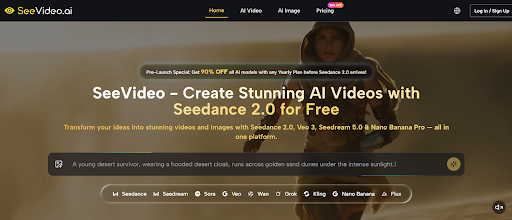
The page I reviewed frames Seedance 2.0 as the core engine inside a broader creative platform, and that positioning changes how the tool should be understood. Instead of treating video generation as a one-shot experiment, it presents the process as something more iterative and structured. Text, image, and audio can all be used as inputs, multi-scene generation is treated as a central capability, and the output sits within an environment where creators can compare results across different models. In practice, that makes the tool feel closer to a workflow decision than a novelty test.
Why Isolated Generation Stops Being Enough
Many early AI video experiences worked well as demos because they solved the first ten seconds of the problem. They proved that a machine could generate motion from language. But once you move from curiosity to production, the real question changes. It is no longer “Can this create something?” but “Can this help me build something coherent?”
That shift matters because real creative work is rarely built from one visual moment. Even short social clips usually need progression. Product videos need visual logic. Mood pieces need rhythm. Story-driven content needs movement from one state to another. A model that supports multiple scenes is not just adding complexity for marketing language. It is addressing the point where many AI videos begin to feel incomplete.
How Multi-Scene Logic Changes The Result
A Sequence Feels Different From A Moment
Single-scene video generation can still be useful. It is often faster, cheaper, and enough for simple loops or visual ideas. But it tends to struggle when the project needs transitions, escalation, or a stronger sense of internal direction. Multi-scene generation changes that equation.
Seedance 2.0 is positioned around the idea that a video can unfold rather than simply appear. In my view, that is one of the most important signs of maturity in AI video. When a model is built to move across scenes, the result has a better chance of feeling designed instead of accidental.
Transitions Matter More Than People Expect
Many viewers do not consciously think about transitions, but they immediately feel when a video lacks them. Even if every shot looks impressive, the whole sequence can still feel synthetic when scene changes are abrupt or unrelated. A tool that places emphasis on multi-scene flow is trying to solve exactly that.
On paper, that sounds technical. In practice, it changes how usable the final output feels. The difference between “interesting clip” and “usable creative” is often hidden in that transition layer.
Why This Matters For Short-Form Content
Short-form video is not simple just because it is short. A 10-second clip still needs intent. For creators working on ads, teasers, social content, or concept pieces, scene continuity can matter more than raw visual fidelity. A shorter video with better internal flow often works better than a longer one with no structural logic.
How The Official Workflow Is Designed
Seedance 2.0 AI Video presents a workflow that is relatively direct, which helps explain how Seedance 2.0 fits into daily use.
Step 1. Start From Text Or Image
You begin by choosing whether the video should be generated from a text prompt or from a reference image. Text-to-video is better for open-ended ideation. Image-to-video is more useful when the visual identity already exists and needs motion rather than reinvention.
Step 2. Select Seedance 2.0 For Structured Output
The site places Seedance 2.0 alongside other video models, but its role is clearly defined around multi-scene generation and flexible input support. That makes it the more relevant choice when the goal is not just to generate movement, but to shape a more connected video sequence.
Step 3. Add Prompt And Supported Inputs
The next stage is to provide the actual creative material. Depending on the project, that can include text guidance, image references, and audio input. The important point is that inputs are treated as practical controls, not decorative extras.
Step 4. Generate And Evaluate Against The Goal
Once the video is produced, the process does not end with simple acceptance. The platform encourages model comparison and refinement, which reflects how most creators actually work. The best result is often the one that aligns most closely with the brief, not the one that looks most dramatic in isolation.
Where Seedance 2.0 Sits In Model Choice
People often ask which model is best, but that question is usually too broad to be useful. It is often more practical to ask which model best matches the type of output you are trying to make.
Varies
| Creative Need | Seedance 2.0 | Single-Scene Models | Cinematic Models | Native Audio Models |
| Smooth multi-scene flow | Strong fit | Usually limited | Moderate to strong | |
| Text to video | Supported | Supported | Supported | Supported |
| Image to video | Supported | Supported | Supported | Supported |
| Audio-guided creation | Supported | Often limited | Varies | Strong |
| Fast iteration with structure | Strong fit | Better for basic drafts | Better for selective high-style outputs | Best when sound leads |
This table does not imply that Seedance 2.0 should replace every other option. It suggests that the model becomes more relevant once video generation stops being about one attractive frame and starts being about connected intent.
Why Audio Support Expands The Workflow
Sound Can Lead Instead Of Follow
One of the more interesting details on the platform is audio input support. That matters because sound is usually treated as something added after visuals are already locked. When audio becomes part of generation, the creative process changes. Rhythm, dialogue, and atmosphere can influence the visual output earlier.
This Opens A Different Kind Of Prompting
In my observation, AI tools become more useful when they accept direction through multiple channels. Some ideas are easier to describe in text. Others are easier to show through an image. Some are better shaped through sound. A system that can respond to all three is better suited to actual production work.
Control Still Requires Iteration
It is important to say this clearly: more input options do not guarantee perfect results. Prompt quality still matters. Reference quality still matters. Sometimes the right result appears on the second or third run rather than the first. But that is not a weakness unique to this tool. It is part of how generative systems behave in real creative use.
Why Seedance 2.0 Signals A Larger Change
The most interesting thing about Seedance 2.0 is not just that it generates videos from text, image, and audio. It is that it reflects a wider shift in AI creation tools. The industry is slowly moving away from “look what this model can do” and toward “here is how this can fit into work.”
That is a healthier direction. It reduces hype and increases usefulness. It invites creators to think in terms of structure, control, and output quality rather than novelty alone. In that sense, Seedance 2.0 feels important not because it ends the need for human judgment, but because it makes AI video a little more compatible with the way humans already build things.


Leave a Reply