

The Best AI Stack for WordPress in 2026
WordPress is getting an AI upgrade that changes how developers build, manage, and ship sites. The best AI stack for WordPress in 2026 covers everything from writing code and generating content to managing entire sites through natural language. This guide walks you through the tools worth your time across six layers, so you can build a workflow that’s faster without being fragile.
Key Takeaways
- AI is now embedded across every stage of WordPress development, from code generation to post-publish site management.
- MCP (Model Context Protocol) is the biggest shift in 2026, letting AI agents perform real WordPress operations through natural language.
- WordPress-specific AI tools consistently outperform general-purpose LLMs because they understand hooks, filters, and CMS architecture.
- The bring-your-own-API-key model is replacing expensive plugin subscriptions, making AI costs usage-based and transparent.
- Cloud-native development platforms with built-in AI integrations (MCP, AI site builders) remove the most friction from modern WordPress workflows.
- The smartest stack isn’t the biggest one. Start with the layer that causes you the most pain and expand from there.
Why AI for WordPress Is Exploding Right Now
A year ago, using AI with WordPress meant pasting ChatGPT output into the block editor and hoping it didn’t sound robotic. That era is over.
Three things changed in 2026 that made AI genuinely useful for WordPress professionals.
First, AI coding tools got trained on WordPress-specific codebases. Generic LLMs used to hallucinate non-existent hooks and invent database tables that don’t exist in WordPress.
Tools like Cursor AI and CodeWP now understand the actual WordPress Codex, WooCommerce APIs, and popular plugin architectures. The output is usable code, not guesswork you have to debug for an hour.
Second, the bring-your-own-API-key model replaced bloated subscription plugins. Instead of paying $49/month for a locked-down AI writing tool, you connect your OpenAI or Anthropic key to a lightweight WordPress plugin and pay pennies per request. Entry costs dropped. Flexibility went up. Developers stopped being locked into one AI provider.
Third, and most importantly, MCP (Model Context Protocol) arrived. This open protocol, developed by Anthropic, standardizes how AI assistants communicate with external services.
For WordPress, MCP means AI tools can actually do things on your site, not just talk about doing them. Create posts, manage plugins, update users, handle taxonomies, all through natural language commands that translate into authenticated REST API calls. WordPress 7.0 even ships with native MCP support through its Connectors UI and Abilities API.
The result? A Reddit thread titled “Bye bye WordPress” hit 367 upvotes on r/ClaudeCode recently. But buried in the 236 comments was a much more interesting story.
Developers who stayed on WordPress and connected AI tools were getting better results than those who migrated away. One developer described giving Claude Code SSH access to his WordPress server and managing content, configuration, and deployment through natural language. His verdict: “game changer.”

The question isn’t whether to use AI with WordPress. It’s which tools to pick and how to connect them.
MCP: The Game Changer for WordPress
Model Context Protocol is the single most important development for AI-powered WordPress in 2026. Understanding it is worth your time even if you don’t adopt it immediately.
MCP standardizes how AI assistants talk to external services. For WordPress, this means tools like Claude Desktop, Claude Code, Cursor, and VS Code can discover and execute real operations on your WordPress site.
Watch this YouTube tutorial to learn how to connect WordPress with Claude Code and Desktop.
Not generate text about what you should do. Actually, do it. Create posts, manage plugins, update user roles, handle taxonomies, upload media, all through natural language that gets translated into authenticated API calls.
Here’s a concrete example: you tell Claude “Publish a draft post titled ‘Summer Collection’ with the featured image from my media library and assign it to the ‘Announcements’ category.” Claude makes the API calls, creates the post, attaches the image, assigns the category, and confirms it’s done. No dashboard, no switching tabs, no manual work.
There are several ways to connect MCP to WordPress. The official WordPress MCP Adapter (shipping with WordPress 7.0) exposes core Abilities to AI agents. Open-source MCP servers built on Node.js or PHP let you self-host and extend with custom tools.
And some managed WordPress hosting platforms now offer one-toggle MCP activation, where you flip a switch in your dashboard and get a secure connection URL. No Node.js installation, no proxy setup, no Application Password configuration. Plug the URL into your AI client and start working.
The best example to state here is InstaWP. Every site build here is shipped with MCP that you can enable over a single toggle.
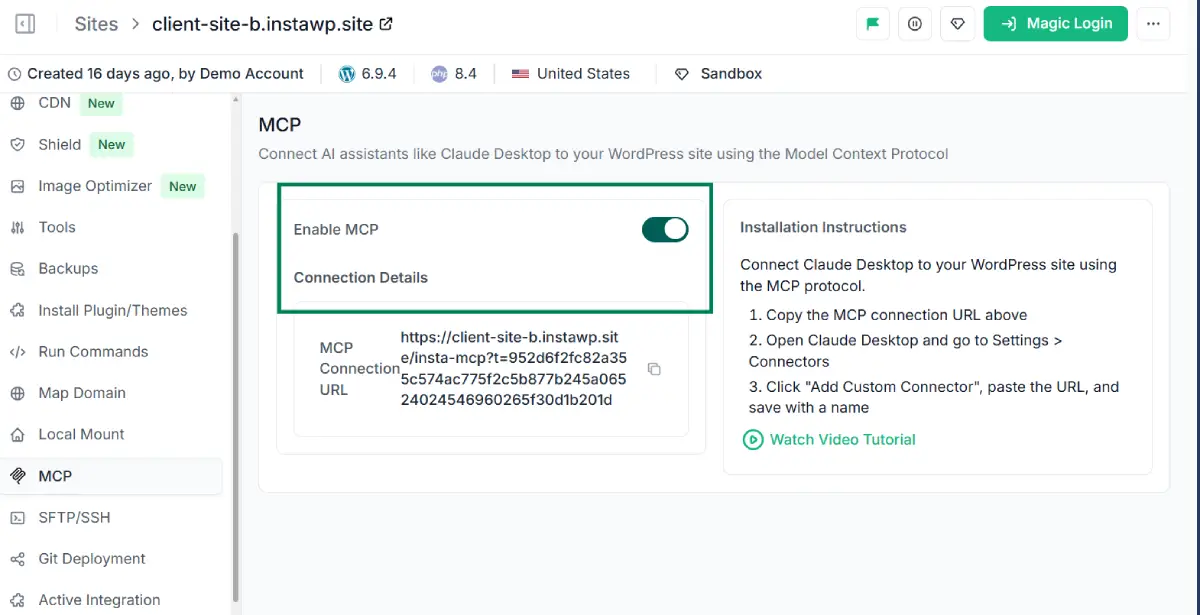
For agencies, MCP opens up entirely new service offerings. Content management packages where AI handles routine publishing. Automated site audits triggered by natural language. Maintenance workflows that used to require a developer logging into wp-admin. The agencies adopting MCP now are building productized services that their competitors can’t match yet.
Other than this, InstaWP offers the underlying development infrastructure that supports fast iteration, disposable environments, and cloud-native workflows. Even though AI for WordPress is strong, you need safe places to test AI agent behavior before pointing those agents at production.
When you connect Claude to your WordPress site via MCP and ask it to reorganize your category taxonomy, you want that happening on a staging copy first. When ZipWP generates a site, you want to review it in a sandbox before a client sees it.
InstaWP gives you:
- Instant sandbox sites
- One-click staging
- Reusable templates from snapshots
- Pay-as-you-go hosting starting at $2/month per site.
What makes it especially relevant for AI workflows is that MCP integration, AI site builders, and sandbox environments all live on the same platform. You don’t need to wire together five different services.
Other AI for WordPress Tools
While having InstaWP as your starting point empowers you greatly for using AI for WordPress, here are a few more tools that you should consider.
AI Coding Assistants: The Biggest Time-Saver
If you build themes, plugins, or custom functionality, an AI coding assistant delivers the fastest ROI of anything in this guide.
- Cursor AI is the standout pick. It’s a VS Code fork designed around AI assistance, and its contextual understanding of WordPress functions, hooks, and filters is noticeably better than generic alternatives. The free tier is workable. Paid plans run $20/month and $40/month. Cursor reported a 300% increase in its user base by early 2026, and WordPress developers are a big part of that growth.
- GitHub Copilot is the reliable daily driver, especially if VS Code is already your home. The free tier covers basic completions. The $10/month Pro plan understands WordPress-specific context well enough to suggest correct hook names, proper escaping patterns, and WooCommerce-specific logic. For most developers, Copilot handles 80% of routine coding tasks.
- CodeWP fills a different niche. It’s trained exclusively on WordPress, WooCommerce, and major plugin APIs. You describe what you need in plain English (“add a custom checkout field that only appears for wholesale customers”) and get accurate, clean PHP. At $18/month, it pays for itself in a single client billing hour. The tradeoff: it doesn’t live inside your editor, so there’s a copy-paste step.
- Claude Code is worth adding if you want a conversational coding partner in the terminal. It’s exceptional for architecture planning, debugging complex server logs, and working through multi-file refactors.
Pair it with SSH access to a WordPress sandbox and you have a tight development loop where you can test AI-generated changes safely before they touch production.
AI Content Creation: Better Than You’d Expect, With Caveats
AI writing tools for WordPress have matured past the “generic blog spam” phase. The best ones now integrate directly into the WordPress editor and produce output that serves as a genuine first draft rather than something you’d be embarrassed to publish.
- Jetpack AI Assistant is the most seamless option. It lives inside the block editor, handles blog drafts, product descriptions, and content summaries without context-switching, and feels like a native WordPress feature. If you want minimal setup, this is the pick.
- AI Engine by Meow Apps is the power user’s toolkit. Over 100,000 active installations and growing. It connects your WordPress dashboard to major language models (OpenAI, Anthropic, Google), lets you build custom chatbots trained on your site’s documentation, and generates content programmatically. The bring-your-own-key model means you control costs completely.
- GetGenie AI works well for marketing teams. It generates blog content, ad copy, and product descriptions with built-in SEO scoring, letting you optimize while you write instead of running a separate audit later.
The honest truth about AI content in 2026: Google’s helpful content updates didn’t kill AI-generated content like some predicted. They killed lazy AI content. Sites using these tools as a starting point and adding real expertise, original data, and editorial judgment are outperforming those doing everything manually. The workflow that works is AI draft, human edit, expert review, then publish.
AI SEO: Automate the Tedious Parts
- Rank Math dominates WordPress SEO, and its AI features have become genuinely valuable rather than gimmicky. The free version offers more than most paid alternatives, with real-time optimization suggestions, schema markup generation, and keyword analysis. The Pro tier adds AI content scoring that benchmarks your posts against what’s actually ranking.
- Surfer SEO works alongside WordPress as an external content optimization tool. It analyzes top-ranking pages for your target keyword and gives you a structure, word count target, and NLP term suggestions. For agencies producing 20+ posts a month, this is where the competitive edge lives.
The practical combo for most WordPress professionals: Rank Math handles on-site technical SEO (schema, meta tags, internal linking suggestions), while Surfer or a similar tool handles content strategy and optimization. Two tools. Full coverage. No plugin bloat.
Conclusion
The AI stack for WordPress in 2026 isn’t about replacing developers. It’s about stripping away the repetitive parts of your workflow, the boilerplate code, the manual content formatting, the endless dashboard clicks, so you can focus on the work that actually requires your judgment and expertise.
The tools are mature. The protocols are standardized. The infrastructure exists. Whether you start with an AI coding assistant that saves you two hours a day or an MCP connection that lets you manage sites through conversation, the entry point matters less than the decision to start.
Pick one bottleneck. Add one tool. See what changes.
Get started with a free WordPress sandbox and $25 in credits →
FAQs
What is the best AI coding tool for WordPress development?
Cursor AI is the top choice for WordPress development in 2026. It’s a VS Code fork with deep AI integration that understands WordPress hooks, filters, and WooCommerce logic. GitHub Copilot’s free tier is a strong second option for developers on a budget.
What is MCP and why does it matter for WordPress?
MCP (Model Context Protocol) is an open protocol by Anthropic that lets AI assistants perform real operations on external services. For WordPress, this means AI tools can create posts, manage plugins, update users, and handle content through natural language instead of manual dashboard work. WordPress 7.0 includes native MCP support.
How much does an AI stack for WordPress cost?
A capable stack can run under $30/month using free tiers (Cursor free, Rank Math free, AI Engine with your own API key, free cloud sandbox). A full agency stack with premium tools typically costs $80 to $150/month plus API usage.
Is AI-generated WordPress content safe for SEO?
Google rewards quality content regardless of how it’s produced. The key is editing AI output for accuracy, expertise, and originality. Unedited AI content gets penalized. Content that combines AI drafting with human expertise ranks well.
How do I connect AI tools to my WordPress site?
Through MCP. Some hosting platforms offer one-click MCP activation. For self-hosted setups, open-source MCP servers (Node.js or PHP) are available on GitHub. WordPress 7.0 also ships with a native MCP Adapter that works with AI tools like Claude and Cursor.


Leave a Reply