

Cloud Hosting Security Best Practices for Websites
The attack surface has never been larger for business websites. When we move our business to the cloud, we get a lot of flexibility, but we also have to start thinking about security in ways that traditional on-premises thinking doesn’t really prepare us for. Cloud environments are particularly vulnerable to things like misconfigured storage buckets, overly privileged service accounts, unpatched runtimes, and poor access controls.
One of the hardest things to understand about cloud security is that it doesn’t have a way to fail just like any other security problem. It can fail due to a forgotten subdomain in a staging environment, an SSH connection left exposed to the world due to a programmer’s mistake, or an unpatched plugin that’s been eight months without an update. The attack surface is large, and attackers are patient.
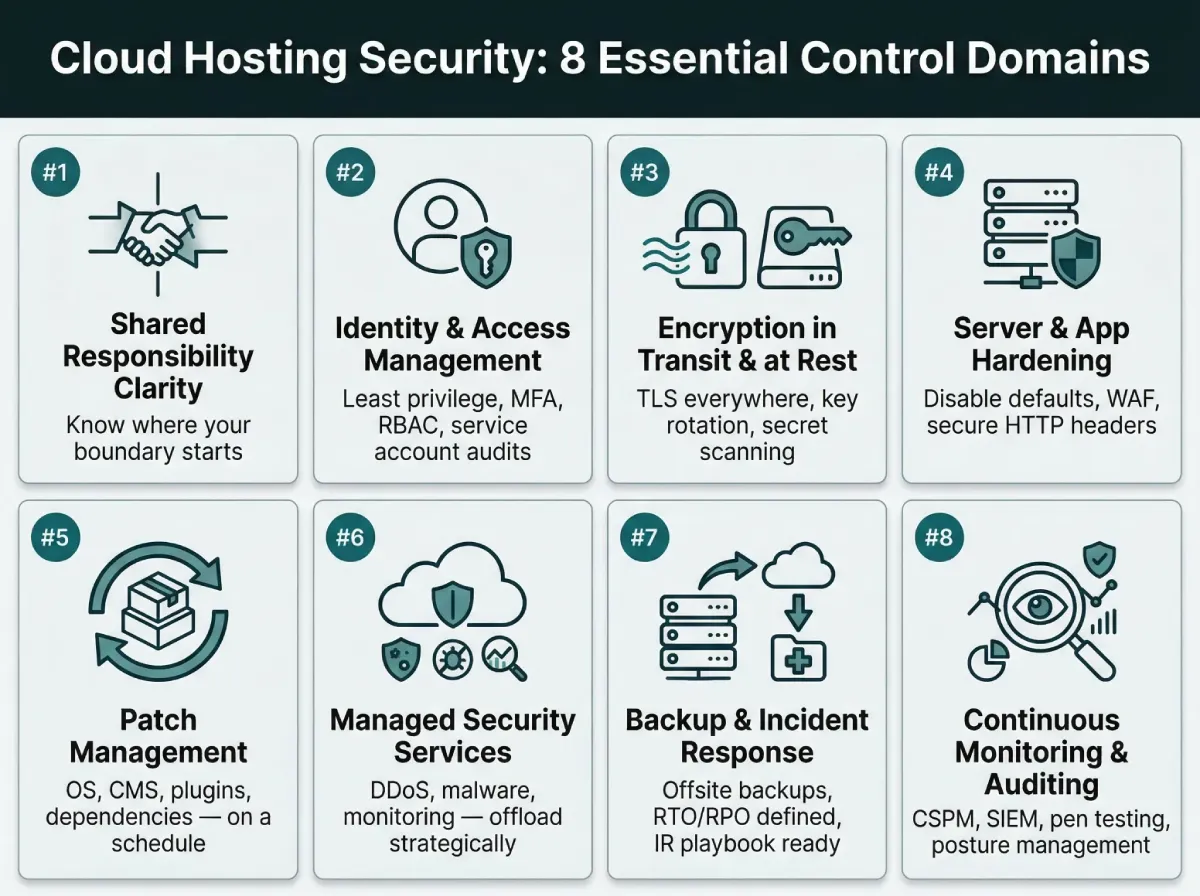
This article discusses the operational security controls that enterprises should have in place for cloud-hosted websites. Not abstract frameworks, but actual practices that can help mitigate risks, presented in a logical flow from foundation to operational readiness.
1. Understanding the Shared Responsibility Model
A lot of cloud security problems start here. The shared responsibility model sounds straightforward in vendor documentation, but in practice, the line between “what the provider secures” and “what you secure” gets blurry fast.
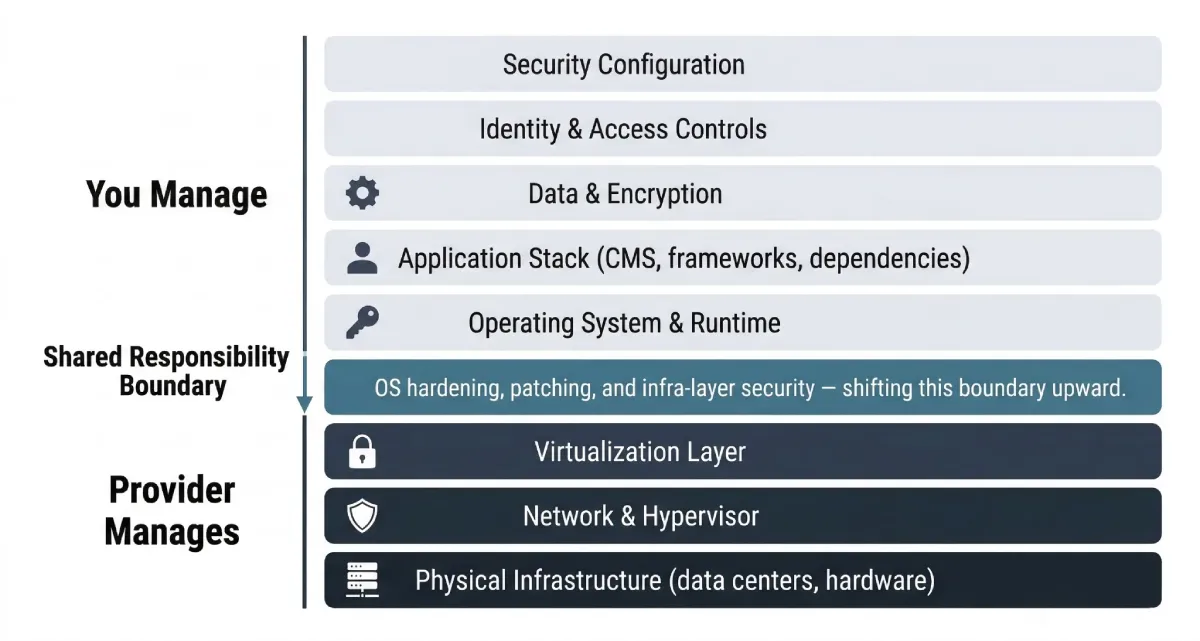
Cloud providers are responsible for the physical infrastructure, the hypervisor layer, and the underlying network. Everything above that, your operating system, application stack, configuration, data, and access controls, falls on you. Managed cloud hosting platforms like Cloudways push that line up further by handling OS hardening, automated patch management, and infrastructure-level security out of the box. That reduces the attack surface your team has to manage directly. But it doesn’t eliminate your responsibility entirely.
The teams that get into trouble are those that assume managed means fully secured. It doesn’t. It means a portion of the stack is handled for you, not that the whole system is locked down.
Before you configure anything else, map out where your responsibility begins. Which layers does your provider manage? What’s left for your team? That clarity is the starting point for everything that follows.
2. Enforce Strict Identity and Access Management
IAM is arguably where most cloud breaches could have been stopped. Overpermissioned accounts, shared credentials, and dormant access that never gets revoked are among the most common entry points for attackers. They’re also entirely preventable.
Start with the concept of providing the least amount of power. This means that each user, service, and application should have the minimum amount of power required for the task. That’s it. This goes for your third-party services, your development team, and your CI/CD pipeline. It’s expected that permission sprawl will happen eventually. That’s why permission reviews should happen regularly and not just when something goes wrong.
There should be no exceptions for multi-factor authentication for any cloud account your team uses. This includes admin panels, SSH access, and other deployment tools. Once MFA is enabled, a stolen password is an annoyance. Without it, the same password is a full breach.
Role-based access control lets you define job-function-level permissions rather than granting access on a per-user basis. It scales better, it audits better, and it makes off-boarding cleaner.
One area that gets overlooked: service accounts. Applications often run under service accounts with permissions far broader than what the application actually uses. Those accounts rarely get reviewed. Attackers know this, and lateral movement through over-permissioned service accounts is a well-documented technique. Audit them regularly.
3. Encrypt Data in Transit and at Rest
Encryption isn’t optional. It’s the minimum. But “we have SSL” is not the same as having a mature encryption posture.
You should use TLS on all of your website’s endpoints, including staging areas, internal tools, and APIs. Staging environments are always a problem. People often think they are low-risk and treat them that way, but they often have production credentials, real user data pulled for testing, and permissions that aren’t set up correctly. It should be encrypted if it’s on the web.
At-rest encryption protects backups, log archives, databases, and object storage. Many cloud providers do this automatically, but just because it is “enabled by default” doesn’t mean it is set up correctly. Instead of assuming that the defaults are good enough, check your encryption settings against the documentation from your provider.
Key management is where things get complicated for most teams. Who holds the encryption keys? How often are they rotated? Are any secrets hardcoded in your repository? The last one is more common than it should be. Secret scanning in your CI/CD pipeline catches these before they make it to production. Tools like git-secrets or built-in scanning features in GitHub and GitLab add this as a pipeline gate.
Certificate lifecycle management deserves a mention too. Expired certificates cause outages, and outages create pressure to push quick fixes that bypass security checks. An automated renewal process through Let’s Encrypt or a similar provider removes the human-error component entirely.
4. Harden Your Server and Application Configuration
Default configurations are a gift to attackers. They’re public knowledge, widely documented, and rarely changed by teams that are moving fast to get a site live.
Disable all services, ports, and protocols your application doesn’t use. Every port represents a potential avenue of attack. Every service that isn’t required means more software that needs to be updated and maintained. Keep your attack surface as small as possible.
Database default passwords, admin interfaces, and control panel default passwords are all scanned and discovered within hours of your server being publicly available. Don’t do this after your server is reachable; do it before. The same goes for default admin paths. Changing your CMS admin path from /admin or /wp-admin doesn’t make your application more secure against a determined hacker. It does make your application more secure against a significant percentage of automated attacks.
Another area that needs more attention is web application firewalls. A well-configured web application firewall with reasonable rules can prevent a wide variety of attacks from the outside before they ever get a chance to get inside. These include SQL injection, cross-site scripting, malicious bots, and volumetric floods. Rate limiting is particularly useful for login pages and API access, where brute force is a big concern.
Secure HTTP headers is another area that is easy but effective. HSTS will only allow https traffic and prevent protocol downgrade attacks. Content Security Policy will only allow scripts that you want, which can prevent XSS attacks. X-Frame-Options will prevent other sites from putting your content inside an iframe, which is what clickjacking is. These are easy to implement and can really reduce the attack surface.
5. Patch Management and Dependency Hygiene
One of the most common causes of cloud breaches is unpatched software, which is also one of the most consistent causes.
This is nothing new; we’ve known this to be a problem for a long time, but it remains a problem due to operational difficulty, which is easy to put off.
Every part of your technology stack has a patch cycle. Your operating system, web server, CMS, plugins, themes, libraries that your application depends on, PHP/Node.js runtime that your application uses… They all have to be kept up to date. Unpatched vulnerabilities can accumulate, and the longer a vulnerability remains unpatched, the more likely it is that a public exploit exists for it.
Using a dependency scanning tool can help, as it can integrate directly into your CI/CD pipeline to identify vulnerable packages before they make it to production. Tools like Dependabot, Snyk, etc., can automatically identify known CVEs in your dependency tree and, in many cases, can also automatically create pull requests to fix them. This turns a quarterly chore into a constant, manageable process.
The staging-first workflow matters here. Applying updates directly to production without testing is how patches cause outages, which creates pressure to roll back quickly and skip the security update entirely. A staging environment that mirrors production lets your team validate updates before they affect live traffic.
6. Leverage Managed Security Services
Building all security features yourself is possible, but it is a costly option. Most enterprises do not have the headcount or tooling budget to run their own security stack, let alone all the other tasks their infrastructure teams have to deal with.
Managed security services provide coverage for certain security needs: DDoS, malware removal, intrusion detection, patching, and uptime monitoring. Outsourcing the services to a company that specializes in them is more effective than relying on your own internal security team, which would struggle to provide adequate coverage.
This is not a black-and-white decision. A hybrid approach, where your team handles application security decisions, while a managed security provider handles infrastructure and hosting security, is how many enterprises solve their security problem without increasing their headcount to meet the threat landscape.
If you’re evaluating cloud hosting platforms, the scope of managed security features offered by the provider is worth scrutinizing carefully. DDoS protection, bot management, automated backups, and proactive monitoring vary significantly between providers and directly affect how much security overhead lands on your team.
The cost framing is straightforward: what does a week of downtime or a data breach cost the business? Compared to that number, managed security services represent a very favorable risk-adjusted investment.
7. Backup, Recovery, and Incident Response
Backups get treated as an insurance policy that teams hope they never need. The problem is that untested backups frequently fail at the worst possible moment. Backup integrity verification and restore drills should be scheduled and treated as seriously as any other operational procedure.
A few specifics matter a lot here. Backups should be stored offsite, in a separate account or region from your production environment. Ransomware that encrypts your primary storage can also reach backup storage in the same account if permissions allow it. Isolation is not optional.
Recovery time objective and recovery point objective need to be defined before an incident, not during one. How long can your business tolerate the site being down? How much data loss is acceptable? Those answers determine your backup frequency and your infrastructure redundancy requirements. Discovering that your RTO is four hours but your restore process takes twelve is not a problem to encounter for the first time during an active incident.
Incident response playbooks are similar. Who gets notified when something goes wrong? In what order? Who has the authority to take systems offline? Who communicates with customers? Having documented answers to these questions dramatically reduces the confusion and delay that make incidents worse.
Centralized log management ties into this. If logs are stored locally on the compromised server, an attacker can delete them. Shipping logs to a separate SIEM or log management platform preserves the forensic evidence needed to understand what happened, when, and from where.
8. Continuous Monitoring and Security Auditing
Security configuration is not a one-time activity. Cloud environments are constantly changing. Services are being added, permissions are being changed, new dependencies are being added. Each of those is a new potential vulnerability if it is not reviewed against a security baseline.
Real-time monitoring should include anomalous traffic patterns, repeated failed authentication attempts, privilege escalations, unexpected network connections, etc. Most of this can be obtained through a cloud provider’s native monitoring tools or a SIEM solution if it has adequate ingestion rules. The idea is to detect problems in real-time, not days later. MTTD is a statistic worth tracking; as MTTD decreases, so does potential damage.
Cloud security posture management tools monitor a cloud configuration in real-time to identify deviations from security best practices. A misconfigured S3 bucket, a publicly exposed database, overly permissive security groups, etc., are automatically identified. Without a CSPM solution, such configuration drift is never identified until it becomes a breach.
Penetration testing and third-party security assessments should occur at regular intervals, at least once a year, and after major architectural changes. Automated tools can identify known vulnerabilities. A penetration tester can identify logical flaws, chained vulnerabilities, business logic vulnerabilities, etc.
The connection between security and operational efficiency is worth stating plainly. Proactive monitoring reduces incident frequency and response time. Fewer incidents means less unplanned work, less downtime, and less damage to customer trust. The teams that treat continuous monitoring as overhead eventually find out what unmonitored cloud environments cost.
Wrapping Up
Cloud security is a multi-layered affair, and there is no single layer that is adequate by itself. “Encrypting your data doesn’t help if your IAM is broken. Having a WAF doesn’t help if your software isn’t patched. Having backups doesn’t help if you’ve never tested your restore process.”
What do successful enterprises, those that have managed to grow their cloud presence securely, or at least securely enough to avoid major security incidents, have in common? “They understand their shared responsibility, integrate security into their deployment process, not just reviewing afterwards, and continuously monitor their environments, not relying on a previous audit being accurate.”
As AI-assisted attacks get more sophisticated, so too will the tools available to attackers, and the divide between those taking a proactive approach to security and those taking a reactive one will grow. “Foundational security is what makes this gap manageable.”


Leave a Reply