

Remove Background from Video Using AI: Beginner-Friendly Tutorial
Video content is now the backbone of digital communication. Whether you are creating content for social media, marketing products, teaching online, or building a personal brand, videos help you connect with your audience more effectively than any other medium. But one issue often stands in the way of professional-looking videos: the background.
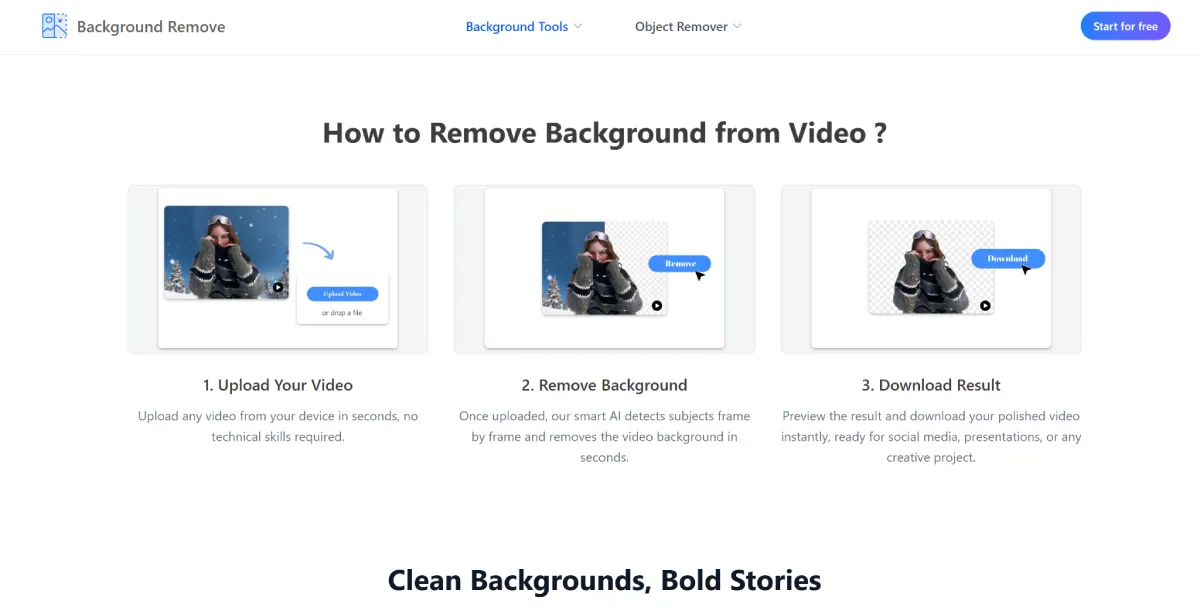
Not everyone has access to a studio or green screen setup. In fact, most creators shoot videos in real rooms, outdoor spaces, or office environments that may contain distractions. Fortunately, AI technology has changed everything. Today, you can easily Remove Background from Video without any special equipment using online tools powered by artificial intelligence.
This beginner-friendly tutorial will guide you step-by-step through how AI-based Video Background Remover tools work, how to use them, and how they can improve your content quality instantly.
Why Video Background Removal Matters Today
In the digital world, visuals are everything. A clean and focused video background can significantly improve viewer engagement and professionalism.
Here’s why removing backgrounds from videos is so important:
- It helps focus attention on the subject
- It removes distractions from the scene
- It improves branding consistency
- It enhances marketing visuals
- It allows creative background replacement
- It makes content look more professional
For example, a YouTuber recording in a messy room can instantly transform their video into a clean studio-style presentation. Similarly, businesses can use background-free videos in advertisements, product showcases, and training materials.
How AI Makes Video Background Removal Possible
Earlier, removing a video background required a green screen and complex editing software. Today, AI handles everything automatically.
Modern AI tools use advanced computer vision and machine learning techniques to analyze video frames and separate the subject from the background.
Step 1: Frame-by-Frame Analysis
The AI breaks down the video into individual frames and studies each one.
Step 2: Subject Detection
It identifies the main subject—usually a person or object—and tracks it throughout the video.
Step 3: Background Separation
Everything that is not part of the subject is identified as background and marked for removal.
Step 4: Motion Tracking
AI ensures that movement is smooth and consistent across all frames.
Step 5: Background Removal or Replacement
The background is either removed completely or replaced with another image or video.
Step 6: Final Rendering
All frames are stitched together to produce a seamless final video.
This entire process is automated, making it accessible even for beginners.
Who Can Benefit from AI Video Background Removal?
AI-powered tools are useful for almost anyone creating video content.
Content Creators
YouTubers, TikTokers, and Instagram creators can improve video quality without expensive setups.
Businesses and Marketers
Companies can create professional ads and product videos with clean visuals.
Online Educators
Teachers can present lessons in a distraction-free environment.
Freelancers and Designers
Video editors can speed up their workflow and deliver faster results.
Social Media Influencers
Influencers can create aesthetic content from any location.
Common Use Cases for Background-Free Videos
AI background removal is used in many industries today:
- Product marketing videos
- Online courses and tutorials
- Virtual meetings and presentations
- Social media reels and shorts
- Gaming livestream overlays
- Corporate training videos
Each of these use cases benefits from cleaner, more focused visuals.
Step-by-Step Guide: How to Remove Video Background Using AI
Now let’s go through a simple beginner-friendly process.
Step 1: Upload Your Video
Start by uploading your video file to an AI tool. Most platforms support formats like MP4, MOV, and AVI.
Step 2: AI Processing Begins Automatically
Once uploaded, the AI scans your video and starts detecting the subject in each frame.
Step 3: Preview the Output
After processing, you can preview how the background has been removed.
Step 4: Customize (Optional)
Some tools allow you to:
- Replace the background with images or videos
- Adjust edge smoothness
- Refine subject borders
Step 5: Download Final Video
Once satisfied, download the final version in high quality.
That’s it—no green screen or editing skills required.
Features to Look for in a Good AI Video Background Remover
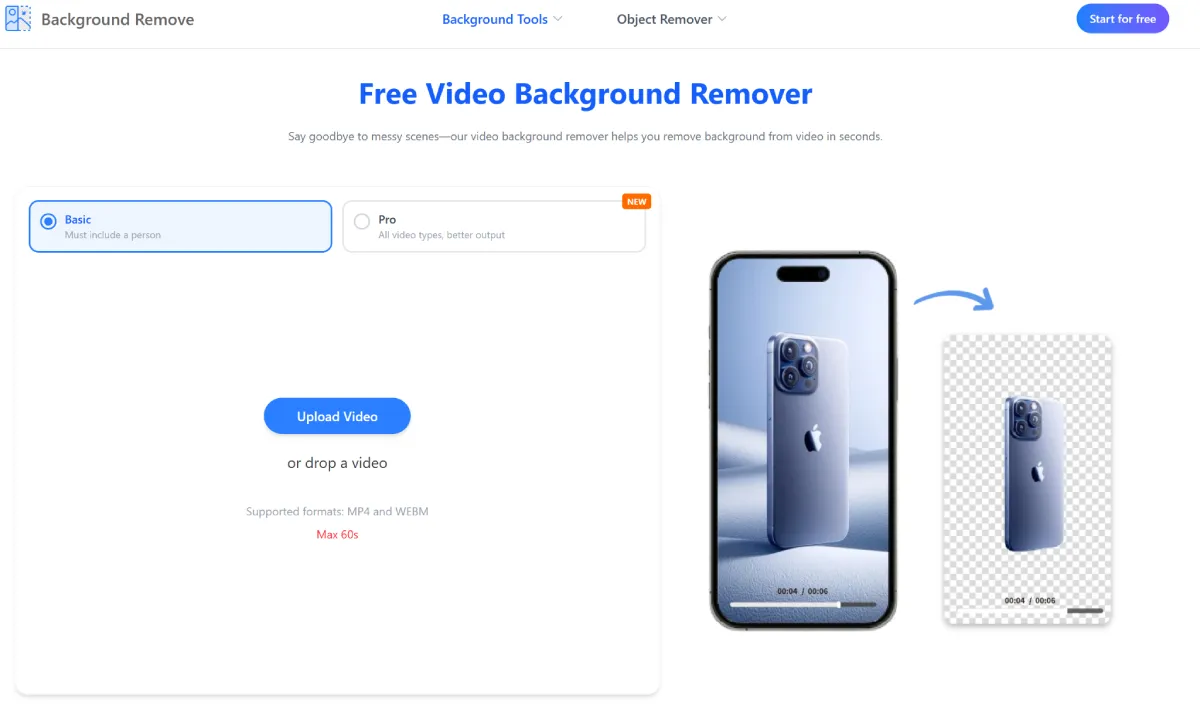
Not all tools offer the same quality. When choosing a Video Background Remover, consider the following features:
Accurate Subject Detection
The tool should clearly separate people and objects from the background.
Smooth Motion Tracking
The subject should remain stable across moving frames.
High-Quality Output
The final video should not lose resolution or clarity.
Fast Processing
AI tools should work quickly without long waiting times.
Background Replacement Options
Some tools let you replace backgrounds with custom images or videos.
User-Friendly Interface
Simple design makes editing easier for beginners.
Tips for Better Background Removal Results
Even though AI is powerful, you can improve results by following these tips:
Use Good Lighting
Well-lit videos help AI detect subjects more accurately.
Avoid Cluttered Backgrounds
Simple backgrounds improve detection quality.
Keep Camera Stable
Shaky footage may reduce accuracy.
Wear Contrasting Clothing
Helps the subject stand out clearly from the background.
Record in High Resolution
Higher quality videos produce better results.
Advantages of AI-Based Video Background Removal
AI tools have made video editing easier than ever before.
No Technical Skills Needed
Anyone can use these tools without editing experience.
Saves Time
What once took hours can now be done in minutes.
Cost-Effective
No need for expensive studio setups or software.
Flexible Editing
You can change backgrounds anytime.
Accessible Anywhere
Most tools work directly in your browser.
These benefits make AI solutions ideal for modern creators.
Real-World Impact of AI Video Editing
AI background removal is transforming multiple industries:
- Marketing teams create high-quality ads faster
- Teachers build engaging online lessons
- Influencers improve video aesthetics instantly
- Businesses produce professional presentations
- Freelancers deliver faster editing services
This technology is not just convenient—it is becoming essential in digital content creation.
Why AI Is Better Than Traditional Green Screens
Green screens have been used for years, but they come with limitations:
- Require special lighting setups
- Need physical space
- Difficult for beginners
- Time-consuming editing process
AI eliminates all these issues by working digitally and automatically detecting subjects without any setup.
This makes AI-based Remove Background from Video tools far more practical for everyday users.
Choosing the Right Online Platform
When selecting a tool, focus on reliability, quality, and ease of use. A strong AI solution should provide smooth editing without technical complications.
One platform many users explore is backgroundremove.io, which offers AI-powered background removal tools designed for both images and videos. It simplifies editing for users who want quick and professional results without complex software.
For beginners and professionals alike, backgroundremove.io provides a convenient way to achieve clean video edits using modern AI technology.
The Future of AI Video Editing
AI video editing is evolving rapidly. In the near future, we can expect even more advanced features such as:
- Real-time background removal during recording
- Instant live streaming background replacement
- Improved motion accuracy for complex scenes
- Faster processing using cloud AI systems
- Automatic scene enhancement tools
As AI continues to improve, video editing will become even more accessible and automated.
Final Thoughts
Removing backgrounds from videos used to be a complex and time-consuming task. Today, AI has completely changed the process, making it simple, fast, and beginner-friendly.
By learning how to Remove Background from Video, you can create professional-quality content without expensive tools or technical skills.
Whether you are a content creator, marketer, educator, or business owner, using a reliable Video Background Remover can significantly improve your visual content.
Platforms like backgroundremove.io are helping make this technology accessible to everyone, allowing users to focus more on creativity and storytelling instead of technical editing.


Leave a Reply