

Website Content Workflow: How Teams Manage Documents, SEO Assets, and Client Approvals
A website content workflow covers far more than layouts and code. Even a small business website can generate page copy, keyword research spreadsheets, brand guidelines, image libraries, redirect plans, testing records, and approval documents – often in both English and Traditional Chinese when the project targets Hong Kong or Taiwan.
Without a defined workflow, these materials become scattered across email attachments, messaging apps, shared drives, and individual computers. A writer may edit an outdated homepage draft while a designer uses a newer version. A client may approve one file and later send changes to another. By launch day, several documents may be labeled “final” even though nobody can confirm which version was approved.
These problems are rarely caused by a lack of software. They usually come from inconsistent document management, unclear ownership, weak version control, and approval rules that exist only in chat messages.
A repeatable website content workflow gives every document an owner, status, review path, and final storage location. The objective is not more administration; it is faster retrieval, cleaner collaboration, more reliable SEO implementation, and a defensible record of what the client approved.
Map Every Document in the Website Content Workflow
Before selecting content collaboration tools or creating folders, the team should identify every type of document the project will require.
This step helps prevent important information from being stored in informal conversations or forgotten until the final stages of development. It also makes it easier to assign ownership and decide which documents require client approval.
Planning Documents
Planning documents define the website before design and development begin. They may include:
- Project requirements
- Website objectives
- Sitemap
- Page list
- User personas
- Competitor research
- Audience notes
- Feature requirements
- Project schedule
- Responsibility matrix
These documents should explain what the website is expected to achieve and which pages, functions, and content assets must be delivered.
The team should assign an owner to every planning document. For example, the project manager may maintain the schedule, while the SEO specialist manages the keyword plan and the UX designer updates the sitemap.
Content Documents
Content documents include all written material that may appear on the website. Common examples include:
- Homepage copy
- About page content
- Product and service descriptions
- Landing pages
- Blog articles
- Frequently asked questions
- Contact page information
- Privacy policies
- Terms and conditions
- Calls to action
- SEO titles and meta descriptions
Each content document should include a clear page name, target market, language or locale, status, primary editor, and approval owner. For regional projects, labels such as EN, zh-HK, and zh-TW help teams distinguish English, Hong Kong Traditional Chinese, and Taiwan Traditional Chinese files. A website content calendar can then show which pages are being drafted, localized, reviewed, approved, or published.
Technical and Approval Documents
Technical and approval records are often overlooked, but they are essential for launch quality and accountability. They may include:
- Website testing checklists
- Redirect maps
- Tracking and analytics requirements
- SEO metadata sheets
- Structured data notes
- Browser and device testing results
- Client approval records
- Launch checklists
- Post-launch issue logs
The first step in website project documentation is therefore not choosing software. It is defining the document types, their purpose, their owners, and the point at which each one becomes final.
Create a Consistent Folder and File Naming System
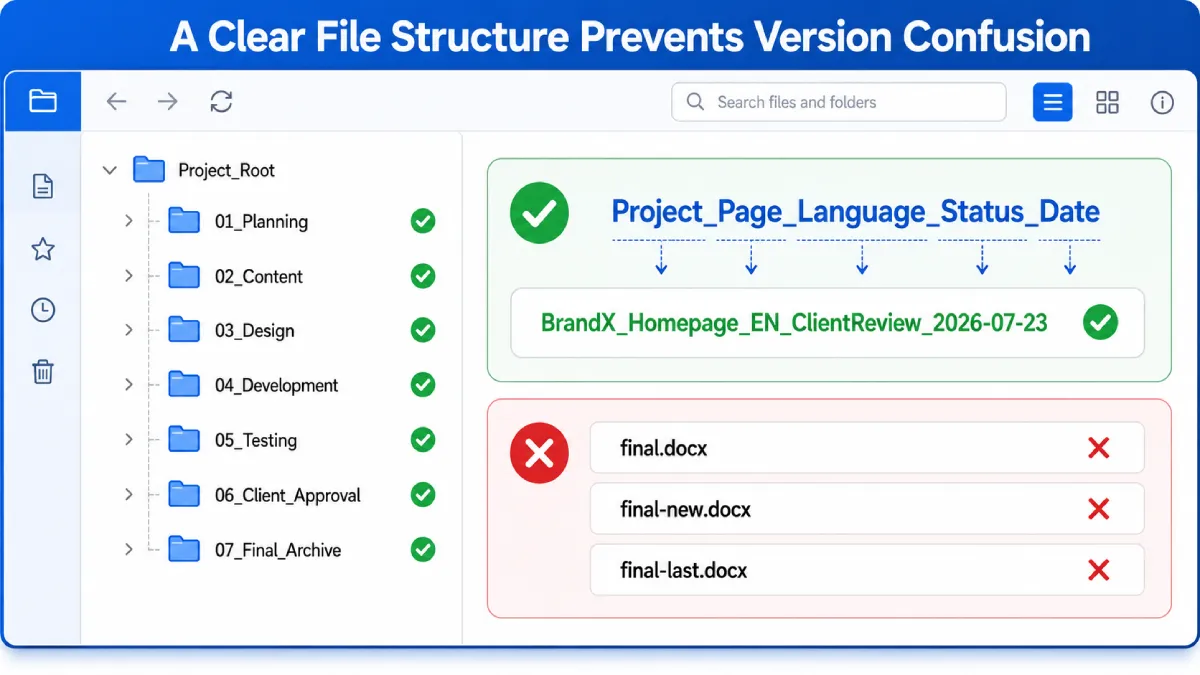
A shared folder structure should reflect the stages of the website project. The exact labels can vary, but the same system should be used by designers, developers, content writers, SEO specialists, and project managers.
A practical structure may look like this:
01_Planning
02_Content
03_Design
04_Development
05_Testing
06_Client_Approval
07_Final_Archive
Numbering the folders keeps them in a logical order and reduces the chance that important files will be placed in random locations.
Subfolders can then be created for individual pages, languages, campaigns, or asset types. For example, the content folder may contain separate sections for the homepage, service pages, blog posts, and legal documents.
File names should also follow a consistent format. One useful model is:
Project_Page_Language_Status_Date
For example:
BrandX_Homepage_zh-TW_ClientReview_2026-07-23
This file name immediately shows:
- The project
- The page
- The language
- The current review status
- The date of the version
Teams should avoid vague file names such as:
final.docx
final-new.docx
final-last.docx
final-approved-new.docx
These names provide no reliable version history. A file may be “final” for one team member but still under review by the client.
A good naming convention should be simple enough that every contributor can use it without additional training.
Plan Multilingual Website Content for Hong Kong and Taiwan
Projects targeting Hong Kong and Taiwan should separate language from market. Both audiences may read Traditional Chinese, but terminology, examples, currencies, legal references, and search wording can differ. Treating every Traditional Chinese page as one interchangeable file makes review and future updates harder.
A practical localization matrix should record the page, target market, primary search topic, locale, writer or translator, reviewer, URL path, document status, and publication date. This makes it easier to see whether the Hong Kong and Taiwan versions are aligned without accidentally overwriting one another.
SEO titles, meta descriptions, headings, calls to action, and screenshots should be reviewed in context rather than translated word for word. A final market review by someone familiar with the target audience can catch vocabulary, formatting, and search-intent differences before the content is approved.
Use One Workspace for Content Drafting and SEO Review
Website teams commonly work with several content formats. Writers may prepare page copy in documents, SEO specialists may use spreadsheets, designers may present concepts in slide decks, and project managers may distribute PDF reports.
The team should choose one primary workspace where these materials can be created, reviewed, and exported. This does not mean that every task must happen in one application. It means that there should be one agreed location for the current working files.
Website teams comparing document and spreadsheet tools may review a wps resource before deciding how to organize content briefs, keyword lists, project schedules, and client feedback in one working environment.
The selected workspace should support the practical needs of the project, including:
- Documents for page copy and briefs
- Spreadsheets for keywords, redirects, and content calendars
- Presentations for design concepts and client meetings
- PDF export for formal review
- Comments and annotations
- Revision history
- Permission control
- Cross-device access
- Reliable file download and backup
The most important rule is that the team must know where the latest version is stored. Files should not be copied into multiple communication channels whenever someone requests an update.
Instead of sending a new attachment each time, team members should share the approved working location and use comments or tracked changes whenever possible.
Separate Drafts, Reviews, and Approved Versions
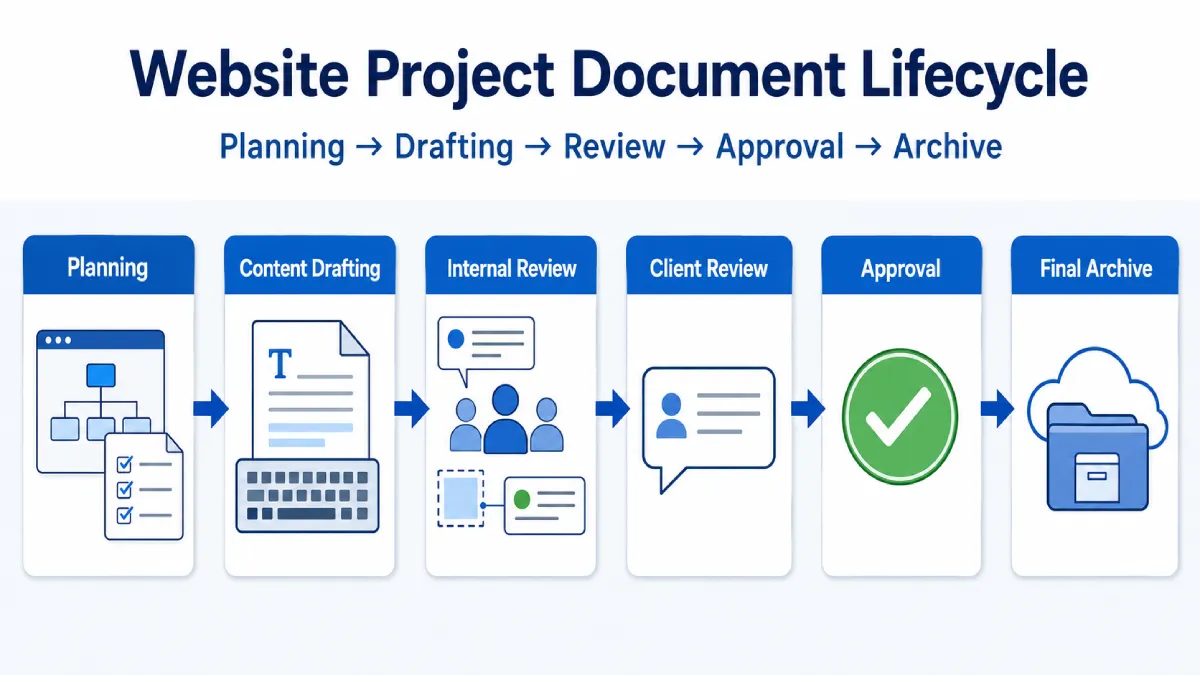
A document management system becomes more reliable when files move through defined stages.
A simple three-stage model is:
- Working Draft
- Client Review
- Approved Version
The working draft is used for active editing. The client review version is stable enough to be evaluated but may still receive comments. The approved version is the record that the team should use for design, development, or publication.
Use Clear Document Status Labels
Every file should have a visible status, such as:
- Draft
- Internal Review
- Client Review
- Approved
- Archived
These labels can appear in the file name, document header, project tracker, or shared workspace.
A content writer should not send a document to the client while it is still marked “Internal Review.” Similarly, a developer should not add page copy to the website until the document is marked “Approved.”
Status labels prevent team members from making assumptions about whether a file is ready for the next stage.
Lock the Approved Version
Once a document is approved, the team should avoid overwriting it directly.
The approved file should record:
- Approval date
- Name of the approver
- Version number
- Related page or deliverable
- Any conditions attached to the approval
If additional changes are requested later, the team should create a new version rather than editing the approved record without documentation.
This approach creates a reliable approval history and helps resolve disagreements about which content or design was accepted.
Choose a Desktop Workflow for Long Documents and SEO Data
Desktop software remains important for website teams that handle long documents, large spreadsheets, image libraries, and multiple files at the same time.
A desktop workflow can be especially useful for:
- Editing long-form content
- Comparing several documents side by side
- Managing extensive keyword spreadsheets
- Reviewing large numbers of images
- Exporting files to PDF
- Working without a continuous internet connection
- Saving local backups
- Organizing downloaded client assets
Teams that handle longer documents, spreadsheets, and local project files can consult a wps电脑版 guide when evaluating desktop installation, compatibility, file formats, and everyday document workflows.
Before adopting any desktop application, teams should confirm that it supports the file formats used by clients and external partners. Compatibility is particularly important when documents are opened, edited, exported, and reviewed across different systems.
The team should also decide where local files will be stored. Desktop downloads should not become the permanent project archive. Working files can remain on a local device temporarily, but approved versions should be copied to the agreed shared location.
A backup policy is equally important. If a contributor’s computer fails, the project should not lose its only copy of a keyword plan, design brief, or approved document.
Centralize Client Feedback Without Losing Context
Client feedback often arrives through several channels because each person uses the communication method that is most convenient at that moment.
Comments may arrive through:
- Telegram
- Phone calls
- Screenshots
- Document comments
- Meeting notes
- Project management tools
Accepting feedback through every channel creates a fragmented approval process. A request made during a phone call may never reach the designer. A screenshot may not identify the correct page. An email thread may discuss an outdated version.
Collect Feedback in One Location
The project manager should define one official location for client feedback.
For example, the team may require all content comments to be added directly to the review document, while design feedback is recorded in a shared project tracker.
Other channels can still be used for reminders and quick questions, but final instructions should be transferred to the official review location.
The client should also be told which version is being reviewed and when feedback is due.
Turn Feedback Into Trackable Actions
Every piece of client feedback should be converted into a clear action item containing:
- Page name
- Exact location
- Requested change
- Responsible team member
- Deadline
- Current status
“Please improve the homepage” is not a trackable instruction.
A better task would be:
Homepage hero section:
Replace the current headline with the approved version from the client review document.
Owner: Content editor
Deadline: July 25
Status: In progress
Clear action items reduce repeated questions and make it easier to confirm when all requested changes have been completed.
Archive SEO and Website Assets After Launch
A website project should not end with a folder full of drafts and temporary downloads.
After launch, the team should create a structured final archive containing:
- Approved page copy
- Original images and videos
- Logo and brand files
- Fonts and licensing information
- SEO titles and meta descriptions
- Redirect map
- Final sitemap
- Plugin and theme information
- Testing results
- Login and access handover records
- Website launch date
- Maintenance instructions
- Final approval documentation
Drafts that no longer have operational value can be moved to a separate historical folder. They should not remain mixed with the final files.
The archive should also identify which information may need future updates. For example, product descriptions, staff profiles, pricing, legal pages, and plugin records may require periodic review.
A well-maintained archive makes future website updates faster because the team does not need to rebuild the project history from old emails and personal computers.
Frequently Asked Questions About Website Content Workflows
What documents should a website content workflow include?
At minimum, it should cover planning documents, page copy, SEO metadata, keyword research, design assets, testing records, redirects, client feedback, approval records, and a final archive. Each item should have an owner and status.
Should Hong Kong and Taiwan content use the same working file?
A shared source brief can be useful, but market-specific copy should normally use separate zh-HK and zh-TW files when wording, examples, offers, or search terms differ. This protects local edits and creates a clearer approval history.
How can teams prevent multiple files from being called final?
Use defined statuses, version numbers, approval dates, and one official storage location. Once a version is approved, lock or archive it and create a new version for later changes instead of overwriting the approved record.
Conclusion: Make the Website Content Workflow Repeatable
Efficient website project management depends less on the number of tools a team uses and more on whether everyone follows the same documented workflow.
A consistent structure for documents, file names, locale labels, version statuses, client feedback, and approvals helps designers, developers, writers, translators, and SEO specialists work from the correct information. It reduces duplicated effort, prevents outdated copy or metadata from reaching production, and creates a clear record of client decisions.
The most effective website content workflow is reusable across projects and flexible enough for multilingual markets. By mapping required documents, separating drafts from approved versions, centralizing feedback, and archiving SEO assets after launch, teams can improve daily collaboration and maintain Hong Kong, Taiwan, and international website content with fewer version errors.


Leave a Reply