

How to Grow Your Ecommerce Business Without Leaving QuickBooks Online
TL;DR
|
Your sales are growing across Shopify, Amazon, and other sales channels. But month-end close keeps dragging, your bank deposits never match your order totals, and somewhere along the way QuickBooks Online starts to feel like the thing holding you back.
The problem usually isn’t QuickBooks itself.
As your business grows, manual imports, marketplace fees, refunds, inventory updates, and payout reconciliation become harder to manage. Without an ecommerce accounting automation platform, even the best accounting software can become overwhelmed by manual work.
QuickBooks Online can handle far more volume than most sellers realize. The real challenge is getting accurate ecommerce data into your books automatically. Once that’s in place, many businesses can continue scaling without changing their accounting software.
| Here’s the problem sellers face: For most growing ecommerce businesses, the accounting software isn’t the bottleneck. The bottleneck is how sales, fees, refunds, inventory, and payouts reach QuickBooks. Solve that problem first, and QuickBooks Online can support far more growth than many sellers expect. |
This guide explains why growing sellers often believe they’ve outgrown QuickBooks, when that assumption is correct, and how ecommerce accounting automation helps businesses scale without the cost and complexity of migrating to an ERP.
Why sellers blame QuickBooks (and why they’re usually half right)
QuickBooks Online is one of the most widely used accounting platforms for small and mid-sized businesses, yet it’s also one of the first systems blamed when accounting starts becoming difficult.
The symptoms are familiar:
- You import spreadsheets into QuickBooks every day
- Marketplace deposits rarely reconcile on the first attempt
- Month-end close consistently takes more than a week
- Refunds require manual journal entries
- Order edits create duplicate transactions
- Your accountant frequently requests corrections
- Finance headcount grows alongside order volume
- Profitability reports aren’t available until weeks after month-end
From the outside, it looks like QuickBooks has reached its limit.
In reality, QuickBooks is usually doing exactly what it was designed to do: record financial activity and generate financial statements.
Where QuickBooks Online starts to show its limits
The real issue is everything happening before those transactions reach QuickBooks. As ecommerce businesses grow, they also inherit operational complexity:
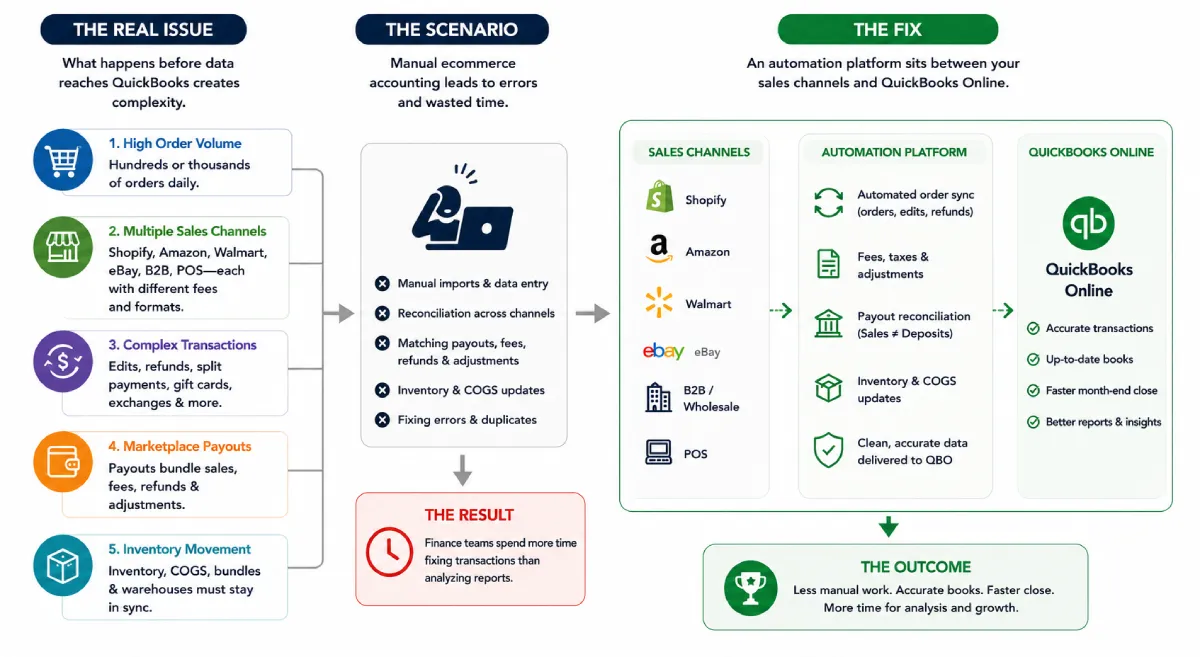
- Growing order volume. Hundreds or thousands of orders a day, each one a transaction someone has to record correctly
- Selling across multiple channels. Shopify, Amazon, Walmart, eBay, B2B, and POS each report sales differently, with their own fees and formats
- Complex transaction types. Order edits, partial refunds, split payments, gift cards, store credit, exchanges, and marketplace adjustments rarely map cleanly to a simple sales receipt
- Marketplace payouts. Sales no longer equal deposits. A single Amazon or Shopify payout bundles sales, fees, refunds, and adjustments into one lump sum
- Inventory movement. Inventory, COGS, bundles, and multiple warehouses all have to stay in sync with what’s actually selling.
Here’s the scenario and the fix: These aren’t signs you’ve outgrown QuickBooks. They’re signs you’ve outgrown manual ecommerce accounting, and the fix is an ecommerce accounting automation platform that sits between your sales channels and QBO.
The result: Finance teams spend more time fixing transactions than analyzing reports.
The real cost of migrating off QBO
When month-end close starts taking longer and reconciliation becomes a daily struggle, replacing QuickBooks Online can feel like the next step.
For some businesses, it is. But for many ecommerce sellers, migrating to an ERP solves the wrong problem.
If your accounting software is producing accurate financial reports once the data is inside it, replacing the ledger won’t eliminate manual imports, marketplace reconciliation, or disconnected sales channels. Those challenges simply move to a more expensive platform.
Before committing to an ERP, consider what’s involved.
- Months of implementation and testing
- Significant software licensing costs
- External consultants and implementation partners
- Employee training across multiple teams
- Rebuilding financial reports and workflows
- Data migration and historical validation
- Temporary disruption to daily operations
Even after the migration is complete, your ecommerce data still needs to flow accurately from Shopify, Amazon, Walmart, eBay, and other channels into the new system.
In other words, changing the accounting software doesn’t automatically fix the ecommerce accounting process.
For many growing ecommerce businesses, the bigger opportunity lies in automating the accounting workflows around QuickBooks rather than replacing QuickBooks itself. Solutions like Webgility help bridge the gap by automatically syncing orders, payouts, fees, inventory, and other ecommerce transactions into QuickBooks, allowing businesses to scale their accounting operations without the cost and disruption of an ERP migration.
Quick comparison: QBO vs ERP (Which problem you’re trying to solve)
Before investing in a new system, it’s important to identify what’s actually limiting your growth.
| Business Need | QuickBooks Online + Ecommerce Accounting Automation | ERP |
| Record financial transactions | ✓ | ✓ |
| Automate order synchronization | ✓ | ✓ |
| Reconcile marketplace payouts | ✓ | ✓ |
| Track marketplace fees and taxes | ✓ | ✓ |
| Manage inventory across sales channels | ✓ | ✓ |
| Financial reporting | ✓ | ✓ |
| Multi-entity consolidation | Limited | Advanced |
| Complex manufacturing & BOM | Limited | Advanced |
| Enterprise procurement workflows | Limited | Advanced |
| Typical implementation time | Days to weeks | Several months |
| Cost | Lower | Significantly higher |
What scaling ecommerce accounting actually requires
Scaling accounting isn’t about handling more transactions, it’s about handling them accurately with less manual effort. As your business grows, your accounting workflow should be able to support higher order volumes without slowing down your finance team.
- Automated order sync: Import orders into QuickBooks without manual uploads.
- Accurate payout reconciliation: Match marketplace deposits with sales, fees, refunds, and taxes.
- Complete fee tracking: Capture marketplace and payment processing fees correctly.
- Inventory synchronization: Keep inventory and COGS aligned across all sales channels.
- Faster month-end close: Spend less time fixing data and more time reviewing financial performance.
Where an ecommerce accounting automation platform fits
If QuickBooks Online isn’t the problem, what is?
For most ecommerce businesses, it’s the growing gap between where transactions happen and where financial records are maintained.
Every day, orders, refunds, marketplace fees, taxes, inventory updates, and payouts are generated across multiple platforms. Without automation, finance teams must manually collect, organize, and post that data into QuickBook; a process that becomes increasingly difficult as sales grow.
This is where an ecommerce accounting automation platform adds value.
Rather than replacing QuickBooks, it automates the
flow of financial data from your ecommerce channels into your accounting software, helping ensure transactions are recorded accurately and consistently.
Platforms like Webgility are built specifically for this purpose, allowing businesses to continue using QuickBooks Online while eliminating much of the manual work associated with multichannel ecommerce accounting.
Concretely, Webgility connects QuickBooks Online to 60+ ecommerce platforms and marketplaces and can:
- Post orders to QuickBooks Online continuously, as often as every 15 minutes as sales receipts, invoices, or sales orders
- Automatically sync orders, refunds, customers, and products
- Reconcile marketplace payouts using gateway-specific clearing accounts, so deposits tie out to the penny
- Capture marketplace fees and sales tax at line-item detail
- Let you choose order-level transactions for granular reporting or summarized journal entries for a cleaner ledger
- Sync inventory across channels and automate purchase orders
- Surface profitability by channel and SKU across 70+ reports built from your clean QuickBooks data
It works with every QuickBooks Online tier, from Simple Start to Advanced, and setup typically takes under 30 minutes with free onboarding from an integration specialist. QuickBooks stays in your financial system of record; the automation just handles the ecommerce accounting that surrounds it.
When leaving QuickBooks Online is the right call
To be fair, there are situations where moving to an ERP genuinely makes sense:
- Complex manufacturing with multi-level bills of materials (BOM)
- Multi-entity financial consolidation
- Advanced procurement and supply chain management
- Global financial operations with extensive compliance requirements
- Enterprise-wide operational planning beyond accounting
If none of those apply to you, there’s a good chance you can keep scaling on QuickBooks Online: you just need to automate the ecommerce layer feeding it.
The smarter way to scale!
Growing your ecommerce business doesn’t always mean replacing QuickBooks Online, it often means replacing manual accounting processes. By automating order sync, payout reconciliation, inventory updates, and fee tracking, you can scale more efficiently while keeping your books accurate.
Before investing in an ERP, consider whether better automation is all you need. If you’re exploring ways to simplify ecommerce accounting, a personalized Webgility demo can show how growing businesses scale with QuickBooks without disrupting their existing workflows.
FAQs
Does QuickBooks Online offer order-level and summarized posting on its own?
No. QuickBooks Online records the transactions it receives, but an ecommerce accounting automation platform controls how ecommerce orders, fees, refunds, and taxes are posted.
What does an ecommerce accounting automation platform do?
It automatically syncs orders, payouts, fees, taxes, refunds, and inventory from your sales channels into your accounting software, reducing manual work and improving accuracy.
Which is the best ecommerce accounting automation platform?
Webgility is a leading ecommerce accounting automation platform for QuickBooks users, helping automate order syncing, payout reconciliation, inventory updates, and marketplace fee tracking across multiple sales channels.


Leave a Reply