
How to Replace Product Photo Backgrounds with AI
The way the product photo looks shapes customers’ opinions of the brand and its services. It is also what makes viewers decide whether they want to buy it or scroll to the next one.
Having a clean and appealing background in the photo builds brand consistency, improves visual appeal, and boosts sales. With modern AI tools, replacing photo backgrounds has become easier than ever before. With only a few clicks, you can get rid of the original background, generate a new matching one, and even adjust the lighting. It is not only cheaper than studio setups, but it is also really fast and easy.
Therefore, if you want to elevate your business to the next level, keep reading this article to find out the best possible AI tools for replacing product photo backgrounds.
Quick Overview Table
| Tool | Key Highlights | Best For |
| Krea.ai | Real-time background generation, precise lighting matching | Creative product staging, advertising |
| Photoroom | Background templates | Mobile & E-commerce |
| Adobe Express | One-click background change | Graphic design |
| Remove.bg | Fast & accurate cutout | Quick cutouts |
| Mokker AI | Realistic background generation | Lifestyle content |
Top 5 AI Tools to Replace Product Photo Backgrounds
Krea.ai
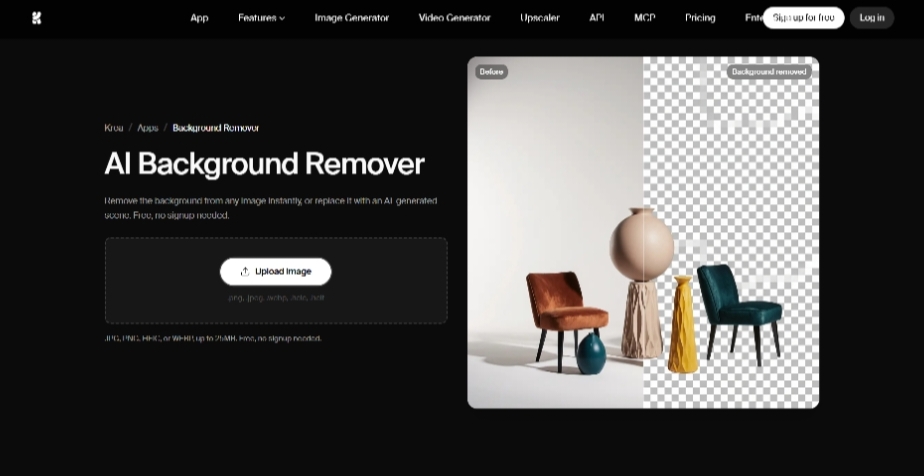
Krea.ai is a creative AI platform that helps you to edit, generate, and animate images. It offers a fast and canvas-based tool that automatically removes the background, replaces it, makes it transparent, or makes subjects isolated. The tool offers one-click action, is used for numerous cases, and is trained for a number of objects.
Best Features
- Clean Cutout: By uploading any image krea.ai will easily detect the object and provide a clean result in a matter of seconds.
- Instant Backgrounds: Compared to other AI tools, Krea.ai not only provides a transparent background but also has an option for generating a new one. Just type your desired prompt and get a background that matches your product.
- Used for a number of cases: Krea’s background remover is used for e-commerce product photos, logos or graphics, pet photos, passport photos, marketing products, real estate, social media content, and many other cases.
- Handles any subject: The tool is trained for a number of objects, including hair, fur, and even blurred and transparent ones.
- No design skills needed: The tool offers manual selection and is perfect for anyone, even with no design experience.
How to Remove Image Background with Krea.ai?
- Open Krea’s background remover tool.
- Upload your image up to 25MB in your preferred format (PG, PNG, HEIC, or WEBP).
- Wait a few seconds to see the image with a removed background.
- Download as a solid color background PNG or choose one with a transparent background.
The quick background removal, advanced image detection, ease of use, and clean result make Krea.ai one of the top AI tools for removing backgrounds.
Photoroom
Photoroom is an AI-powered photo editing platform that is designed to provide studio-quality pictures. Its background remover automatically isolates subjects, removes image backgrounds, and generates new realistic ones.
Best Features
- Instant Detection: The tool separates the main subject from the background just in one click.
- High Precision: Manages complex details including hair, intricate product edges, fur, and provides clean results.
- Manual Refinement Tools: The app includes brush, erase, and restore features to manually edit any parts if needed.
- Batch Editing: Save time by uploading and editing a number of photos at the same time.
Photoroom is a good tool for replacing background information by helping users to save time, work with a number of subjects, and get their desired outcome.
Adobe Express
For easily removing image backgrounds, Adobe Express provides its own AI-powered tool that can be used both on the web and as a mobile app. It is a quick and great option for even people who do not have any design experience.
Best Features
- One-Click Result: The tool automatically detects the main subjects and removes the background without the need for manual adjustment.
- Fine-Tune: Manually edit any parts, paint missed spots, and bring back any missed parts.
- Make it More Creative: You can change the shape and frame of your subject and add filters to match the mood.
- Add More Scenes: After you remove the background, you can use the same tool to place your subject on a new scene and add any texts or animations needed.
Adobe Express background remover is a nice option for gaining quick results, adding creativity to your product, and quick edits if required.
Remove.bg
Remove.bg is another AI-powered tool great for automatic background removal and precision edge detection for complex elements.
Best Features
- All-in-one Tool: The tool offers a high-quality background remover and great accuracy while isolating the picture background.
- Numerous Uses: You can use the tool for professional headshots, e-commerce shots, marketing purposes, logo or graphic design or any professional and personal project.
- Magic Brush: The magic brush gives you control over the image so you can decide what needs to be removed or restored.
- Detail Handling: The tool detects tricky transitions such as fur, hair, and even elements that are not fully visible.
Remove.bg is another interesting tool for quickly removing the background, and its advanced manual editing tool makes it easy to edit and perfect for your own use.
Mokker AI
Mokker AI is an AI-powered background remover tool that provides clear and original backgrounds and quick results.
Best Features
- Automatic Removal: Mokker AI instantly removes original backgrounds from standard image formats (jpg, png, webp).
- Template Library: The tool offers a number of industry-specific templates to edit the background of your image and make it perfect for your needs.
- Customization: Users are able to adjust colors, control design elements, or add any additional details they need.
Mokker AI is a good option for quick results and advanced customization, allowing users to gain their desired outcome.
The Bottomline
Neat and attractive backgrounds are what grab customers’ attention. To achieve this, numerous AI tools help to remove the product background and replace it with a new one in a matter of seconds, providing a studio-level outcome.
These tools are not only quick, but they also provide detailed precision when working with tricky elements and ensure clean results. In addition, users can easily edit the pictures and add any elements to make it perfect for the specific need.
Make your products stand out and follow your brand consistency while choosing the right photo background replacer.


Leave a Reply