
How to Check Who Owns Any Domain Name, Without Any Coding
Ever landed on a website and wondered who’s actually behind it? Maybe you’re thinking about buying an old domain, or a “too good to be true” site made you suspicious. Either way, there’s a quick way to find out, and you don’t need to write a single line of code to do it.
A WHOIS lookup is a search that shows you who registered a domain name, when it was registered, when it expires, and which company manages it. Every domain on the internet has this record attached to it, whether it’s a personal blog or a Fortune 500 company’s main site.
In my experience, most people assume checking domain ownership is a “developer thing.” It isn’t. You can pull this data through a simple lookup website or an API’s own test console, and once you know what you’re looking at, it takes about 30 seconds to read.
What a WHOIS Record Actually Shows You
When you run a WHOIS lookup, you’re not getting a vague summary. You’re getting a structured record with specific fields, and each one tells you something different.
Here’s what typically shows up:
| Field | What It Tells You | Why It Matters |
|---|---|---|
| Registrant / Organization | Who owns the domain (if not private) | Confirms who you’d actually be dealing with |
| Registrar | The company the domain was bought through (e.g., GoDaddy, Namecheap) | Useful if you need to contact them about a dispute or transfer |
| Creation Date | When the domain was first registered | Helps you judge how established a site is |
| Expiration Date | When the domain needs to be renewed | Tells you if a domain is close to expiring |
| Nameservers | Which DNS provider is handling the domain | Useful for technical due diligence |
| Status | Whether the domain is active, locked, or expired | Flags domains that are on hold or about to drop |
Not every field is always public. Since GDPR came into effect, a lot of registrars automatically hide the registrant’s personal details unless the domain owner chooses to make them visible. So if you search a domain and the “owner” field just says something like “Redacted for Privacy,” that’s normal. It doesn’t mean the data doesn’t exist, it just means it’s not shown publicly.
Why You’d Want to Check Who Owns a Domain
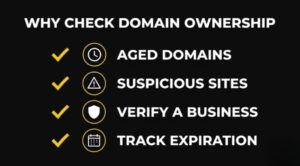
There are more everyday reasons to do this than people realize:
- Buying an aged or expired domain: older domains can carry SEO value, but only if their history is clean.
- Checking a suspicious website: a domain registered last week with hidden ownership is a red flag worth noticing.
- Verifying a business you’re about to work with: a quick lookup can tell you if a “company” site is only a few days old.
- Tracking your own domain’s expiration: so you don’t lose it by accident.
- Vetting a site before a guest post or backlink deal: knowing how long a domain has existed helps you judge whether it’s a real, established site.
That last one comes up a lot for anyone doing SEO or content outreach. A domain that’s only six months old and already “accepting guest posts” is worth a second look.
The Simple Way to Look Up a Domain, No Coding Needed
You don’t need to know how APIs work to use one. Most WHOIS tools online let you type a domain into a search box and get the record back instantly. That covers you for a one-off check.
But if you’re checking domains regularly, say you’re vetting several sites a week, a WHOIS API is the better option since you can run each check directly through the tester instead of opening a new lookup website every time, and you still don’t have to touch code to use it.
Here’s what that looks like in practice:
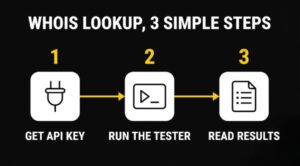
- Get a free API key. Most WHOIS API providers, including the Domain WHOIS Lookup API from APIFreaks, offer a free tier with a set number of credits, so you can try it before paying for anything.
- Run it through the API’s test console. Most API providers, including APIFreaks, have a built-in “Try it” tester right on the API’s documentation page. You paste in the domain name, hit run, and the tool sends the request for you, no coding and no separate automation platform needed.
- Read the results. The tester shows you a JSON response with labeled fields, registrar, creation date, expiration date, and so on. It looks technical at first glance, but each value sits next to its label, so you’re not digging through raw text to figure out what’s what.
This setup is especially handy if you manage a portfolio of domains or run outreach for guest posts and want a fast way to check ownership and expiry without digging through a full WHOIS site each time.
What If You Just Want to Know If a Domain Is Free to Register?
Sometimes you don’t need the full ownership history, you just want to know if a name is available. Running a full WHOIS lookup for that is overkill.
For that specific question, APIFreaks also has a Domain Availability API that returns a simple yes-or-no answer on whether a domain is registered. It’s built for exactly this use case: checking a name (or a batch of names) before you commit to buying, without pulling the entire WHOIS record.
A practical way to combine both: use the availability check first to see if a name is open, and if it’s taken, run the full WHOIS lookup to see who has it and when it expires.
Common Mistakes People Make When Checking Domain Ownership
| Mistake | Consequence |
|---|---|
| Assuming a hidden owner means no real owner | The domain still has a legal owner. Privacy protection just hides the contact details |
| Ignoring the expiration date | Someone else can register the domain the moment it lapses |
| Only checking once | Ownership and registrar info can change; a one-time check goes stale |
| Confusing “domain age” with “site age” | A domain can sit unused for years before a site is actually built on it |
FAQs
Is a WHOIS lookup free? Yes, for basic checks. Most WHOIS tools and APIs, including APIFreaks, offer a free tier with limited credits, which is usually enough for occasional lookups.
Can I see who owns a domain if WHOIS privacy is turned on? Not directly through a standard lookup. Privacy protection hides the registrant’s personal contact details, though the domain still has a legal owner on record with the registrar.
How often does WHOIS data update after a domain changes hands? It varies by registrar, but most updates reflect within 24 to 48 hours after a transfer or renewal is processed.
Conclusion
Checking who owns a domain used to feel like something only developers could do. It isn’t. A basic lookup tool handles one-off checks, and an API’s test console handles anything you need to do regularly, no coding required either way. Once you know what the fields in a WHOIS record actually mean, reading one takes seconds, and it’s one of the fastest ways to size up a website before you trust it, buy it, or build on it.


Leave a Reply