
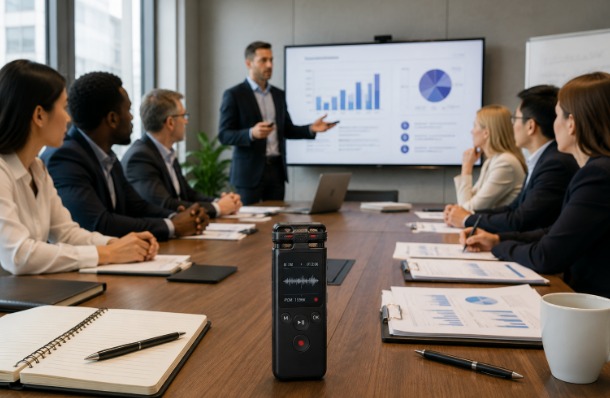
How to Record Large Meetings and One-on-One Interviews With the Right Device
Recording a large meeting and recording a one-on-one interview create different technical demands. A boardroom discussion requires broad sound coverage, clear pickup from distant speakers, and enough storage for a long session. An interview usually requires portability, quick setup, and reliable capture of two voices at close range.
Choosing the right device begins with understanding the environment rather than comparing specifications alone. The best recorder is the one that matches the room, number of speakers, recording time, and the way the audio will be reviewed afterward.
Start With the Recording Environment
Before selecting a recorder, consider where the conversation will happen. A large meeting room may include several speakers around a table, along with sounds from ventilation, keyboards, chairs, and projectors. An interview may take place in an office, café, exhibition hall, or outdoor location.
Room size affects microphone placement and pickup distance. In a large meeting, the recorder should sit near the center rather than beside one participant. For an interview, place it between the interviewer and guest so both voices are captured at a similar level.
The environment also determines whether directional or omnidirectional recording is more useful. Broad pickup works well when speakers are distributed around a room, while focused pickup can help reduce surrounding noise during an interview.
Choose a Recorder for Large Meetings
Large meetings require a device that can capture voices from different positions without constant adjustment. Long-distance pickup, noise reduction, multiple recording modes, and reliable local storage are more important than wearable convenience.
The iFLYTEK Smart Recorder is designed for meetings, speeches, interviews, and business negotiations. Its official product page lists recording from up to 10 meters, offline real-time transcription in five languages, AI noise reduction, and several recording modes. These features make it suitable for conference rooms where speakers may be spread across a wider area.
Before the meeting starts, test the device from the farthest seat. Ask several participants to speak at normal volume and check whether their voices remain clear.
Choose a Recorder for One-on-One Interviews
Interviews usually benefit from a smaller recorder that can be carried throughout the day and started quickly. Journalists, researchers, consultants, and recruiters may move between locations, so portability and battery life often matter more than long-distance room coverage.
The iFLYTEK AI Recorder P1 weighs 22.5 grams and can be worn as a watch, clip, or lanyard. The product page also lists up to 25 hours of continuous recording, clear capture within five meters, app-based transcription and summaries, speaker identification, and Wi-Fi file transfer. This makes it practical for mobile interviews and frequent recording sessions.
For a seated interview, place the recorder where neither person will cover or touch it. For a walking interview, use a secure clip or lanyard position and test whether clothing movement affects the audio.
Prepare the Room and Participants
Even a capable recorder cannot fully correct poor setup. Close windows, silence phones, move the device away from laptops and projectors, and avoid placing it beside objects that may be moved.
In a large meeting, ask participants to speak one at a time and avoid side conversations. If someone joins remotely, confirm whether their audio will be captured through the room speaker or recorded separately.
For interviews, explain that the conversation will be recorded and obtain permission before starting. Confirm any legal, organizational, or ethical requirements that apply, especially when the discussion includes confidential or personal information.
Use Brief Notes Alongside the Recording
A recording preserves detail, but it should not replace active listening. Keep brief notes to mark decisions, strong quotations, unanswered questions, and sections that require review.
Time stamps are especially useful. If an important point appears 24 minutes into a meeting, note the time rather than writing the entire statement. During an interview, mark moments that may provide a useful quotation or require fact-checking.
This method reduces the need to replay the whole file and helps the reviewer focus on the most valuable sections.
Plan for Transcription and File Management
Consider what will happen after recording. A large meeting may need formal minutes, while an interview may require a transcript, selected quotations, or a thematic summary.
Create a naming system that includes the date, subject, and recording type:
2026-08-03_Quarterly Planning_Meeting Audio
2026-08-03_Client Interview_Jordan Lee
Transfer files soon after the session and keep the original audio until the transcript and final notes have been checked. Automated transcription can save time, but names, numbers, technical terms, and direct quotations should be reviewed against the recording.
Files containing sensitive information should be stored in an approved location, protected with secure access, and deleted when no longer required.
Match the Device to the Job
A large meeting and a one-on-one interview do not always need the same recorder. Conference rooms benefit from wider coverage, longer-distance pickup, and offline transcription. Mobile interviews benefit from lightweight design, quick operation, long battery life, and easy synchronization.
The correct choice is not the device with the longest feature list. It is the one that reduces the risk of missing information in the environment where it will be used.
Conclusion
Clear recordings depend on choosing the right device, placing it correctly, and planning how the audio will be reviewed. Large meetings require dependable room coverage and structured follow-up, while interviews require portability and close-range clarity.
By testing the setup, reducing background noise, taking time-stamped notes, and reviewing transcripts carefully, professionals can create recordings that are easier to understand, organize, and use.


Leave a Reply