

How to Turn Your Shopify Store Into an App (Without Hiring Developers)
You’ve decided you want a mobile app for your Shopify store.
Then you get a quote from an agency, and the project dies right there. Five-six figures upfront. Months of build time. And it doesn’t end there – you’re looking at a second product to maintain once it ships (and that takes more dev hours).
That was the only way to launch an app for a long time. It isn’t anymore.
You can put a real iOS and Android app in the App Store without writing code, hiring a developer, or taking on a second codebase.
Here’s what an app gives you, what “turning your store into an app” really means, and the two ways to get there without paying for custom development.
Why Your Shopify Store Should Have an App
Your site does the hard work of getting found and winning the first sale. Most of your customers will keep shopping there.
An app serves a narrower group – your repeat customers, the ones who already know your brand and have bought from you more than once.
That group is small. It doesn’t need to be big.
The numbers from brands running apps today tell you why.
- They visit far more often. Tadashi Shoji sees 3.8x more sessions per app user than per mobile web visitor. Freedom Rave Wear sees 5.75x. John Varvatos sees 12x.
- They spend more per order. AOV lifts of 10-50% are typical across brands with live apps. Sleefs and XCVI both sit around 30%.
- You can reach them when your website can’t. A push notification lands on a lock screen while the customer is doing something else entirely. Abandoned cart notifications alone can add five or six figures in new revenue every month.
- They concentrate your revenue. Brands with apps typically see 10-35% of total online revenue come through the app, often from a single-digit share of their customer base.
All of it comes down to one tap versus five.
Opening an app takes one tap. Getting to your store in a mobile browser means opening the browser, typing or searching, then finding the product. Close that gap and your best customers come back more often. More visits, more chances to buy.
There’s a fair objection here, and you may already be thinking it: “won’t most of that revenue come from people who would have bought on my site anyway?”
Some of it will. Not the push notification revenue, though – that channel doesn’t exist without the app. And not the extra sessions either.
Even on conservative assumptions, the lift is real.
What “Turning Your Store Into an App” Means
To launch a mobile app for your store, you don’t need to build something completely new.
Look at what you’ve already built over the years: your branding and visual design, your product page layouts and variant logic, your search and filtering, your subscription and loyalty apps, your checkout, and every piece of custom work you’ve paid for over the years.
That’s years of investment, and it’s on your site because it works.
What it can’t do is run on a customer’s device, sit on their home screen, get published in the App Store, or send a native push notification.
You should be thinking: “how can I take the best parts of my web experience and extend this into something that can run on my customer’s phone?
That can mean doing as little as taking your existing web experience and adding native features on top:
- Native push notifications
- Tab bar navigation and native UI behaviour
- A permanent icon on the customer’s home screen
- Deep links that open a specific product or collection straight from a notification
- Distribution through the Apple App Store and Google Play
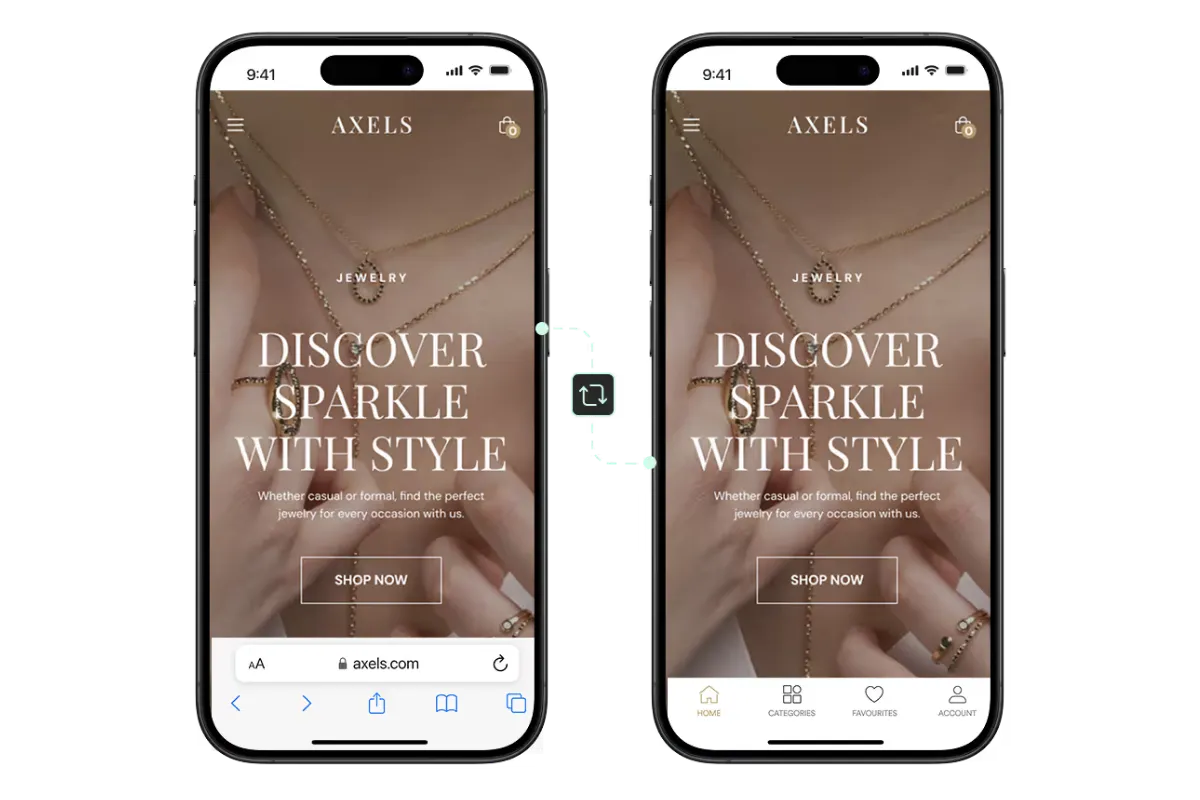
A good mobile app doesn’t have to do a lot differently to your website
Your app doesn’t have to be dramatically better than your site. It just can’t be worse.
Give your best customers fewer features, a weaker product page, or a subscription flow that breaks, and they’ll go back to the browser. Then the app earns nothing.
Parity with your website is the floor. Judge everything below against it.
Why Hiring Developers Is Usually the Wrong Move
Custom development is the first option most brands look at, because it’s the one that sounds like building an app.
You think: “I want an app, so I need to hire a team of developers, or hand off the project to an agency.”
It does give you complete control over every screen. It’s also the most expensive way to essentially just rebuild a site you’ve already built and paid for.
Here’s what agencies typically charge for a custom ecommerce app:
| Cost | Timeline | |
|---|---|---|
| Basic build | $40,000-$80,000 | 3-5 months |
| Intermediate | $80,000-$150,000 | 5-8 months |
| Advanced | $150,000-$250,000+ | 8-14 months |
Then there’s the part that doesn’t appear in the first quote.
Maintaining the app runs roughly 15-25% of the original build cost every year – OS updates, security patches, dependency upgrades, bug fixes. On a $100,000 build, that’s $15,000 to $25,000 a year before you add a single feature.
The bigger cost never arrives as an invoice.
A custom app is a second codebase. Every change you make on the web – a new collection template, a promotion, a checkout tweak, a new Shopify app – has to be built a second time, or the two channels drift apart. Your web team ships on Tuesday and your app is behind by Wednesday.
A year of that, and you’re running two different stores.
If your app is meant to be its own product, with its own roadmap, that’s a fair price to pay for the freedom.
But if you just want your existing store in your customers’ hands, it’s a lot of money and permanent overhead to arrive at something your website already does.
Two Ways to Get a Shopify Mobile App Without Developers
So how do you launch an app without any of that?
You have two routes that make sense.
1. Template-based app builders
Most Shopify app builders work the same way.
You get a drag-and-drop editor. You pick a theme, arrange components for your home screen and product pages, and the platform produces an app that pulls your catalogue through Shopify’s APIs.
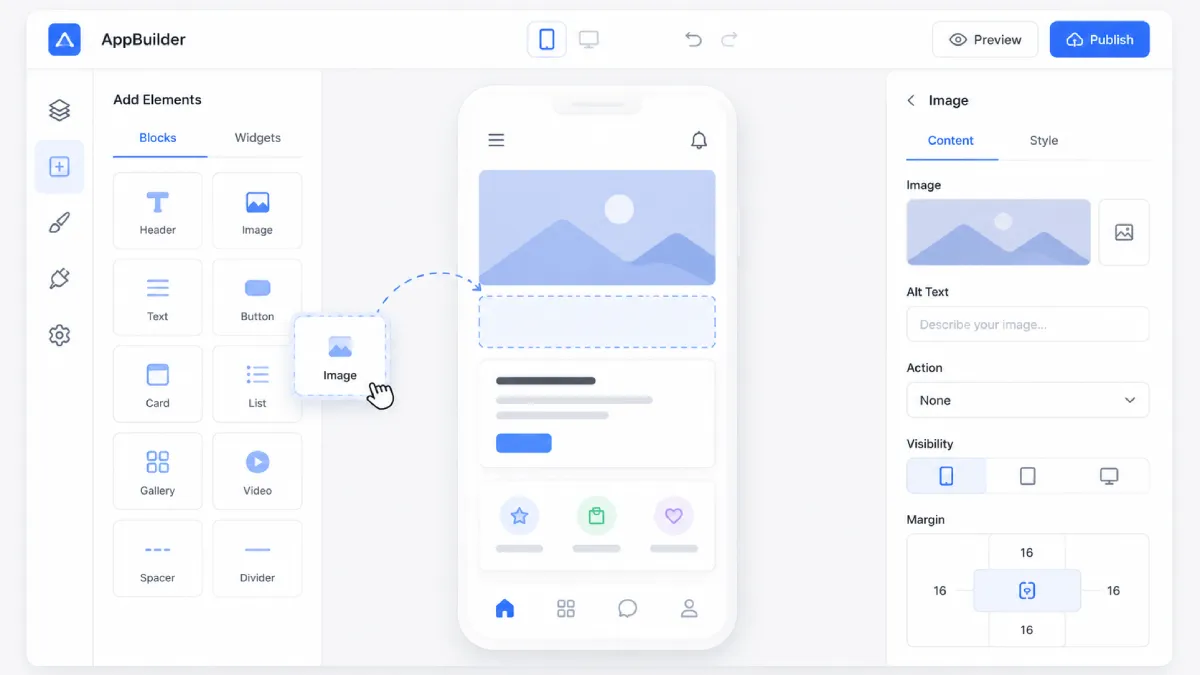
A simplified version of what a no-code app builder typically looks like
They’re fast and they’re cheap. Some start as little as $99 per month. Even premium-positioned tools and these platforms’ Enterprise plans come in around $1-2k per month, which is a very reasonable cost compared to what you’d pay for custom development (one developer alone could cost 5-10x that amount).
It’s a great way to launch an app for a simple Shopify store.
You can get an app built in days, and potentially be live and in the App Stores in a week or so, depending on how long the App Store review takes.
The caveat is, if your store isn’t simple, it will be more difficult to get the app you want; one that matches up to your site.
That’s just the nature of a template-based tool. You’re trading the ease of no-code development for certain limitations around what your app can do and look like.
2. Website-to-app app builders
There’s another kind of app builder, like MobiLoud, which does the app builder thing a little differently.
Instead of starting from a template, it builds on top of your existing store.
Your store powers the core design, content, functionality. While the platform adds a native layer with the native features and design that make your app look and feel like a true, native app.
Because you’re pulling from your site, not starting over with a drag-and-drop template, everything from your website carries over – design, custom features, integrations with any tools you use on your site.
And it’s easier to manage, because you’re essentially managing everything from one place – your existing Shopify admin and web dev workflows – instead of juggling two separate codebases.
It’s a little more complicated if you want to extensively customize the app, separate from your website.
But if you’re looking for a unified experience across your channels, it’s a lot easier.
How the Three Options Compare
Here’s a breakdown of the three ways you can build a mobile app for your Shopify store.
| Custom development | Template builder | Website-to-app | |
|---|---|---|---|
| Upfront cost | $40K-$250K+ | $0-low | Setup fee |
| Ongoing cost | 15-25% of build per year | $49-$1,299/mo | From $549/mo |
| Time to launch | 3-14 months | Days to weeks | ~30 days |
| Starting point | A new mobile frontend | Platform templates | Your existing store |
| Existing design and features | Rebuilt | Rebuilt where supported | Used directly |
| Integrations | Connected individually | Only those supported | Already in place |
| Site updates | Built twice | Repeated in the editor | Flow through |
| Design freedom | Complete | Within the templates | Follows your site |
| Who does the work | Developers or an agency | Your team | Managed for you |
| Best suited to | An app with its own roadmap | Stores close to stock Shopify | Extending an established store |
Which Route Fits Best For You?
The right answer depends on what you want your app to be.
Want a separate product, with its own experience and its own roadmap? You’ll want either a no-code Shopify app builder or custom development.
App builder if your requirements are relatively straightforward. Custom dev may be necessary if you need to build some high-level functionality; but realistically, this is usually overkill for ecommerce apps.
If what you’re looking for is a natural extension of your website, a web-to-app approach like MobiLoud’s is best – especially if you have custom features or unique quirks on your site that a typical app builder can’t replicate.
Whichever route you go down, an app is usually a worthwhile investment.
Just how worthwhile depends on getting your development approach right.


Leave a Reply