

Best WordPress Embedding Plugin for Interactive Content in 2026: Why EmbedPress Deserves a Closer Look
Creating a modern WordPress website is no longer just about publishing text and images. Today, visitors expect richer experiences with videos, documents, maps, social posts, reviews, audio, and interactive assets built directly into the page. For site owners, that means the ability to embed content smoothly has become a practical requirement, not just a nice extra.
While WordPress supports some basic embeds out of the box, most growing websites need more flexibility, better design control, broader source support, and features that go beyond pasting a simple URL. That is where a dedicated embedding solution becomes valuable, especially for businesses, creators, agencies, educators, and marketers who want content to look polished and perform well.
Among the available options, EmbedPress stands out as a powerful solution built specifically to help WordPress users embed content from a huge range of sources without coding. With support for 250+ content types, compatibility with major editors, and advanced features like branding, lazy loading, access control, ads, and analytics, it offers much more than a basic embed tool.
Core Features That Make EmbedPress a Strong Choice for WordPress
One of the biggest strengths of EmbedPress is that it is not limited to a narrow group of platforms or file types. Instead, it approaches embedding as a complete content experience, giving users one place to manage videos, PDFs, social content, Google files, live streams, audio, and more. That broad support makes it especially useful for sites that publish content in different formats and want a consistent workflow across all of them.
Another major advantage is accessibility. Rather than forcing users to work with complicated code snippets or platform-specific settings, EmbedPress is designed to make the process simple inside WordPress. It also works across popular editors and page builders, which means teams do not have to rebuild their workflow just to improve how embedded content appears on the site.
Embed 250+ Content Sources Without Coding
EmbedPress is built around one very compelling promise: it helps you embed content from more than 250 sources directly into WordPress. That includes videos, images, PDFs, maps, audio, social posts, live streams, charts, and other web content, making it a flexible tool for websites with varied publishing needs. For a blog, business site, or media-heavy landing page, that kind of source coverage removes a lot of friction from day-to-day content creation.
Display PDFs and Documents in a More Professional Way
Document embedding is one of the areas where EmbedPress becomes especially practical. It supports PDFs and other document formats, and it also offers enhanced presentation options such as a 3D PDF flipbook experience, making files feel more interactive and visually appealing on the page. This is useful for portfolios, brochures, product catalogs, reports, manuals, and downloadable resources that need to be shown cleanly inside WordPress.
Add Videos With Better Presentation and More Control
Video is central to modern content strategy, and EmbedPress gives users more than a basic video embed. It supports major video platforms such as YouTube, Vimeo, Wistia, Twitch, Dailymotion, and others, while also offering customization features that help site owners control how those videos appear to visitors. That means video content can feel more aligned with the rest of the website instead of looking like an unstyled third-party insert.
Embed Google Docs, Sheets, Slides, Forms, and Maps Seamlessly
For many WordPress users, Google sources are part of the everyday workflow. EmbedPress supports Google Docs, Sheets, Slides, Forms, Maps, Drawings, and other Google-based resources, making it easier to present everything from surveys and presentations to location details and collaborative documents within a live page. That is especially valuable for educational sites, teams, agencies, and businesses that rely on Google Workspace assets.
Support Social, Audio, Image, and Live Content in One Plugin
A strong website often combines multiple content formats, and EmbedPress is built for exactly that kind of publishing environment. It supports social platforms like Facebook, Instagram, TikTok, and X, as well as audio platforms such as Spotify and SoundCloud, image sources like Flickr and Imgur, and live-stream content that can boost engagement. Instead of relying on separate solutions for each media type, users can manage a wide range of embeds through one plugin.
Advanced Features That Improve Performance, Branding, and Business Value
Beyond source compatibility, EmbedPress includes advanced options that help teams improve page speed, protect content, reinforce branding, create monetization opportunities, and measure how embedded assets perform.
These features matter because embedded content should not simply appear on a page. It should contribute to the overall user experience, support conversions, and fit into the larger growth strategy of a website. EmbedPress adds those extra layers in a way that makes it relevant not only for bloggers, but also for agencies, SaaS companies, educators, publishers, and store owners.
Lazy Loading to Improve Performance
Heavy embedded content can slow down a website if it loads all at once. EmbedPress addresses that with lazy loading, a feature highlighted on its feature pages as a way to make loading faster and reduce bounce rates. For websites that use multiple videos, documents, or external embeds on the same page, this can be an important advantage for performance and user experience.
Custom Branding for a More Consistent Website Experience
One common weakness of third-party embeds is that they often feel visually disconnected from the site around them. EmbedPress tackles this by offering custom branding options for various embed types, including the ability to add logos and call-to-action elements for content such as videos and documents. That gives businesses more control over presentation and helps embedded assets feel like part of the brand rather than borrowed content blocks.
Content Protection and Access Control
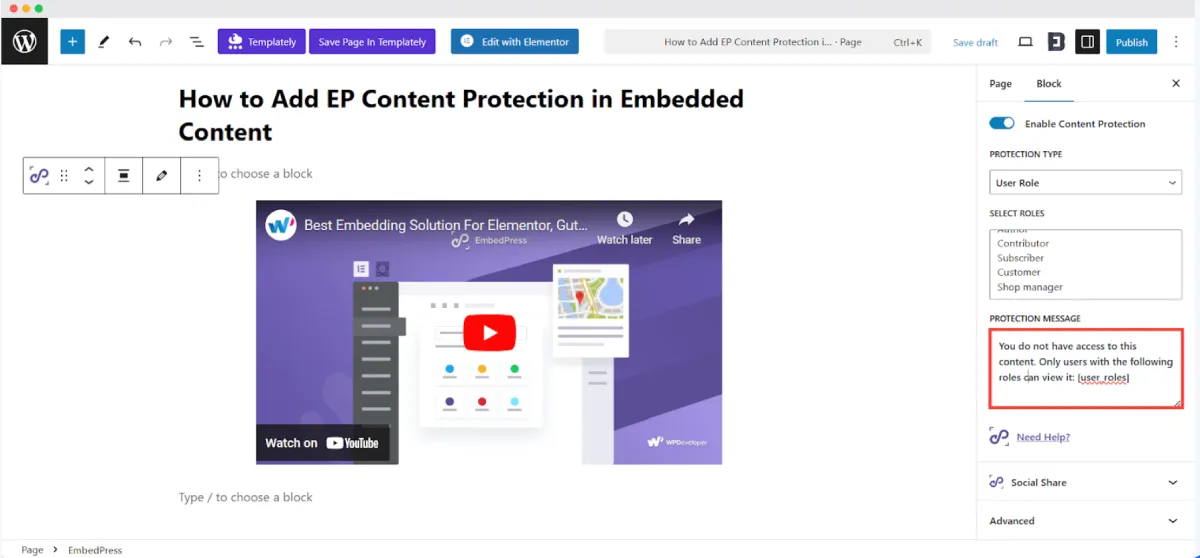
Not every piece of embedded content should be available to everyone. EmbedPress includes content protection and visibility controls that can help site owners manage who can see certain embedded assets. For membership sites, online learning portals, private client resources, or internal business content, this makes the plugin much more useful than a simple public embed tool.
Monetize Embedded Content With Custom Ads
For content-driven websites, embeds can do more than improve the page visually; they can also contribute to revenue. EmbedPress includes a custom ads feature that allows users to display ads inside embedded content from 250+ sources, with controls for things like width, height, position, start time, and skip behavior. That opens the door for site owners who want to turn embedded media into a more strategic business asset.
Use Analytics to Understand Audience Interaction
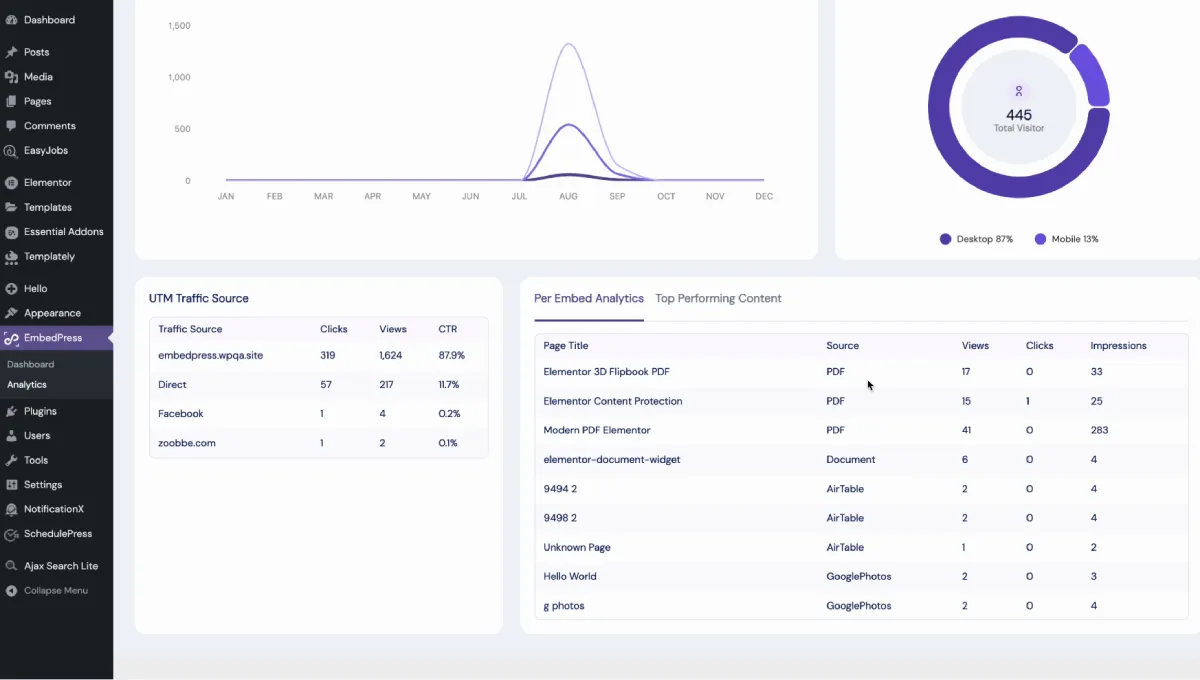
Embed performance is often overlooked, but it can reveal a lot about what visitors actually engage with. EmbedPress highlights advanced analytics features that track metrics such as views, unique visitors, clicks, location data, device insights, source and UTM tracking, and even one-click export for reports. For agencies and growth-focused teams, those insights can make embedded content easier to optimize and justify.
Works Smoothly With the Editors and Builders WordPress Users Already Know
One reason WordPress plugins fail to scale is that they work well in one environment and become frustrating in another. EmbedPress solves that problem by supporting Gutenberg, Elementor, Classic Editor, Divi, Beaver Builder, and other popular page-building environments. That compatibility is important because it lets users improve embedding without changing the way they already build websites.
This also makes the plugin attractive to freelancers and agencies managing multiple client setups. Not every project uses the same editor, and not every client site is built the same way. A plugin that can move across those environments while keeping the workflow simple offers a practical advantage for anyone building WordPress sites at scale.
Gutenberg-Friendly for Modern WordPress Publishing
If your site depends on the block editor, EmbedPress fits naturally into the Gutenberg workflow. It is presented as a simple way to embed content directly inside modern WordPress pages and posts, which is especially useful for publishers who want a faster editorial process without extra technical steps.
Strong Fit for Elementor and Other Builders
For Elementor users and teams working with Divi, Beaver Builder, or Classic Editor, EmbedPress still keeps the workflow straightforward. That cross-editor support means the plugin is not tied to a single WordPress ecosystem, which makes it easier to recommend across different types of websites and client projects.
Why EmbedPress Is Worth Trying for WordPress Websites in 2026
What makes EmbedPress compelling is not just the number of supported sources, though that alone is impressive. It is the way the plugin combines source variety, visual flexibility, performance awareness, monetization features, analytics, and editor compatibility into one complete package. For users who publish rich media regularly, that all-in-one value matters a lot.
It also lowers the barrier for non-technical users. Instead of piecing together multiple plugins or relying on custom embed workarounds, site owners can use one solution to handle a broad range of needs. That makes EmbedPress a strong option for solo creators, marketers, online educators, agencies, and businesses that want content to look better and work harder without adding unnecessary complexity.
Another practical advantage is that users can start with the free plugin on WordPress.org and then scale into advanced functionality if needed. EmbedPress also promotes a 14-day money-back guarantee on its official site, which reduces the risk for teams that want to explore the Pro experience more seriously.
Make Your Website More Engaging With EmbedPress
If your goal is to build a WordPress site that feels more dynamic, informative, and interactive, EmbedPress is a plugin worth serious attention. It helps transform ordinary pages into richer experiences by making it easy to embed documents, videos, maps, social posts, audio, reviews, and more from a huge list of supported sources.
What makes it stand out even more is that it does not stop at embedding alone. With features like lazy loading, branding controls, access control, custom ads, analytics, and compatibility with major WordPress editors, EmbedPress is a broader content enhancement tool rather than a basic utility plugin.
Resources to get started:
For WordPress site owners who want richer content presentation without coding headaches, EmbedPress makes a strong case for itself in 2026.


Leave a Reply