

Checkout Field Editor for WooCommerce – Block & Classic Compatible
If you’ve ever managed a WooCommerce store, you already know how important the checkout process is. It’s the final step between a visitor and a paying customer and if that experience isn’t smooth, you risk losing sales. That’s why having the ability to customize your checkout page matters more than ever.
The Checkout Field Editor for WooCommerce, developed by Jcodex Technologies, is one of those must-have plugins that gives you complete control over what your customers see during checkout. It’s flexible, beginner-friendly, and most importantly fully compatible with both the new WooCommerce Checkout Block and the Classic Checkout.
In simple words, whether you’re using the modern block-based checkout or the old classic layout, this plugin makes sure your custom fields look and work perfectly.
Why Customize the WooCommerce Checkout?
WooCommerce’s default checkout form is good enough to get started but it’s not ideal for every business. Each store has unique needs. For example:
- A gift shop may want to ask for a personalized message.
- A clothing store might need size or measurement confirmations.
- A B2B store could need a company name or tax ID.
Unfortunately, WooCommerce doesn’t let you easily add or edit checkout fields from the dashboard. That’s exactly where a WooCommerce checkout manager like the Checkout Field Editor plugin steps in.
With it, you can:
- Add custom fields WooCommerce checkout such as text boxes, dropdowns, or date pickers.
- Edit checkout fields WooCommerce to rename, reorder, or remove unnecessary ones.
- Create additional fields on WooCommerce checkout for specific purposes like order notes, delivery preferences, or extra information.
It’s basically a simple interface that gives you full power over your checkout form without touching code.
Classic Checkout vs Checkout Block – What’s the Difference?
Before diving into compatibility, it helps to understand what these two checkout systems are.
1. Classic Checkout
This is the original WooCommerce checkout that’s been around for years. It uses shortcodes and works with virtually every WordPress theme. You’ll see all your WooCommerce checkout form fields name, email, address, phone, etc.displayed in a simple form layout.
Many store owners still prefer Classic Checkout because it’s reliable, flexible, and compatible with almost every extension. The WooCommerce Checkout Field Editor plugin was originally built for this system, allowing users to edit checkout fields WooCommerce directly from the backend.
2. WooCommerce Checkout Block
As WordPress introduced the block editor, WooCommerce followed the same path with its Checkout Block, a modernized, faster version of the checkout process built entirely with blocks.
It provides a cleaner design, better mobile performance, and an overall improved user experience. However, when the Checkout Block was first released, most third-party checkout plugins didn’t support it, which caused compatibility issues.
That’s why the Checkout Field Editor for WooCommerce stands out it’s one of the few tools that now supports both the Classic Checkout and the new Checkout Block, making it future-ready while keeping full backward compatibility.
How Checkout Field Editor Handles Both Systems
When you install the Checkout Field Editor for WooCommerce, it automatically detects which checkout type your store is using. You don’t have to configure anything manually.
Here’s how it ensures smooth compatibility with both:
- Auto Detection – The plugin intelligently identifies whether you’re using Classic Checkout or Block Checkout and adjusts its functionality accordingly.
- Smooth Integration – For block-based checkout, your custom checkout fields WooCommerce appear exactly where you want them, without breaking the layout.
- Consistent Data Handling – No matter which system your site runs, the data from all WooCommerce checkout form fields (including custom ones) is saved correctly in order details.
- Conditional Logic Support – You can use conditions to show or hide fields based on user choices and it works perfectly in both checkout types.
- Zero Conflicts – Whether your site uses third-party themes or additional WooCommerce extensions, the plugin plays well with others.
This means you can confidently customize your checkout today, knowing it will keep working when you decide to move to the newer WooCommerce Checkout Block.
Key Features of Checkout Field Editor for WooCommerce
Let’s break down what makes this WooCommerce checkout customization plugin one of the most versatile tools available:
1. Add Custom Fields with Ease
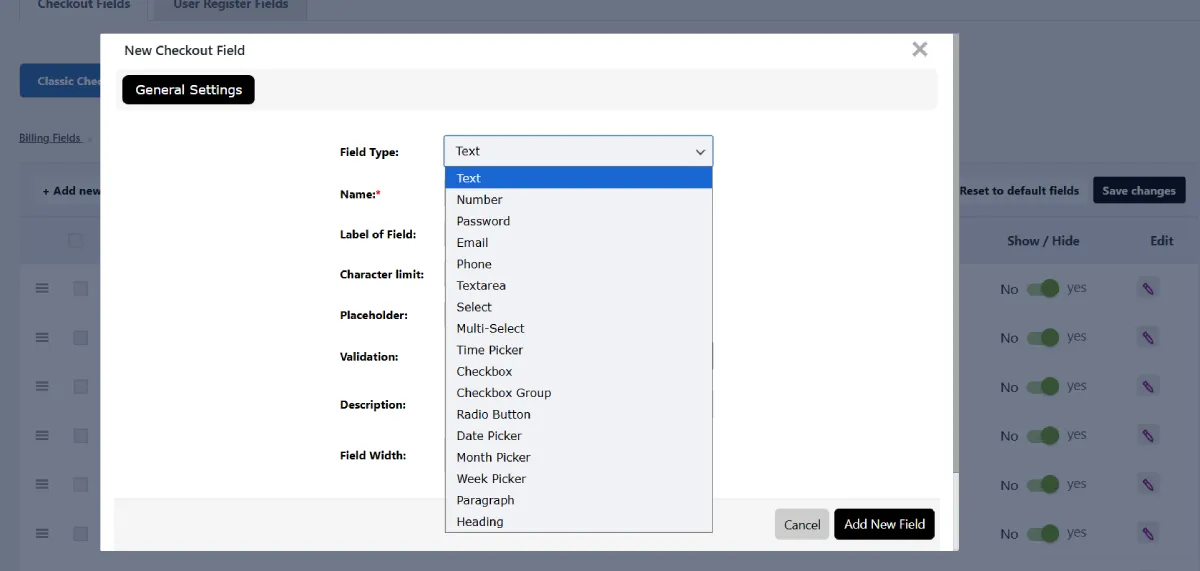
Need extra inputs during checkout? You can easily add custom fields WooCommerce checkout like:
- Text and email fields
- Dropdown lists
- Date pickers
- Checkboxes or radio buttons
No coding, no hassle just select the field type, name it, and decide where it should appear.
2. Edit or Remove Existing Fields
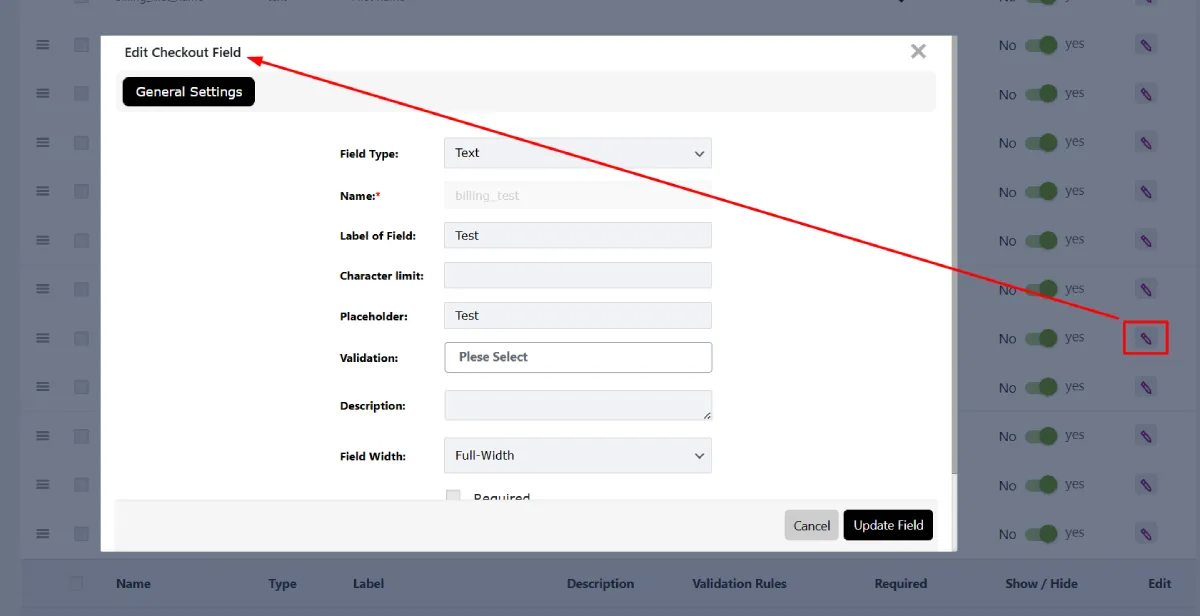
You can edit checkout fields WooCommerce directly from your admin panel. Change labels, placeholders, field positions, or make certain fields optional. You can even hide unnecessary ones to simplify the checkout experience.
3. Conditional Logic
The pro version supports advanced conditional logic, meaning certain WooCommerce checkout form fields can appear only if specific conditions are met. For example, if the user selects “Ship to a different address,” additional address fields appear instantly.
4. User Role-Based Fields
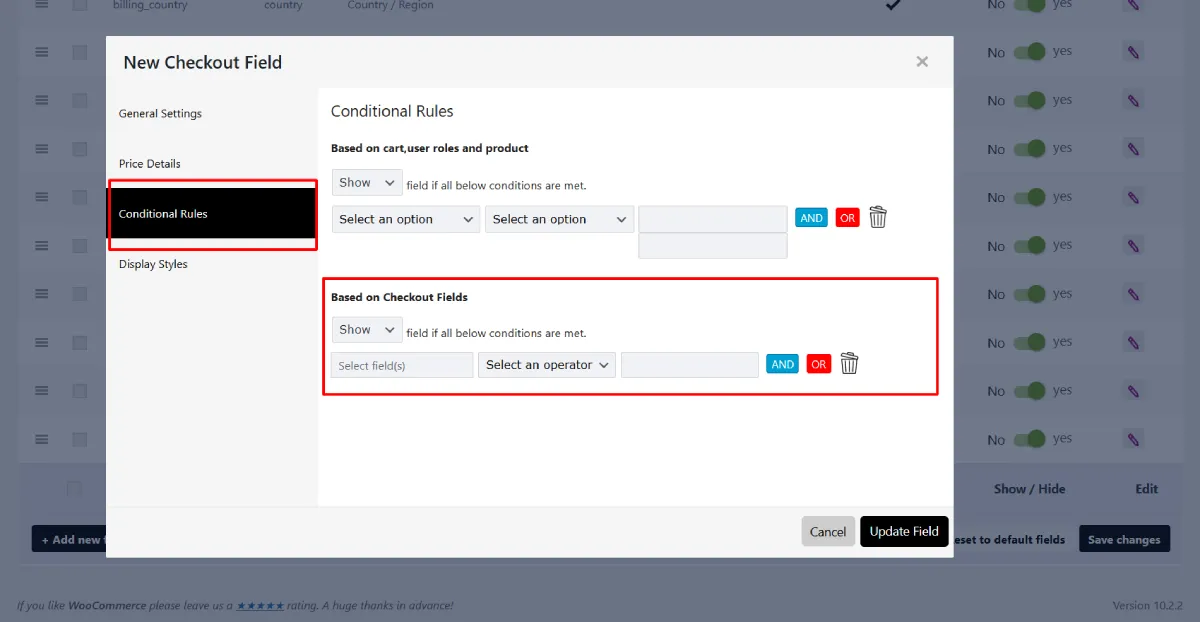
This feature lets you show or hide fields depending on who’s checking out, for example, display “Company Name” only for wholesale buyers or “Referral Source” for guest users.
5. Drag and Drop Field Order
The intuitive drag-and-drop builder makes it simple to rearrange the order of your custom checkout fields WooCommerce. You can organize everything in seconds without writing code.
6. Safe and Reliable Data Storage
All field data is saved correctly in WooCommerce orders. Admins can view this data from the order details page, ensuring no information is lost.
Benefits of Using a WooCommerce Checkout Manager

If you’re wondering whether you really need a WooCommerce checkout manager, the answer is almost always yes. Here’s why:
1. Better Customer Experience
Customers appreciate a checkout form that feels tailored to them. Adding additional fields on WooCommerce checkout allows you to ask for relevant details that help you deliver better service without overwhelming them.
2. Increased Conversion Rate
A messy or confusing checkout can drive customers away. By using a WooCommerce checkout editor, you can simplify the form, remove unnecessary steps, and reduce cart abandonment.
3. Collect More Useful Information
Need delivery instructions, custom notes, or marketing preferences? With the Checkout Field Editor for WooCommerce, you can collect this data directly at checkout no extra forms required.
4. Adaptability for Future Updates
WooCommerce keeps evolving, and the transition toward blocks is ongoing. A plugin that supports both systems ensures your WooCommerce checkout form fields won’t break during future updates.
5. Easier Store Management
Every bit of information your customers provide can be managed from one place. Whether you want to segment users or analyze checkout behavior, the plugin makes it easy.
Step-by-Step: How to Customize Your Checkout
Here’s how simple it is to get started with the checkout field editor for WooCommerce:
1. Install the Plugin
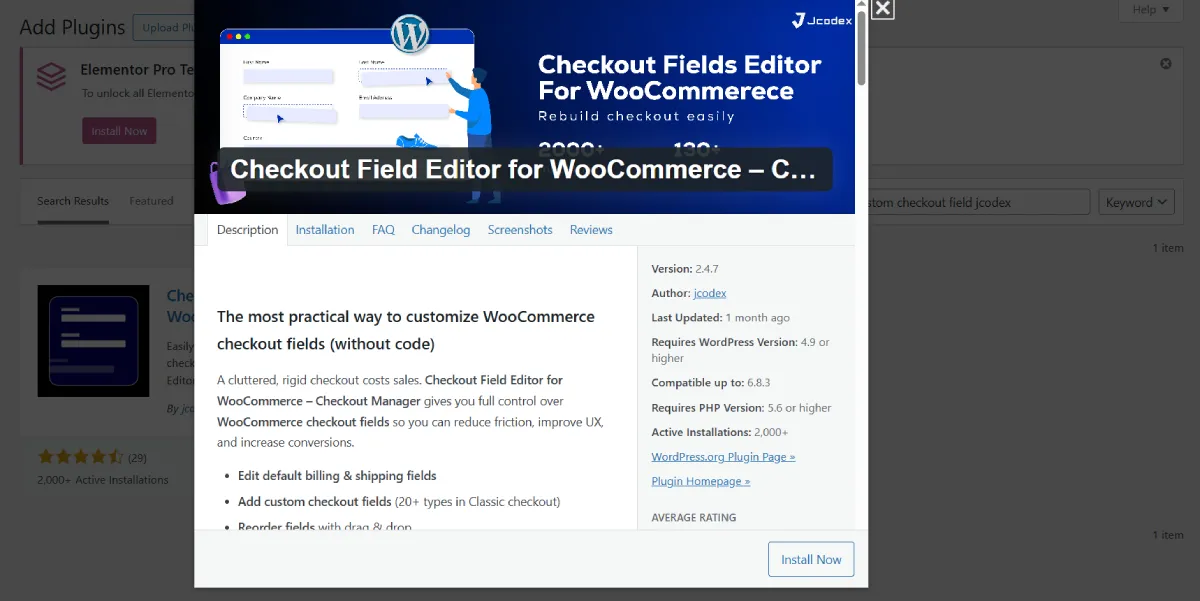
From your WordPress dashboard, go to Plugins → Add New.
Search for “Checkout Field Editor for WooCommerce”.
Click Install and then Activate.
2. Access the Editor
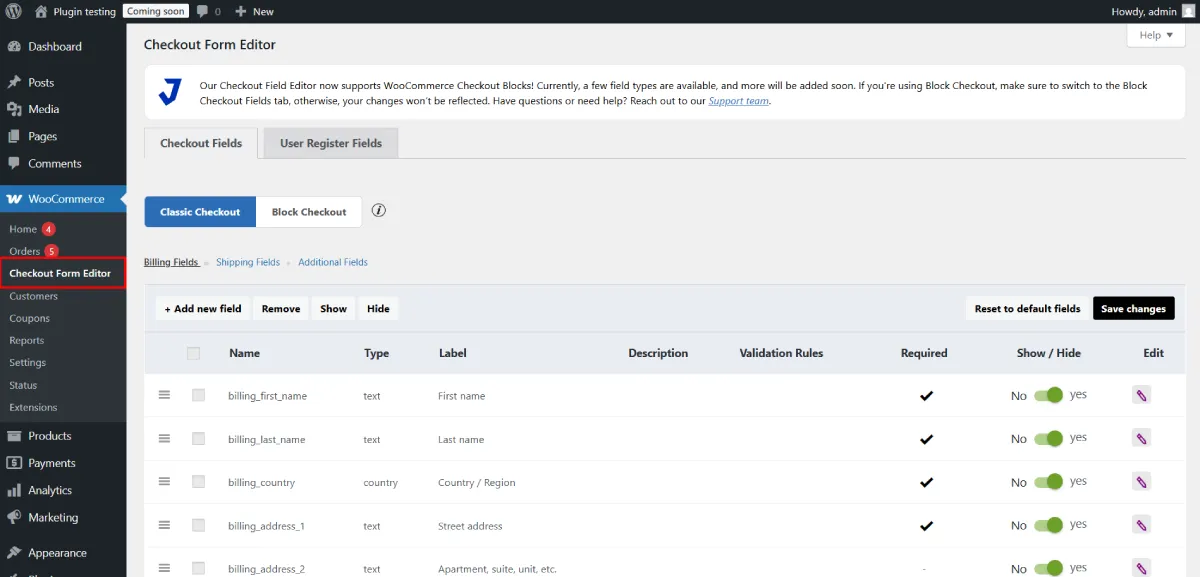
Go to WooCommerce → Checkout Fields.
You’ll see all your existing checkout fields listed here.
3. Add or Edit Fields
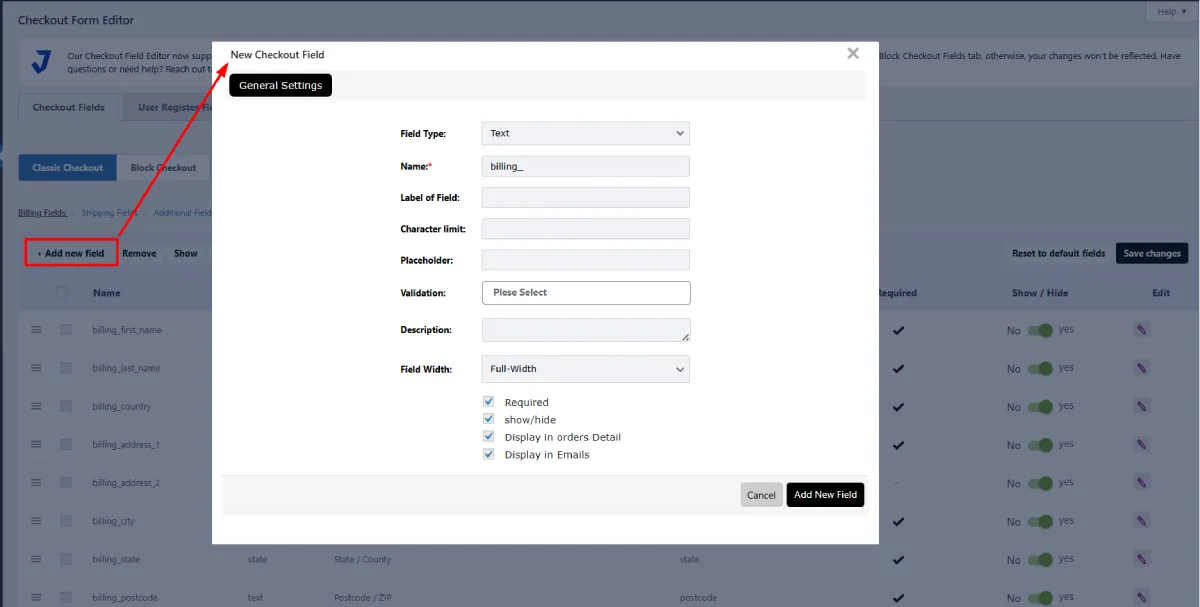
Click “Add Field” to create a new one or choose “Edit” next to an existing field.
Configure labels, field types, placeholders, and required options.
4. Reorder Fields
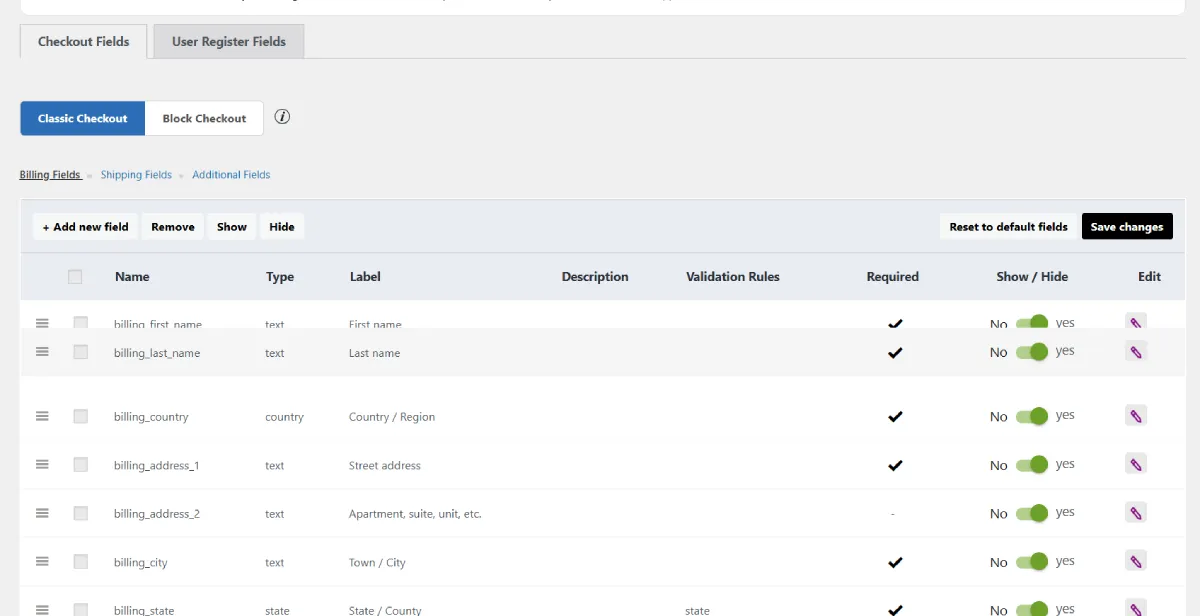
Use drag-and-drop to reorder them as needed.
5. Save and Preview
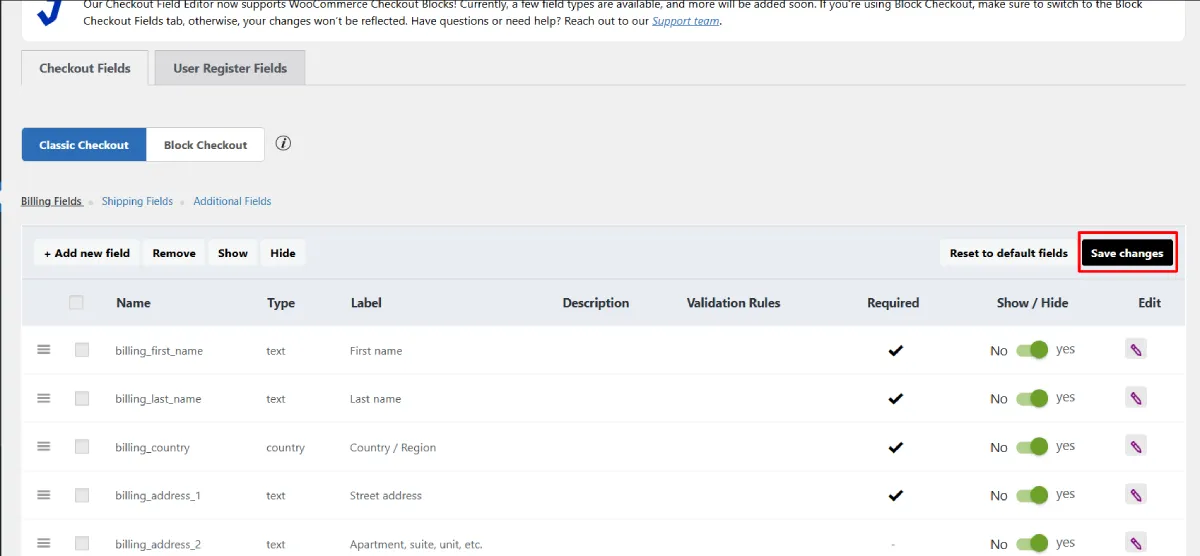
Save changes and test your checkout page both block and classic versions will reflect your updates automatically.
That’s it, no complex setup, just quick results.
Free vs Pro Version
The free version of the WooCommerce checkout field editor offers plenty for most stores: add, edit, remove, and reorder checkout fields easily.
However, the Pro version takes it several steps further, adding features like:
- Conditional logic for dynamic checkout experiences.
- User-role-based fields for personalized control.
- Advanced field types like date pickers, file uploads, and select menus.
- Custom validations to ensure accurate data entry.
- Premium support and regular updates.
Real-World Example
Let’s say you run a handmade gift shop. You want customers to add a “Gift Message” and choose “Gift Wrap” as an optional service.
With the WooCommerce checkout editor, you can create a text field for the message and a checkbox for gift wrapping both appear dynamically when needed. All the data shows up in your admin order details, making packaging and fulfillment much easier.
Simple customizations like these make your brand look professional and organized without spending hours editing PHP templates.
Final Thoughts
The Checkout Field Editor for WooCommerce is more than just another plugin; it’s a tool that gives you complete control over your checkout page.
Whether you’re using the Classic Checkout or have switched to the WooCommerce Checkout Block this plugin ensures smooth compatibility, easy customization, and reliable data handling.
It’s the ideal WooCommerce checkout customization plugin for store owners who want to improve user experience, reduce cart abandonment, and make their checkout process smarter.
Start enhancing your checkout today with the Checkout Field Editor for WooCommerce the plugin that makes checkout customization simple, powerful, and future-ready.


Leave a Reply