
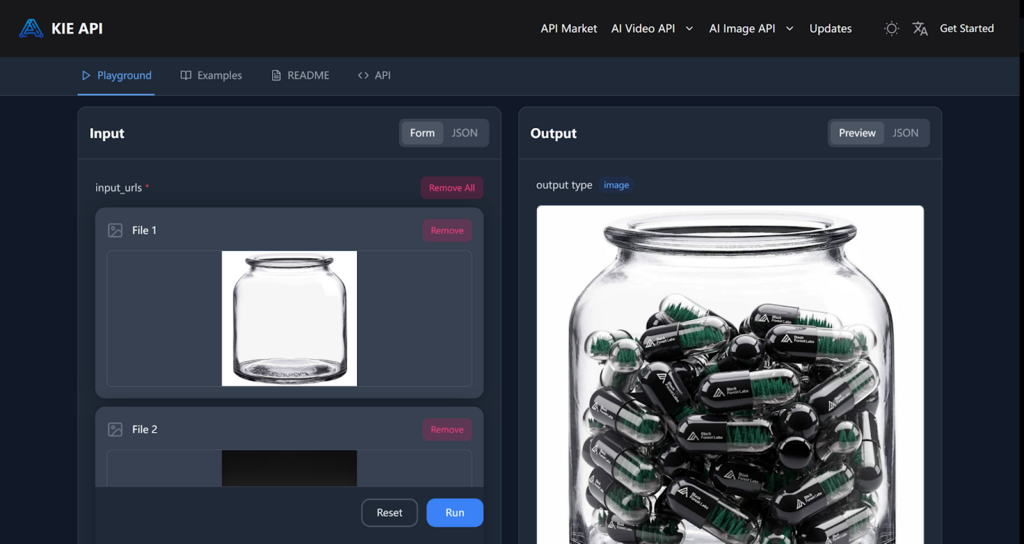
How Flux 2 API Change Content Creation for Developers and Creators on Kie.ai
As image production demands increase, developers and content creators are seeking ways to simplify and speed up their workflows. Flux 2 API on Kie.ai provides an efficient solution for automating the creation of high-quality images. Whether you’re looking to streamline your content production for marketing, social media, or educational purposes, Flux 2 AI API offers the tools necessary to generate detailed, professional-grade visuals quickly and efficiently.
This guide will explore the key features of Flux 2 API, its benefits for developers and content creators, and practical insights on how to integrate it into your project workflow. With a focus on flexibility and scalability, Flux 2 API helps automate content generation while maintaining the high standards of quality that your audience expects.
Key Features of Flux 2 API for Streamlined Content Creation
High-Resolution Image Editing with Flexibility in Input and Output Ratios
One of the standout capabilities of Flux 2 API is its ability to generate images with up to 4MP resolution, offering developers and content creators the ability to produce crisp, detailed visuals. The API also allows for flexible input and output ratios, giving users full control over the aspect ratio and resolution of their images. Whether you’re producing images for marketing campaigns or creating detailed product visuals, Flux 2 API ensures high-quality content tailored to your specific needs.
Realistic Lighting Simulations and Enhanced Image Details
Flux 2 API offers enhanced lighting simulations that adapt based on the environment, delivering more accurate and dynamic lighting effects. This ensures that the generated images look natural, with rich textures and lighting that mimic real-world conditions. When you’re creating static images, this feature is essential for achieving photorealistic results.
Advanced Text Rendering and Layout Customization
When it comes to creating UI models, infographics, or adding text elements to images, Flux 2 API excels at rendering complex text clearly and seamlessly. The API handles everything from intricate typography to dynamic layouts, ensuring that all text components are well-integrated into your image designs. This is particularly useful for image content creators who need precise and professional-looking text elements for advertising, branding, or educational content.
Improved Compliance with Structured Prompts
Flux 2 API is designed to handle more complex, multi-part prompts with ease. Whether you need to generate content with specific composition constraints or follow highly detailed instructions, the API can interpret and execute these prompts accurately. This makes it ideal for users working on customized image projects or content that requires fine-tuned specifications, ensuring the final output matches the desired criteria.
Why Choose Flux 2 API on Kie.ai?
Affordable Flux 2 Pricing for Scalable Content Creation
One of the main reasons to choose Flux 2 API is its affordable pricing structure. Whether you’re a small business or an enterprise, Flux 2 API offers pricing plans that scale according to your needs. The Flux 2 Pro API is priced at approximately $0.025 per 1K images and $0.035 per 2K images, while the Flux 2 Flex API is priced at $0.07 per 1K images and $0.12 per 2K images. This cost-effective pricing ensures that both small businesses and larger enterprises can access high-quality image generation without exceeding their budgets.
Comprehensive Flux 2 API Documentation and Technical Support
Kie.ai provides detailed Flux 2 API documentation that walks users through each step of the integration process. The documentation is clear and easy to follow, making it accessible for developers and content creators alike. Additionally, Kie.ai offers reliable technical support to help with any issues that may arise during the integration process, ensuring that users can smoothly incorporate Flux 2 API into their projects.
Free Trial for New Users
To help users evaluate Flux 2 API, Kie.ai offers a free trial. This allows new users to experiment with the API and test its capabilities before committing to a paid plan. The free trial is perfect for developers and creators who want to explore the tool’s full potential and see how it fits within their production workflows.
API Updates and Transparent Usage Monitoring
With Flux 2 API, users have access to regular API updates and a transparent usage monitoring system. This allows users to stay informed about new features, improvements, and any changes to the API. The ability to track API usage ensures that users can optimize their workflow and make the most out of their allocated resources without exceeding usage limits.
How to Integrate Flux 2 API into Your Workflow
Step 1: Register for a Kie.ai Account and Get Your API Key
To start using Flux 2 API, create an account on Kie.ai. After registering, navigate to the API section of your account to generate your Flux 2 API key. This key is essential for authenticating your requests and ensuring that all interactions with the API are secure.
Step 2: Review the Flux 2 API Documentation
Before beginning the integration process, take time to review the detailed Flux 2 API documentation. It provides a clear overview of the available features, including required parameters like input URLs, prompts, and resolution. Understanding these elements will help you structure your API requests accurately and ensure you get the desired output.
Step 3: Submit Your First Task Request
Once you’re familiar with the documentation, you can start by submitting your first task request. Choose the model you wish to use, define the input parameters such as reference images and prompts, and specify the desired aspect ratio and resolution. After submitting the request, Flux 2 API will begin processing and generate the content according to your specifications.
Step 4: Monitor Task Status and Retrieve Generated Content
After submitting the task, you can track its progress using the task ID provided. Kie.ai offers a simple way to monitor the status of your task, from the initial queue to the completed generation. Once the task is finished, you’ll receive a result URL where you can download the generated image for use in your project.
Use Cases: How Flux 2 API Can Benefit Developers and Creators
Automating Marketing Image Creation and Product Visuals
For developers working with e-commerce platforms or marketing applications, Flux 2 API automates the creation of high-quality marketing images and product visuals. By integrating the API into marketing systems, developers can streamline content creation for client websites or apps, eliminating the need for manual design work. Whether you’re showcasing new products or generating promotional content, Flux 2 API ensures consistent, professional-grade image production that enhances engagement and drives conversions.
Enhancing Educational Content with High-Resolution Visuals
Flux 2 API is an invaluable API for developers creating educational content or learning platforms. By leveraging the API, developers can generate interactive lessons, visual aids, and other educational resources with high-resolution imagery that makes complex concepts easier to understand. This functionality allows for large-scale content creation, enabling developers to offer more dynamic and engaging educational experiences for students or corporate training programs.
Creating Engaging Social Media Content
For developers working on social media management tools, Flux 2 API simplifies the production of dynamic and high-quality content. By incorporating the API into their platforms, developers can automate the creation of social media images—from posts to advertisements—that are customized for platforms like Instagram, TikTok, or Facebook. Whether it’s a promotional image or a branded post, Flux 2 API handles the heavy lifting, making it easier for businesses to maintain a consistent social media presence without manual intervention.
Improving Product Visualization for E-commerce Platforms
For e-commerce developers, Flux 2 API can be used to enhance product visualization on online stores. By integrating the API, developers can create realistic product images, 360-degree views, and other high-quality visuals. This functionality helps e-commerce businesses improve the online shopping experience by providing customers with detailed, accurate, and visually appealing images of products. From product shots to interactive displays, Flux 2 API ensures that visuals are high-quality, on-brand, and engaging, which can directly impact sales.
Integrating the Flux 2 API on Kie.ai simplifies the content creation process.
Flux 2 API provides a comprehensive solution for developers and content creators looking to optimize their workflows and generate high-quality content. Flux 2 API helps users automate the creation of images, and interactive content, while maintaining a high level of flexibility and precision. Whether for marketing images, e-commerce product visuals, or social media content, Flux 2 API offers the scalability and functionality needed to meet the demands of modern content production. The integration process is straightforward, with detailed Flux 2 API documentation and technical support to ensure a smooth experience from start to finish. By utilizing Flux 2 API, both small businesses and large enterprises can enhance their content creation processes, making them faster and more efficient without compromising quality.


Leave a Reply