

How to Choose the Best WordPress Web Hosting For Your Blog
It’s tempting to pick a WordPress host provider based only on simple price comparisons.
However, deciding purely on cost may limit your website performance and growth potential.
Instead, consider the big picture.
Let’s explore everything you need to consider when evaluating WordPress web hosting options for your blog, from customer support to security features like SSL certificates.
What Is WordPress Hosting?
WordPress hosting is a service that allows you to publish your website on the internet via the WordPress platform.
WordPress hosting providers optimize their servers and offer platform-specific resources that help WordPress websites run smoothly.
The right blog hosting solution simplifies technical tasks and enhances your blog’s functionality.
What Types of WordPress Hosting Exist?
To pick a blog hosting provider, you need to understand the different hosting options.
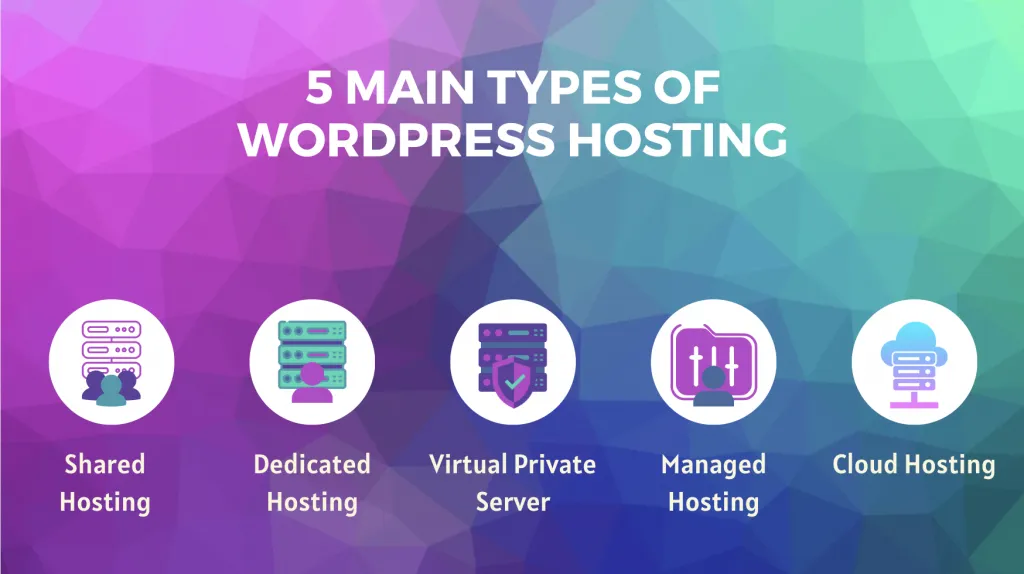
This helps you find blog hosting options that fit your needs and business model.
Here’s a quick overview of each:
Shared WordPress Hosting
With shared hosting, your website exists on a shared server with other websites.
This is the cheapest web hosting plan.
Smaller websites, beginner bloggers, and hobby sites often choose shared hosting plans.
Dedicated WordPress Hosting
Dedicated hosting is the most expensive option. But it also gives you the most control.
You get an entire physical server dedicated to your website alone.
If you’re a big business with lots of visitors, a dedicated server allows you to handle heavy traffic, advanced interlinking, and large media files that require proper SEO image optimization.
VPS WordPress Hosting
With Virtual Private Server (VPS) hosting, you have a dedicated part of a server.
It’s less pricey than an entire server but offers more control and resources than shared hosting.
It’s best for medium-sized businesses or rapidly growing blogs.
Managed WordPress Hosting
With managed blog hosting, the web hosting company manages the technical side of your WordPress site.
This is the best option if you’d rather have someone else take care of things like security (such as SSL certificates), updates, and performance tests.
It’s best for small to medium businesses (SMBs) or blog writers focusing on content to build a reputable online presence rather than tech. By letting the platform handle the technical side, they can focus entirely on producing good website content that engages their audience.
Cloud WordPress Hosting
Mukhost Cloud hosting uses a network of servers. If one server goes down, it switches to another.
If you need a highly reliable blog or experience unpredictable traffic spikes, this option handles outages well.
It’s also good for blogs that want to scale up and down. As your website needs to change, you can add and remove resources like processing power, disk space, and bandwidth.
How to Choose Your WordPress Hosting: 8 Factors to Consider
While affordable blog hosting plans are important, you need hosting services that fit your blog’s needs — not just your budget.
Here are eight factors to consider when weighing your decision.
1. Website Needs and Traffic Volume
Consider your current traffic levels and plans for future growth.
If you’re only planning to run a small blog with a low number of monthly visits, shared web hosting is likely enough.
You might need a more scalable solution if your blog is a high-traffic e-commerce store to boost sales from your sales list. In this case, cloud hosting would be a more suitable option.
2. Speed and Performance
Load time influences the user experience.
As Apostolos Grigoropoulos, Founder at DigitalboxWordPress Agency, explains …
“The significance of [lag time] in UX cannot be overstated. It’s a critical factor that can either elevate a user’s engagement or provoke their departure.”
In other words, you want a host that prioritizes faster load times and excellent performance so your readers can access your blog instantly.
Look for optimized servers, caching mechanisms, and reliable content delivery networks (CDNs). Many providers also integrate built-in speed optimization tools to help you further fine-tune your site’s performance.
3. Uptime and Reliability
Unplanned downtime can cause you to lose visitors which is why choosing reliable WordPress hosting with a proven uptime guarantee is essential for long-term blog growth.
If people head to your blog and can’t access your articles, even temporarily, they may not return.
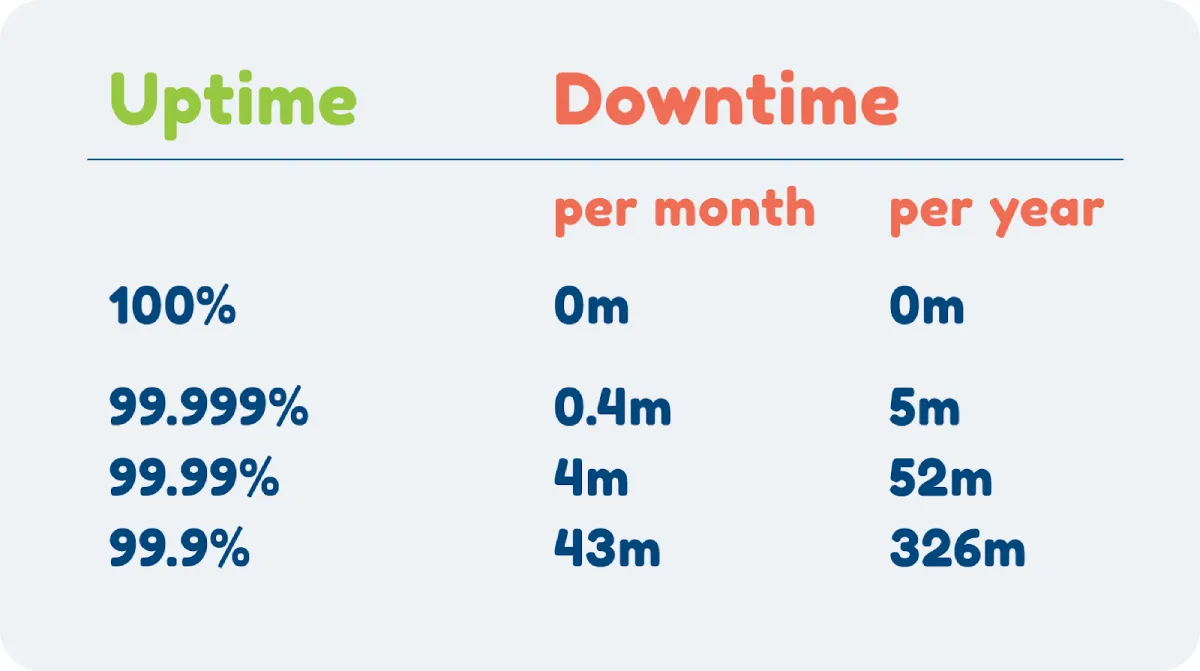
Search for hosts with a proven track record for their strong uptime guarantee.
Ideally, this should be at least 99.9% — an industry standard also known as the “three nines.”
4. Ease of Use
You want a blog hosting solution that’s easy to use — especially if you’re new to website management.
Managed web hosting is usually the easiest since you often get a simplified user interface. This is really helpful if you don’t have much technical knowledge.
Other features to look for include a user-friendly control panel, support documents and tutorials, and an extensive knowledge base.
5. Security Features
WordPress is a frequent target for bad actors as one of the most popular blogging sites.
As WP Engine puts it:
“If you want to take over a lot of websites for your own nefarious purposes, are you going to spend all of your time trying to find vulnerabilities on a platform used by only 500 websites, or are you going to try to break the platform with hundreds of millions of sites?”
This is why it’s imperative to pick a blog host provider that offers top-notch security features.
Look for features like automatic malware scanning, firewalls, DDoS protection, and two-factor authentication.
If you’re dealing with particularly sensitive information, opt for managed web hosting providers with advanced features like cloud workload protection platforms (CWPP). This constantly monitors activity, blocks suspicious attempts to access your data, and keeps your sensitive information extra safe
6. Customer Service and Support
You’ll need quick, efficient customer support if you need help with your blog.
Evaluate potential providers’ customer support channels. See if they offer phone support, live chat, and email, and research average response times.

Look through reviews to see if they have a reputation for excellent customer support.
7. Scalability
Your blog hosting needs to evolve as your blog grows.
If you plan to expand, look for a provider with straightforward scalability options. You should be able to upgrade seamlessly without downtime or technical hurdles.
8. Backups and Disaster Recovery
Daily backups help you recover your site in case of hacking or unexpected data loss.
Look for hosts that supply automatic backups and a clear disaster recovery plan.
Another powerful tool to enhance your backup strategy is a reliable cloud storage service, such as AWS S3. Integrating AWS S3 backups with your WordPress site allows automatic backups to a secure, scalable storage solution.
Wrap Up
To pick the best WordPress web hosting provider, you need to understand how your blog functions — and how you see it growing in the future.
Absolutely, think about your budget. You need a dedicated hosting plan that fits your price range.
But make sure the web hosting service you choose is easy enough to use, provides sufficient customer support, and matches your performance needs, too.
And remember, it’s not just your host provider that makes a difference when it comes to user experience. So does your blog design.
Want expert guidance to get both your web hosting and design right? Get in touch with Porto today and discover how we can help you build a blog that’s fast, secure, and designed to grow.


Leave a Reply