
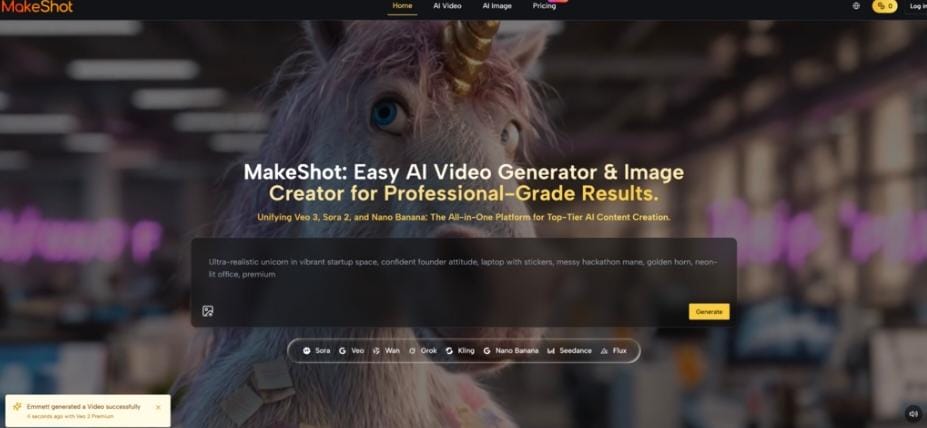
How to Harness Sora 2, Google Veo 3, and Nano Banana in One Place
You know the feeling. It sits in the pit of your stomach every time you open your browser to start a new project. You have a brilliant concept for a video ad or a short film. The vision in your head is crystal clear—the lighting, the camera movement, the texture of the skin.
But then reality hits.
To execute this vision, you need a subscription to a video generator. Then you need another tool for upscaling. You need a separate account for high-end image generation to create your storyboards. And don’t forget the audio—that is yet another platform. Suddenly, your creative flow is interrupted by login screens, credit limits, and the mental gymnastics of jumping between five different interfaces.
Your wallet bleeds from multiple subscriptions, but worse, your creativity bleeds out from the friction. You spend more time managing tools than creating art. The joy of creation turns into a chore of logistics. You start to compromise. You accept “good enough” because “perfect” is too hard to coordinate across so many disconnected platforms.
This is where the story changes. Imagine a command center where the world’s most powerful creative engines—Sora 2, Google Veo 3, and Nano Banana—live under one roof. This is not a fantasy; this is MakeShot AI.
My Personal “Aha!” Moment with Unified AI
I remember the specific Tuesday afternoon when I hit my breaking point. I was trying to produce a spec commercial for a luxury watch brand. I had generated a decent video clip on one platform, but the resolution was muddy. I moved to another tool to upscale it, but it introduced weird artifacts. Then, I spent two hours hunting for stock audio that matched the “ticking clock” vibe I needed. By the time I pieced it all together, the soul of the video was gone. It felt disjointed.
Then I logged into MakeShot AI.
It felt less like opening a tool and more like walking into a fully staffed Hollywood studio where every department head was waiting for my orders. I typed a prompt into the Veo 3 model. Not only did I get a stunning, high-definition video of the watch face catching the light, but it also came with native, synchronized audio. The ticking was crisp; the ambient room tone was perfect.
I then needed a promotional poster to go with it. I didn’t switch tabs. I simply toggled to the Image Creator, selected Nano Banana, and generated a hyper-realistic lifestyle shot of the watch on a wrist.
In 20 minutes, I had done what usually took me two days. That is the power of unification.
The Narrative Engine: Why Integration Matters
Think of your current workflow like trying to cook a gourmet meal in five different kitchens. You chop vegetables in one house, run down the street to sear the steak in another, and drive across town to plate it. By the time you serve the food, it is cold.
MakeShot AI is a professional chef’s kitchen. Everything is within arm’s reach. The stove, the prep station, and the plating area are arranged for maximum flow. This integration does more than save time; it preserves the “heat” of your creativity.
Before and After: The Creative Bridge
Let us look at a specific scenario to see how this changes the game for you.
The Old Way (The Struggle):
You want to create a cinematic travel vlog intro. You generate a clip of a mountain range using an older model. The physics look slightly off—the clouds move too fast. You accept it. You then spend hours looking for a “wind howling” sound effect. It sounds generic. You try to generate a thumbnail, but the style does not match the video. The result is a piece of content that feels assembled, not crafted.
The MakeShot Way (The Solution):
You access Sora 2 or Google Veo 3 through MakeShot. You prompt: “Drone shot of the Alps, storm approaching, cinematic lighting.” The video generates with perfect physics; the clouds have weight and mass. Because you used Veo 3, the sound of the wind whipping past the lens is generated simultaneously, perfectly synced to the camera’s velocity. You then take a frame from that video and use Nano Banana to expand it into a high-resolution thumbnail. The result is a cohesive, broadcast-quality masterpiece.
Meet the Titans: Sora 2, Veo 3, and Nano Banana
MakeShot AI is not just a wrapper; it is a gateway to the heavy hitters of the industry. Let us break down why having access to these specific models changes everything for you.
Sora 2: The Director of Physics
If AI models were film crew members, Sora 2 would be the Director who is obsessed with realism. It understands how the world moves. It knows that when a woman walks in a long dress, the fabric should ripple and fold in a specific way. It knows that reflections in a puddle should distort when the water is disturbed.
When you use Sora 2, you are not just asking for a video; you are asking for a simulation of reality. It is perfect for narrative storytelling where emotional connection relies on believability.
Google Veo 3: The Cinematographer and Sound Engineer
Veo 3 is the technical wizard. Its standout feature is the integration of visual fidelity with native audio generation. In the past, AI video was a silent film era. Veo 3 brings the talkies.
Imagine generating a video of a cyberpunk city. With Veo 3, you do not just see the neon lights flickering; you hear the hum of the electricity and the distant sirens. This multisensory output increases viewer retention significantly because it engages two senses instantly.
Nano Banana: The Art Director
While video captures attention, images capture the imagination. Nano Banana is the powerhouse for static imagery. It excels at “Hyper-Realism.” This is not the plastic, smooth look of early AI. Nano Banana generates skin textures with pores, wood with grain, and metal with microscopic scratches.
For e-commerce and product visualization, this is non-negotiable. You need your product to look real, not like a 3D render. Nano Banana delivers that tactile quality that makes a viewer want to reach out and touch the screen.
Visualizing the Advantage
To truly understand why consolidating these tools is superior to piecing them together, let us look at the numbers and features side-by-side.
| Feature | MakeShot AI Experience | Traditional Workflow (Multiple Subs) |
| Access to Models | All-in-One: Sora 2, Veo 3, Nano Banana, Flux, Kling | Limited to one provider (e.g., only OpenAI or only Google) |
| Cost Efficiency | Free to start: Explore professional tools without barriers | High (Paying for multiple separate accounts) |
| Workflow Friction | Zero: Seamless switching between Video and Image modes | High (Login fatigue, file transfers, format issues) |
| Audio Capabilities | Native: Veo 3 generates audio directly with video | Usually requires a 3rd party external tool |
| Learning Curve | Unified: One intuitive interface for all models | Steep (Learning 5 different interfaces) |
| Commercial Rights | Streamlined: Clear commercial usage terms | Varies by platform, confusing legalities |
Who Is This For?
You might be wondering if this level of power is overkill for you. It is not. The democratization of these tools means they are ready for anyone serious about content.
For the Social Media Maverick
You need volume, but you cannot sacrifice quality. The algorithm punishes low-effort content. With MakeShot, you can use the “Fishbowl Worker” prompt style to create trend-setting, surreal visuals that stop the scroll. You can generate a week’s worth of TikTok content in an hour using Veo 3 for video and Nano Banana for your cover images.
For the Filmmaker and Storyteller
You are building a world. You need consistency. Use Sora 2 for your establishing shots—the “Prehistoric Giant Returns” style where the camera scales a dinosaur. The consistency in lighting and physics allows you to cut these AI shots next to live-action footage without jarring the audience.
For the Marketing Professional
Speed is your currency. When a trend hits, you have hours, not days, to react. MakeShot allows you to prototype ad creatives instantly. Need a product shot of a sneaker in a volcano? Nano Banana has it done in seconds. Need a 10-second teaser video for that sneaker? Veo 3 handles it. You become an agile powerhouse.
The Technical Edge: Why “Nano Banana” and “Veo 3” Are Not Just Buzzwords
It is easy to get lost in the hype, but the technical specifications of these models on MakeShot are what deliver the ROI.
Veo 3’s understanding of temporal consistency means that objects do not morph or disappear when they move behind other objects. This “object permanence” is crucial for professional work. If you are showing a car driving behind a tree, it needs to emerge as the same car. Veo 3 nails this.
Nano Banana’s advantage lies in prompt adherence. Many image models hallucinate or ignore complex instructions. Nano Banana is built to listen. If you ask for “a tiny male explorer dangling from a giant’s hand,” it respects the scale, the lighting, and the composition exactly as requested. This precision saves you from the “regenerate lottery” where you hope for a lucky hit.
Your Creative Future Starts Here
We are standing at the precipice of a new era in digital creation. The barrier to entry is no longer technical skill; it is imagination. But imagination needs the right vehicle.
You can continue to struggle with a fragmented toolkit, paying more for less, and losing your best ideas to the friction of the process. Or, you can step into the streamlined future.
MakeShot AI is not just a tool; it is your studio, your crew, and your canvas wrapped into one. It is the place where Sora 2’s physics meet Veo 3’s audio and Nano Banana’s realism. And the best part? It is Free to start.


Leave a Reply