
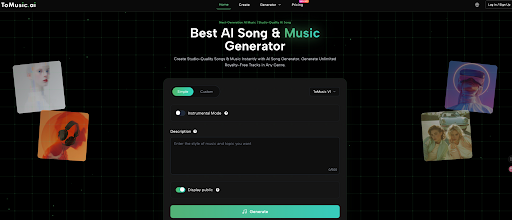
How to Use Lyrics to Song AI: A Complete Guide to ToMusic
Do you have a notebook full of poetry or a melody stuck in your head, but lack the instruments to bring it to life? It is frustrating to feel the music inside you but remain silent because you aren’t a professional producer. You are a creator without a studio.
ToMusic is the solution that bridges this gap. By using advanced Lyrics to Song technology, this platform transforms your written words into fully produced tracks with vocals in seconds. Stop letting your lack of music theory hold you back—let’s unlock your potential with Lyrics to Song.
Overview of the ToMusic Platform
Before diving into the tutorial, it is essential to understand the powerful capabilities of ToMusic.ai. It is not just a sound generator; it is a comprehensive AI composer designed to function as a “Zero-Threshold Music Producer.”
Here are the core functions that make ToMusic a market leader in Lyrics to Song AI:
Lyrics to Song
This is the platform’s flagship capability. Unlike basic melody generators, ToMusic analyzes your pasted text—whether it’s poetry, structured lyrics, or random thoughts—and composes a full song. It aligns the rhythm of your words with melody and generates a complete track with lead vocals.
Text to Music
If you don’t need vocals, ToMusic offers powerful text to music capabilities. You simply describe a scene or emotion (e.g., “A cyber-punk electronic beat for a racing game” or “Sad piano for a rainy day”), and the AI generates the perfect background instrumental.
AI Vocal Synthesis
Most AI tools only create instrumentals. ToMusic stands out by including AI Vocal Synthesis. It simulates human breath, tone, and emotion, meaning your Lyrics to Song creation will feature a realistic singer, not a robotic drone.
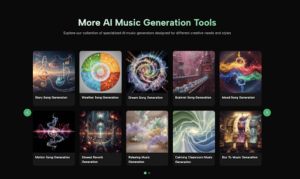
Multi-Genre Style Generation
The platform supports a vast array of musical styles. From Pop, Rock, and Electronic to Classical and Hip-hop, the Lyrics to Music engine adapts your text to fit the specific genre rules and instrumentation you select.
Preparation and Prerequisites for Lyrics to Music
Getting started with Lyrics to Song AI is surprisingly simple. The barrier to entry is low, but a little preparation ensures the highest quality output.
What You Need
- A ToMusic Account: Simply sign up to save your projects.
- Your Text: Have your lyrics, poem, or script ready.
- A Creative Concept: A basic idea of emotion (e.g., “Sad,” “Energetic”).
What You Don’t Need
- Expensive microphones or recording gear.
- Knowledge of chord progressions or melody composition.
- Hired vocalists.
Step-by-Step: Transforming Lyrics to Song
Ready to create? Follow this guide to turn your text into a track using the Lyrics to Song features on ToMusic.
Step 1: Inputting Text for Lyrics to Song AI
Navigate to the creation dashboard. This is where the Lyrics to Music process begins. You will see a text box designed to accept your creative input.
- The Action: Copy and paste your lyrics into the box.
- The Detail: The Lyrics to Song AI is sensitive to structure. If you are writing a song, ensure your formatting reflects verses and choruses.
- Alternative: If you don’t have lyrics, you can use the “Text to Music” feature by describing a vibe.
Pro Tip: Break your text into short lines. This helps the AI understand the phrasing and rhythm, ensuring the generated vocals flow naturally rather than sounding rushed.
Step 2: Selecting Styles for Your Lyrics to Music
This is the most critical creative decision you will make. You are the director, and ToMusic is the orchestra. The lyrics to the song engine need to know the “genre” of your story.
- Genre Selection: Choose from a vast library including Pop, Rock, Electronic, Classical, and Hip-hop.
- Mood Definition: Select the emotional tone. A set of lyrics can be a tear-jerker or a club anthem depending on this setting.
The “Before and After” Transformation:
- Before: You have “dry” text that conveys information but lacks feeling.
- After: By selecting “Acoustic Folk,” your text is wrapped in warm guitar strums and a soft voice, instantly turning a simple poem into a heartfelt ballad.
Step 3: Generating and Refining the Lyrics to Song Output
Once your settings are dialed in, click “Generate.” The Lyrics to Song AI now performs millions of calculations. It analyzes the sentiment of your words, composes a unique melody, arranges the backing track, and synthesizes the vocals.
- The Result: Within seconds, you will see your track appear. Press play.
- The Experience: Hearing your words sung back to you by a realistic AI voice is a magical moment. It validates your songwriting instantly.

Advanced Tips for Lyrics to Song Optimization
To truly master Lyrics to Music creation, you need to go beyond the basics. Here are expert tips to get professional results from ToMusic.
Using Structure Tags
The Lyrics to Song AI is smart, but it loves guidance. Use square brackets to define song sections:
- [Verse 1]
- [Chorus]
- [Bridge]
- [Outro]
By doing this, you tell the AI to change the energy level. It might make the [Chorus] louder and more catchy, while keeping the [Verse] more subdued.
Iterative Generation
Don’t settle for the first draft. The speed of lyrics to music generation means you can afford to experiment.
- Change the Genre: Try your sad lyrics with an upbeat tempo for an ironic effect.
- Tweak the Lyrics: If a line sounds clunky when sung, rewrite it to match the rhythm better and regenerate.
Traditional Production vs. Lyrics to Song AI
Why are creators switching to AI tools? The difference is stark when you visualize the resources required.
| Feature | Traditional Music Production | ToMusic Lyrics to Song AI |
| Time to Market | Weeks (Composition + Recording) | Seconds (Instant Generation) |
| Cost | $$$ (Studio, Musicians, Mixing) | $ (Affordable Subscription) |
| Vocal Capability | Requires a trained singer | AI Vocal Synthesis (Included) |
| Skill Barrier | High (Music Theory required) | None (Text input only) |
| Accessibility | Limited to those with connections | Available to Global Users |
Common Questions About Lyrics to Music (FAQ)
Are the lyrics to Song AI really creating unique music?
Yes. ToMusic uses Generative AI. It does not just paste pre-recorded loops together; it composes the melody and harmony from scratch based on your specific inputs.
Can I use the lyrics to music output for YouTube?
Absolutely. One of the main goals of ToMusic is to provide copyright-safe material for content creators, solving the issue of copyright strikes.
Do the Lyrics to Song AI handle different languages?
While optimized for English, the AI is capable of processing various languages, making it a powerful tool for global creators in Asia, Europe, and the Americas.
Conclusion
Lyrics to Song technology has fundamentally changed how we create art. You no longer need to be a musician to create music; you simply need to be a storyteller. ToMusic empowers you to turn the text in your notes app into professional-sounding tracks instantly.
Don’t let your lyrics gather dust. Unleash your creativity and hear your words come to life today.
Ready to start? Visit ToMusic.ai now and create your first hit song in seconds.


Leave a Reply