
How WPoptic is Revolutionizing the Way We Understand WordPress Websites
Have you ever landed on a website and thought, how did they build this?
Maybe it’s a competitor’s online store that loads lightning fast, or a blog with a layout that just feels right. You can guess which theme or plugins they might be using, but without the right tools, it’s impossible to know for sure.
That’s exactly what WPoptic helps you uncover.
WPoptic is built to analyze any WordPress site, not just your own. It reveals the structure behind the pages you visit, showing which theme, plugins, and technologies power that site.
It’s like looking under the hood of your competitors’ websites. You see what tools they rely on, how their stack is built, and what choices help them perform better.
Whether you’re researching new tools, comparing client sites, or learning from others in your niche, WPoptic turns curiosity into actionable insight.
What is WPoptic
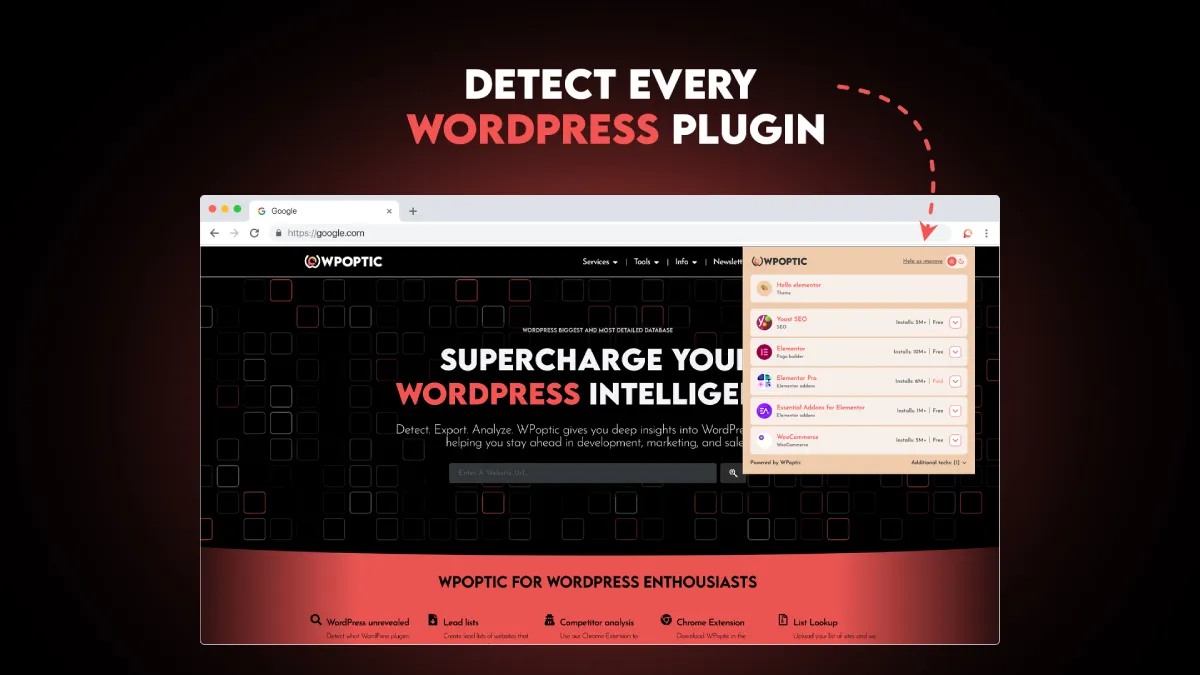
WPoptic | WordPress plugin detector and theme detector, is a free browser extension that lets you uncover how any WordPress site is built, right as you browse.
Instead of running scans or digging through source code, you can simply visit a website, click the WPoptic icon in your browser, and instantly see a full breakdown of its setup.
In a single click, WPoptic reveals in milliseconds:
- The theme the site is using
- All detected plugins and tools
It’s designed for WordPress professionals, developers, and curious site owners who want to understand what powers the sites they admire or compete with.
Whether you’re exploring a competitor’s eCommerce store or checking how a favorite blog was built, WPoptic gives you instant technical insight without leaving your browser.
The WPoptic Platform
WPoptic.com is the main platform where all the collected website data comes together. Every time a site is analyzed through the WPoptic browser extension, its information is added to the platform’s growing database.
From there, users can explore deep insights about how WordPress sites are built across the web.
The platform provides:
- Plugin insights, see which plugins are most used, trending, or commonly paired together
- Category insights, explore what plugin is popular in a specific WordPress category.
- Custom website lists, create and export lists of sites that match specific WordPress setups or technologies
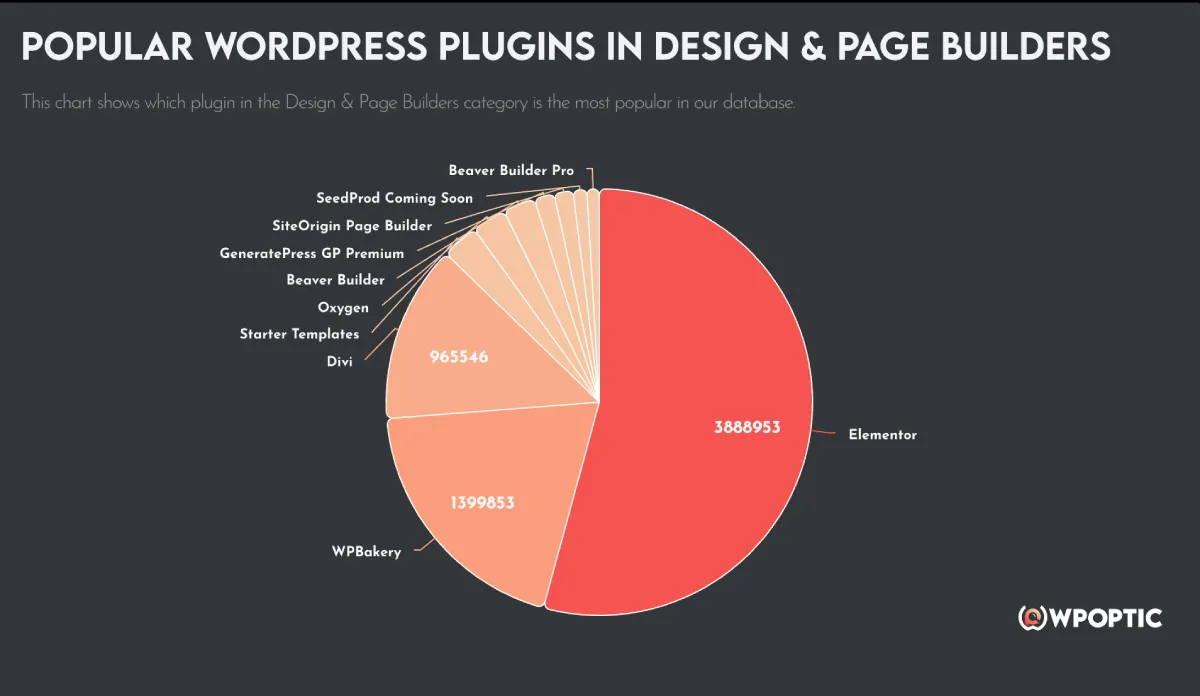
You can filter sites by theme, plugin, country and more, then export a tailored list for research, or inspiration.
Whether you’re a developer looking to study plugin usage, a marketer analyzing competitors, or an agency building client reports, WPoptic.com turns raw WordPress data into clear, organized insights you can actually use.
How to Use WPoptic
Getting started with WPoptic is simple. You can start analyzing WordPress sites in just a few minutes, no signup or technical setup required.
Here’s how it works:
Step 1: Install the Browser Extension
Go to the Chrome Web Store or Edge browser extension store and install the WPoptic extension. Once it’s added, you’ll see the WPoptic icon appear in your toolbar.
Step 2: Visit Any WordPress Site
Open any website built with WordPress. WPoptic automatically detects if it’s a WordPress site in the background.
Step 3: Click the WPoptic Icon
When you click the icon, a panel appears showing all the WordPress plugins found on the site, the theme, and other technical information.
Step 4: 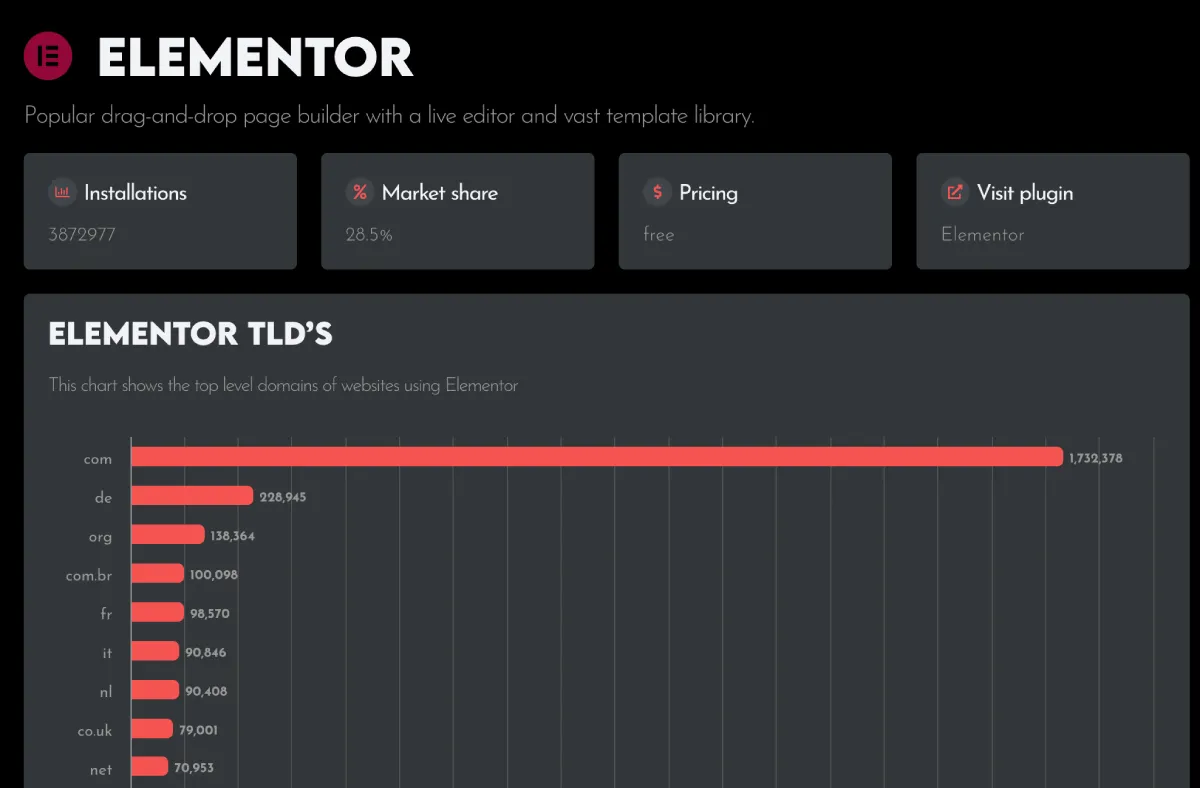
If you want to go deeper, you can view full details on WPoptic.com. There, you’ll find advanced reports, plugin usage stats, and tools to compare or export site lists.
Step 5: Create Custom Lists and Reports
Use the platform filters to find websites by theme, plugin, or category. Then export those results to create your own list.
WPoptic is designed to fit both quick research and in-depth analysis. Whether you’re checking what powers a competitor’s store or building a list of sites using a specific plugin, the process is fast, accurate, and effortless.
Why WPoptic Is Useful for WordPress Professionals
WPoptic isn’t just a curiosity tool. It’s built for people who work with WordPress every day and need real data to make smarter decisions.
Whether you design, develop, or market WordPress sites, WPoptic helps you understand what works in the real world, not just what’s written in documentation or plugin listings.
Here’s how different professionals benefit from it:
For Developers
Developers use WPoptic to study how other sites are built. You can see which plugins and builders are most stable, which themes are used on high-performing sites, and how others solve similar technical challenges. It’s a fast way to learn from real production setups without digging through code manually.
For Agencies
Agencies can use WPoptic to research client industries and identify popular tools in that niche. Before starting a new project, they can check what competitors use and plan better tech stacks. It also helps them discover trends for example, which page builders dominate eCommerce or portfolio sites.
For Plugin and Theme Creators
Creators use WPoptic.com to track where their products appear across analyzed sites. This gives a real sense of adoption, visibility, and user patterns. Seeing how often and where a plugin is used helps guide updates, marketing, and pricing decisions.
For Marketers and SEO Professionals
WPoptic provides context for their marketing campaign. Marketers can export lists of sites using certain plugins or themes and tailor their campaigns based on real setups, not assumptions.
WPoptic turns what used to be guesswork into actionable insight. Instead of guessing what others use, professionals can see verified data and apply it directly to their next project, audit, or campaign.
Future Plans for WPoptic
WPoptic is just getting started. The goal is to build the most complete and accurate database of WordPress technology in the world, and that means big updates are on the way.
Here’s what’s coming next for the platform:
Discovering All WordPress Plugins
The team is expanding WPoptic’s detection engine to recognize every plugin, both free and paid. That includes plugins from the WordPress.org directory, premium marketplaces, and even custom-built extensions. The goal is to make plugin insights fully transparent across the web.
Improved Detection Accuracy
WPoptic will continue refining how it identifies WordPress plugins. Better scanning logic will detect more tools, builders, and integrations with higher precision. This ensures that the data you see is always reliable and up to date.
More Platform Functions
New tools are being developed for the WPoptic.com platform, including:
- API access for developers who want to integrate WPoptic data into their own projects
- Historical tracking, so users can see what plugins are popular or are on their way back.
- Deeper filtering and reporting, giving users even more control over the data they export
The mission is clear: make WPoptic the go-to research tool for anyone who wants to understand how the WordPress ecosystem truly works.
Next Steps
If you work with WordPress, WPoptic gives you a simple way to see what others are building and learn directly from it. Instead of guessing which plugins or themes a site uses, you can find out instantly, and use that knowledge to improve your own projects.
Start by installing the WPoptic browser extension to explore how sites are built right from your browser. Then visit WPoptic.com to access deeper insights, filter data, and export custom lists based on real WordPress setups.
It’s fast, accurate, and built for people who want to understand WordPress better, one site at a time.


Leave a Reply