
Mastering Cinematography: How to Replicate Professional Camera Movements with Seedance 2.0
In the world of traditional filmmaking, the camera is far more than a recording device; it is a narrator. A slow, lingering pan can build suspense, a rapid whip-pan can ignite energy, and a complex dolly zoom—famously known as the “Vertigo effect”—can visually represent a character’s internal psychological shift. Historically, achieving these cinematic movements required expensive hardware: cranes, dollies, stabilized gimbals, and highly skilled camera operators.
As AI video generation has emerged, the struggle has always been “directing” the virtual camera. Most models offer a chaotic, unpredictable movement that lacks the intentionality of a human director. Seedance 2.0 changes this narrative entirely. By introducing precise video-to-video reference capabilities, it allows creators to “borrow” the cinematography of the greats and apply it to their own unique visions.
The Language of the Lens: Why Camera Movement Matters
Before diving into how to use Seedance 2.0, one must understand why camera movement is the backbone of professional production. Static shots are functional, but dynamic shots create emotion. When a camera moves, the parallax effect—the way objects at different distances move at different speeds—provides the viewer with a sense of depth and immersion.
For AI creators, the challenge has been two-fold:
- Intentionality: Telling the AI to “move the camera” often results in a simple zoom or a jittery slide.
- Stability: High-speed movements often cause the AI to “hallucinate” or break the consistency of the environment.
Seedance 2.0’s multi-modal engine addresses these issues by using real-world video data as a structural guide, ensuring that the movement isn’t just “random motion,” but true, professional-grade cinematography.
The Secret Weapon: Reference-Based Motion Synthesis
The core innovation of Seedance 2.0 is its ability to decouple content from motion. In traditional AI tools, the prompt is responsible for everything: the subject, the lighting, and the movement. In Seedance 2.0, you can assign these tasks to different “modalities.”
You might provide an image of a futuristic cyberpunk city (the content) and then upload a 10-second clip of a drone flying through a narrow canyon (the motion). Seedance 2.0 analyzes the canyon video, extracts the 3D trajectory of the camera, and applies that exact flight path to your cyberpunk city.
This “Motion Reference” feature allows you to replicate:
- The Tracking Shot: Follow a character through a crowded room with the precision of a Steadicam.
- The Crane Shot: Elevate the perspective to reveal a massive landscape, mimicking the sweeping feel of a Hollywood epic.
- The Handheld Aesthetic: Replicate the raw, gritty “shaky cam” style found in action movies like the Bourne series to add a sense of realism and urgency.
Step-by-Step: Replicating a Professional “Dolly Zoom”
The Dolly Zoom is one of the most difficult shots to execute perfectly in real life. It requires the camera to move toward or away from a subject while simultaneously adjusting the lens’s focal length (zoom) in the opposite direction. The result is a background that seems to shrink or grow while the subject stays the same size.
Here is how you can master this using Seedance 2.0:
- Source Your Reference: Find a public domain or personal clip of a perfect Dolly Zoom. It doesn’t matter what is in the video; we only need the physics of the movement.
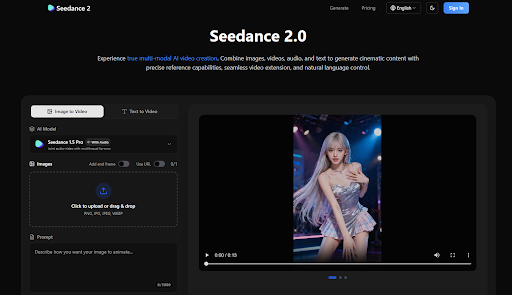
- Upload the Motion Guide: In the Seedance 2.0 interface, upload this clip to the “Video Reference” slot.
- Define Your Subject: Upload an image of the character or object you want to be the focus of your scene.
- The Natural Language Command: In the prompt box, use the tagging system to guide the AI: “Replicate the camera movement from @video1 using the character from @image1. Maintain high cinematic lighting and 4k textures.”
- Generate and Refine: The AI will then calculate the spatial relationship between the camera and the subject, delivering a perfect Dolly Zoom that would have otherwise required a $50,000 rig and a professional crew.
Maintaining Environmental Consistency During Complex Moves
A common problem with AI video is that as the camera moves, the background “morphs.” A building that was on the left might disappear or change shape as it moves out of frame. Seedance 2.0 solves this through its Superior Consistency engine.
When the model references a camera move, it doesn’t just look at the motion; it maps the environment. By utilizing “Seedance 1.5 Pro” or the latest “Seedance 2.0” models, the AI maintains a “memory” of the 3D space. This ensures that if the camera pans 180 degrees and then pans back, the original starting point looks exactly the same. This level of spatial awareness is what separates a “generative clip” from a “cinematic scene.”
The Multi-Modal Workflow for Directors
For directors using Seedance 2.0, the workflow is remarkably similar to a traditional film set:
- Location Scouting (Images): You upload several images of the “set” you’ve designed.
- Choreography (Video Reference): You upload a clip of a person performing a specific movement—perhaps a complex martial arts sequence or a subtle emotional gesture.
- The Score (Audio Reference): You upload the soundtrack. Seedance 2.0’s audio-sync capabilities ensure that the “hits” in the music align with the peaks of the camera movement.
By combining these elements, you aren’t just “prompting”—you are composing. You are managing different departments (Cinematography, Art Direction, Sound) all within a single AI interface.
Bridging the Gap: From Professional Clips to Full Narratives
One of the most powerful features for mastering cinematography is Video Extension. Often, a perfect camera move is cut short by the 5-second or 10-second limit of AI generation. Seedance 2.0 allows you to take a generated cinematic shot and extend it seamlessly.
Imagine a shot that begins with a close-up of a character’s eye (macro cinematography) and then zooms out to reveal they are standing on a distant planet (extreme wide shot). With Seedance 2.0, you can generate the first segment, upload it as a reference, and then “Direct” the extension to continue the backward pull of the camera. The transitions are virtually invisible, allowing for long, uninterrupted “oners” that are the hallmark of master directors like Alfonso Cuarón or Sam Mendes.
Conclusion: The Democratization of the Lens
The true power of Seedance 2.0 lies in its ability to democratize the “technical” side of filmmaking. Not every creator has access to a film crew or expensive gear, but every creator has a vision. By mastering the art of motion referencing, you can replicate the most sophisticated camera techniques in film history with a few clicks.
Whether you are building a cinematic universe for a YouTube series, creating a high-end commercial for a brand, or simply experimenting with the limits of visual storytelling, Seedance 2.0 provides the “virtual camera” you need. It turns the AI from a black box of random results into a precision-engineered tool for the modern digital director.
The era of “guessing” what the AI will produce is over. With Seedance 2.0, you don’t just watch the video—you direct the lens.


Leave a Reply