

Top 10 Free Online C Compilers for C Programming (Zero-Setup)
C programming continues to be one of the foundational languages in the software development world. However, traditional development environments often require a lengthy setup process involving compiler installation, environment configuration, and system compatibility checks. This is where online compilers for C programming come in.
Coding platforms like these give the user the ability to write, compile and execute C code from their web browser (no install, no configuration and an absolute no setup). More and more people are looking for fast, simple and accessible methods of writing code with the increasing popularity of Coding Platforms. In fact, with over a million monthly searches for terms like online compiler for C programming, it’s clear that developers—especially beginners and students—prefer fast, browser-based solutions.
An online C compiler is essentially a web-based IDE (Integrated Development Environment) that allows you to write code, compile it, and see the results instantly. They are platform-independent and ideal for quick testing, learning, and collaborative coding.
Whether you’re learning C from scratch, debugging a function, or just running code snippets, these tools save valuable time and system resources. In this comprehensive guide, we will review the top 10 free online C compilers that offer zero-setup coding experiences, highlight their features, and explain how they work.
Best Free Online C Compilers
Whether you’re learning to write your first “Hello World” program or testing more complex logic, a good compiler can make your learning experience smooth and efficient. Below is a breakdown of the top 10 free online C compilers, including an in-depth look at what makes each one special.
1. WsCube Tech
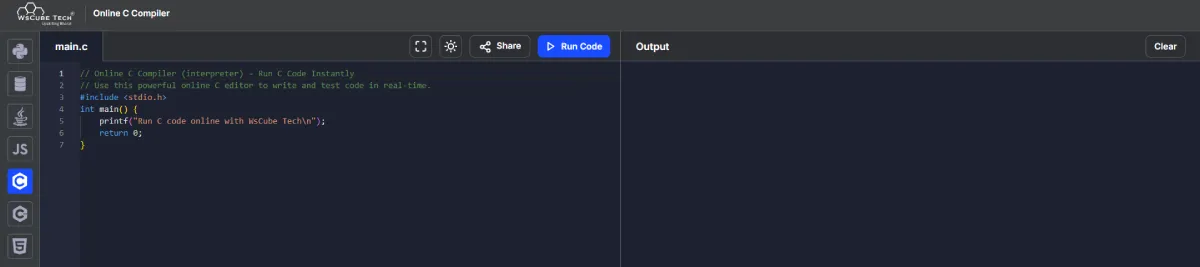
Among the best online compilers for C programming, the WsCube Tech Online C Compiler is designed for learners and educators alike. This free, browser-based compiler lets users write, run, and test C code without any downloads or login requirements.
WsCube Tech has a very clean and easy to use interface with no extra fluff. This is a great option for those who are just starting out and would like to concentrate on simply learning the C language without the distractions of additional features. The ability to compile your code and receive an immediate output makes coding a breeze and allows anyone to practice without the hassle.
Key Features:
- 100% browser-based C compiler with no setup required
- Real-time execution and instant output display
- Supports both C and C++ programming
- Optimized for mobile, desktop, and tablets
- Great for students, coding learners, and educators
This online compiler for C language and C tutorial is frequently used in classrooms, coding bootcamps, and online courses. With a growing demand for tools that simplify learning, WsCube Tech meets expectations by delivering a reliable and seamless experience.
2. Programiz
Programiz provides a simple and educational environment for writing C code online. It’s made for learners who are just starting their journey with programming. The interface is clean, and the tool allows real-time compilation with minimal distractions.
While it doesn’t provide advanced debugging features, it’s effective for basic C programs and exercises. Students can run small pieces of code and instantly see their output, which makes it easier to understand core concepts.
3. GDB Online
GDB Online is suitable for those who want a bit more control over their code. It includes options for debugging, which is especially useful when learning how to fix logic errors or understand program flow.
This compiler supports multiple languages and is often used in learning environments. Its standout feature is the integrated debugger, which allows learners to gain deeper insights into how C programs behave line by line.
4. CodeChef
CodeChef’s online compiler is used widely in the competitive programming community. It supports C language and allows users to test code with multiple inputs. While it’s not loaded with advanced features, it performs effectively for quick testing and algorithm practice.
Its simple interface and easy execution make it a compact tool for users preparing for coding challenges or trying out short code snippets in C.
5. OneCompiler
OneCompiler is an easy-to-use and flexible way to execute C code quickly and with good syntax formatting. It functions across multiple web browsers and does not require the creation of an account.
The system is designed for people wanting to write small pieces of code but is equally effective for larger pieces of code. If you want to transition from doing simple practice as a new C programmer to developing your first simple application, OneCompiler will give you a balanced experience.
6. Playcode.io
Playcode.io supports various languages, including C, and is lightweight and easy to use for quick testing. Playcode.io is best for writing and testing small C programs or learning syntax without distractions.
Although it’s lacking in advanced features, the minimalistic interface of Playcode.io makes it easy for students who want to concentrate on logic rather than deal with complex development tools.
7. W3Schools
W3Schools also provides a built-in editor for practicing code snippets. Its Tryit Editor supports C and helps beginners understand the language through practical implementation.
While it may not be ideal for full-scale projects, it’s a great addition for learners reading W3Schools tutorials and wanting to test their understanding in real-time.
8. NextLeap
NextLeap is an online coding platform without distractions. It is designed for those who want an uncluttered interface without excessive toolbars, allowing students to focus only on writing and running their C programs.
This platform supports academic practice and short code challenges and also provides the opportunity for the user to focus on logic and builds concentration by eliminating distractions.
9. Replit
Replit is a cloud-based IDE with support for C programming. It offers collaborative features, real-time code sharing, and multi-file project support. While more feature-rich than basic compilers, it’s still easy to use.
Ideal for learners advancing into team-based or project-level coding, Replit provides an environment that grows with the user’s skill level.
10. JDoodle
JDoodle is a quick and stable online C compiler with a clean interface and broad language support. It enables users to write, run, and share code with ease. It also offers resource tracking, like memory usage and execution time.
It’s especially useful in classroom settings or peer-learning environments where code needs to be shared and reviewed regularly.
Quick Comparison of C Compiler Providers
| Platform | Mobile Friendly | Ease of Use | Input Support | Requires Sign-Up |
| WsCube Tech | Yes | Beginner-Friendly | Yes | No |
| Programiz | Yes | User-Friendly | Yes | No |
| GDB Online | Moderate | Technical | Yes | No |
| CodeChef | Yes | Standard | Yes | No |
| OneCompiler | Yes | Easy to Navigate | Yes | No |
| Playcode.io | Yes | Lightweight | No | No |
| W3Schools | Yes | Simplified | No | No |
| NextLeap | Yes | Clean UI | Yes | No |
| Replit | Yes | Feature-Rich | Yes | Yes |
| JDoodle | Yes | Clear & Stable | Yes | No |
How Online C Compilers Work
Online C compilers work by utilizing server-side infrastructure to process and execute code. When code is written in the browser and submitted, it is sent to a remote server that uses a backend compiler such as GCC (GNU Compiler Collection) to compile the code. The server then returns the result, which is displayed in the output section of the browser.
This process is secure and efficient, with most platforms running code in sandboxed environments to ensure safety and performance. Users don’t need to worry about operating system compatibility or software installation—just open a browser, type code, and run.
These compilers are particularly helpful for those learning C programming, as they reduce technical barriers and encourage experimentation.
Key Features to Look While Choosing Online C Compilers
When choosing the best online compiler for C programming, it’s important to look for features that enhance the coding experience. Some must-have features include:
- Real-Time Output: Instant results help with debugging and learning.
- Syntax Highlighting: Makes the code easier to read and understand.
- Custom Input Support: Allows interactive program execution.
- Debugger Integration: Helps identify logical and runtime errors.
- Multi-language Support: Useful for learners exploring more than one language.
- Code Sharing: Makes it easy to collaborate or get help from others.
The presence of these features often determines how useful and versatile an online compiler can be, especially for students and beginners.
Advantages of Online C Compilers
The advantages of using an online compiler for C programming are both practical and learner-focused:
1. No Setup Required
Online C Compilers are different from traditional C Compilers in that they do not require the user to install, download, or configure their computer system. Users can begin coding immediately, making online C Compilers ideal for new students who want to learn right away with minimal technical issues.
2. Access from Anywhere
Compilers operate via cloud-based technologies, meaning they can be accessed through any device that has an Internet Connection. Whether users choose to use a Smartphone, Tablet, or Computer, the ability to write and run C programs is seamless.
3. Beginner-Friendly
The top-rated online compilers for the C programming language offer easy-to-use interfaces with minimal distractions, enabling learners to concentrate on mastering the C language.
4. Ideal for Practice
Online compilers are also helpful when practicing coding exercises, experimenting with syntax, and solving logic problems. Most compilers support real-time execution, allowing users to quickly identify and fix errors.
5. Compatible Across Devices
In addition, online compilers are usable across platforms, e.g., Windows, Mac OS, Linux, and Android. The responsive design of most online compilers means they work well on both desktop and mobile devices.
6. Saves Time
These services allow you to compile and test your C programs instantly, which is extremely beneficial when working on assignment due dates, tutoring sessions, and preparing for job interviews.
These features make online C compilers popular among students, self-taught programmers, and coding enthusiasts.
7. Cost-Effective
Most online C compilers are free to use, making them accessible to students, self-learners, and educational institutions.
8. Secure and Sandbox Execution
When you run your code on an online compiler, it is done so in a secure, isolated environment (sandbox) to provide protection from damage while learning or experimenting.
Step‑by‑Step Tutorials
How to run a C program in an online compiler:
- Open your browser and visit a compiler site such as WsCube Tech.
- In the editor, write or paste your C program.
- Click the ‘Run’ or ‘Execute’ button.
- View the output in the console or result section.
Sample C Program:
| #include <stdio.h>
int main() { printf(“Hello, World!\n”); return 0; } |
This simple program can be run on any of the compilers mentioned above. It prints “Hello, World!” to the output.
Using these platforms is an excellent way to understand the flow of a C program and how each function behaves.
Best Practices When Using Online C Compilers
To make the most out of an online compiler, here are some tips:
- Keep Code Modular: Break your program into functions to keep it organized.
- Use Comments: Always use comments to define and clarify your code.
- Save Regularly: Since some compilers will auto-save your work, but you should still have a backup handy.
- Test in Small Sections: Run your code in sections at a time to improve your ability to debug your code effectively.
- Check Compiler Support: Certain compilers might not have capabilities for advanced C libraries.
Maintaining code quality and minimizing debugging time is the intent of these methods, particularly for students doing assignments and self-learners.
FAQs About Online C Compilers
- What is an online C compiler used for?
It helps the users to write and run C programs directly in the browser without installation or setups. - Are online C compilers suitable for learning?
Yes, especially for newbies. Platforms like WsCube Tech offer a clean and easy environment to start learning. - Can I run C programs on my mobile phone?
Yes, most compilers work properly on mobile devices and tablets. - Do I need to register to use an online compiler?
No, the listed platforms mentioned above offer free use without registration. - Are online compilers safe for testing code?
Yes, they run code in a secure and isolated environment. - Which online compiler supports both C and C++?
Several platforms do, including WsCube Tech. - Can I use online compilers for my college assignments?
Yes, they’re great for writing and testing assignment code. - Are these compilers fast enough for practice?
Most good compilers provide quick and real-time results. - What if my program needs input?
Many compilers support standard input, allowing you to test such programs easily. - Can I share my code with someone?
Some platforms offer shareable links so you can share your codes and collaborate.
Conclusion
Learning C programming doesn’t have to start from technical setup or downloading software. Thanks to online compilers, anyone can start writing and running code within seconds. They make coding accessible, simple, and fast.
Among all the options explored, one platform consistently delivers an ideal experience for learners—balancing simplicity, speed, and usability. WsCube Tech, with its clean interface and beginner-focused design, offers one of the most efficient ways to learn and practice C programming online.
Choosing the right tool can make coding easier and more enjoyable. Start with the compiler that meets your needs and lets you focus on building skills—not fixing software issues.


Leave a Reply