
The Complete AI Content Workflow for WordPress Bloggers: From Detection to Humanization
What will 2026 do for WordPress bloggers? An AI writing tool can create a week‘s worth of content over an afternoon, but there‘s a snag; readers and search engines are increasingly adept at identifying artificial text.
Chances are if you have been using ChatGPT, Jasper, or other AI writing tools to scale out your blog content you‘ve also noticed one other thing, you are producing content faster, but it‘s beginning to sound… Artificial. Repetitive sentence structure. Transitions that feel unnatural. It‘s got that AI voice that turns the reader off, scrolling right past.
And it’s not just about reader experience anymore. Google’s algorithms are evolving to identify and potentially deprioritize purely AI-generated content. Academic plagiarism checkers flag it. Even your regular readers can sense when something feels “off.”
However, you don‘t have to choose between what AI will do for you and making your site sound human. Successful scaling WordPress bloggers have automated their systems, and their workflows utilize AI as a copywriting agent rather than an publishing agent. Remember, they have quality control layers that catch bad copy before anything goes public.
This will lead you through the entire process of generating AI content, to making it read naturally, and pass detection software.
Why WordPress Bloggers Can’t Ignore This Problem
Let me be direct about what’s at stake.
Search rankings are shifting. The new Google algorithm update is about to give priority to ‘useful content created for people’. Google states it is not penalising AI, generated content automatically but pure AI content with no humans checking and rephrasing are pushed under the mat. We see bloggers using WordPress checking their analytics and that the indexed AI content does not rank.
Reader engagement drops. High bounce rate and short average time on page typically indicates your content isn‘t hitting the mark. AI, created blog posts typically don‘t have storytelling or personal anecdotes and do not maintain an conversational feel.
Your reputation matters. If people find out you‘ve pasted AI content into your site, how will it affect your perceived authority? For example, WordPress blog writers working in a competitive subject area such as computers, finance, or health.
Competition is using better workflows. The bloggers outranking you aren’t necessarily working harder—they’re working smarter. They’ve built systems that leverage AI speed while maintaining human quality.
A WordPress blogger I know saw their organic traffic drop 40% over three months. When we analyzed their content, the pattern was clear: posts created entirely with AI (no editing) were getting impressions but almost no clicks. Their titles appeared in search results, but users weren’t clicking through. Once they implemented a proper refinement workflow, traffic recovered within six weeks.
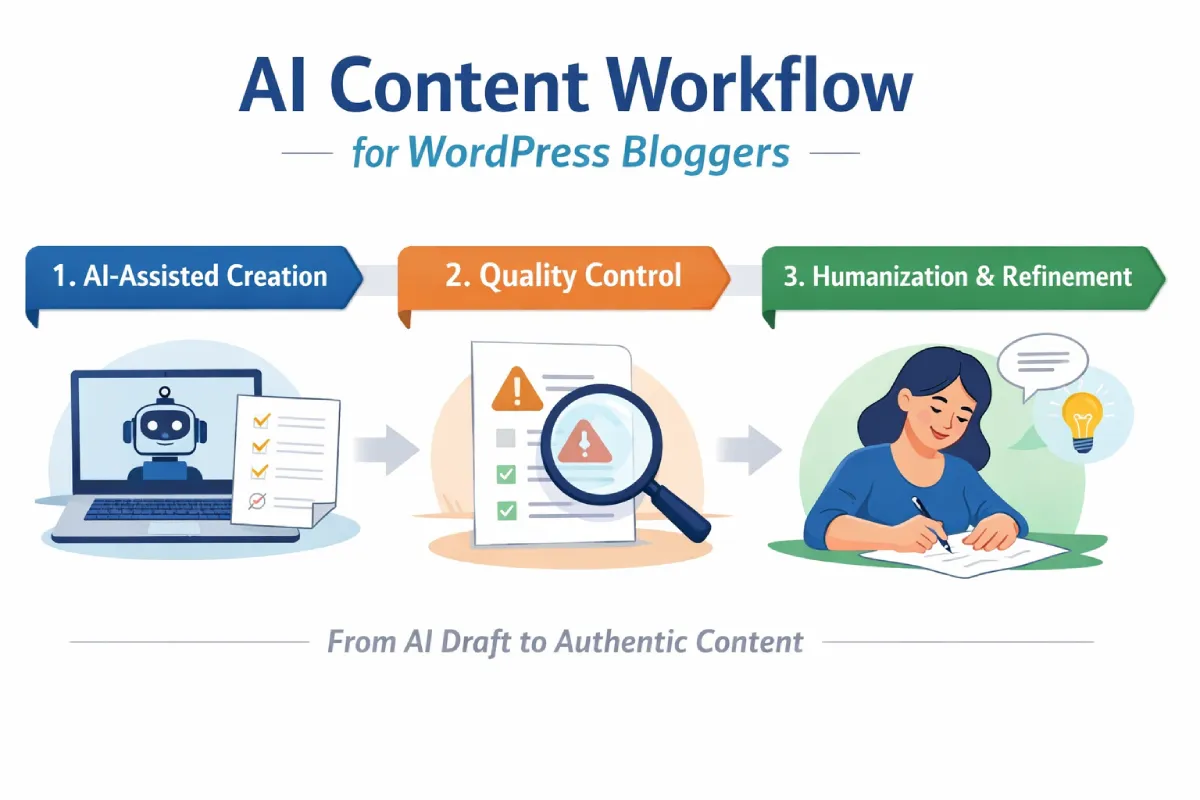
The 3-Stage AI Content Workflow That Actually Works
Good WordPress bloggers don‘t merely publish AI, generated drafts. Instead they run pieces through a manual workflow that weeds out quality problems before they reach their audience.
Here’s the framework:
Stage 1: AI-Assisted Creation (30% of effort)
Use AI to handle the time-consuming parts:
- Research and outline generation
- First draft writing
- Heading structure
- Basic SEO optimization
Tools WordPress bloggers commonly use: ChatGPT, Jasper, Claude, Writesonic, or WordPress plugins like AI Engine or Jetpack AI Assistant.
Key principle: AI creates the scaffold. You add the substance.
Stage 2: Quality Control & Detection (20% of effort)
Before refining content, identify what specifically needs improvement:
- Run AI detection checks
- Identify overly formal or robotic sections
- Flag generic statements that lack specificity
- Check for factual accuracy
This stage prevents wasted time refining content that might need to be rewritten entirely.
Stage 3: Humanization & Refinement (50% of effort)
Transform the AI draft into authentic-sounding content:
- Add personal anecdotes and examples
- Vary sentence structure and length
- Replace generic phrases with specific language
- Inject conversational elements
- Ensure claims are defensible
Most WordPress bloggers spend the majority of their time here—and that’s correct. This is where generic AI output becomes valuable blog content.
Breaking Down Each Stage: Practical Implementation
Let’s get specific about how to execute each stage in your WordPress workflow.
Stage 1: Creating the Initial AI Draft
What to prompt for better results:
❌ Generic prompt: “Write a blog post about email marketing”
✅ Specific prompt: “Write a 1500, word blog post for small business owners who have never done email marketing. Cover the basics of email marketing in an easy, to, understand way and offer 3, 5 quick tips that are easy to follow. Write in an informal, “for the average guy” tone with a target keyword of: email marketing for beginners.'”
Pro tip for WordPress users: Install an AI writing plugin directly in your WordPress editor so you’re drafting in the same environment where you’ll publish. This saves time on formatting transfers.
What AI should handle:
- Researching current best practices
- Organizing information logically
- Expanding bullet points into paragraphs
- Generating meta descriptions and alt text
What AI shouldn’t handle alone:
- Personal stories or case studies
- Specific recommendations without your review
- Technical claims that need verification
- Anything requiring recent data (AI training has cutoff dates)
Stage 2: Running Quality Control Checks
Before you invest time refining content, verify it’s worth refining.
Detection checkpoint questions:
- Does this sound distinctly robotic? Read three paragraphs aloud. If it sounds like a corporate press release rather than a conversation, it needs significant work.
- Are there AI “tells”? Watch for phrases like “it’s important to note,” “in today’s digital landscape,” “leveraging,” or “robust.” AI loves these—humans rarely speak this way naturally.
- Is the content too generic? If you could swap your blog’s name with any competitor and the article would still make sense, it’s not differentiated enough.
- Does it actually say anything? AI sometimes generates paragraphs that sound authoritative but contain zero specific information. Cut these entirely.
Technical detection tools:
Programmatic checking saves time for WordPress bloggers with lots of posts. WordPress bloggers writing AI, powered content should check its could set off an AI detector prior to publishing. Detection, linked correction tools, , such as those available via the AI humanizer API, , exist to flag passages that should be refined by humans.
This is particularly valuable for agencies managing multiple client WordPress sites where consistency matters.
Stage 3: Humanizing Your Content
This is where AI-assisted content becomes genuinely valuable blog content.
Specific refinement tactics:
Add conversational elements:
- Start sentences with “And,” “But,” or “So” occasionally
- Use contractions (you’re, it’s, don’t)
- Ask rhetorical questions
- Address the reader directly (“you,” “your”)
Inject personality:
- Share a brief personal anecdote related to the topic
- Admit what you don’t know or what’s challenging
- Use humor or casual language where appropriate
- Reference specific experiences, not generic examples
Vary your structure:
- Mix short punchy sentences with longer explanatory ones
- Break up text with subheadings every 200-300 words
- Use bullet points for scannable lists
- Add bold text to highlight key concepts (not just keywords)
Replace generic with specific:
| AI’s Generic Version | Humanized Specific Version |
| “Email marketing can significantly improve customer engagement.” | “When I started sending weekly tips, my email open rate jumped from 12% to 34% in two months.” |
| “There are many tools available for WordPress users.” | “I’ve tested 15 WordPress SEO plugins. RankMath and Yoast consistently deliver the best results for bloggers.” |
| “It’s important to optimize images for faster loading.” | “Last month, compressing my images cut page load time from 4.2 seconds to 1.8 seconds. Google Search Console showed the difference within a week.” |
Notice the pattern? Specific numbers, personal experience, and concrete examples replace vague generalizations.
Using refinement tools:
Once you’ve identified content that needs improvement, humanization tools help restore natural flow. Platforms like TextToHuman refine AI-generated drafts while preserving your intended meaning, ensuring content reads authentically.
This is particularly useful for WordPress bloggers producing high volumes of content where manual line-by-line editing isn’t scalable.
WordPress-Specific Implementation Tips
Your WordPress setup can make this workflow easier or harder. Here’s how to optimize:
Plugins That Support This Workflow
For AI drafting:
- AI Engine – Integrates multiple AI models directly into your editor
- Jetpack AI Assistant – Native WordPress AI writing tool
- WriteWise – WordPress-specific content assistant
For quality control:
- Grammarly for WordPress – Catches robotic phrasing
- Yoast SEO – Readability scoring (aim for 60+ readability score)
For publishing workflow:
- EditFlow – Adds editorial workflow stages
- Revisr – Version control for content changes
Custom Fields for Content Tracking
Smart WordPress bloggers add custom fields to track content quality:
- AI Assistance Level: (None / Partial / Heavy)
- Human Review Status: (Not reviewed / In review / Approved)
- Last Humanization Date: Track when content was last refined
- Detection Score: Record AI detection probability
This metadata helps you identify which posts might need updating as AI detection improves.
Building Your Editorial Calendar Around This Workflow
Monday-Tuesday: Generate AI drafts for the week (3-5 posts)
Wednesday-Thursday: Run quality checks and humanize content
Friday: Final review, scheduling, and WordPress optimization
This batching approach is more efficient than trying to complete each post individually from start to finish.
Common Mistakes WordPress Bloggers Make (And How to Avoid Them)
After reviewing hundreds of WordPress blogs using AI content, I’ve noticed these patterns:
Mistake #1: Publishing AI Drafts With Only Grammar Fixes
What happens: You run the AI output through Grammarly, fix typos, and hit publish. The grammar is perfect, but the content still sounds robotic and generic.
Fix: Grammar checking is the last step, not the refinement step. Focus first on adding specific examples, personal voice, and conversational elements.
Mistake #2: Over-Relying on AI for Technical or Specialized Topics
What happens: AI confidently generates incorrect information about WordPress code, plugins, or technical processes. You publish it because it sounds authoritative, then readers correct you in comments.
Fix: For technical WordPress content, use AI for structure only. Write the actual technical explanations yourself, or verify every technical claim before publishing.
Mistake #3: Ignoring Your Existing Top-Performing Content Style
What happens: Your most successful blog posts have a specific style—maybe casual and story-driven. Your AI-assisted posts are formal and information-heavy. The disconnect confuses your audience.
Fix: Before using AI tools, analyze your top 10 posts by engagement. What’s the average sentence length? How many personal examples per post? What’s the tone? Give these specifications to your AI tools and refinement process.
Mistake #4: Not Building Humanization Into Your Workflow
What happens: You plan to “humanize later” but never do because you’re focused on creating more content. Your blog fills with AI-generated posts that don’t engage readers.
Fix: Make humanization non-negotiable. If you’re not humanizing content, you’re not ready to publish it. Period.
Programmatic access is also very necessary to the WordPress agencies working with several clients. The AI humanizer API gives developers the possibility to incorporate these quality tests within WordPress publishing flows, ensuring uniformity among client websites.
Measuring Success: What Metrics Actually Matter
How do you know if your AI content workflow is working? Track these WordPress-specific metrics:
Organic traffic trends: Compare AI-assisted posts to manually written posts. They should perform similarly within 3 months of publication.
Engagement metrics:
- Average time on page (should be 2+ minutes for 1,500-word posts)
- Scroll depth (aim for 60%+ reaching the end)
- Bounce rate (lower is better, under 70% is ideal)
Search performance:
- Click-through rate from search results
- Average position for target keywords
- Number of ranking keywords per post
Reader feedback:
- Comments quality and quantity
- Social shares
- Direct messages or emails mentioning specific posts
If AI-assisted content significantly underperforms your manually written content after 90 days, your humanization process needs improvement.
Your Next Steps: Implementing This Week
Don’t overhaul everything at once. Here’s a practical implementation plan:
This week: Choose one upcoming blog post. Run it through the complete 3-stage workflow. Document how long each stage takes.
Next week: Refine the process based on what you learned. Adjust time allocation between stages. Test different AI prompts to see what produces better drafts.
Week 3-4: Scale to 2-3 posts per week using this workflow. Track metrics compared to your previous content.
Month 2: Optimize based on data. Which types of posts benefit most from AI assistance? Which need more human input? Adjust accordingly.
Final Thoughts
AI writing tools are here and they‘re only getting better rapidly. Smart WordPress bloggers who learn to integrate them well (fast AI writers with the quality human writers offer) will gain a definite advantage.
But the key word is “properly.”
Publishing raw AI content not only lowers the authority of your blog but also your ranking in search results. Not using AI altogether means you‘ll be producing content at a much slower rate than competitors.
This approach is a step, by, step process: A. Use AI to draft as much as possible, B. perform basic QA before spending on refinement time, then C. Humanize fully and publish.
You can‘t have your reader realize that you didn‘t write the first draft of the text. Your reader only realizes if the text produced is interesting, engaging, and seems human, written.


Leave a Reply