

Top Reasons Entrepreneurs Choose Dokan to Launch Their Marketplace on WordPress
Building an online marketplace sounds exciting. But the work behind it can feel heavy. Many entrepreneurs want to start fast, test ideas, grow vendors, and keep costs low. They also want a system that does not break when the business grows.
This is where Dokan becomes a popular choice.
Dokan helps anyone create a full multi-vendor marketplace on WordPress. You do not have to build everything from scratch. You do not need a large team. You do not need months of development. Dokan gives you the tools you need from day one, and you can start small and scale at your own speed.
In this guest post, we will look at the top reasons entrepreneurs pick Dokan for their marketplace. These reasons come from real startup founders, small business owners, and creators who wanted a simple way to launch and grow.
We will explore what makes Dokan easy to use, why it saves time, and how it supports different business models. Each section will break things down with clear examples and simple explanations.
Let’s start with the first reason many entrepreneurs choose Dokan: they can launch fast without hiring developers.
Top Reasons Why Entrepreneurs Choose Dokan to Launch Their Marketplace on WordPress
Dokan is a popular pick for entrepreneurs who want to launch a marketplace without long development time, high costs, or technical challenges. It gives you a ready multi-vendor setup on WordPress, so you can focus on growing your business instead of building every feature from scratch. Below are the main reasons founders trust Dokan when starting their marketplace journey.\
Fast Launch Without Technical Work
One of the biggest reasons entrepreneurs pick Dokan is the speed it offers during the early stages of building a marketplace. When you are starting a new business, time matters a lot. You want to launch fast, test your idea, and see how the market responds. Dokan helps you do exactly that.
You don’t need to handle complex coding or hire a developer to build the core features. The system already comes with everything a marketplace needs. Vendor registration, store pages, product upload options, order management, earnings reports — all of these are built in. This means you don’t have to spend weeks planning technical features or paying for custom development.
Once you install Dokan on WordPress, the marketplace structure is ready to use. All you need to do is follow a simple setup process. You can add your branding, choose how commissions will work, and allow vendors to start selling immediately.
This fast setup is very helpful for new founders. It reduces cost, removes technical stress, and allows you to focus on vendor growth and marketing instead of backend development. Many entrepreneurs launch their first version within a single day because Dokan takes care of the heavy technical work for them.
Simple Vendor Dashboard That Reduces Support Work
A marketplace grows when vendors feel confident using it. If the system is confusing, vendors keep asking questions, sending support requests, and waiting for help. This slows down your business and adds extra pressure on your team. Dokan solves this problem with a clean and simple vendor dashboard.
The vendor dashboard looks like a mini store control panel. Vendors can do everything from one place. They can add products, manage stock, check orders, track earnings, and update their store details without needing any technical knowledge. The layout is easy to follow, and every tool is placed where vendors expect it to be.
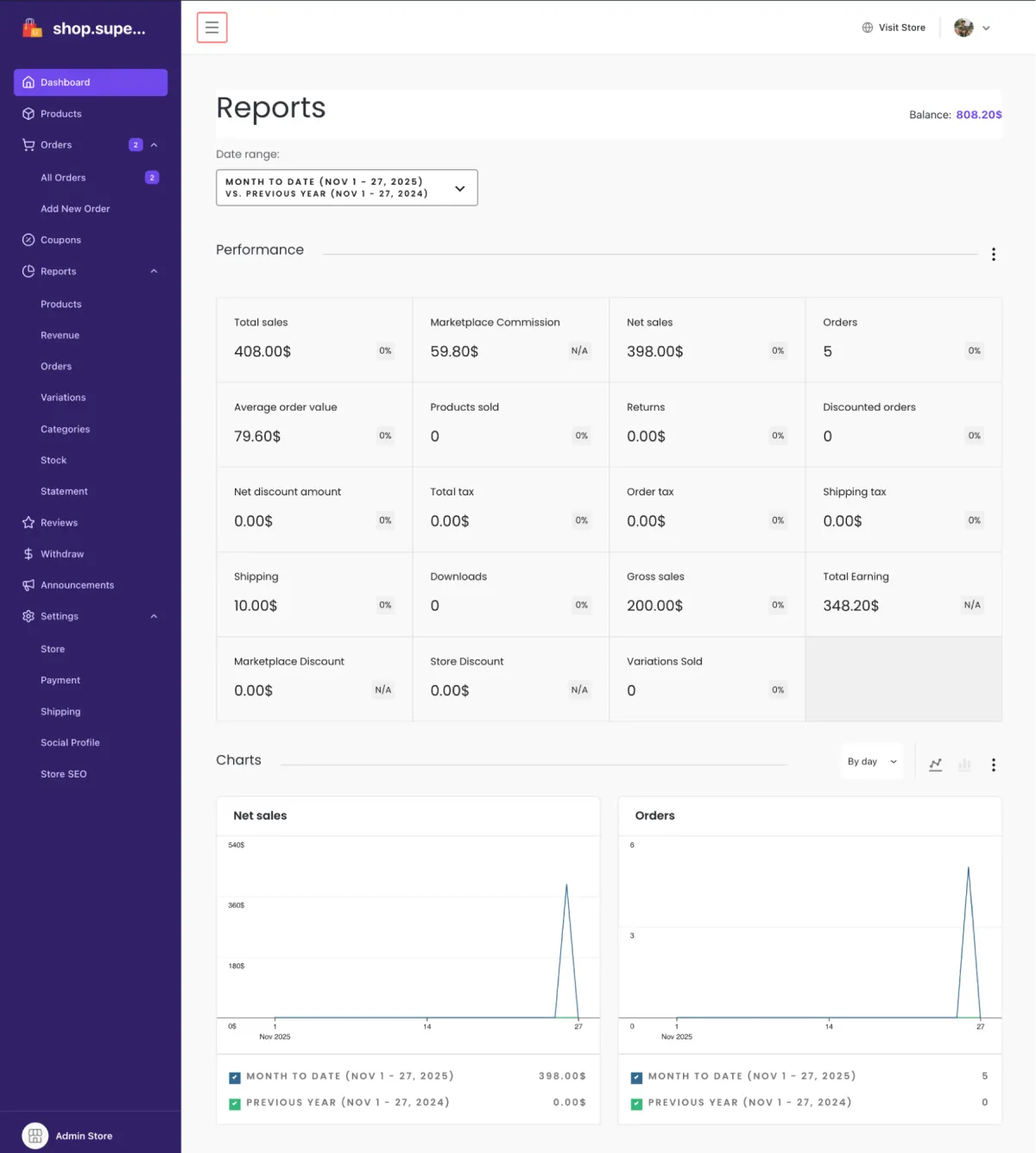
This reduces the number of support questions you receive. Vendors do not need to ask how to upload a product or where to find their earnings report. They can figure it out on their own, which saves time for both you and your sellers.
The dashboard also helps with onboarding. New vendors can sign up and start selling quickly because the system does not feel complicated. They don’t have to learn a new platform or go through long training sessions. The smooth experience gives them confidence, which leads to better product uploads, faster store setup, and fewer mistakes.
Full Marketplace Features Built In
Entrepreneurs love that Dokan comes with all the essential marketplace features already included. When you are starting a new business, you don’t want to search for separate plugins or build features from scratch. Dokan solves this by giving you a full multi-vendor system on day one.
Vendors get their own store pages where they can display products, add descriptions, upload images, and manage sales. Customers can browse different vendors, check ratings, compare products, and place orders easily. The entire buying and selling process feels smooth because the core features are already connected.
Dokan also includes tools for product management, order handling, shipping setup, vendor earnings, and commissions. You can decide how much commission you want to charge, set different rates for different vendors, and automate payouts. This gives you full control over the business without needing custom development.
The best part is that everything works together. The product listings, order flow, vendor dashboard, reports, and customer checkout all run under one system. You don’t need to install multiple plugins and hope they work well with each other. Dokan keeps your marketplace stable and organized from the start.
For founders, this means less guesswork, fewer technical issues, and a much smoother launch. You get all the tools you need to run a complete marketplace without building anything on your own.
For entrepreneurs, this simplicity is a big help. It allows them to manage more vendors without extra team members and keeps the marketplace running smoothly as it grows.
Works With Any Business Model
Every entrepreneur has a different idea for their marketplace. Some want to sell physical products like clothing, handmade items, or electronics. Others want to offer digital products such as ebooks, templates, or online courses. Some want a service-based marketplace where people can book tutors, designers, or fitness coaches. Dokan makes all of these possible because it supports multiple business models without extra setup.
If you want to sell physical products, vendors can manage stock, add variations, set shipping rates, and track orders easily. For digital products, vendors can upload files, set access rules, and deliver downloads instantly. If you are building a service marketplace, vendors can list services, set prices, choose availability, and take bookings.
This flexibility is important for entrepreneurs because it lets them shape the marketplace around their vision. You are not stuck with one type of product. You can start with one model and expand later. For example, a marketplace that begins with physical items can later add digital services or subscription-based products.
Dokan works smoothly with WordPress and WooCommerce, which means you can also extend the marketplace with addons. You can add memberships, product bundles, bookings, coupons, or subscription plans depending on your needs. This lets you grow the business in your own way, step by step.
Because Dokan fits different business ideas, entrepreneurs can focus on building their brand instead of worrying about technical limits. The platform adjusts to the type of marketplace you want, making it easier to reach your goals.
Easy Payment Setup
Payments are one of the most important parts of any marketplace. If the payment system is confusing or unreliable, both vendors and customers lose trust. Dokan makes this process simple by supporting popular and trusted payment gateways right out of the box.
You can connect payment methods like PayPal, Stripe, bank transfers, and other WooCommerce-supported gateways with just a few steps. Once the payment gateway is active, customers can checkout smoothly, and vendors can receive their earnings without any manual work.
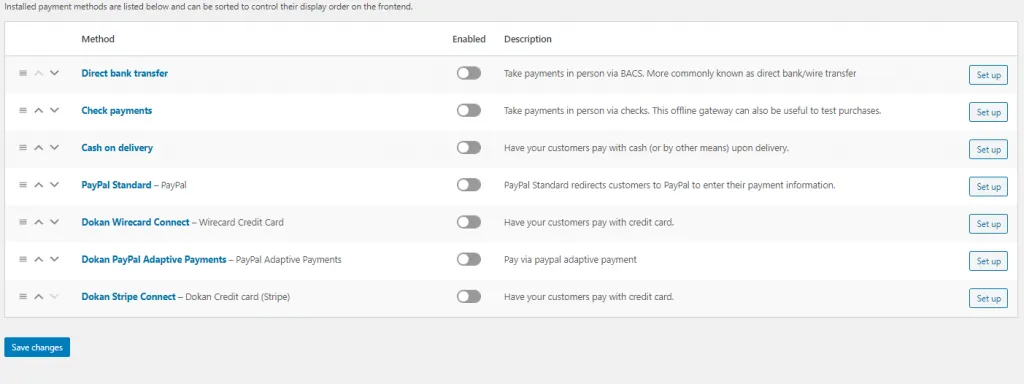
Dokan also gives you full control over commissions. You can choose how much you want to earn from each sale. You can set a global rate or create different commission rules for different vendors. If you want, you can even set special commission rates for new vendors or top performers. This flexibility helps you run your business the way you want.
The withdrawal system is also simple for vendors. They can request payouts from their dashboard, track past withdrawals, and see their earnings clearly. This builds trust, because vendors know exactly how much they are earning and when they will get paid.
For entrepreneurs, this smooth payment setup reduces a lot of stress. You don’t need a developer to configure payments. You don’t need a complex financial system. Everything is built to be easy, clear, and dependable. This allows you to focus on growth while Dokan handles the technical work behind the scenes.
Scales as the Marketplace Grows
A marketplace may start small, but the goal is always growth. You might begin with a few vendors and a handful of products, but over time, you want hundreds of vendors, thousands of items, and a strong customer base. Dokan is built to support this journey.
When your marketplace grows, you don’t need to switch platforms. Dokan can handle more vendors, more products, and more orders without breaking the system. The structure is designed to expand smoothly, so you don’t face performance issues early on.
You can also add more features as your marketplace becomes bigger. Dokan has a wide range of modules that you can enable when needed. For example, you can add vendor subscriptions, product add-ons, live chat, store support, booking systems, and many other advanced options. This lets you build your marketplace step by step instead of paying for everything at once.
Because Dokan is built on top of WordPress and WooCommerce, it also benefits from a huge ecosystem. You can upgrade your hosting, add caching tools, improve search, or connect advanced analytics as your marketplace grows. This gives you full freedom to expand without limitations.
For entrepreneurs, this scalability is a major advantage. You do not need to rebuild your marketplace when your business becomes bigger. You can grow at your own pace and keep improving the platform without facing technical roadblocks.
Strong Compatibility With the WordPress Ecosystem
One of the biggest strengths of Dokan is how well it works with the larger WordPress ecosystem. Many entrepreneurs prefer WordPress because it is flexible, familiar, and has thousands of plugins and themes. Dokan fits right into this environment without issues.
You can choose almost any WordPress theme you like. Most modern themes work smoothly with Dokan, which means you can design your marketplace the way you want. You can make it minimal, colorful, niche-focused, or premium-looking without any custom coding.
Dokan also works well with popular WordPress plugins. You can use SEO plugins to improve search rankings, security plugins to protect your site, and caching tools to make your marketplace faster. If you need advanced features like membership plans, bookings, or marketing automation, you can add them using WooCommerce extensions.
Because of this compatibility, entrepreneurs have more freedom. You are not locked into one design or limited feature set. You can combine Dokan with tools you already know, making your marketplace easier to manage and more powerful over time.
This flexibility helps your business grow in the direction you choose. You can test new features, make changes, or try new designs without worrying about platform restrictions. For many founders, this seamless connection with the WordPress ecosystem is a major reason to use Dokan.
Affordable for New Entrepreneurs
Cost is one of the biggest concerns for anyone starting a new marketplace. Many founders do not have a large budget in the beginning. They need a solution that is powerful but still affordable. This is where Dokan stands out.
With Dokan, you avoid the high expense of custom development. You do not need to hire a full development team or pay for months of coding work. The core plugin gives you the foundation of a complete marketplace, and you can add premium modules only when you truly need them.
This helps entrepreneurs start small and grow slowly. You can begin with the basic tools, add vendors, test your idea, and only invest in more features when the marketplace starts generating revenue. There is no pressure to pay for everything upfront.
Dokan’s pricing is also clear. There are no hidden costs or surprise fees. You know exactly what you are paying for, and you have full control over upgrades. This is very helpful for small business owners who need to manage their finances carefully during the early stages.
Many entrepreneurs say that Dokan lets them build a marketplace that looks and feels professional, even with a small starting budget. It lowers entry barriers and makes marketplace building possible for almost anyone, even with limited resources.
Active Support and Helpful Community
When you are building a marketplace, questions will come up. You might need help with a feature, face a small issue, or want guidance on the best way to set something up. Having access to fast and friendly support makes a big difference, and this is another area where Dokan stands strong.
Dokan provides active customer support through tickets and documentation. If you run into a problem, you can reach out and get help from a real support team that understands the product. This gives entrepreneurs confidence because they know they are not building their marketplace alone.
The documentation is also very clear. It includes setup guides, step-by-step tutorials, and explanations for all the major features. Many users can solve their issues simply by checking the guides, which saves time and keeps the workflow smooth.
Along with official support, Dokan has a large user community. Many WordPress developers, freelancers, and marketplace owners use Dokan, so there is plenty of shared knowledge online. If you need ideas, best practices, or inspiration, you will find lots of examples from people who have already built successful marketplaces with Dokan.
This combination of strong support and a helpful community makes the journey easier for entrepreneurs. You feel supported, guided, and connected — which is very important when growing a new business.
How to Create a Marketplace with Dokan — Step by Step
Follow these clear steps to build a marketplace with Dokan. Short steps. No jargon. You can do most of this without a developer.
Before you start
Make sure you have a domain name, hosting, and an email for admin. Install WordPress on your hosting. Have WooCommerce ready.
- Install WordPress: Choose a host and install WordPress. Most hosts offer one-click WordPress installs. Use a strong admin password and set your site title.
- Install and set up WooCommerce: From the WordPress dashboard go to Plugins → Add New → search WooCommerce. Install and activate it. Run the WooCommerce setup wizard. Add store address, currency, and basic shipping and tax settings.
- Install Dokan: Go to Plugins → Add New and search for Dokan. Install and activate the plugin. You can start with the free version and add premium modules later.
- Run the Dokan setup wizard: Dokan shows a setup wizard after activation. Follow the wizard. Set vendor registration options, store pages, and basic seller rules. This prepares the marketplace structure.
- Choose and install a compatible theme: Pick a modern theme that works with WooCommerce and Dokan. Install and activate it. Most page builders and many themes work well. Preview your site on desktop and mobile.
- Configure payment gateways: Set up payment methods like Stripe, PayPal, or direct bank transfer. Connect them in WooCommerce settings. Test payments in sandbox or test mode first.
- Set commission rules and payouts: In Dokan settings choose your commission model. Set global commission or vendor-specific rates. Configure withdrawal methods and minimum payout rules so vendors can request payouts.
- Set product and shipping rules: Decide what product types you will allow: physical, digital, or services. Configure shipping zones and rates. Add rules for product approval if you want to review listings.
- Create store pages and key content: Add About, Terms, Shipping, Refund, and Vendor Guidelines pages. Make rules clear so vendors know what to do and what is allowed.
- Test the full buyer and seller flows: Create a test vendor account and a test customer account. Upload a product, place an order, checkout, and request a payout. Fix any issues you find.
- Invite and onboard vendors: Open vendor registration. Share a short guide or checklist for new sellers. Encourage vendors to complete store profiles, add logos, and upload good product photos.
- Enable needed add-ons: Add modules only when you need them. Common add-ons: bookings, subscriptions, product reviews, advanced shipping, and vendor verification. Add gradually to keep costs low.
- Set up support and policies: Create a simple support flow. Add a help page or FAQ. Set clear rules for disputes, returns, and content. This reduces support tickets later..
Final Thoughts
Dokan makes marketplace building easier for entrepreneurs who want to start fast and grow with confidence. It removes the heavy technical work, keeps setup simple, and gives you all the tools you need to run a full multi-vendor business on WordPress. You can launch with a small budget, invite vendors quickly, and add more features whenever you’re ready.
Because of its ease of use, strong features, smooth vendor experience, and full compatibility with the WordPress ecosystem, many founders trust Dokan as the base of their marketplace. It supports different business models, scales with growth, and keeps management simple even as your vendor list gets bigger.
If you are planning to launch your own marketplace, Dokan gives you a reliable and flexible way to bring your idea to life — without long development time or high upfront cost. It helps you focus on what matters most: growing your business and supporting your vendors.


Leave a Reply