
Top WordPress Plugins for Showcasing Explainer Videos
If you were to ask what the essential element is for websites to engage visitors effectively today, your answer would be Video content. And if you don’t agree, it’s high time you abandon living under a rock.
For established companies to growing startups, the explainer videos stand out. They are effective at simplifying complex ideas and clearly showcasing products or services. Their ability to boost understanding and conversions makes them a powerful tool for businesses.
Even WordPress users rely on the native video embedding features to add explainer videos. But there are some inherent challenges they deal with:
Slow load times, Limited customization options, Compatibility issues with different video sources, like YouTube, Vimeo, or self-hosted files
And because of these limitations, even a dedicated WordPress video plugin proves invaluable.
Why You Should Use a WordPress Plugin to Showcase Explainer Videos
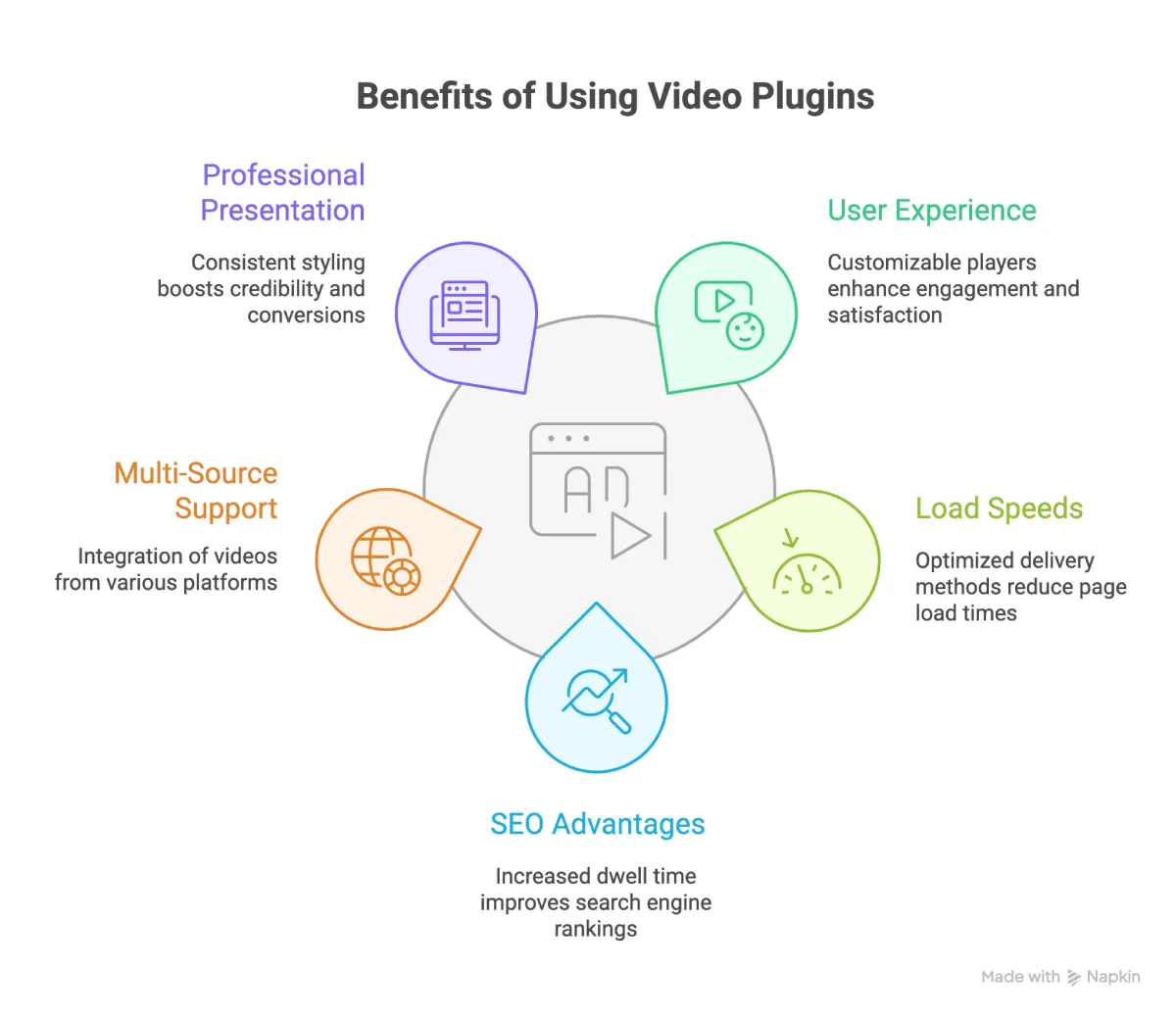
Using WordPress plugins for explainer videos offers significant advantages over native embedding options. While the default embedding tools are good, they often result in slower load times, offer limited customization options, and have basic player controls.
On the other hand, a dedicated plugin can enhance the user experience. It delivers faster-loading videos, smooth playback, and visually appealing player designs that can easily align with your brand.
Choosing the right plugin equips your website with tools tailored specifically for video content. The advantage is that it elevates how the explainer videos are displayed and the experience of your website visitors without extensive technical knowledge or custom coding.
Key Features to Look for in a WordPress Video Plugin
Selecting the right video WordPress plugin isn’t that tough if you pay attention to several key features that enhance usability and presentation. These are as follows:
1. Beginner-friendly setup
It should be fundamental that every platform be user-friendly. So, following the same route, a video plugin should offer an intuitive interface and simple configuration steps. All this so users don’t get confused.
Easy setup comes in handy for small business owners or site managers who don’t have much technical know-how. And there you can save them unnecessary frustration allowing them quick deployment.
2. Compatibility with page builders and Gutenberg
Your ideal video plugin should seamlessly integrate with popular tools like Elementor, Beaver Builder, or the native Gutenberg editor. This compatibility ensures there are no design conflicts and streamlines content management, too.
3. Customizable galleries and players
When plugins provide tailored video players or galleries, it becomes easy to maintain consistent branding. You have better control over variables such as colors, thumbnails, controls, and layouts to showcase your explainer videos in a visually cohesive way.
4. Enhancements to performance
Lazy loading is a feature that slows down initial site load time by delaying video loading until it is needed. Regardless of screen size, mobile responsiveness ensures seamless playback across devices, promoting a satisfying user experience.
5. Interactive components
Explicit calls to action in videos can increase audience engagement and conversion rates. Chapter marks make it easier for viewers to navigate lengthy explainer videos, thereby enhancing comprehension and recall.
By focusing on these features, you can be confident that the WordPress video plugin you select will support user engagement and site performance, in addition to displaying content in an aesthetically pleasing manner.
Good Read: – Collection of Explainer Video Templets
Top 5 WordPress Plugins for Hosting/Showcasing Explainer Videos
1. Envira Gallery – Drag-and-Drop Video Galleries with eCommerce Integration

One of the best WordPress video plugins for creating aesthetically pleasing, useful video galleries is Envira Gallery.
Its drag-and-drop interface makes it simple for users to create galleries with self-hosted content or explanatory videos from websites like Vimeo and YouTube.
Because of its adaptability, it’s a great option for showing explanatory films without requiring coding knowledge.
Additionally, Envira Gallery includes performance enhancements, such as lazy loading, that speed up page loads even when hosting numerous videos.
2. YouTube Showcase – Automatic YouTube Video Galleries

YouTube Showcase is yet another among the best WordPress video plugins. It’s specifically designed for users heavily invested in YouTube content.
This video plugin simplifies creating dynamic galleries by automatically updating them based on the YouTube video IDs stored in the plugin settings.
3. Modula – Attractive and Easy Video Galleries

Modula’s highly intuitive option is designed for users seeking the best WordPress video plugin with minimal setup time. It easily meets the requirements for a user-friendly interface. It allows beginners to create stylish, customizable video galleries in just a few clicks.
4. Jetpack VideoPress – Dedicated Hosting with Custom Player Controls

Jetpack VideoPress stands out among the best WordPress video plugins for those seeking reliable hosting paired with customizable player options.
Unlike basic embedding, VideoPress offers dedicated video hosting, significantly reducing server load and improving site speed and playback performance.
5. Presto Player – Advanced Marketing Tools Built-in

Presto Player stands out as the best WordPress video plugin for marketers and content creators who want to enhance viewer engagement when hosting explainer videos.
Unlike Envira Gallery and other plugins focused primarily on visual presentation, Presto Player integrates powerful marketing features directly into the video experience.
Best Practices for Embedding Explainer Videos on Your WordPress Site
We talked about the features a good video plugin should have. Then explored some best options for the same. Now let’s talk about the few things that you need to consider while embedding videos on your WordPress website that maximize engagement and performance.
The following are some best practices for optimizing video display and enhancing the viewer experience.
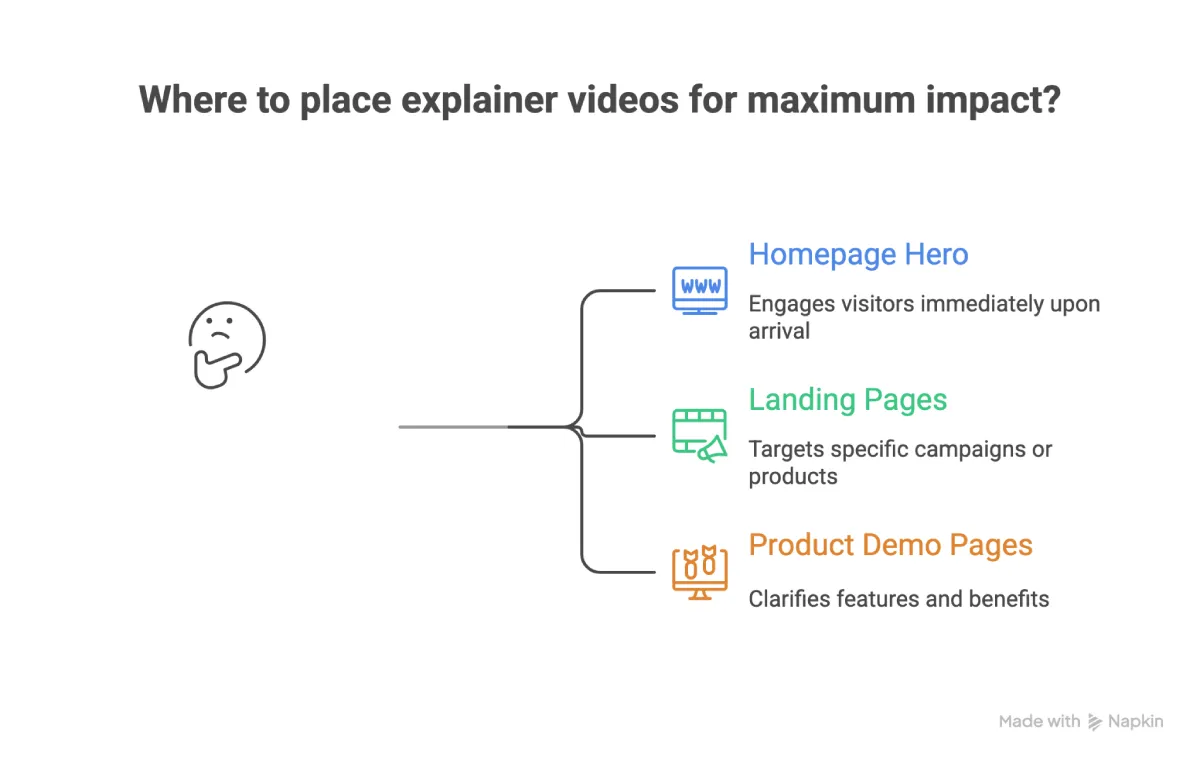
1. Optimal Placement
Position explainer videos strategically where they grab the most attention:
2. Thumbnail Optimization

Use custom thumbnails that load quickly without sacrificing image quality. A clear, compelling thumbnail encourages clicks and sets viewer expectations before the video plays.
- Deferred or Lazy Loading
Use lazy-loading strategies to ensure movies load only when they enter the viewport. This speeds up the site overall and keeps users engaged by reducing initial page load times.
- Selecting Formats for Videos
Because of its broad compatibility and well-balanced quality-to-file-size ratio, MP4 is still the favored format. Faster streaming is ensured by smaller file sizes, which is essential for keeping viewers interested.
- Adaptability to Mobile
Make sure your video player works flawlessly on many screens and devices. Smooth playback on smartphones and tablets is ensured by a responsive design, improving accessibility for all users.
When combined with Top Plugins for Hosting Videos, these techniques produce a polished, professional presentation that advances your website’s objectives.
Conclusion
With so many video plugins out there, the right choice really comes down to how you want your videos to work for you.
Picking the right video plugin is simple: it should look good, load quickly, and offer simple tools to boost engagement. Pick the one that feels easy to manage and helps your videos shine without slowing you down.
I hope that helped you somewhat, and these inputs will help you pick the right plugins for you.


Leave a Reply