
Turn Any Photo into a Custom Emoji: A Practical Guide to AI Emoji Makers with Bylo.ai
Modern web projects increasingly rely on lightweight visual elements to improve user interaction and interface clarity. From status indicators to micro-feedback icons, emojis are no longer limited to messaging platforms—they have become useful UI assets. However, creating custom emojis from photos often requires design tools and manual editing, which can slow down workflows for site owners, and content creators.
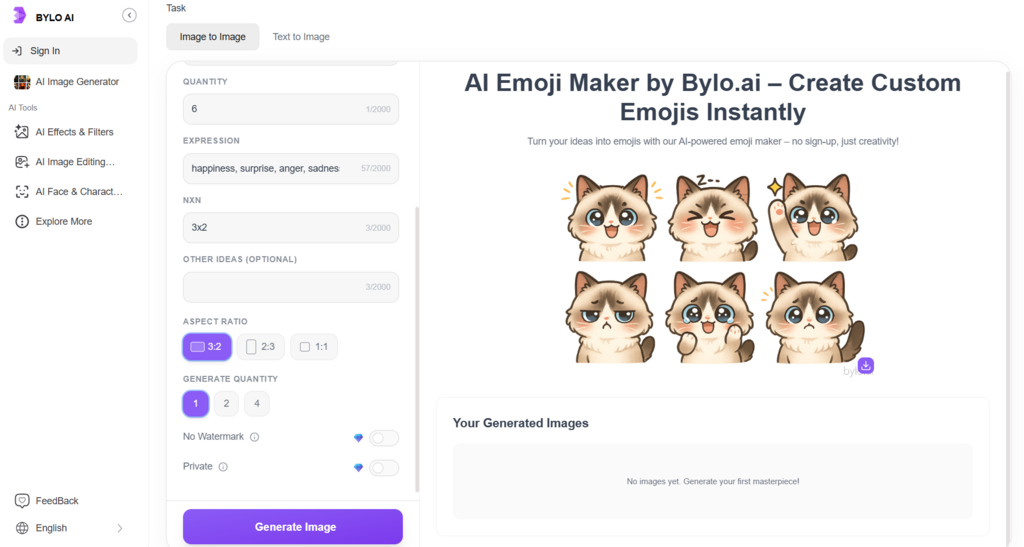
This shift has driven interest in AI emoji makers that simplify the process. With an emoji maker from photo, users can turn images into consistent, reusable emojis without design experience. Tools like Bylo.ai make this workflow accessible through an emoji maker online, allowing teams to generate visual assets quickly and focus more on building and refining their web projects. This guide explains how AI emoji creation fits into modern web workflows and how it can be applied in practical design scenarios.
What Is an AI Emoji Maker and How It Works with Photos
An AI emoji maker is a tool designed to convert images into emoji-style visuals automatically. Instead of manually cropping, cleaning backgrounds, and adjusting styles, users can upload a photo and let AI handle the transformation.
This emoji maker from photo approach uses image recognition to identify the main subject and adapt it into a simplified, emoji-friendly format.The result is a clean, shareable emoji—often exported as a transparent PNG—that can be reused across interfaces, content, or design systems. By streamlining image to emoji conversion, AI tools reduce the effort needed to create custom visual assets for web projects.
Why Turning Photos into Emojis Makes Sense for Web Projects
Faster Asset Creation with an AI Emoji Maker
For web teams, efficiency is critical. Using an AI emoji maker allows creators to turn photos into emojis within minutes, without relying on complex design software. An emoji maker online streamlines the process, making it easier to generate visual assets quickly and keep projects moving without unnecessary overhead.
More Control Through Custom Emoji Creation
Custom visuals help web projects stand out. With an emoji maker from photo, users can transform real images into emojis that better align with a site’s tone or interface style. This level of customization gives designers and content creators more control than generic emoji libraries, while avoiding the effort of manual illustration.
Flexible Creation with Image to Emoji and Text to Emoji
Not every project starts with a perfect image. By supporting both image to emoji and text to emoji workflows, modern emoji creators adapt to different needs. Photos can be converted directly, while text descriptions can be used to generate concepts or icons from scratch, making emoji creation more flexible across different stages of web development.
How to Turn Photo into a Custom Emoji Using an AI Emoji Maker
Step 1: Upload a Photo to the Emoji Maker Online
Start by selecting and uploading an image to an emoji maker online. This can be a portrait, product photo, illustration, or any visual element you want to convert into an emoji. Using an emoji maker from photo works best with clear subjects, as it helps the AI emoji maker identify the main focus more accurately.
Step 2: Let the AI Convert the Image into an Emoji
After uploading, the AI emoji maker automatically processes the image. This image to emoji step includes subject detection, background removal, and style adjustment to fit an emoji format. In most cases, the emoji generator completes this conversion quickly, without requiring any manual editing.
Step 3: Download and Reuse the Custom Emoji
Once the emoji is generated, you can download it in a transparent PNG format and reuse it across different projects. Whether applied to interfaces, content, or design systems, this workflow allows creators to generate multiple emojis efficiently using the same emoji creator, making it easy to maintain consistency across web assets.
Common Use Cases for AI Emoji Makers in Web and UI Design
UI Feedback and Status Indicators
An AI emoji maker can be used to create clear, friendly visual cues for interface feedback, such as success states, warnings, or empty-state illustrations. By using an emoji maker, designers can generate lightweight visuals that communicate status without relying on large icons or complex graphics.
Custom Emojis for Website Content and CMS Platforms
Content creators and site owners often need simple visuals to enhance articles, comments, or interactive sections. With an emoji maker online, emojis can be generated quickly and reused across CMS platforms, including blogs and page builders. This makes an emoji creator a practical option for improving readability and engagement without adding heavy visual assets.
Consistent Visual Elements for Product Interfaces
Maintaining a consistent style across a product interface can be challenging. Using an image to emoji workflow, teams can convert photos or illustrations into emojis that follow a unified visual language. An emoji generator helps standardize these elements, making them suitable for buttons, labels, or micro-interactions within web applications.
Custom Emojis as Practical Visual Elements for Modern Websites
As web projects continue to emphasize clarity, speed, and visual consistency, custom emojis have evolved into practical interface elements rather than decorative extras. Using an AI emoji maker, creators can turn photos or text-based ideas into reusable visuals that fit naturally into modern websites, without adding complexity to existing workflows.
By combining image to emoji and text to emoji capabilities, the AI emoji maker offers a flexible way to build lightweight visual assets for design systems. For web and UI teams, this approach supports faster iteration and more expressive design—making custom emojis a useful addition to today’s digital projects.


Leave a Reply