

5 Reasons AI Is Redefining How We Build and Experience the Web
It’s official …
You don’t need to be an experienced developer to build a functional website anymore.
Modern AI web development tools simplify web creation and improve every step of the creation process.
They cut down on repetitive tasks that slow you down, reduce coding errors, and speed up the development cycle. They also help make websites smarter and more personal. You get better design choices, tailored user experiences, and stronger security, without extra manual work.
Artificial Intelligence (AI), powered by large language models and generative AI systems, is redefining how we experience the web. It learns from user behavior and adapts to their preferences. This makes browsing more personalized and helps users find what they need more quickly.
Let’s take a closer look at all of these details below.
Here are five reasons AI is rewriting the rules when it comes to building and experiencing the web. (And what you should do about it.)
1. AI Is Breaking Barriers To Make Web Creation Accessible to All
You don’t have to write code line by line to build a stunning website today. AI-powered low-code and no-code website builder platforms make it easier to build, especially with AI tools for UI/UX designers integrated into the workflow. Platforms like these simplify the development cycle and reduce manual coding and errors.
Besides design, these tools support the entire web creation process, not just the technical build.
This includes everything involved in bringing a website to life, from planning and designing to coding, content writing, testing, and launching.
For example, tools like Otter AI and other alternatives make collaboration easier by transcribing meetings, generating captions, and helping teams stay aligned. Everyone can contribute to a web creation project, from content creators to project managers, without complicated tech getting in the way.
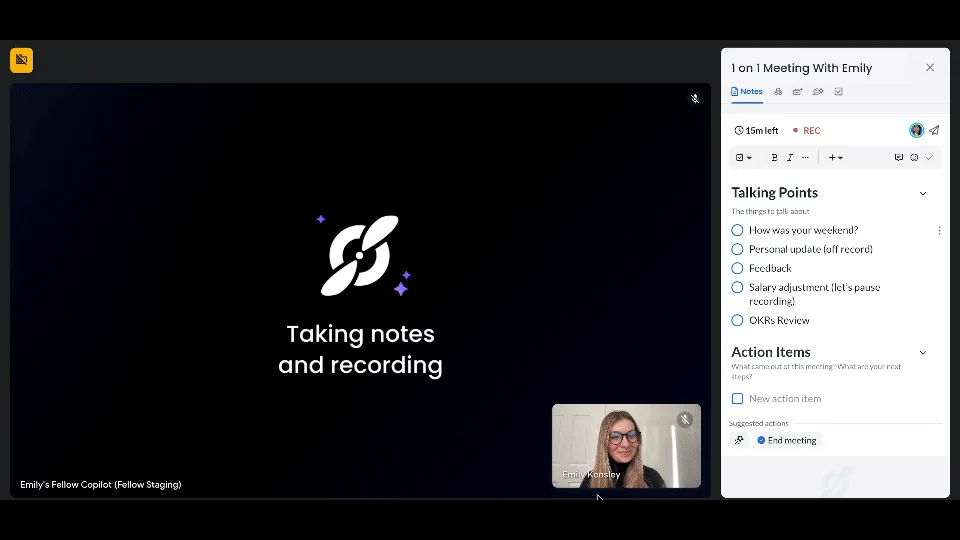
TL;DR: Accessibility is the main theme here. While web development used to be a highly technical skill, it is now possible for just about anyone (including non-technical users) to learn to use AI tools, such as AI models and agents, to build web experiences.
2. AI Is Transforming Web Design From Guesswork to Data-Driven Decisions
Design is no longer a shot in the dark. AI studies user behavior (where people click, scroll, and pause) using Natural Language Processing and predictive analytics models to suggest smarter layouts, color palettes, and content placement.
This is great news because you don’t have to waste time testing dozens of designs. AI shows you what performs best based on real user input.
You also get instant feedback during the design process.
AI-driven tools powered by large language models and AI models can identify weak spots in your layout, recommend visual hierarchy adjustments, and even automatically adjust spacing and contrast for improved readability. You have a smart assistant helping you make the best changes as you build. Platforms like Figma Design and Framer AI now integrate design-assistance features that generate interactive prototypes and improve UI/UX design with high-fidelity suggestions.
TL;DR: Data-driven web design from the web creator’s point of view is the main theme here. Instead of guessing what works, you get actionable insights that help you create stunning websites aligned with how individual users behave.
This is what happens during design. But what if the site kept learning after launch?
3. AI Makes Every Web Experience Feel Tailor-Made
Every click tells a story that AI can use to create tailor-made user experiences after a site goes live.
With AI decisioning powered by autonomous AI agents and multi-agent research systems, your site can respond to real user behavior (like lingering on a feature, skipping a section, or clicking a product twice) and adjust layouts, messaging, or calls to action (CTA) in real time.
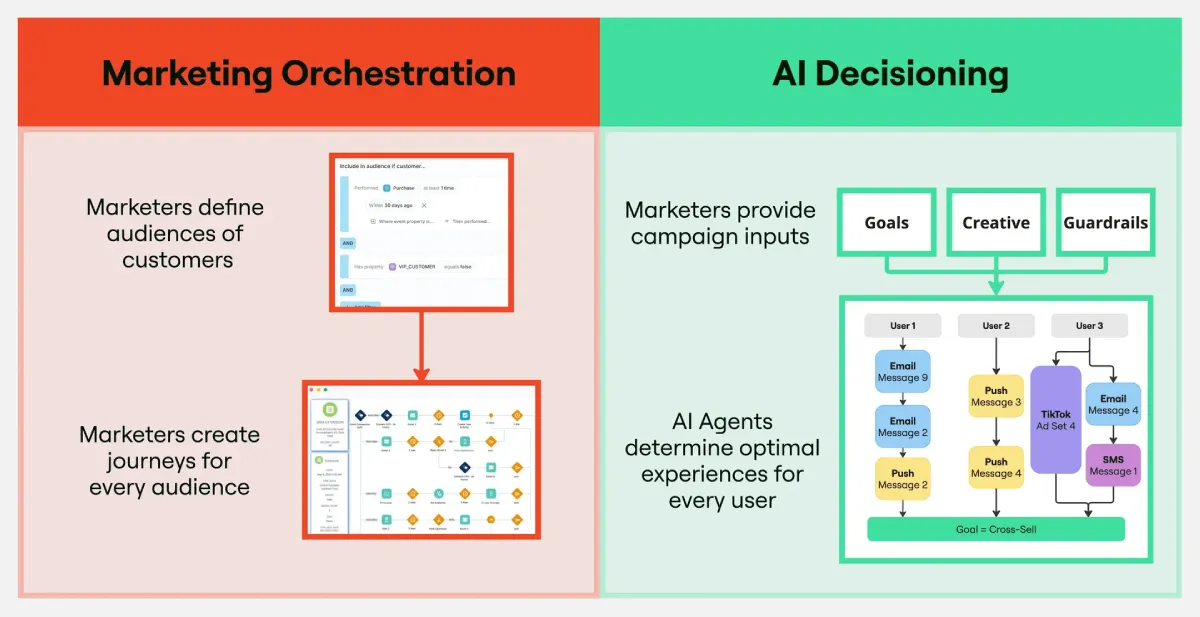
Instead of designing for a broad persona, the experience adapts to each visitor, without extra work on your end.
This means no two users get the same experience, because they don’t have the same behavior.
This type of agentic development platform approach allows AI agents to optimize user experiences in real time while maintaining data privacy and content moderation standards.
TL;DR: Personalized user experiences from the visitor’s point of view are the main theme here. The right AI tools promote more engaging, relevant interactions with each visitor.
4. AI Is Automating How Websites Serve, Sell, and Support Users
AI is taking over the repetitive tasks of online sales and customer support.
For instance:
- Interactive product quizzes help guide buyers toward the right product choice without needing a human assistant.
- Automated support flows resolve frequent issues and smoothly route more complex cases to your team.
- Chatbots and interactive AI avatars answer common questions instantly, reducing wait times and keeping visitors engaged.
- AI-driven dashboards support virtual assistants in the medical field as they manage patient data and scheduling with higher precision.
With AI managing these routine interactions, you get more time to focus on complex problems and strategic priorities.
Automation also enhances the user experience on your site. Fast, accurate responses at every step keep people moving forward. You can look forward to fewer abandoned carts, faster resolutions, and higher customer satisfaction, without the added manual work.
TL;DR: Real-time service and support is the main theme here. AI chatbots, guided selling, and automated support flows keep your website active and smart without consuming company resources.
5. AI Is Strengthening Web Security With Continuous, Adaptive Defense
Security used to mean ticking tons of technical boxes on a checklist. Now, AI takes it a step further.
AI Security Posture Management (AI-SPM) tools keep a constant watch on your website’s defenses. They can detect new threats as they appear and automatically adjust your security settings without needing manual updates.
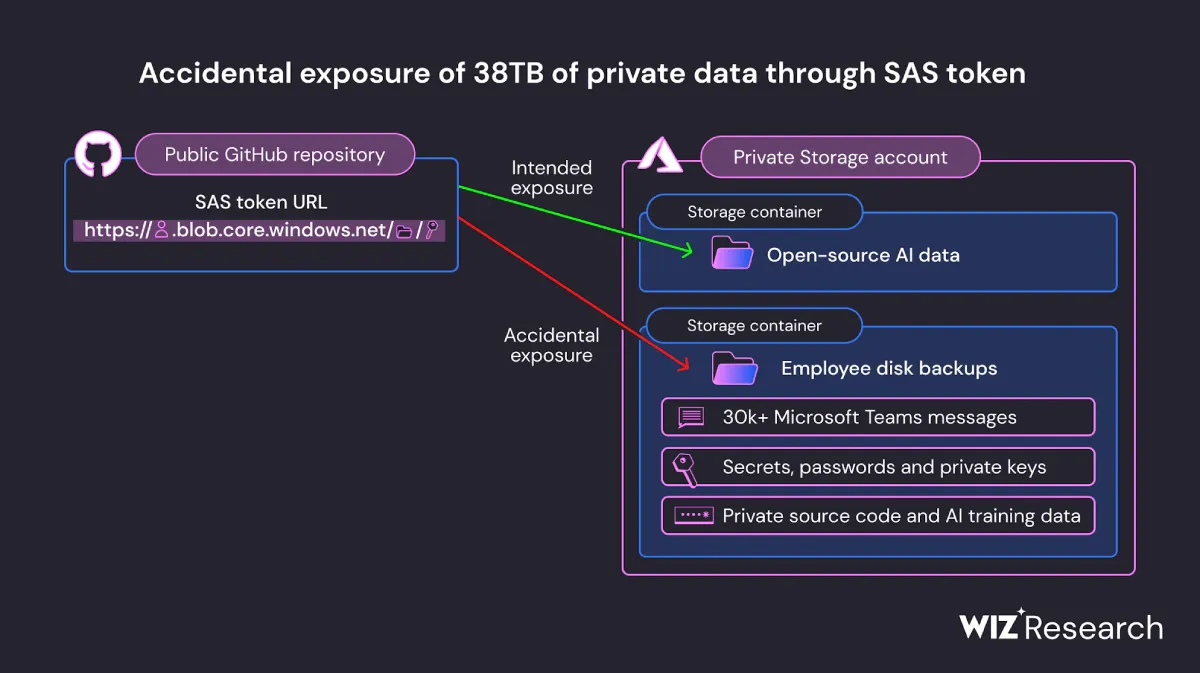
This continuous monitoring reduces the risk of breaches by closing gaps before they become problems. It also lowers the burden on your team, as they no longer have to manually track every potential threat.
TL;DR: Making website security smarter, adaptive, and less reliant on manual work is the main theme here. Using AI-SPM means your site adapts to evolving attacks in real time, which keeps user data safe and your website steady.
How To Apply AI-Powered Web Innovations to Your Projects
Understanding AI’s impact is one thing. But putting it into action is where real results happen.
Here’s how you can start using AI-powered platforms to transform your web creation and user experience right now:
1. Choose AI-Enhanced Platforms for Faster Builds
No-code and low-code platforms get AI hype, but what really matters is how they fit into your team’s process. Look for builders that learn from brand content and goals.
For example, select platforms that analyze your existing assets — such as images, copy, or product details — and tailor design suggestions that reflect your unique voice and audience.
Instead of settling for default AI designs, use these platforms’ customization features to iterate.
Treat AI as a design collaborator, not a one-and-done fix. Push the AI to offer multiple concept options and test them with small user groups before launch. This iterative use of AI cuts down wasted development hours and sharpens your site’s fit for your market.
2. Use Behavioral Data To Design With Precision — Test and Evolve Constantly
Heatmaps and click-tracking tools are common, but the next level is combining them with AI-driven pattern recognition to uncover why users behave a certain way. For example, don’t just note where people drop off; use AI to correlate that behavior with page load times, content type, or visual clutter.

Turn these insights into hypotheses, then run A/B tests with AI-powered experimentation tools that automatically identify winning design tweaks.
Set up weekly or biweekly reviews of these tests, and incorporate data-driven design changes into your regular website maintenance.
3. Build Truly Adaptive User Journeys With Dynamic AI Decisioning (Start Small, Then Scale)
Personalization sounds great, but it’s easy to overwhelm your team with too many variables.
Start by mapping out just two to three key behaviors or triggers that meaningfully impact user decisions. (Like returning visitors, cart abandonment, or engagement with a high-value feature.)
Use AI to automate real-time adjustments for these behaviors first. For example, show returning visitors personalized product recommendations or targeted offers based on their prior browsing behavior, without altering the entire site experience.
Once you validate the impact, expand to more complex behaviors and multi-step user journeys.
4. Automate Customer Interactions for Seamless Support and Sales
Deploy AI chatbots and guided selling tools to handle routine inquiries and assist users in making purchasing decisions.
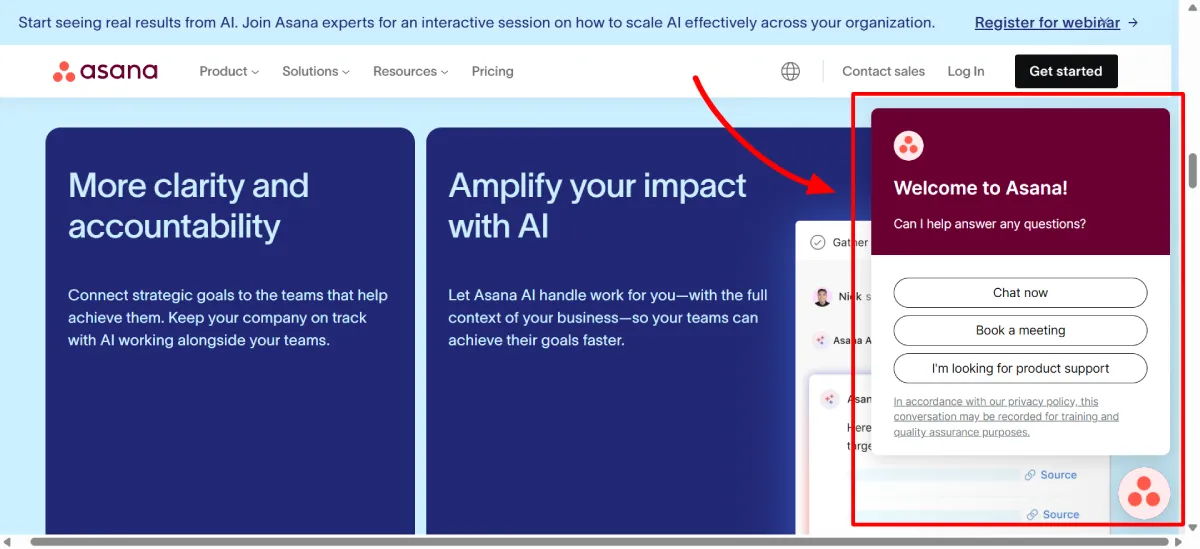
Begin with common questions and expand as the bot learns.
Be sure to also automate support ticket routing so your team can focus on complex issues while routine cases resolve automatically.
5. Integrate AI-Powered Security Solutions Early
Use AI-SPM tools that continuously monitor vulnerabilities and respond to threats automatically.
Regularly review AI-generated risk reports with your security team to identify patterns and adjust defenses proactively. As your website and threat landscape evolve, configure your AI tools to dynamically update security policies. (For instance, adjust firewall rules or access controls based on detected risks.)
Wrap Up
AI is central to how we build and experience the web. It makes web creation more accessible, designs smarter, experiences more personal, services more instant, and security more adaptive.
To stay ahead, explore how AI-powered tools can streamline your web creation projects and enhance user experiences. If you need ready-made website templates, consider checking out PortoTheme.
Build a professional site faster and easier with PortoTheme now — no coding needed.


Leave a Reply