

7 Best Free Text to Speech Tools for Quick Voiceovers
Recording your own voice for a project is often harder than it looks. You need a quiet room, an expensive microphone, and plenty of patience to get a clean take. If you make a small mistake, you usually have to start the whole recording over again. This is why many people now turn to automated voices to save time and energy.
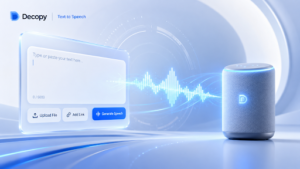
Using a reliable text to speech tool allows you to skip the recording phase entirely. You simply type your script into a box and let the software generate the audio for you. This approach saves hours of editing and ensures that your voiceovers sound consistent every single time.
Finding a quality text to speech free ai is a major priority for students and new creators who are working with a limited budget. You want an option that sounds natural without having to pay for a monthly subscription. There are several excellent tools available that provide realistic results for zero dollars.
1. Decopy AI
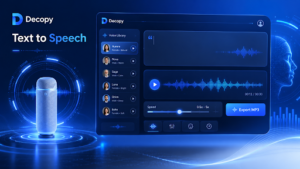
Decopy AI is designed for people who need high quality results without a complicated setup. It focuses on a clean user experience that allows you to generate audio in just a few clicks. This makes it a great choice for beginners who do not want to spend hours learning how to use a new piece of software.
Key Features
The platform offers a variety of voice profiles that range from professional to casual. It processes text quickly and allows you to download your audio files in standard formats. The interface is very intuitive, so you can start working on your project immediately after signing up.
Pros and Cons
One of the biggest advantages is the speed of the rendering process. You do not have to wait long to hear your results. On the downside, it may have fewer advanced customization options compared to technical tools built for developers.
Best For
This tool is best for social media creators and freelancers who need to produce quick drafts or voiceovers for short videos.
2. Google Cloud Text to Speech
Google provides a professional grade tool that uses deep learning technology to create human like speech. It is one of the most powerful engines available and is used by many large companies to power their applications.
Key Features
You get access to over 220 voices across more than 40 languages. It uses WaveNet technology, which is known for producing audio that sounds incredibly close to a real human voice. It also supports SSML, which lets you add pauses or change the pronunciation of specific words.
Pros and Cons
The audio quality is among the best in the industry. However, the setup process can be a bit confusing because you have to create a Google Cloud account. This involves navigating a technical dashboard that might feel overwhelming if you are not a developer.
Best For
This is an ideal choice for tech savvy users and developers who want the highest possible audio quality and do not mind a technical setup.
3. Microsoft Azure Speech Studio
Microsoft offers some of the most realistic neural voices on the market today. Their Speech Studio platform is a robust environment where you can fine tune almost every aspect of the voiceover.
Key Features
The tool provides neural text to speech that captures the rhythm and intonation of human voices. You can adjust the pitch, speed, and even the speaking style. For example, you can make a voice sound cheerful, empathetic, or professional depending on your needs.
Pros and Cons
The realism of the voices is excellent. It is particularly good for long form content like audiobooks. The main drawback is that the interface is quite complex and contains many features that a casual user might never need.
Best For
Professional video producers and content creators who need total control over the emotional tone of their voiceovers will find this tool very useful.
4. IBM Watson Text to Speech
IBM Watson is a leader in the world of enterprise artificial intelligence. Their speech tool is built for clarity and professional use cases.
Key Features
Watson offers expressive synthesis that allows the AI to sound more engaged. It supports multiple languages and provides real time streaming capabilities. This means you can generate audio as the text is being written or processed.
Pros and Cons
The voices are very clear and easy to understand, which is perfect for business settings. However, it does not offer as many casual or character voices as some of the other platforms. It focuses more on being functional rather than creative.
Best For
This tool is best for corporate presentations, training modules, and customer service applications where a steady and clear voice is required.
5. Amazon Polly
Amazon Polly is a veteran service in the cloud computing space. It is part of the Amazon Web Services suite and is used to power many speech enabled products.
Key Features
Polly offers both standard and neural voices. It includes a Newscaster speaking style that is designed specifically for reading news articles or blog posts. It also allows you to use pronunciation lexicons to ensure that technical terms are said correctly.
Pros and Cons
It is very cost effective for large scale projects and has very low latency. The biggest hurdle is the AWS console itself. It is a massive platform that can be intimidating for someone who just wants to convert a single paragraph of text.
Best For
App developers and creators who are working on large scale projects that require thousands of voiceover files will benefit from Polly.
6. Clipchamp
Clipchamp is a web based video editor that is now owned by Microsoft. It includes a built in voice generator that is very convenient for people who are already editing video.
Key Features
The voice generator is integrated directly into the video timeline. You can type your script and the audio appears as a track that you can move around. It offers a wide selection of realistic voices in many different languages.
Pros and Cons
The main benefit is that you can sync your audio and video in one place without switching between different websites. The free version is quite generous, though there are some limits on the resolution of your video exports.
Best For
YouTubers, TikTokers, and social media managers who want an all in one solution for video and audio editing will love this tool.
7. NaturalReader
NaturalReader is a tool that focuses heavily on accessibility and personal use. It is very popular among students and people who prefer to listen to text rather than read it.
Key Features
It includes OCR technology, which means it can read text from images or scanned PDF files. There is also a browser extension that can read web pages out loud. It has a mobile app that syncs with your desktop so you can listen to your documents on the go.
Pros and Cons
It is incredibly easy to use and is great for proofreading your own work. You can hear mistakes in your writing that you might miss when reading. The free voices are a bit more basic and robotic than the premium ones, but they are still very functional.
Best For
Students, researchers, and anyone with reading difficulties who needs a simple way to convert documents into audio files.
Comparison Summary
| Product | Primary Benefit | User Level |
| Decopy AI | Speed and Simplicity | Beginner |
| Google Cloud | Language Variety | Advanced |
| Microsoft Azure | Natural Realism | Professional |
| IBM Watson | Business Clarity | Corporate |
| Amazon Polly | Scalability | Developer |
| Clipchamp | Video Integration | Creator |
| NaturalReader | Accessibility | Student |
How to Choose the Right Tool
Selecting the right software depends on your specific goals. If you are a student trying to get through a long list of research papers, NaturalReader is likely your best bet. Its ability to handle PDFs and web pages makes it a specialized tool for learning. You can listen to your assignments while you are commuting or doing chores.
Freelancers who need to create quick demos for clients should look toward Decopy AI. It allows you to produce a professional sounding voiceover in a matter of minutes. You do not have to worry about complex settings or technical jargon. It gets the job done so you can move on to your next task.
If you are a creator building a faceless YouTube channel, Clipchamp or Microsoft Azure might be the better choice. These tools offer more control over the way the voice sounds. You can adjust the speed to match your video clips or change the tone to keep your audience engaged. Having the voiceover tool inside your video editor saves a lot of time during the production process.
Final Recommendation
For most people who need a quick and reliable solution, starting with a simple platform like Decopy AI is the best move. It removes the barriers to entry and lets you see the benefits of automated voices immediately. If you find that you need more technical features later on, you can then explore the cloud based options from Google or Microsoft.
The world of voice synthesis has improved significantly over the last few years. You no longer have to settle for robotic or grating sounds. With these free tools, you can produce high quality audio that enhances your projects and saves you from the stress of manual recording. Whether you are a student, a freelancer, or a creator, there is a tool on this list that will fit your workflow perfectly.


Leave a Reply