
How to Create Scroll-Stopping Visual Content with AI Image and Video Generation
Every designer I know has the same complaint: the gap between creative vision and finished visual assets keeps growing wider. A brand refresh that should take a week stretches to three because the client needs forty product shots, twelve social media variants, and a handful of short video clips for their landing page — all in different aspect ratios, all needing unique creative direction. The tools exist to produce this work manually, but the production hours simply don’t.
I hit this wall hard last autumn when a freelance project required me to deliver a complete visual identity package — static images, animated social content, and product showcase videos — within five business days. Traditional stock libraries couldn’t match the aesthetic I needed. Hiring a photographer and videographer for a rush job was financially out of the question. I started looking at AI generation tools purely out of desperation, expecting to find interesting toys that couldn’t produce professional work.
Finding a Platform That Actually Delivered Professional Output
What changed my expectations was discovering that the current generation of AI models had moved far beyond the blurry, inconsistent output I’d dismissed in 2024. I set up an account on GenMix AI after a colleague mentioned it handled both image generation and video creation through a single interface. The platform aggregates multiple AI models — including Google’s Gemini Flash for images and various video generation architectures — so you can match different creative needs to different engines without juggling separate subscriptions.
Within my first session I generated a set of product lifestyle images that genuinely surprised me. The compositions were balanced. The lighting felt natural. The colour palette stayed consistent across generations when I kept my prompts structured. This wasn’t a novelty filter — it was a legitimate production tool.
AI Image Generation: What Actually Works in a Professional Workflow
The Speed-to-Quality Equation
The most significant shift wasn’t image quality alone — it was the combination of quality and speed. Generating a high-resolution image from a text prompt takes roughly 15-30 seconds. Running five variations of the same concept to find the strongest composition takes under three minutes. Compare that to the traditional cycle of briefing a photographer, scheduling a shoot, waiting for selects, and requesting edits.
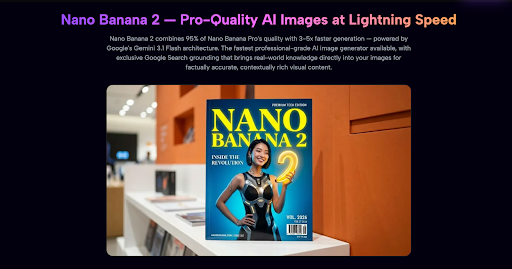
I tested Nano Banana 2 for a batch of product-style images and the results were striking. The model combines Google’s Gemini 3.1 Flash architecture with built-in Google Search grounding, which means it pulls real-world visual knowledge into the generation process. The practical result: images that feel contextually accurate rather than generically “AI-looking.”
Prompt Strategies That Produce Usable Results
After generating several hundred images over the past four months, I’ve developed a reliable prompt structure that consistently produces professional output:
- Lead with the subject and context — “A ceramic coffee mug on a marble countertop” beats “Generate a nice picture of a mug”
- Specify lighting explicitly — “Soft window light from the left, warm colour temperature” eliminates the guesswork that produces flat, artificial lighting
- Reference a visual style — “Product photography style, shallow depth of field, neutral background” gives the model a clear aesthetic target
- Include composition direction — “Rule of thirds placement, negative space on the right for text overlay” produces images ready for design layouts
- State the aspect ratio upfront — “16:9 landscape” or “4:5 portrait” prevents cropping headaches downstream
The difference between a vague prompt and a structured one isn’t marginal — it’s the difference between getting something you might use and something you definitely will.
Adding Motion: Where AI Video Effects Changed My Output
Static Images Stop Working When Algorithms Demand Movement
The platform algorithm shift toward short-form video content caught many designers off guard. Static posts that previously earned strong engagement started disappearing from feeds entirely in late 2025. Every major social platform — Instagram, TikTok, LinkedIn — now prioritises motion content in their recommendation systems. If your visual assets don’t move, they’re increasingly invisible.
I started experimenting with AI video effects as a bridge between static design work and full video production. The AI twerk video generator was my first test — I uploaded a full-body photo and the AI analysed the body position, mapped skeletal structure, and generated a fluid dance animation that preserved the subject’s appearance throughout. The output was a ten-second clip that stopped the social media scroll dead.
The Engagement Numbers That Justified the Shift
My first AI-generated motion clip earned 3.8x the engagement of the static image version of the same content. Over a two-week testing period alternating between static and motion posts, the pattern held consistently:
| Content Type | Average Engagement Rate | Average Watch Time | Share Rate |
| Static Image | 2.1% | N/A | 0.3% |
| AI Motion Clip (5-10s) | 7.9% | 8.2 seconds | 1.7% |
| AI Dance Effect | 11.4% | Full loop (2-3 replays) | 4.2% |
Dance effects in particular drove extraordinary share rates. People share content that surprises them, and a photo that suddenly starts dancing delivers exactly that surprise factor. The motion quality from current-generation models — fluid skeletal tracking, consistent clothing texture, stable backgrounds — makes the output compelling enough for professional social media use.
Building a Practical Weekly Production System
The Batch Generation Approach
Rather than generating assets on demand throughout the week, I’ve moved to a batch production model that maximises efficiency:
- Monday morning (40 minutes) — Generate the week’s image assets: product shots, social media graphics, blog header images. Run 3-5 variations of each concept and select the strongest
- Monday afternoon (20 minutes) — Generate motion content: upload selected photos to video effect templates, queue dance animations and cinematic transitions
- Wednesday (30 minutes) — Post-processing: add text overlays, branding elements, and platform-specific formatting in Figma or Canva
- Throughout the week — Schedule and publish from the pre-built asset library
Total weekly time investment for multi-platform visual content: under two hours. Six months ago, the same volume consumed an entire working day — sometimes more when revisions were needed.
Input Quality Rules That Took Months to Learn
AI generation follows a strict garbage-in-garbage-out principle. After months of testing, these are the input rules that consistently produce professional output:
| Input Factor | What Works | What Fails | Why It Matters |
| Image Resolution | High-res, sharp focus originals | Screenshots or compressed files | Low-res input produces soft, unconvincing output regardless of model quality |
| Lighting | Even, diffused natural light | Harsh shadows or backlit subjects | Uneven lighting causes flickering artifacts in animated output |
| Background | Simple, uncluttered scenes | Busy environments with many objects | Complex backgrounds produce edge distortion during video animation |
| Body Visibility | Full body visible, head to toe | Cropped at waist or chest | Dance and motion effects need complete body context for convincing movement |
| Subject Count | Single person centred in frame | Group photos or partial visibility | Multiple subjects cause unpredictable motion interference |
| Pre-Processing | Original, unfiltered photos | Heavy beauty filters or HDR | Existing filters confuse the AI’s spatial analysis algorithms |
Honest Limitations After Four Months of Daily Use
These tools have genuinely restructured my production workflow, but they’re not replacements for everything:
- Video length ceiling — Generated clips cap at 5-15 seconds. They’re perfect for social media teasers and landing page hero sections, but they won’t replace traditional video production for longer content
- Variability between generations — Running the same prompt twice produces similar but not identical results. If pixel-perfect consistency across a large batch matters for your brand, expect to generate extras and curate
- Complex scene limitations — Reflective materials, unusual body poses, and highly detailed backgrounds still reduce output quality. Simple compositions consistently outperform complex ones
- Learning the prompt language — While the tools themselves have zero learning curve (upload, select, generate), writing prompts that consistently produce usable results takes practice and iteration
Who Gets the Most Value From AI Visual Generation
After integrating these tools into daily production work for four months, the clearest value emerges for designers and content teams who need high-volume visual assets without proportionally scaling their production hours. If you’re managing visual content across multiple social platforms, producing marketing materials for clients on tight timelines, or building landing pages that need both static imagery and motion content — the time compression alone justifies the investment.
The models improve on a quarterly cadence. Output quality today is measurably better than it was six months ago, and the trajectory shows no signs of flattening. Whether you’re generating product imagery, creating motion content for social engagement, or producing visual assets at a pace that traditional production simply can’t match — the gap between AI-generated and professionally produced visual content narrows with each model generation. For any designer spending more time on asset production than on actual creative direction, the workflow shift is worth making now.


Leave a Reply