
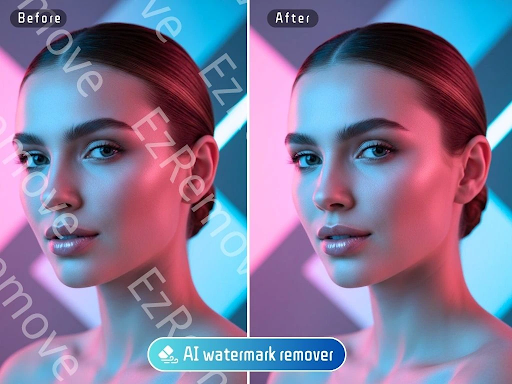
Best Free AI Watermark Removers
Finding the perfect image for your project, only to see it covered by a distracting watermark, can be frustrating. Manually editing these marks out is tedious and often leaves messy results. Thankfully, AI has made this process much simpler, allowing you to clean up images in seconds. This guide ranks the best free AI watermark removers available today, so you can get clean, professional-looking visuals without the hassle.
We’ll break down the top tools, looking at their features, performance, and who they’re best suited for. Let’s find the right solution for you.
Top 1: EzRemove AI Watermark Remover
Overview
EzRemove AI stands out for its simplicity and effectiveness. It’s a web-based tool designed specifically for one purpose: to remove unwanted objects from photos cleanly. The interface is incredibly straightforward, requiring no technical skills to get started. You upload your image, highlight the watermark, and let the AI work its magic. It uses advanced algorithms to analyze the surrounding pixels and intelligently fill in the space, making the edit look natural and seamless. We found its performance to be consistently impressive, especially with complex backgrounds, making it our top choice for a reliable Free AI Watermark Remover.
Key Features
* Intuitive Brush Tool: Simply paint over the watermark you want to remove. The tool is precise and easy to control.
* Context-Aware Filling: The AI doesn’t just smudge the area. It understands the context of the image to rebuild the background believably.
* Fast Processing: Most removals are completed in under a minute, making it perfect for quick edits.
* No Sign-Up Required: You can use the tool immediately without creating an account, which is great for one-off tasks.
Pros & Cons
Pros:
* Extremely easy to use.
* High-quality, natural-looking results.
* Completely free for standard use.
* Works quickly in your browser.
Cons:
* Lacks advanced editing features like batch processing.
* Resolution of the downloaded image may be limited in the free version.
Best For
This tool is ideal for marketers, social media managers, and casual users who need to quickly clean up an image without downloading software or learning complex editing techniques.
Top 2: EzRemove AI Image Generator
Overview
While not a remover in the traditional sense, the EzRemove AI Image Generator offers a powerful alternative: creating a brand-new, unique image from scratch. If you’re struggling with a watermarked photo, you can use this tool to generate a similar, royalty-free visual that is entirely your own. Just describe the scene, style, and elements you want, and the AI will produce several options. It’s a proactive solution that avoids copyright issues altogether. By using a Free AI Image Generator Online, you can direct the creative process and get a perfect, watermark-free image every time.
Key Features
* Text-to-Image Generation: Create detailed images from simple text prompts.
* Multiple Art Styles: Choose from various styles like photorealistic, cartoon, digital art, and more.
* High-Resolution Outputs: Download high-quality images suitable for professional use.
* Fast Generation: Get multiple image concepts within seconds of entering your prompt.
Pros & Cons
Pros:
* Creates 100% original, copyright-free images.
* Offers limitless creative possibilities.
* Eliminates the need to search for stock photos.
* Simple and fun to use.
Cons:
* Doesn’t remove watermarks from existing images.
* Achieving a very specific result can require some prompt experimentation.
Best For
Content creators, bloggers, and designers who want unique visuals and wish to avoid the hassle of stock photo licenses and watermarks entirely.
Top 3: WatermarkRemover.io
Overview
WatermarkRemover.io is another highly popular, single-purpose tool that focuses exclusively on removing watermarks. Its AI can automatically detect and erase watermarks without manual highlighting, which saves a significant amount of time. The platform supports various types of watermarks, from logos and text overlays to date stamps. It’s a powerful and automated solution that delivers clean results with minimal user effort.
Key Features
* Automatic Detection: The AI identifies the watermark on its own, so you don’t have to select it.
* Batch Processing: The paid version allows you to upload and process multiple images at once.
* Multi-Color Watermark Removal: It effectively handles watermarks that have multiple colors or gradients.
* API Access: Developers can integrate its functionality into their own applications.
Pros & Cons
Pros:
* A fully automated process is very fast.
* Good at handling different types of watermarks.
* Clean and simple user interface.
Cons:
* Free version has limitations on file size and resolution.
* Sometimes struggles with very large or opaque watermarks on intricate backgrounds.
Best For
Users who need to process multiple images quickly and prefer an automated tool that requires almost no manual input.
Top 4: Fotor
Overview
Fotor is a comprehensive online photo editor that includes a powerful AI object remover among its many features. While not just a watermark remover, the tool is highly effective for this task. You can use its AI brush to paint over the watermark, and Fotor’s AI will intelligently reconstruct the area. Because it’s part of a full editing suite, you can immediately make other adjustments to your image, like color correction, cropping, or adding text, all in one place.
Key Features
* All-in-One Editor: Access a wide range of photo editing tools beyond just watermark removal.
* AI-Powered Removal: The “AI Remover” tool is precise and creates clean, natural-looking edits.
* Template Library: Fotor offers thousands of templates for social media posts, presentations, and more.
* Mobile and Desktop Apps: Available across multiple platforms for editing on the go.
Pros & Cons
Pros:
* A versatile tool with many editing functions.
* The removal quality is generally high.
* Great for users who want to do more than just remove a watermark.
Cons:
* Many of the best features, including high-resolution downloads, are behind a paywall.
* The interface can feel cluttered for users who only need one specific tool.
Best For
Individuals and businesses are looking for an all-in-one photo editor that can handle watermark removal as well as other creative tasks.
Top 5: Inpaint
Overview
Inpaint is a classic tool in the object removal space that has been refined over many years. It specializes in non-destructively removing unwanted elements from photos, including watermarks, people, and skin blemishes. The technology works by filling the selected area with intelligently generated textures pulled from the surrounding image data. It’s available as both an online tool and downloadable software for Mac and Windows.
Key Features
* Advanced Reconstruction Algorithm: Inpaint’s algorithm is excellent at rebuilding complex textures like grass, wood, or fabric.
* Multiple Selection Tools: Offers a marker, lasso, and polygon tool for making precise selections.
* Batch Processing (Desktop Version): The downloadable software allows you to process entire folders of images.
* Simple, Focused Interface: The tool is designed to do one job and do it well, without extra clutter.
Pros & Cons
Pros:
* Excellent results on photos with detailed or repeating patterns.
* Relatively easy to use for such a powerful tool.
* The online version is free for basic use.
Cons:
* The free online version has image size and format limitations.
* Full features like batch processing are only available in the paid desktop version.
Best For
Photographers and editors who need a reliable and powerful tool for removing objects from images with complex backgrounds and are willing to use a desktop application for more features.
Comparison Summary
| Tool | Key Strength | Ease of Use | Free Version Quality | Best For |
| EzRemove AI Remover | Simplicity & Quality | Very High | Excellent | Quick, high-quality single edits |
| EzRemove AI Generator | Original Image Creation | Very High | Excellent | Creating new, custom visuals |
| WatermarkRemover.io | Automation & Speed | High | Good | Fast, automated batch removals |
| Fotor | All-in-One Suite | Medium | Good | Editing beyond watermark removal |
| Inpaint | Complex Backgrounds | Medium | Good | Photographers needing precision |
Final Recommendation
Choosing the right tool depends entirely on your needs.
For the vast majority of users who need a fast, free, and high-quality solution, EzRemove AI Watermark Remover is the clear winner. It’s incredibly easy to use and delivers consistently clean results without any fuss.
If your goal is to avoid watermark issues altogether and create unique content, the EzRemove AI Image Generator is an outstanding alternative. It gives you complete creative control and produces professional, royalty-free images in seconds.
For those who need more advanced features like batch processing or a full editing suite, options like WatermarkRemover.io and Fotor are worth exploring, though you may encounter stricter limitations in their free versions.


Leave a Reply