
Cutting Content Costs: How to Use AI Pose Generators to Transform Brand Photography
In today’s digital landscape, high-quality visuals are essential, yet the traditional cost of producing them—studios, models, and endless reshoots—is a major bottleneck for scaling brands. Marketers often struggle with static image libraries that lack the flexibility needed for multi-channel campaigns, leading to wasted budgets and stagnant creative.
By integrating an AI pose generator into your creative workflow, you can bypass the logistical nightmares of reshoots and manual editing. Whether you need to change image pose to better highlight a product or generate a specific body reference for a new design, this technology allows you to transform a single base image into a versatile content library. This not only slashes production costs but also gives creative teams the agility to pivot their visual storytelling in minutes.
Why Choose AI Pose Generator to Impose Your Marketing Impact
Generate Custom Poses from Text Descriptions
With the AI pose generator, you can create custom poses by simply inputting a text description. Whether you’re describing a mood, action, or scene, the AI uses your words to generate highly detailed, tailored poses that match your vision. This feature is ideal for marketers who need quick, unique visuals for their campaigns without spending hours on design or photography.
By providing a few key words or sentences, you can generate poses that fit specific themes, settings, or product needs, all without the need for a professional photographer or designer. The AI pose generator makes it easier than ever to transform your ideas into visual content, ensuring each pose aligns perfectly with your campaign.
Edit Multiple Poses Within One Image
One of the standout features of the AI pose generator is its ability to generate and edit multiple poses within a single image. This is particularly useful for marketing campaigns that require a group of people or characters interacting in the same setting. The tool allows you to seamlessly alter the poses of each individual within the image, saving time and effort on complex edits.
Whether you need several individuals in different poses or a dynamic scene involving multiple characters, the AI pose changer ensures that all elements within the image maintain their natural flow and consistency, perfect for advertisements, social media posts, or influencer collaborations.
Consistent Character Poses Across Different Angles
The AI pose generator ensures that your characters maintain consistency across various poses and angles, which is essential for creating cohesive marketing materials. The tool can adapt your character’s pose from different perspectives, allowing you to create dynamic, realistic content for ads, videos, and social media posts.
This feature is especially valuable for campaigns that require multiple versions of a character, such as for product showcases, digital campaigns, or even animated content. The AI generates poses that remain consistent with your original character design, preserving brand identity across all assets.
Realistic and Physically Accurate Poses
The AI pose generator is built to create highly realistic and physically accurate poses that adhere to natural human movement. Whether you’re generating standing, sitting, or action-oriented poses, the AI takes into account real-world physics to ensure that each pose looks believable and natural.
This realistic approach helps to avoid stiff or awkward poses often seen in other AI-generated visuals, providing your campaigns with more authentic, engaging images that resonate with your audience. With the pose maker, you can trust that the generated poses will maintain a high level of realism, making your marketing content look professional and polished.
Beyond Humans: Versatile Use Cases for Every Brand Voice
One of the most significant advantages of AI pose generator is its versatility across different artistic styles. It isn’t just for fashion brands with human models; it’s a comprehensive pose maker for any visual identity.
Mastering Non-Human and Mascot Poses
For brands that use mascots or animal characters, finding the right body reference can be nearly impossible. Whether you are adjusting the stance of a 3D animated character or a stylized animal, an image to pose generator ensures the movements look natural and consistent with the character’s unique anatomy. This allows you to place your mascot in seasonal campaign shots—like a brand character holding a holiday gift—without needing a new custom illustration from scratch.
Perfecting Anime and Stylized Content
The creator economy thrives on stylized art, but keeping an anime character’s proportions accurate across various scenes is a challenge. By using an AI pose generator from photo, artists and marketers can create a library of consistent poses for virtual influencers or gaming characters. This maintains the “soul” of the character while providing the flexibility to adapt them to banners, social media stories, or promotional videos.
Rapid Prototyping for Product Staging
Before committing to a high-budget shoot, creative directors can use an AI pose generator to storyboard their vision. By generating various body reference images, teams can visualize how a product interacts with a model or a group of characters. This rapid prototyping ensures that when you finally do go to production, every angle and pose has already been “market-tested” internally for maximum impact.
How to Use the AI Pose Generator to Create Custom Visuals
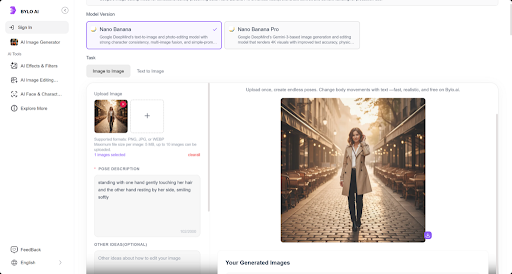
Transforming your creative vision into a final marketing asset is straightforward. Here is how to use the AI pose changer to generate high-quality, custom visuals in three simple steps.
Step 1: Visit the Bylo.ai’s AI Pose Generator
Start by visiting the Bylo.ai platform. Sign up for an account if you don’t already have one. Once logged in, you’ll have full access to the tools you need to create custom poses for your marketing campaigns. Whether you’re looking to generate new visuals from scratch or refine existing images, the platform is easy to navigate and ready for use.
Step 2: Upload Your Image or Enter a Description
Next, you can either upload an image for pose adjustments or enter a detailed description of the pose you need. If you’re starting with text, describe the desired mood, action, or scenario, and the AI pose generator will automatically create a pose that matches your description. For more control, you can also specify details like facial expressions, body angles, and specific accessories or items in the image.
Step 3: Let the AI Generate Your Pose and Download the Image
Once you’ve entered your description or uploaded your image, click the “Generate” button. The AI pose changer will process your input, and within a few minutes, you’ll have your customized visual ready. You can then download your high-resolution asset in PNG format, allowing for seamless integration into your ads, social media graphics, or website landing pages with maximum clarity.
Leveraging AI Pose Generators for Efficient and Creative Marketing
Bylo.ai’s AI pose generator is transforming how marketers create compelling and unique visual content. By automating the process of generating customized poses, it enables brands to produce high-quality images for various marketing channels quickly and cost-effectively. From social media posts to product ads, and influencer collaborations, AI-generated visuals are helping marketers save time while maintaining creative control. By leveraging the flexibility and efficiency of this technology, businesses can stay ahead of the curve and create engaging, consistent, and professional marketing materials that truly resonate with their target audience.


Leave a Reply