
Fastest Business Internet in Montgomery Alabama: 6 Picks Past the 35 Mbps Upload Cap
We all love to flash a 1-gig badge, but push a 100 GB backup through a 10 Mbps upload and you’ll wait more than six hours. Most Montgomery cable and fixed-wireless plans top out between 20 and 50 Mbps upstream, so we drew a firm line at 35 Mbps and stacked every carrier that beats it. That leaves six providers, which we ranked by speed, availability, SLA strength, and cost per upload megabit. Read on to see which network keeps your River Region operation moving when every second, and every packet, counts.
How we evaluated Montgomery business internet
Speed alone doesn’t keep payroll running, so we built a scorecard that balances capacity, uptime, and cost. To make the cut, a provider had to advertise at least 35 Mbps upload before we even ran the numbers.
| Criterion | Why it matters | Weight |
| Availability (on FCC BDC map and provider address checkers) | Fiber on paper is useless if it stops a block away | 20 % |
| Upload capacity | Symmetrical fiber earns full credit; 50 Mbps-cap cable earns partial | 25 % |
| Price per upload Mbps | Normalizes promo hype across tiers and terms | 15 % |
| Reliability & SLA (uptime target, MTTR, wireless failover) | Determines how fast trouble gets fixed, not just how fast bits fly | 20 % |
| Independent performance data | Crowdsourced or licensed speed-test medians add reality checks | 10 % |
| Extras (static IP, managed Wi-Fi, 10 Gb upgrade path) | Future-proofing and IT simplicity | 10 % |
Fastest business internet in Montgomery – quick comparison
Need the TL;DR? The chart below stacks each qualifying provider by technology, headline speed, entry price, contract term, and what kind of uptime promise, if any, you can hold them to.
| Provider | Best for | Technology | Max advertised down / up | Entry price† | Contract | SLA / backup notes |
| WOW! Business | Broadest budget option | Cable (DOCSIS) | 1.2 Gbps / 60 Mbps | $65.99 (promo) | 1- to 3-year term or no contract | Marketing “99 percent network reliability”; LTE failover add-on, no formal uptime SLA |
| AT&T Business Fiber | Off-the-shelf multi-gig symmetry | Shared fiber (PON) | 5 Gbps / 5 Gbps | $285 – $235 w/ wireless bundle | Month-to-month | 5G backup included on 1 Gig and higher tiers; static-IP traffic does not fail over; gateway needs power |
| C Spire Business | Local support, on-net fiber | Shared & dedicated fiber | Up to 1 Gbps / 1 Gbps shared; up to 10 Gbps DIA | Quote | Varies | 99.99 percent uptime SLA; on-net latency and jitter targets in the Network Connectivity SLA |
| Spectrum Enterprise | Contractual uptime guarantee | Dedicated fiber | Up to 100 Gbps sym. | Quote | Multi-year | 100 percent uptime SLA on Dedicated Fiber Internet; 4G/5G failover available |
| Central Access | Prattville/Millbrook/Wetumpka branches | Cooperative fiber | 2 Gbps / 2 Gbps | $79.99 (300 Mbps) to $399.99 (2 Gbps) | No contract | No public SLA; after-hours support limited |
| Uniti Fiber GulfCo | Custom 10-100 Gbps builds | Dedicated fiber / transport | Up to 100 Gbps sym. | Quote | Varies | Contract-specific SLA; MGMix participant |
†Public prices verified September 2, 2026; quote-only providers require an address survey.
For example, WOW! Business’s 1.2 Gbps / 60 Mbps cable tier lists at $70.99 per month, giving Montgomery offices the cheapest ticket past the 35 Mbps upload bar. That pencils out to about $1.18 per advertised upload megabit-handy when a fiber quote lands at five to ten times that rate. WOW! Business also puts its fiber uptime at 99.9 percent based on average availability measured between January and March 2026, a reminder to weigh reliability claims alongside raw speed. By contrast, AT&T’s 5 Gbps symmetrical tier costs about four times more yet delivers more than 80 times the upstream headroom. Spectrum Enterprise and Uniti occupy the enterprise tier; expect written MTTR targets, dual entrances, and no overnight installs.
The sections that follow unpack each carrier, surface hidden costs, and translate these raw numbers into real-world transfer times and downtime credits.
1. WOW! Business: broad coverage on a budget
Need to break past the cable upload ceiling without wrecking your budget? WOW!’s high-speed business internet Montgomery, AL page lists a 600 Mbps service at $65.99 per month alongside a 1.2 Gbps tier for just $70.99. Both require a 1- to 3-year term but include free installation and a three-month modem credit (see the WOW! Business website). If you want to stay month-to-month, the 600 Mbps plan is $89.99 per month with no early-termination fees and unlimited data. The 600 Mbps tier supplies 51 Mbps typical upstream, while the 1.2 Gbps tier reaches 60 Mbps.
Why 51 Mbps matters: a 10 GB design file finishes in about 27 minutes; the same upload drags on for nearly two hours over a 10 Mbps coax link. That extra headroom also shortens daily backups, camera feeds, and POS syncs.
Coverage carries weight. WOW! publishes 12 Montgomery-area ZIP codes on its service page (36117, 36116, 36106, 36109, 36107, 36104, 36105, 36108, 36110, 36066, 36067, 36064), covering Downtown Montgomery, East Montgomery, Cloverdale, Prattville, and Pike Road, so run the address checker before you assume a fiber rival reaches your block. Static-IP blocks ($14.99 per month) and Whole-Business Wi-Fi ($19.99 per month) are optional.
Know the limits before you sign. The quoted “99 percent network reliability” is marketing only, not a credit-backed SLA. The optional Wireless Internet Backup ($44.99 per month for a Cradlepoint E100, plus an optional 8-16-hour battery) keeps traffic flowing during a wired outage; WOW! does not publish whether static-IP sessions survive the switchover, so ask before you anchor a VPN to it. If uptime drives revenue, budget for a second wired carrier or true dedicated internet access.
Bottom line: WOW! lets small offices and storefronts clear the 35 Mbps upload bar without jumping straight to enterprise pricing. Run the address checker, note that the free modem runs three months on promotional plans and the FCC label lists the modem at $11 per month plus a $99 install on standard rates, so ask what the modem costs from month four, and confirm that 51-60 Mbps still covers your busiest hour.
2. AT&T Business Fiber: multi-gig uploads for data-heavy teams
Need to push a 100 GB project to the cloud in minutes, not hours? According to AT&T Business, its 5-Gig symmetrical tier lists at $285 per month, or $235 when you bundle an eligible wireless line. The plan has no annual contract, includes standard installation, and works out to roughly $0.06 per advertised upload Mbps, a price point coax cannot match.
Speed math is stark: that same 100 GB backup that drags for about six hours on a 35 Mbps link finishes in under three minutes here. Video studios, CAD teams, and imaging labs notice the difference every day.
Resilience is baked in. Tiers 1 Gig and above ship with a 5G/LTE gateway, so most traffic rolls over automatically during a fiber cut. Fine print matters, though: static-IP sessions do not follow the failover path, and the backup needs power to work. If your firewall anchors site-to-site VPNs, plan on a UPS and possibly a second wired circuit for true business continuity.
Remember, Business Fiber is shared PON, not dedicated internet access. Still, for addresses already on AT&T’s fiber grid, it is the fastest upgrade you can order online, with no construction bid and no enterprise price tag, just raw upstream velocity.
3. C Spire Business: regional fiber with a hometown touch
National brands get the press, but C Spire runs its own fiber through downtown Montgomery from an office at 445 Dexter Avenue, Suite 8075. That footprint means your install crew and support desk know the same streets you do.
Business Fiber runs symmetrical speeds up to 1 Gbps with no data caps, and Dedicated Internet Access scales to 10 Gbps symmetrical on a quote, backed by a 99.99 percent uptime SLA. On-net connectivity carries latency and jitter targets set out in C Spire’s Network Connectivity SLA, numbers that apply only when your address sits directly on C Spire’s backbone, so confirm whether you are on, near, or off net before signing.
Pricing hides behind a quote form, but local customers often place it between AT&T’s shared fiber and Spectrum’s dedicated circuits. Because C Spire already lights many downtown buildings, installs can finish in weeks instead of months.
One more local benefit: C Spire peers at MGMix, saving a few router hops to cloud platforms for participants. If you want fiber performance plus a handshake from a neighbor instead of a large national provider, C Spire is Montgomery’s strongest regional play. Just confirm whether you are buying best-effort broadband or a full DIA circuit, and get that SLA in writing.
4. Spectrum Enterprise: SLA-backed bandwidth you can bet the business on
Need fiber that comes with a written guarantee instead of marketing promises? Spectrum Enterprise’s Dedicated Fiber Internet (DFI) scales from sub-gig tiers to 100 Gbps symmetrical and carries a 100 percent uptime SLA all the way to your handoff point. If Spectrum misses that mark, it credits your bill with no “best-effort” escape clauses.
The reliability mindset shows up in the build. Engineers pull fiber to your exact floor, not just the telco closet, and a managed 4G/5G link can sit beside it for automatic failover. Static IPv4 blocks come standard, so VPNs, VoIP trunks, and inbound apps keep the same addresses after turn-up.
Plan for enterprise logistics: multi-year terms and, for off-net buildings, construction charges. Spectrum’s sister product, Enterprise Internet, is a shared connection without the 100 percent SLA; use it if you do not need the full DFI guarantee.
For hospitals, law firms, manufacturers, or anyone who counts downtime in four-digit minutes, those fees feel like insurance rather than overhead. If you need contractual certainty instead of crossed fingers, Spectrum Enterprise is the River Region’s most accessible path to carrier-grade connectivity.
5. Central Access: fiber for Prattville, Millbrook, and Wetumpka
North of Montgomery proper, the electric-coop brand Central Access has strung symmetrical fiber tiers up to 2 Gbps through Prattville, Millbrook, Wetumpka, and other cooperative territory. For branch offices and warehouses, that is a lifeline beyond DSL or 25-to-35 Mbps cable.
Because the fiber rides poles the coop already owns, address-qualified installs often land in weeks, not the months a fresh enterprise build can take. Business pricing is published: 300 Mbps at $79.99, 500 Mbps at $149.99, 1 Gbps at $299.99, and 2 Gbps at $399.99 per month, all symmetrical with no contract, which undercuts dedicated-internet contracts at the same speeds.
Trade-offs? No publicly posted SLA, and after-hours support is leaner than the big telcos. Still, if your ZIP falls inside Central Access territory, it is the most direct path to gig-class uploads without Montgomery’s downtown price tag. Just confirm you are on coop power lines before banking on availability.
6. Uniti Fiber GulfCo: custom 100 Gbps circuits for the data-hungry few
Some networks count in wavelengths and BGP sessions, not megabits. For those shops, Uniti Fiber GulfCo is Montgomery’s heavy-lift carrier. Uniti lights up to 100 Gbps symmetrical service at a handful of downtown and campus locations, and overall availability is limited.
Everything starts with an engineering survey. If the building is on net, Uniti can light a port in weeks. Near-net projects often trigger construction bids and can climb into six-figure install fees, so budget both dollars and calendar.
The payoff? Contracts can bake in latency, packet-loss, and jitter clauses tight enough for trading floors or real-time content delivery, plus options for dual entrances and a local handoff at MGMix. Need dark fiber or wavelengths instead of a lit internet port? Uniti’s wholesale desk speaks that language, too.
Bottom line: Uniti is not casual connectivity. It is the River Region’s heavyweight for campuses, data centers, and government sites that see 10 Gbps as table stakes. If that is your world, request the survey, lock the SLA, and plan for the build window.
What moving past 35 Mbps upload means for your workflow
Upstream speed works like the outbound lanes leaving your office. A single lane turns a 6 pm backup into gridlock; add lanes and everyone cruises out on time.
| Task | Comfortable starting upload (wired) |
| Basic SaaS, email, cloud POS | 25-50 Mbps |
| 10-20 simultaneous HD video calls | 50-100 Mbps |
| Continuous cloud backups + 4K cameras | 100-500 Mbps |
| Daily 100 GB design/media transfers | 500 Mbps to 2 Gbps |
| Real-time off-site replication | 1 Gbps+ or dedicated internet |
These ranges sit above the FCC Broadband Speed Guide, which lists 5 to 25 Mbps for telecommuting and treats 25 Mbps as the advanced household tier, and multi-user cloud workloads need significantly more. Aim for 25-50 percent headroom above today’s busiest 15-minute window; that buffer absorbs surprise uploads and OS patches without knocking calls offline.
Bandwidth is only half the story. Fiber circuits in Alabama often post sub-10 ms round trips, keeping VoIP and video sharp, while cable or fixed-wireless links can add 20-40 ms. If real-time collaboration pays the bills, pick the tech that keeps ping times tight.
Clearing the 35 Mbps bar is not bragging; it is table stakes. When backups finish at 5 pm instead of midnight, you will understand why most River Region upgrades start with upstream speed.
Montgomery’s local network advantage: inside MGMix
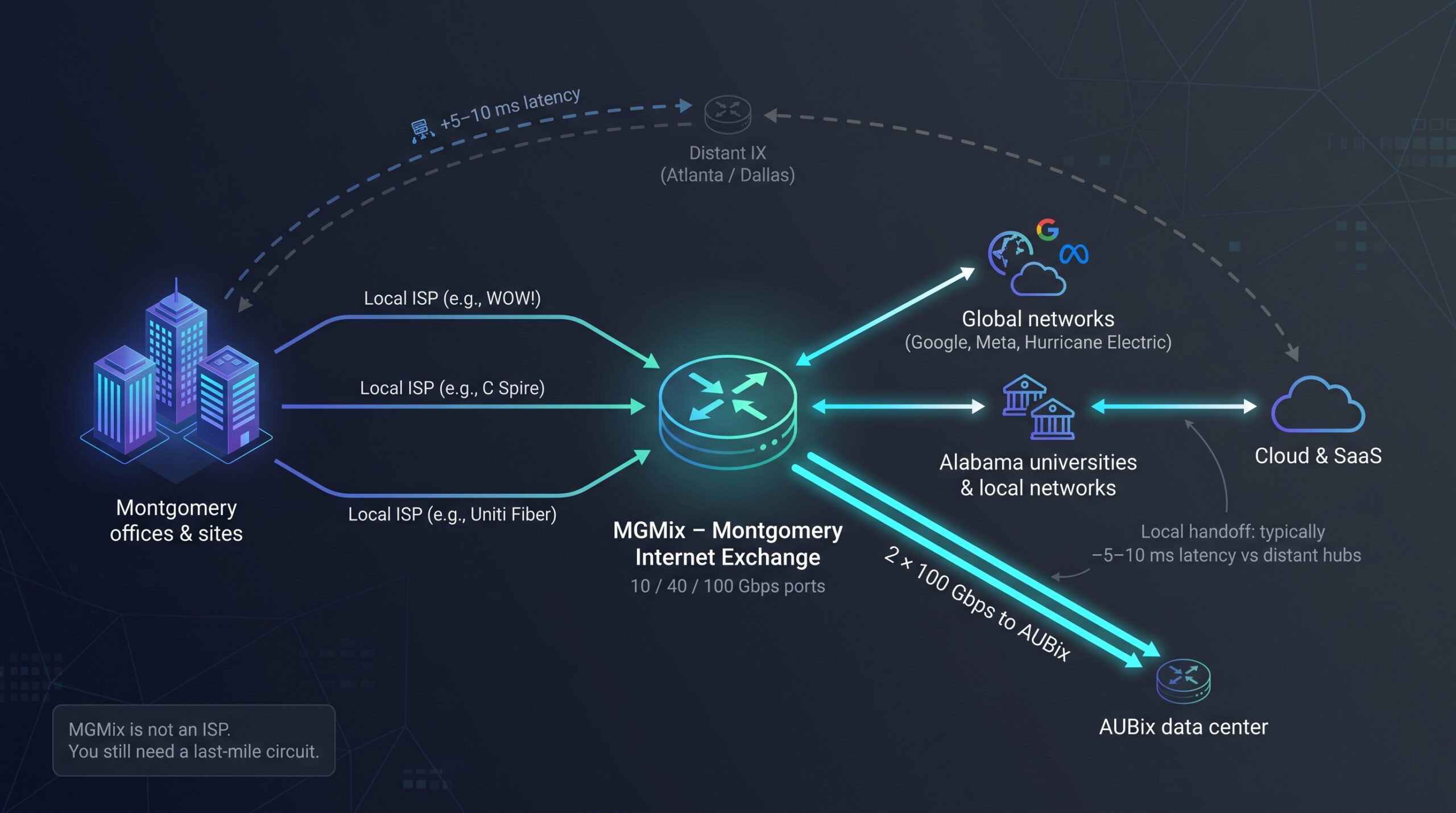
Few midsize cities operate their own internet exchange, but Montgomery does. MGMix lets participating networks hand off traffic locally instead of sending every packet through Atlanta or Dallas. The shorter path typically trims roughly 5-10 ms of latency on regional SaaS and video calls.
The switch fabric offers 10, 40, and 100 Gbps ports and now reaches the AUBix data center through two diverse 100-gig waves. Current members include C Spire, Uniti Fiber, Hurricane Electric, Google, Meta, Microsoft, Cloudflare, and Alabama State University and Auburn University at Montgomery. WOW! is not on the member list, so ask your WOW! rep how Montgomery traffic reaches regional peers.
Two reality checks:
- MGMix is not an ISP; you still need a last-mile circuit.
- Peering is voluntary, so buying service from a member does not guarantee every route uses the exchange.
Ask your account rep whether your prefixes ride MGMix and whether a secondary carrier can enter through a different conduit. Pair that local hop with a solid backup plan and you gain a metro-class edge without leaving town.
Where each provider shows up in Montgomery, Pike Road, and the river towns
Service maps are glossy, but last-mile truth lives at the curb. Based on the FCC National Broadband Map and provider coverage data:
- Downtown Montgomery / Dexter Avenue: WOW! coax reaches almost every block, AT&T lights most multi-tenant buildings with shared fiber, and C Spire owns strands into key government and office towers. Spectrum Enterprise and Uniti quote dedicated entrances case by case, so expect construction bids if you are off net.
- Pike Road & EastChase: Fiber looks like a checkerboard. AT&T dominates newer subdivisions, while C Spire fills gaps where it won easements. Older retail pads often fall back to cable. Always pull the FCC broadband label before you sign; the gap between 5 Gbps and 50 Mbps can appear within a single block.
- Across the river: Prattville, Millbrook, Wetumpka: These ZIPs sit inside Central Access territory, giving branches a coop fiber option that rivals downtown speeds. AT&T and Spectrum thin out north of the county line, so redundancy usually pairs Central Access with wireless or satellite rather than a second wired loop.
Availability in the River Region shifts every few hundred yards. Run each provider’s address checker the same day you grab the lease sheet, then screenshot the label before promotions or construction timelines change.
Honorable mentions and emerging options
Some connections miss our 35 Mbps-upload cut today but still matter for fail-over or future upgrades:
- T-Mobile Business Internet – Indoor 5G gateways typically post roughly 20-25 Mbps upstream; the gear is inexpensive and portable, making it handy for card readers or pop-up sites.
- Verizon 5G Business Internet – Roughly 20-30 Mbps uploads; performance depends on tower load, so test before you rely on it.
- Spectrum Business coax – Standard tiers list 35 Mbps upload, and a few cable nodes may post more. Pull the broadband label; one block can mean 5 Gbps fiber or 50 Mbps coax.
- Starlink Priority – Roughly 30 Mbps upstream; helps where cellular fades, such as construction trailers or rural venues.
- Brightspeed and smaller CLECs – FCC filings southeast of Montgomery show gig-class fiber “planned”; no public live date yet, so set a calendar reminder before your next contract renewal.
Treat these as secondary circuits or watch-list items. Backup links only help if you test fail-over quarterly and keep screenshots of current speeds and contract terms.
Business internet buying guide for Montgomery companies
Choosing the right circuit is less about headline speed and more about how, and how often, your business moves data. Use the three-step checklist below to ground the decision in numbers, not marketing copy.
1. Match circuit type to revenue risk
| Scenario | Best fit | Why |
| Email, SaaS dashboards, cloud POS | Shared broadband (DOCSIS or PON fiber) | Lowest dollars per Mbps; brief lunch-hour slowdowns rarely cost real money. |
| Video production, CAD, medical imaging | Shared PON fiber ≥1 Gbps | Symmetrical uploads under $0.10 per Mbps; no construction wait. |
| 24/7 revenue or compliance penalties (healthcare, finance) | Dedicated Internet Access (DIA) | Written SLA (≥99.9 % uptime, ≤6-hour MTTR) with service credits. |
Tip: Ask every provider whether the SLA applies to the local loop or only the core network.
2. Calculate busy-hour upload, then add 25 %
- List your heaviest concurrent tasks (backups, cameras, video calls).
- Multiply their per-stream upload by how many run at the same time.
- Add 25 % headroom for OS patches and surprise file drops.
Example: Ten HD calls (3 Mbps each) plus two 4K cameras (12 Mbps each) equals 54 Mbps. Target at least a 75 Mbps upstream tier.
3. Build resilience before you sign
- Dual entrance: Ask if a second provider can enter through a different conduit.
- Automatic failover: Verify that static-IP sessions survive the switchover; many LTE/5G backups will not.
- Power: A wireless gateway still needs electricity; budget a UPS.
- Credits: Confirm whether outage credits are automatic or must be claimed in writing.
Take a snapshot of every quote (price, term, construction fee, SLA metrics) before promotions shift. Then run a three-year total cost that includes equipment rentals, static-IP blocks, and any backup circuit. A short spreadsheet session now saves late-night troubleshooting later.
Shared broadband or dedicated internet?
Start by matching your workload to the right lane.
| Factor | Shared broadband (DOCSIS / PON fiber) | Dedicated Internet Access (DIA) |
| Typical Montgomery entry price* | $70-$300/mo (for example, AT&T Business Fiber 5 Gig at $285/mo) | $400-$900/mo (industry average for 100 Mbps dedicated fiber) |
| Bandwidth symmetry | Often symmetrical on fiber, 10-50 Mbps up on cable | Symmetrical, 10 Mbps to 100 Gbps |
| Contention | Shared local node; speeds dip at lunch | Reserved capacity; no local contention |
| SLA / MTTR | Best effort or 8-24 hr restore | ≥99.9 % uptime, 4-6 hr MTTR with credits |
| Ideal for | Email, SaaS, video calls | Real-time transactions, revenue-critical apps |
*Prices exclude taxes and fees; always request a written quote.
Choose DIA when a single hour offline costs more than the monthly price gap. Hospitals, engineering firms, and state agencies in Montgomery often run that calculation and sign the DIA line.
Ask each provider:
- Does the SLA measure from my router or the provider core?
- What happens if you miss the target: automatic credit or claim form?
- How much of the install charge is refundable if construction runs late?
Answer these before the contract, and you will never wonder which column you should have picked.
How much upload do you need?
- Inventory the heavy hitters. List the largest file or stream you send during peak hour, such as a 250 MB design render, a 4K camera at 12 Mbps, or a 100 GB nightly backup.
- Add them up by concurrency. Ten HD calls at 3 Mbps each equal 30 Mbps. Two 4K cameras at 12 Mbps each add 24 Mbps. Peak load ≈ 54 Mbps.
- Pad by 25 to 50 percent. Network engineers recommend adding a 20 to 30 percent burst buffer to absorb TCP/IP overhead and background tasks like OS updates.
| Peak load | Recommended circuit |
| ≤ 40 Mbps | Shared cable/fiber 75 Mbps up |
| 40-150 Mbps | Shared fiber 300 Mbps to 1 Gbps up |
| > 150 Mbps or strict SLA | DIA 100 Mbps+ |
Quick check: if your biggest single upload finishes in under five minutes and no one complains about stutter, you are fine. If colleagues mute video to stay connected, price the next tier; productivity often repays the delta long before the contract ends.
Frequently asked questions
Which provider is the fastest in Montgomery?
Custom builds: Spectrum Enterprise or Uniti Fiber GulfCo (up to 100 Gbps symmetrical). Order-online tiers: AT&T Business Fiber 5 Gbps symmetrical at a $285 per month list price.
Is fiber available at my address?
Check two places: 1) the FCC Broadband Map for provider-reported availability, and 2) the provider’s own address checker; coverage can flip from 5 Gbps fiber to 50 Mbps cable within a single block.
Will 50 Mbps upload support a small office?
Yes for email, SaaS, and fewer than ten HD calls. If you stream cameras 24/7 or move files larger than 10 GB each day, plan for at least 100 Mbps upstream.
Do business plans include a static IP?
Not always. WOW! charges $14.99 per month for a static IP, and AT&T sells blocks à la carte on shared tiers; Spectrum Enterprise includes IPv4 blocks on dedicated fiber. Confirm both cost and whether the address stays live during LTE/5G failover, since many shared-tier backups do not.
Can 5G replace a wired primary link?
Treat it as backup unless speed tests show 35 Mbps or more upstream with latency under 40 ms at your site. Current T-Mobile and Verizon fixed-wireless caps hover around 30 Mbps up, below our main-list threshold.
Next steps: lock your quote, test, then sleep easier
- Benchmark the pain. Run a wired speed test at peak hour. If you see less than 35 Mbps upload or more than 40 ms latency, an upgrade almost always pays off.
- Pull fresh quotes. Check WOW!, AT&T, and C Spire online; request DIA pricing from Spectrum Enterprise or Uniti if uptime drives revenue. Screenshot each broadband label, promo price, install fee, and contract term.
- Do the three-year math. Add monthly rate × 36, equipment rentals, static-IP fees, LTE/5G backup charges, and any one-time construction cost. For example, WOW!’s 600 Mbps tier at the $89.99 standing rate totals about $3,735 over three years when you include the $99 install and $11 monthly modem fee.
- Walk the site. With the front-runner, trace conduit paths, confirm dual entrances, and note power needs for backup hardware.
- Get the SLA on paper. Confirm measurement point, uptime target, MTTR, and whether credits post automatically.
Follow these five steps now, and you will not be speed-testing at midnight when payroll is due.


Leave a Reply