
Grok Imagine for Creators: Turning Simple Ideas Into Powerful Visual Stories
The way people create visual content is changing quickly. In the past, producing a polished image or short video usually required design software, photography equipment, editing skills, and a significant amount of time. Today, AI visual tools allow creators to move from an idea to a usable concept in a much shorter period.
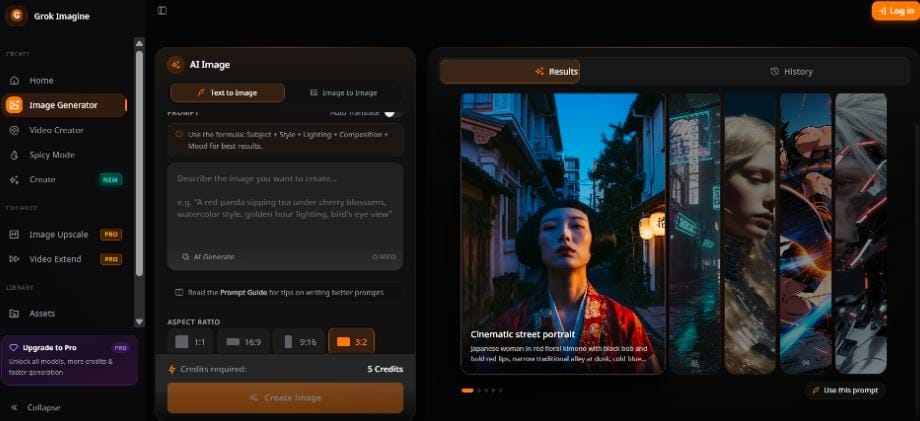
Grok Imagine is part of this new generation of creative technology. It gives users a way to explore visual ideas through text prompts, reference images, and motion-focused instructions. Instead of waiting until the final production stage to see whether an idea works, creators can experiment with different directions at the beginning.
This makes AI generation useful for more than making attractive pictures. It can become a practical part of brainstorming, content planning, marketing, storytelling, and product development.
Why Visual Experimentation Matters
Many creative projects begin with an idea that is difficult to explain. A writer may imagine a futuristic city but struggle to describe its atmosphere. A marketer may know that a campaign should feel energetic and modern but not know which colors or composition will communicate that message. A product designer may have a rough concept without a finished visual reference.
Text-based AI generation can help turn those abstract ideas into something visible.
Once a concept exists as an image, it becomes easier to evaluate. A team can discuss whether the lighting feels correct, whether the composition communicates the right mood, and whether the subject is clear enough. Even an imperfect result can help reveal what should change in the next version.
An AI image generation studio can support this early-stage process by making it easier to test multiple creative possibilities without committing immediately to a full production workflow.
From Simple Prompts to Stronger Creative Direction
The quality of an AI-generated image often depends on the quality of the prompt. A short description may produce an interesting result, but more specific instructions generally give creators better control.
A useful prompt can include:
- The main subject
- The environment
- The visual style
- Lighting conditions
- Camera angle
- Color palette
- Composition
- Emotional tone
- Important details that must remain visible
For example, a basic prompt might say:
A stylish sports car in a city.
A more specific version might say:
A silver electric sports car parked on a rain-soaked street at night, reflections from blue and amber neon signs, low-angle cinematic photography, dramatic side lighting, shallow depth of field, modern urban atmosphere, clean composition with space above the vehicle for headline text.
The second prompt gives the model a clearer visual structure. It also creates more opportunities for controlled revisions. The creator can later change the weather, lighting, camera angle, or background without changing the entire concept.
A text-to-image workspace is useful for this kind of experimentation because creators can compare prompt variations and learn which details have the greatest impact on the final result.
Reference Images Make Ideas More Concrete
Prompts are not the only way to guide an AI image generator. Reference images can also provide important information about the subject, style, or composition.
A creator may use a reference image to communicate:
- The shape of a product
- The appearance of a character
- The layout of a room
- A particular clothing style
- A color relationship
- A lighting direction
- A general artistic mood
This is especially useful when the final image needs to remain connected to something real. For example, an online store may want to create different backgrounds for an existing product. An interior designer may want to visualize a room in several styles while keeping the original structure. A content creator may want to develop several scenes around the same fictional character.
The best results usually come from using references with a clear purpose. One image might define the subject, while another could influence the mood or visual treatment. Uploading too many unrelated references may create confusion rather than consistency.
Exploring Styles Without Starting From Scratch
One of the most valuable features of AI image generation is the ability to explore different styles quickly.
The same subject can be reimagined as:
- A realistic editorial photograph
- A cinematic movie still
- A colorful anime illustration
- A vintage poster
- A minimalist product composition
- A detailed architectural rendering
- A surreal fantasy scene
- A hand-painted concept artwork
This allows creators to test the right visual language for a specific audience.
A technology startup may prefer a clean, futuristic style. A restaurant may benefit from warm editorial photography. A music artist may want dramatic color, unusual perspective, and a stronger sense of movement. A travel brand may choose natural lighting and spacious compositions to create a feeling of escape.
Instead of choosing one style based only on assumptions, teams can create several visual directions and compare them. This makes the creative decision more concrete.
Image-to-Video Adds Movement to Still Concepts
Static images are useful, but many platforms now prioritize motion. Short videos are widely used in social media, advertising, product promotion, and online storytelling.
Image-to-video generation provides a bridge between still-image concepts and short-form video. A creator can begin with a single image, then describe how the scene should move.
A good image-to-video prompt might include:
- The subject’s movement
- Camera direction
- Speed of motion
- Environmental changes
- Lighting transitions
- Background activity
- Emotional tone
For example:
The camera slowly moves toward the cyclist as light rain falls across the street. Reflections shimmer on the pavement while the cyclist turns slightly toward the camera. Keep the face, clothing, and bicycle design consistent throughout the shot.
This type of prompt is more useful than simply writing “animate this image.” It explains what should move and what should remain stable.
An image-to-video creation tool can help creators turn a still concept into a short visual sequence for social media, presentations, campaigns, or creative development.
Practical Uses for Grok Imagine
Grok Imagine can be useful in many creative workflows.
Marketing Concepts
Marketing teams can test different campaign themes before investing in professional photography or video production. They can explore different locations, lighting styles, and product arrangements to find a stronger direction.
Storyboarding
Filmmakers, writers, and game designers can use generated images to visualize scenes, characters, environments, and camera ideas. These references can make it easier to communicate a story before production begins.
Product Visualization
Businesses can present early product ideas in realistic settings. This can help internal teams review a concept, prepare a presentation, or explain a product direction to potential customers.
Social Media Content
Creators can generate multiple visual variations for different platforms. A single concept might become a square post, a portrait story, a wide banner, or a short animated clip.
Design Exploration
Architects, interior designers, and creative professionals can use AI visuals to compare different materials, layouts, color schemes, or atmospheres before developing a detailed final design.
Human Judgment Remains Essential
AI generation can produce images quickly, but creators still need to review the results carefully.
Important details may be changed unexpectedly. Product labels may look inaccurate. Hands, faces, or objects may appear distorted. Generated text may not be readable. A background may contain elements that were not part of the original concept.
For commercial work, every image should be checked before publication. Businesses should also make sure that uploaded reference images are used with the proper permissions and that the final content complies with relevant platform, brand, and advertising requirements.
AI works best as a creative assistant, not as a replacement for review. It expands the number of ideas that a creator can explore, while human judgment determines which ideas are accurate, useful, and suitable for the intended audience.
The Future of Creative Work Is More Iterative
The biggest advantage of AI visual tools is not that they produce a perfect result every time. Their real value comes from making iteration faster.
Creators can test an idea, identify what feels wrong, adjust the prompt, and generate another version. They can compare several styles before choosing one. They can turn a still image into motion and see whether the concept works as a video.
This process encourages experimentation. It allows individuals and small teams to explore more creative directions without increasing production costs at the same rate.
Grok Imagine represents this broader shift toward faster, more accessible visual creation. By combining clear prompts, useful references, thoughtful review, and repeated experimentation, creators can move from simple ideas to stronger visual stories.
The most successful users will not simply generate more images. They will learn how to ask better creative questions, evaluate visual results, and refine their direction with purpose. That combination of AI speed and human judgment is what makes the new visual workflow so powerful.


Leave a Reply