
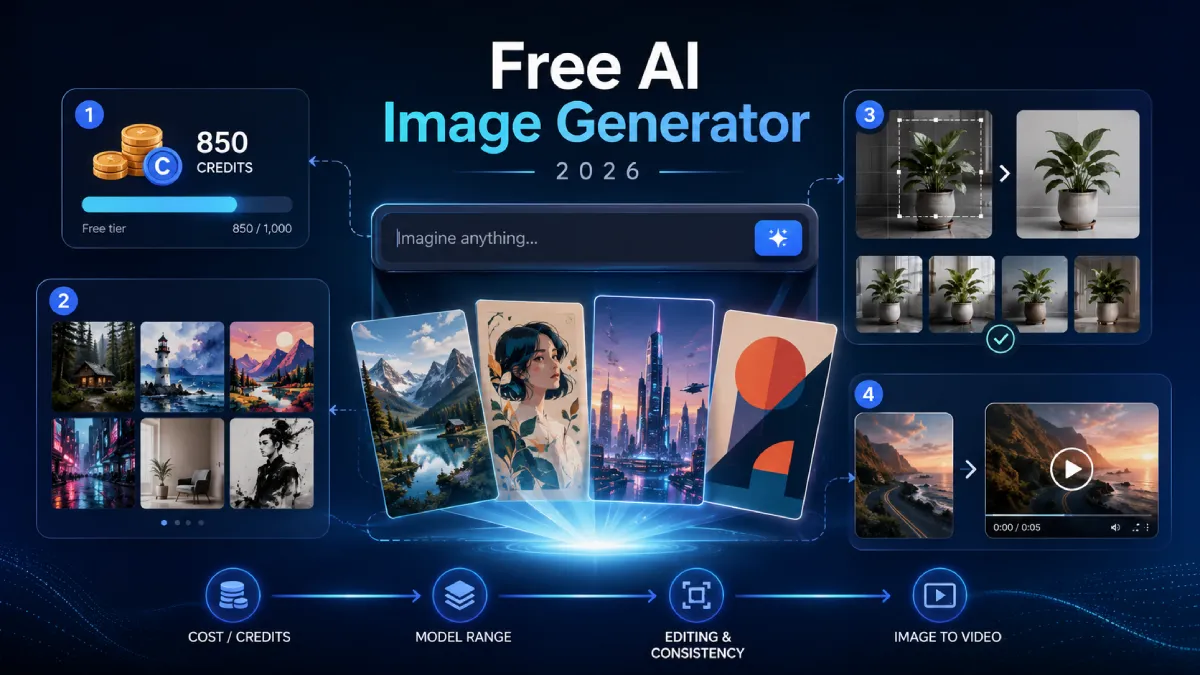
How to choose a free AI image generator in 2026: 4 criteria that actually matter
Search “best free AI image generator” and you get the same thing every time: a Top 10 list. Then a Top 20. Then a Top 60. I counted six of them on the first page last week, and every one recommended a slightly different winner.
That is the real problem with free image tools in 2026. Not scarcity. Overload. Picking is now the hard part.
Here is the shortcut I wish someone had given me: stop asking which tool is best and start asking what free actually costs me, and how far this tool carries a project before I have to switch. Those two questions filter the list faster than any ranking.
What “free” actually means for an AI image generator
In short: a free AI image generator lets you create images from a text prompt at no cash cost, but “free” almost always comes with one of three limits — a daily or monthly credit cap, a visible watermark, or a license that blocks commercial use. The genuinely useful free tier is the one that lets you test real work with zero friction, not the one that promises unlimited everything.
That distinction matters because the volume is staggering. By Everypixel’s count, people generated more than 15 billion AI images between mid-2022 and 2023, running at roughly 34 million a day. Adobe alone passed 24 billion generated assets on Firefly. Free access is what drove those numbers. It is also why the market is crowded enough to be confusing.
So free is not the question. What the free tier costs you in credits, quality, and rights is. Here are the four criteria I actually use.
Criterion 1: What the free tier really costs you
Read the free tier like a contract, because it is one. Three things decide whether “free” is useful or a demo:
- Credits. Most tools run on a daily or monthly credit pool. Some give you a handful of images a day; some hand out a chunk of one-time credits and then stop. Neither is bad, but know which one you are getting before you build a workflow on it.
- Watermarks. A watermark on the free tier is fine for testing and useless for client work. Check before, not after.
- Commercial rights. This is the one people miss. Some free tiers explicitly forbid commercial use, and a few train on data with murky licensing. If you are making anything you plan to sell or publish, read the terms.
My rule: a free tier is good if it lets me finish one real piece of work end to end. If I hit a wall halfway through a genuine task, it was a trial, not a tool.
Criterion 2: Model range behind one prompt box
Quality is not one number anymore. Different models are good at different things. One renders text inside an image cleanly; another nails photorealistic lighting; a third is better at stylized art.
If you commit to a single-model tool, you inherit that model’s blind spots. The more useful setup is a tool that puts several current models behind one interface, so you can switch by task instead of switching sites. Suites that bundle recent models — think Nano Banana, Flux, and Seedream-class options — let you run the same prompt through a few engines and keep the best result.
That is the practical value of a broad free image generator ai setup: you test which model fits this project without opening five tabs and learning five different prompt boxes. Google’s free Gemini image tools are worth trying for the same reason — strong default quality with no cost to start. The point is coverage, not loyalty to one model.
Criterion 3: Editing and consistency, not just the first image
The first generation is the easy 20%. The other 80% is fixing it: changing one detail, keeping a character’s face consistent across a set, redoing a background without redrawing everything.
A lot of free tools generate beautifully and then leave you stranded. No inpainting, no reference-image consistency, no upscaler. You get one nice picture and no way to iterate.
Before you settle on anything, check for three things:
- Local editing (inpainting or “edit this part”) so you can fix a hand without regenerating the whole image.
- Reference consistency so the same character or product looks the same across images.
- Cleanup utilities like an upscaler or background remover, ideally in the same place.
If those live in one tool, you save the hidden tax nobody lists: the time lost moving a file between four single-purpose apps.
Criterion 4: Does it carry you into video?
This is the criterion the listicles skip, and in 2026 it is the one that changes your workflow most.
Image work rarely stays image work. You make a product shot, then you want a five-second clip of it. You design a character, then you want it to move. If your image generator dead-ends at a PNG, you are back to exporting, re-uploading, and re-describing the same thing inside a separate video tool.
The tools worth betting on close that gap. A platform like Imagvio AI runs image generation, image editing, and video generation (routing between models like Veo, Kling, and Seedance) in one place, so an image you just made becomes the reference frame for a clip without leaving the page. Honestly, the free tier here is credit-capped like everyone else’s, so you will not get unlimited video for nothing. But for testing whether an image-to-video workflow fits how you actually work, one connected surface beats stitching three free tools together.
How I’d actually pick
Give yourself one real task, not a test prompt. A social post you owe, a thumbnail, a product image. Then run it through two or three free tiers and watch where each one stops you: a watermark, a credit wall, no way to edit, no path to video.
Whichever tool lets you finish the real task is your answer. The ranking lists cannot tell you that, because the best free AI image generator is not the one that scored highest on someone else’s chart. It is the one that does not make you switch tools halfway through your own.
FAQ
Is there a truly free AI image generator with no limits?
Not really. Every free tier has a limit somewhere — credits, watermarks, resolution, or commercial-use restrictions. The honest goal is finding one whose limits do not block the work you actually do.
Can I use free AI images commercially?
Sometimes. It depends entirely on the tool’s license. Some free tiers allow commercial use, some forbid it, and some are ambiguous. Always check the terms before selling or publishing anything.
What’s the difference between the free and paid tiers?
Usually volume and rights: paid tiers lift credit caps, remove watermarks, raise resolution, and clear commercial use. Free tiers are for testing quality and fit before you spend.
Do I need separate tools for images and video?
Increasingly, no. Some platforms now run image generation, editing, and video in one interface, which removes the export-and-re-upload step between them.


Leave a Reply