
How to Recover Deleted Photos and Videos from SD Card on Android
SD cards are still common on Android phones, especially for storing photos, videos, downloads, screen recordings, and app exports. That convenience becomes a problem the moment important media disappears. One accidental delete, a formatting prompt, a failed file transfer, or a damaged card can wipe out months of memories in seconds.
If you need to recover deleted photos and videos from an SD card on Android, the first rule is simple: stop using the card right away. Every new file written to the memory card can overwrite deleted media and reduce the chance of full recovery.
This guide explains why Android SD card data gets lost, what to do immediately after deletion, and the most practical way to restore your photos and videos using Recoverit.
Why photos and videos disappear from Android SD cards
Media loss on Android memory cards usually comes from a few common causes:
- Accidental deletion in the Gallery or file manager
- Formatting the SD card by mistake
- Removing the card during transfer
- File system corruption after a crash or battery drain
- Using the same card across multiple devices
- Malware or damaged sectors on an aging memory card
These cases are more common than people think because SD cards move between phones, cameras, drones, laptops, and card readers. A single interruption can make an entire folder of media seem gone.
What to do immediately after deleting Android SD card files
Before you try recovery, protect the remaining data.
- Stop taking new photos or videos
- Do not download large files to the card
- Do not reformat the SD card
- Remove it from the Android device if possible
- Connect it to a computer with a reliable card reader
This step matters because deleted files are often still recoverable until new data takes their place.
Can Android recover deleted SD card photos by itself?
Sometimes, but not reliably. If your phone gallery syncs with Google Photos, OneDrive, Dropbox, or another cloud service, some media may still exist there. A few Android file managers also keep a temporary trash folder. Still, that only covers a small share of real loss cases.
If the files were stored mainly on the SD card and then deleted, formatted, or corrupted, Android alone usually cannot rebuild them. That is where dedicated recovery software becomes the practical route.
How to recover deleted photos and videos from SD card on Android
The safest and most complete method is to remove the card, connect it to a Windows or Mac computer, and scan it with a memory card recovery tool.
Step 1: Remove the SD card from your Android phone
Power off the phone if needed, eject the SD card, and place it in a stable card reader. Avoid cheap or loose readers because connection drops can interrupt scanning.
Step 2: Launch Recoverit and select the memory card
Recoverit Photo and Video Recovery is a good fit here because it is built for recovering media from memory cards, cameras, drones, and removable storage. The official product page highlights support for deleted, formatted, and inaccessible photo and video files across more than 500 loss situations.
Recoverit is especially relevant for Android SD card recovery because users usually want image and video restoration, not just generic file recovery.
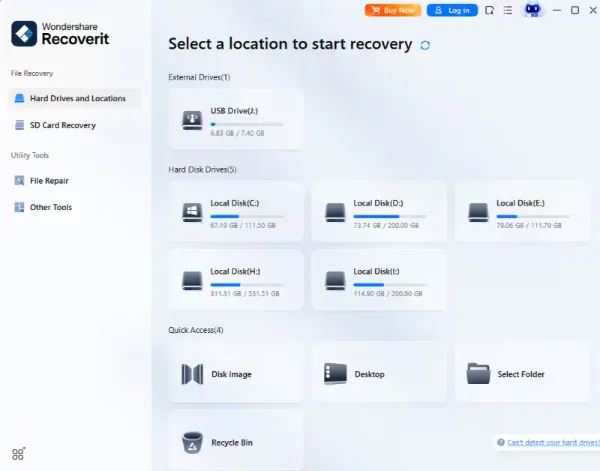
Step 3: Scan for deleted photos and videos
Choose the SD card and start the scan. Depending on card size and condition, the process can take a while. Let it finish so the software can identify as many recoverable files as possible.
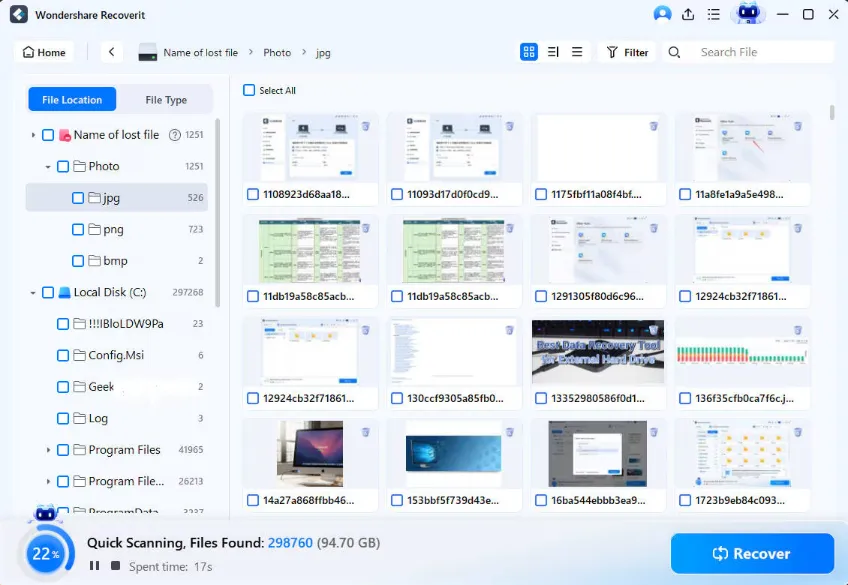
Typical recoverable file types include:
- JPG and PNG photos
- MP4 and MOV videos
- Screen recordings and social media exports
- Camera folders moved from other devices
- Audio files saved to the card
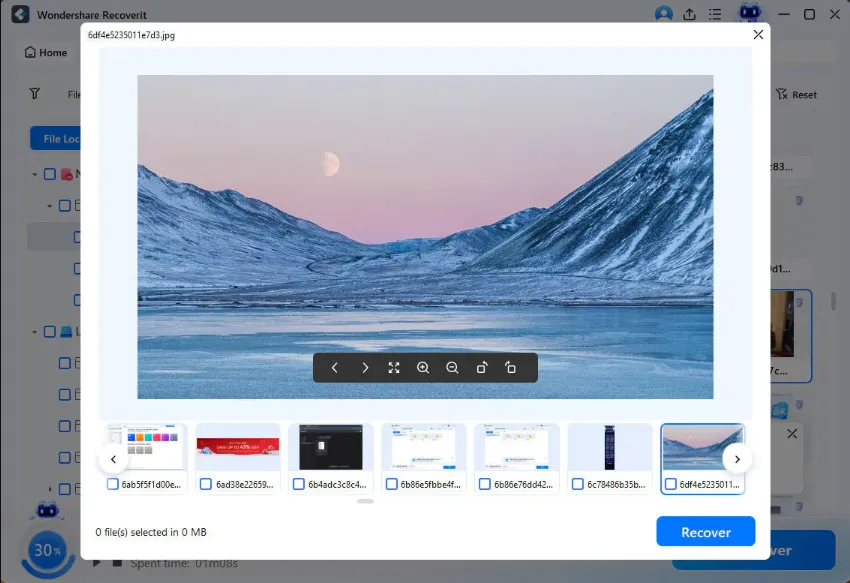
Step 4: Preview the results
Once the scan is complete, review the found media. This is useful when you are trying to restore only certain folders, travel albums, or recent clips rather than the entire card.
Step 5: Recover files to a different location
Save the recovered files to your computer or an external hard drive, not back to the same SD card during the first recovery pass. This prevents overwriting other recoverable data that may still be on the card.
Why Recoverit fits Android SD card recovery well
This topic naturally matches Recoverit’s product strengths. The official recovery pages position the software around:
- Photo and video recovery
- Memory card recovery
- Support for removable storage devices
- Deleted and formatted file recovery
- Windows and Mac data recovery workflows
That makes it a natural recommendation in an external article about Android SD card media loss. If readers want broader recovery options beyond memory cards, they can also check the main Recoverit data recovery page. For more tutorials and loss-scenario guides, the Recoverit tips section works as a supporting internal destination.
Common Android SD card recovery scenarios
Here are the situations where recovery is most often needed:
- You deleted photos from the gallery and emptied trash
- Your Android phone asked you to format the card
- Videos disappeared after moving files between phone and PC
- The SD card became unreadable after a reboot
- The phone crashed while saving or exporting media
- You used the same card in a drone, camera, and Android device
How to improve recovery success
- Stop writing new data to the card immediately
- Use a proper computer scan instead of random mobile apps
- Recover files to another storage device
- Back up restored media right away
- Replace the SD card if it keeps corrupting or disconnecting
How to avoid losing Android SD card media again
Recovery is useful, but prevention is cheaper. Use automatic cloud backup for key albums when possible. Eject the SD card safely before removing it. Avoid filling the card to its limit, and replace older cards that start showing slow writes, random disconnects, or file system errors.
For people who store family photos, work footage, travel clips, or creator assets on Android, a backup routine matters just as much as the recovery tool.
Final thoughts
If you deleted photos or videos from an SD card on Android, do not keep using the card and hope the files come back on their own. In many cases, they are still recoverable, but only if you act before new data overwrites them.
For Android users dealing with missing media, formatted memory cards, or corrupted removable storage, Recoverit is a practical option because it directly matches the photo, video, and SD card recovery scenario.


Leave a Reply