

How to Repair Corrupted Videos Online Without Technical Skills?
In today’s digital world, videos play an important role in our lives. From recording personal memories on smartphones to storing important office presentations and social media content, video files are everywhere. However, one common issue that you may encounter with these video files is their sudden or unexpected corruption. Having a corrupted video file can put you in trouble, especially if you don’t know how to repair it.
If your video freezes midway, shows a black screen, or displays any error message, it’s important to proceed with the repair workarounds immediately. The good news is that you can repair your corrupt or damaged video files without any prior technical knowledge. In this guide, we’ll explore an easy and quick way on how to repair videos without technical skills, using reliable and easy-to-use online tool. Let’s get started!
Common Signs of Corrupt Video Files
When your video gets corrupted, it’s important to understand the exact cause of such corruption. Video corruption occurs when a video file becomes partially or completely unreadable due to damage in its data structure. In such cases, you may encounter one or many of the following symptoms:
- Your video won’t play at all
- Video-audio sync issues or no audio at all
- Video starts freezing or lagging
- Display error messages like “file format not supported”
Now it’s time to check the adequate reasons for your video corruption.
Why Do Video Files Get Corrupted?
Here are some common reasons why video files appear corrupted/damaged or become unplayable on your device:
- Interrupted Recording: If the video recording process is interrupted – often due to unexpected system shutdowns caused by low battery or overheating – the file may not be saved correctly and can show errors during playback.
- Improper File Transfer: Disconnecting external devices such as a USB drive, SD card, or external hard disk without safely ejecting them can damage video files.
- Virus or Malware Attacks: Malicious programs like viruses or malware can infect your video files and make them unplayable.
- System Crashes: Unexpected system shutdowns, power cuts, or software crashes during video editing or playback can lead to corruption.
- Codec Incompatibility: In some cases, a video may appear corrupted simply because the media player does not support the required codec.
Step-by-Step Guide: Repair Corrupted Videos Using Online Video Repair Tools
When you find your video is corrupted or not playing properly, it’s important to immediately proceed with the repair workarounds. If you are looking for video repair methods that don’t need technical skills, online video repair software is the ideal solution. Several online tools are available on the internet that can help you repair corrupted or damaged videos directly from a web browser. Yes, you heard right – videos can be repaired online, i.e., there’s no need to install any third-party software on your device.
Stellar Repair for Video Online is an all-in-one online video repair software that helps you repair corrupted video files of any file format, including MP4, MOV, AVI, MKV, WMV, ASF, and more. This software can help you repair videos captured from smartphones, DSLRs, action cameras, drones, or other devices. You can use this software to repair videos that are corrupted or damaged due to several reasons, ranging from interrupted recording, power failure, system crashes, or unsupported codecs.
Key Features of Stellar Repair for Video Online Tool
- This online tool offers an intuitive and easy-to-use interface, so even beginners can repair videos with just a few clicks.
- You can repair multiple video files at the same time, saving time and effort when dealing with many corrupted videos.
- The Stellar Repair for Video Online tool follows a freemium model, offering basic features for free with advanced repair options available in paid plans.
- The preview feature of this online video repair software lets you preview the repaired video before saving it on your device.
- The repair process is secure, and the tool works without damaging your original files.
Here’s how to repair corrupted videos online without technical skills using this amazing online video repair software:
Step 1: Open a web browser on your PC and go to the Stellar Online Video Repair official website. Click “Upload Video” and select the corrupted video file you want to repair.
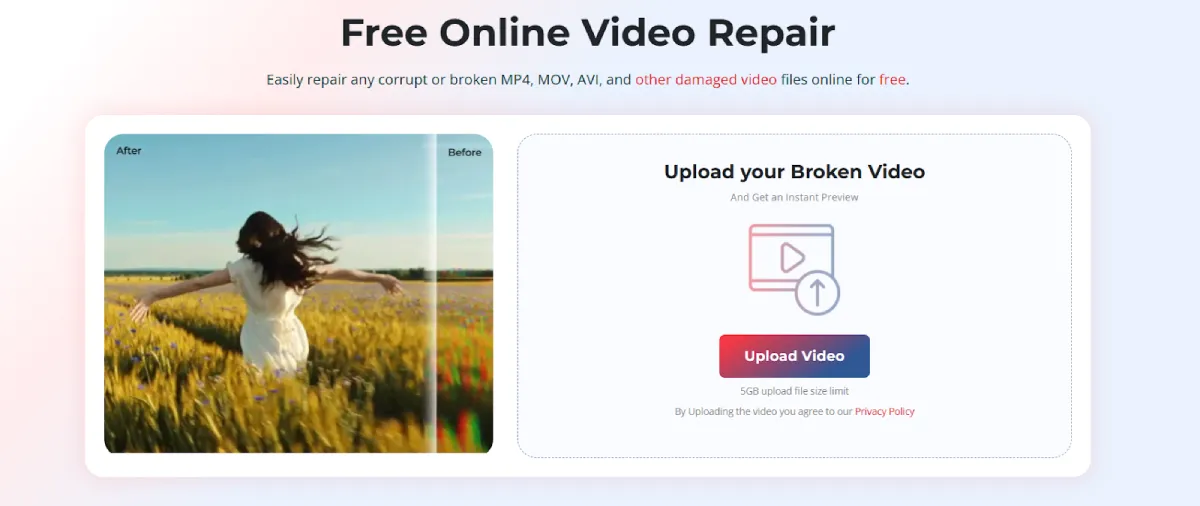
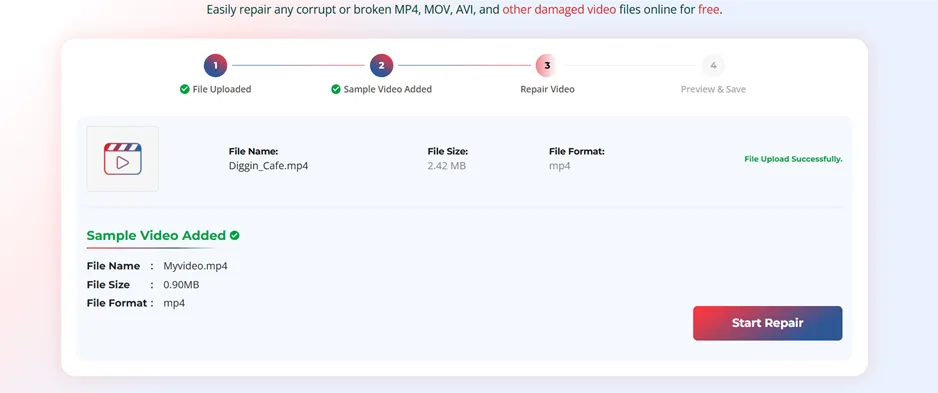
Step 2: If the video is badly damaged, the tool may ask you to upload a sample video. This should be a working video recorded using the same device and file format as the corrupted one.
Step 3: Click Start Repair to initiate the repair process. Wait till the tool automatically analyses the file and fixes issues related to headers, frame data, indexes, and other structural errors.
Step 4: Once the repair is complete, preview the repaired video file and click Save Repaired Video to download the fixed video to your device.
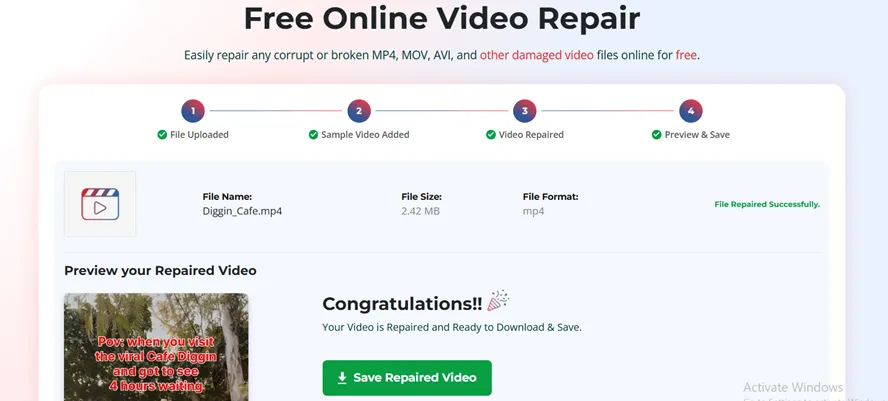
That’s it! In just a few clicks, your corrupted video can be repaired and ready to play again without any technical hassle.
Additional Tip: How to Prevent Video Corruption in Future?
Now that you know how to repair corrupted videos online without technical skills, let’s look at how you can prevent video corruption in the future. Here are some quick preventive tips that you can consider to avoid video corruption from your own:
- Safely Eject Storage Devices – Always properly remove external devices, such as SD cards, USB drives, or external hard drives, from your PC to avoid file damage.
- Keep Devices Charged While Recording – Ensure your device is fully charged to avoid shutdowns due to low battery during video recording.
- Use Reliable Storage Media – Invest in high-quality memory cards and drives to minimise the risk of corruption.
- Regularly Update Software and Firmware – Keep the cameras, smartphones, and video editing software installed on your device up to date.
- Backup Important Videos – Create multiple copies of important videos on different devices or cloud storage.
Wrapping Up
Video corruption is a common issue and can happen at any time. Whether your video was damaged due to recording errors, sudden power failures, virus attacks, or unsupported formats, try repairing it at the earliest to prevent further damage. You can use online video repair tools such as Stellar Repair for Video Online to fix corrupt videos in just three steps, all without any software installation. No technical skills are needed—simply upload, repair, and download your video to fix it. With a user-friendly interface, browser-based access, and fast repair process, repairing corrupted videos has never been easier.
FAQs About Online Video Repair
How long does it take to repair a video?
The time to repair your corrupted videos depends on the video size and the level of corruption within the video.
Can Stellar Online Video Repair software fix videos recorded on drones?
Yes. Most drone devices use the same encoding to compress the video. So, drones create videos in MP4 or MOV formats, and this online video repair tool can easily perform MP4 repair and MOV repair in no time.
Can I repair blurry and missing audio in video files?
Yes. Tools like Stellar online video repair software provide powerful features to repair blurry and inaccessible videos. Use it to repair video files in a few simple clicks effortlessly.


Leave a Reply