

Picking the Right API Client for How Your Team Actually Works
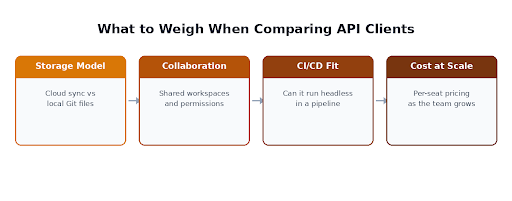
Every engineer who has worked with APIs for more than a year has opinions about their client of choice, and most of those opinions are really about workflow fit rather than feature lists. The client comparison posts tend to reduce this to a features table, but the real decision usually comes down to three things: where your collections live, how your team collaborates, and whether the tool has to run headless somewhere in a pipeline.
Treating this as part of a broader testing setup, not a standalone tool choice, tends to produce a better outcome than picking whatever the last engineer to join the team happened to already know.
Storage Model Decides More Than People Expect
The first real fork in the road is where API collections actually live. Cloud-synced tools store collections in a hosted account, which makes sharing across a team effortless but ties your request history to a vendor’s storage and, in some tools, a paid seat. Git-native tools store collections as plain text files in your repository, which means they get reviewed in pull requests alongside the code they test and never depend on anyone’s individual account still being active.
Neither model is universally correct. A team that treats API collections as throwaway scratch work during development leans toward the convenience of cloud sync. A team that wants its API contracts to be reviewable, versioned artifacts alongside the service code benefits from the Git-native model, even though it asks a little more of new team members getting set up.
Collaboration Features Matter Differently at Different Team Sizes
A team of three engineers rarely needs role-based access control or audit logs. A team of thirty across multiple squads usually does, and that’s precisely the point at which many teams discover their original tool choice was made for a much smaller team and no longer fits. Shared workspaces, permission tiers, and the ability to see who changed a request and when become load-bearing rather than nice to have once enough people are touching the same collections.
Before switching tools purely for collaboration features, check whether the pain is actually a collaboration problem or an organization problem. Splitting one enormous shared workspace into smaller, team-owned collections often solves more than a tool migration would, and costs nothing.
CI/CD Fit Is Where the Real Cost Shows Up
Manual exploration and automated regression are different jobs, and the tool that’s pleasant for one is sometimes awkward for the other. Some clients run their collections headless via a command-line runner, which is what actually matters for CI integration, while others are built purely for interactive use and were never designed to run unattended in a pipeline. If your software testing strategies depends on API checks running automatically on every pull request, confirm the client actually supports that before standardizing the whole team on it, rather than discovering the gap after collections have already multiplied across every service.
When It’s Time to Reconsider Postman Specifically
Postman is still the default for a lot of teams, and for good reason: it’s mature, well documented, and most engineers have already used it somewhere. The friction usually shows up at the team level rather than the individual level, once the features a growing team actually needs (git sync, SSO, larger collection runs) sit behind paid tiers that weren’t part of the original evaluation. That’s the point where it’s worth actually comparing a Postman alternative against your specific requirements instead of assuming the tool everyone already knows is still the cheapest and best fit. Keploy is one such alternative worth a look, particularly for teams whose real bottleneck is writing and maintaining test coverage rather than exploring APIs manually. A Git-native client can look like a lateral move on a feature list and still be the right call once storage model and CI integration are weighed alongside price.
A Short Checklist Before Standardizing
Before committing a team to one API client, confirm where collections will live and who owns that storage if the vendor relationship ends. Confirm whether the tool needs to run unattended in CI, and test that specifically rather than assuming it works because the interactive experience is good. And price out the collaboration tier at the team size you expect in a year, not the size you are today, since that’s usually where the original choice quietly stops making sense.
The Real Point
An API client is infrastructure, not a personal preference, once more than one person depends on the collections it holds. The right choice depends on how your team actually works: where you want collections stored, how many people need coordinated access, and whether the tool has to disappear into a pipeline rather than stay on someone’s screen. Get those three answers first, and the specific tool name becomes a much easier decision.


Leave a Reply