

Scaling WordPress with AdminVPS
A WordPress website rarely stays the same size as it was on launch day. New pages appear, traffic grows, plugins are added, and a simple company website may eventually become an online store, content platform, or business-critical service.
This is where the hosting environment starts to matter more. AdminVPS provides several infrastructure options for WordPress projects, allowing a website to start with conventional hosting and move to a VPS or dedicated server when its requirements become more demanding.
The key is not to move to a larger server too early. It is to choose infrastructure that matches the current stage of the project and leaves room for the next one.
Starting with WordPress Hosting
Not every WordPress website needs a virtual server.
For a blog, portfolio, landing page, company website, or relatively small online project, a ready-to-use hosting environment is usually the simpler option. There is no need to configure the operating system, web server, database server, or other infrastructure components manually.
AdminVPS offers dedicated WordPress hosting for projects built on the CMS. This gives site owners a straightforward starting point without requiring them to administer a VPS from the first day.
The hosting environment includes the components most WordPress owners expect from a managed hosting service: CMS installation, SSL support, backups, a control panel, and technical support.
For many websites, this is enough for a long time.
The important question is not whether VPS is technically “better,” but whether the project actually needs the additional control and resources that a VPS provides.
When the Requirements Start to Change
WordPress itself can operate with relatively modest resources. What changes the equation is everything built around it.
A basic website may serve mostly cached pages. A WooCommerce store has to process customer sessions, cart operations, checkout requests, product filters, database queries, payment integrations, and background tasks.
A growing content project may accumulate a large database, dozens of plugins, scheduled jobs, search functionality, analytics integrations, and external API requests.
At that point, the limitations of a shared environment may become more visible.
The WordPress admin panel may become slower. Dynamic pages may respond differently from cached pages. Resource-intensive tasks may affect other operations. Developers may also need server software or configurations that cannot be changed on conventional hosting.
These are better reasons to consider VPS than simply reaching an arbitrary number of monthly visitors.
Moving from Hosting to VPS
A VPS changes the level of control available to the project.
Instead of working entirely within a predefined hosting environment, the owner or administrator can configure the server around the application. PHP parameters, database settings, caching systems, background processes, and server software can all be adjusted according to the workload.
AdminVPS provides KVM-based virtual servers with NVMe storage and root access, making them suitable for projects that need an isolated environment rather than a standard shared-hosting configuration.
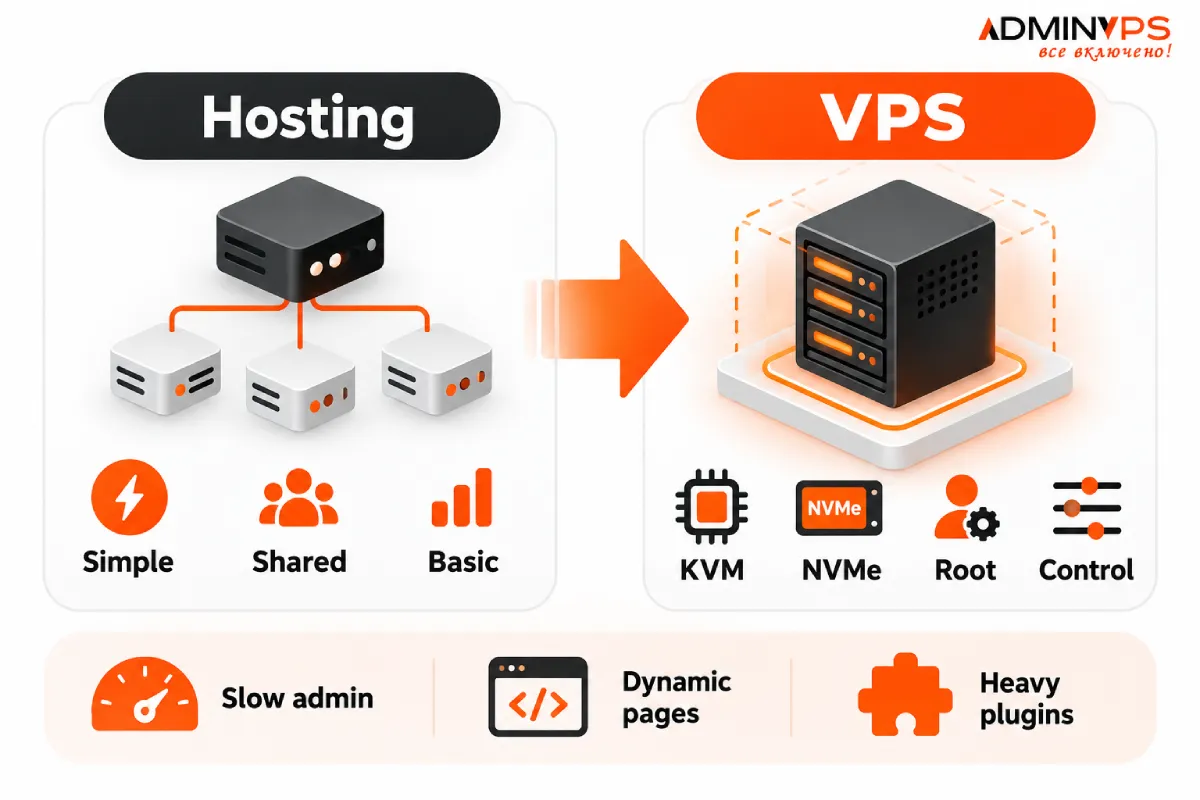
For WordPress, this can be useful when running WooCommerce, several websites on one server, custom integrations, staging environments, or resource-intensive plugins.
It also becomes possible to introduce server-side tools such as object caching or to tune the database and PHP environment more precisely.
But moving to VPS does not automatically make WordPress fast.
A poorly optimized plugin, oversized database, inefficient query, or excessive front-end code remains a problem regardless of server size. VPS should provide the resources and flexibility to solve infrastructure limitations, not replace application optimization.
WordPress Performance Is a Full-Stack Problem
Theme optimization is important, particularly for a design-heavy WordPress site.
Images, fonts, CSS, JavaScript, and third-party scripts affect how quickly a page can be displayed after it reaches the browser.
The server handles a different part of the process.
Before the browser receives the page, WordPress may need to execute PHP, access the database, run plugins, process a user session, and generate the requested content.
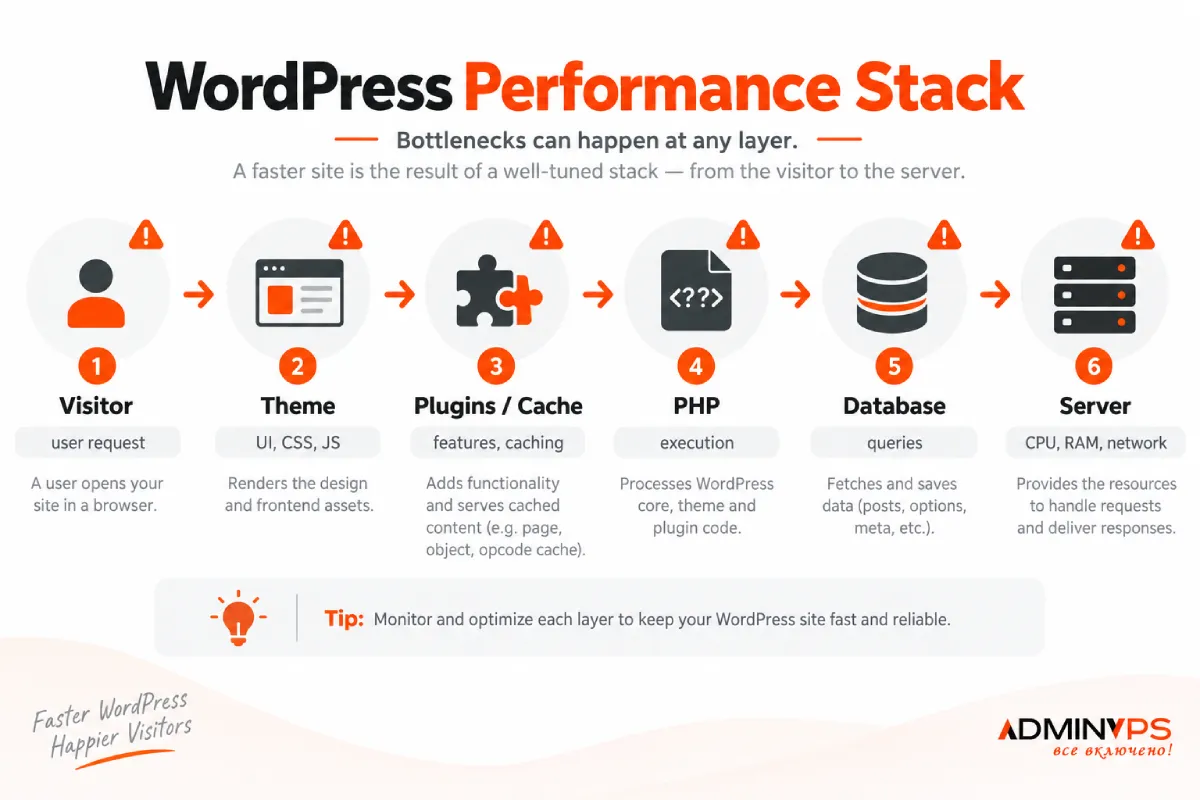
This is why a website can have an optimized theme and still feel slow.
For example, a cached homepage may perform very well while WooCommerce checkout remains noticeably slower. The first request can be served from cache, while the second needs dynamic application and database processing.
When diagnosing WordPress performance, both layers need to be considered.
Administration Matters Too
The most obvious difference between hosting and VPS is responsibility.
With conventional hosting, much of the server environment is managed by the provider. With an unmanaged virtual server, the customer may be responsible for operating-system updates, security configuration, software installation, web-server settings, backups, and troubleshooting.
This is not a problem for a development team with Linux administration experience.
For a business owner, agency, or WordPress specialist focused primarily on websites rather than infrastructure, it can become additional work.
AdminVPS also provides administration services, which makes VPS more practical for projects that need additional server control without wanting to handle every system task internally.
This distinction can be more important than the hardware specifications themselves.
A technically powerful server is not especially useful if nobody is monitoring it, installing security updates, checking backups, or investigating failures.
Backups Should Grow with the Project
A small WordPress website can often be restored relatively easily. For an active online store or business service, recovery becomes more complicated.
The database may contain recent orders, customer accounts, form submissions, content changes, or operational data that cannot simply be recreated.
AdminVPS includes backup options across its hosting and server products, but the important point for any growing WordPress project is to think about recovery as part of the infrastructure.
As the value of the website increases, so should the backup strategy.
A WordPress plugin creating a copy of the site can be useful, but server-level backups provide another layer. Critical projects may also keep independent copies outside the production environment.
What matters is not merely having a backup file but knowing what is being backed up, how often it happens, and how the project will actually be restored after a failure.
Server Location Is Part of the Architecture
Another factor that becomes more relevant as a project grows is geography.
The physical distance between visitors and the origin server contributes to network latency. A CDN can reduce this distance for static files, but WordPress still needs to reach the origin for many dynamic operations.
AdminVPS operates infrastructure in several locations, so projects can select hosting or server geography according to their audience and operational requirements.
For a regional project, locating the server closer to its main users can be a sensible architectural decision. For an international project, server location should be considered together with CDN usage, application architecture, and the geographic distribution of visitors.
It is not a substitute for optimization, but it is another part of the performance stack.
What Comes After VPS?
VPS is not necessarily the final stage.
If a project continues to grow, dedicated infrastructure may eventually become more appropriate. AdminVPS also offers dedicated servers for workloads that require physical hardware, larger resource allocations, or greater infrastructure isolation.
That creates a relatively clear progression.
A new WordPress project can begin with managed WordPress hosting. A growing store or application can move to VPS when it needs additional resources and server-level control. A significantly larger workload can later move to dedicated infrastructure.
Not every project will need all three stages.
The advantage is having different options available without treating the first hosting decision as permanent.
Choosing the Right Stage
The best hosting option is the one that solves the project’s current problems without adding unnecessary complexity.
WordPress hosting makes sense when simplicity is important and the project fits comfortably within a managed environment.
VPS becomes more relevant when the website needs additional resources, custom server configuration, isolated workloads, or greater control over PHP, databases, caching, and background services.
Dedicated servers are more appropriate when the workload has moved beyond what a virtual environment can efficiently provide or when physical infrastructure is required for technical reasons.
For WordPress owners, the practical approach is therefore to scale infrastructure together with the website rather than ahead of it.
Final Thoughts
Growing a WordPress project does not automatically mean replacing hosting with the largest server available.
In many cases, the better approach is gradual.
Start with an environment that keeps management simple. Monitor how the site behaves as traffic, functionality, and database size increase. Move to VPS when the application genuinely benefits from additional resources or server-level control. Consider dedicated infrastructure only when the workload justifies it.
AdminVPS supports this progression with WordPress hosting, VPS/VDS, administration services, and dedicated servers within the same service ecosystem.
For website owners, that makes infrastructure less about choosing one hosting product forever and more about selecting the right platform for each stage of a WordPress project’s growth.


Leave a Reply