

The 10 Best Squarespace Plugins for Small Business Marketing in 2026
Having a polished Squarespace website is the bare minimum. To compete and grow your business, you need ways to capture attention and nudge users to conversion.
That’s why small businesses are turning to Squarespace plugins.
These no-code solutions add the marketing power your template can’t.
Think:
- Slide-out carts that reduce checkout friction
- Translation tools that open new markets
- SEO plugins that boost visibility
In 2026, the right plugins can turn a basic Squarespace website into a more capable marketing and ecommerce platform.
Let’s take a closer look at the 10 best Squarespace plugins for small business marketing in 2026.
How Marketing Plugins Help Small Businesses
Squarespace plugins transform your website into a marketing tool that supports growth.
They help you create experiences that win customers, build trust, and keep people coming back.
Marketing plugins for Squarespace can help small businesses:
- Streamline the buying journey with faster checkouts, cart slide-outs, and clear pricing displays
- Offer multilingual experiences so customers can shop and engage in their own language
- Improve visibility with SEO-friendly features and site performance upgrades
- Engage visitors with interactive layouts, dynamic content, and smart CTAs
- Build credibility through customer reviews, testimonials, and social proof
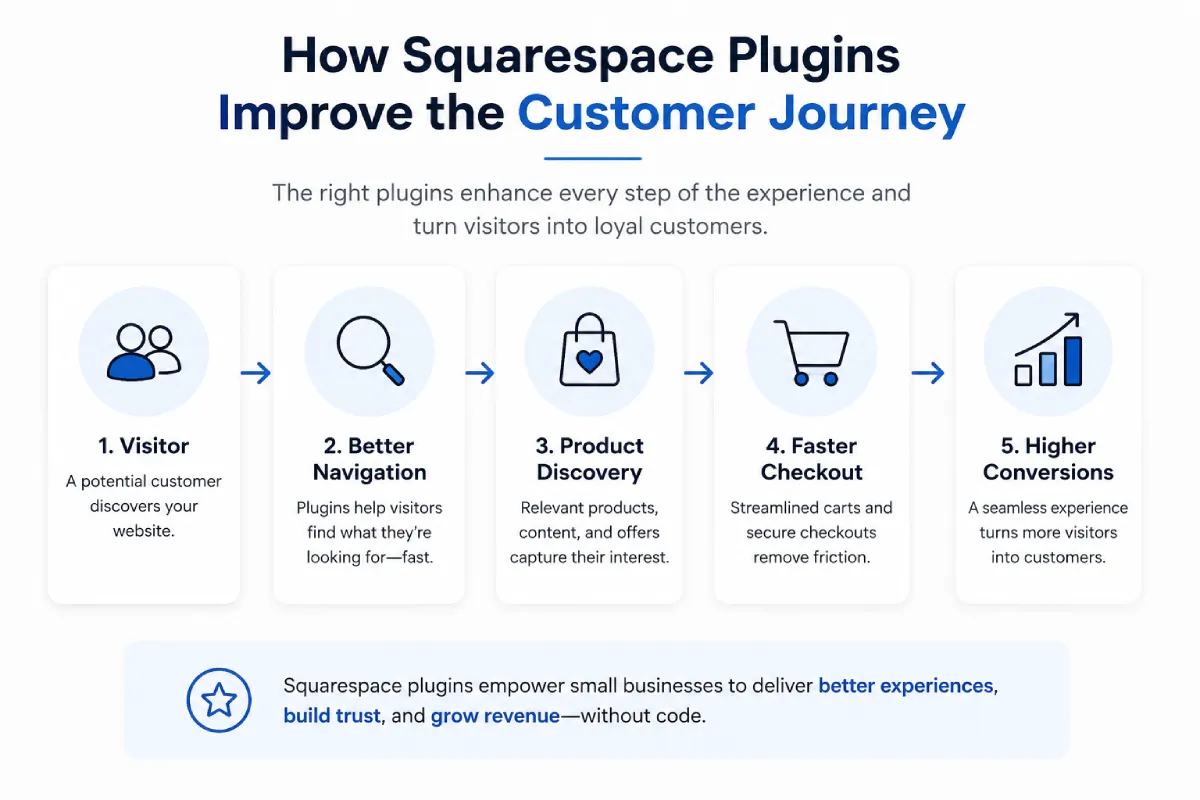
In short, the right plugin mix helps you compete on the same level as bigger brands. And you won’t need custom code or expensive development.
10 Best Squarespace Plugins for Small Business Marketing in 2026
Squarespace plugins can help small businesses attract more visitors and convert casual browsers into paying customers.
Here are the top 10 Squarespace plugins to improve marketing in 2026:
1. Universal Filter
The Universal Filter plugin helps organize content so it feels intuitive for visitors.
Instead of forcing customers to scroll through every item, Universal Filter lets them sort and filter the content. They can filter by category, price, or popularity across products, blog posts, or galleries. This creates a cleaner shopping experience for Squarespace stores.
This easier browsing experience can keep visitors engaged and increase their likelihood of finding a relevant product.
Think about it this way.
Imagine an online shop selling handmade ceramics. A buyer wants blue plates, but they can’t filter by size, color, or style. Instead, they’re lost scrolling through bowls and mugs in yellows and greens. Eventually, they get frustrated and don’t buy anything.
With Universal Filter, the buyer can narrow the catalog by color, size, or style to find relevant products without searching through unrelated items.
2. Custom Cart Slide Out
Nothing kills momentum faster than a clunky checkout.
On most sites, if customers want to change something in their cart, they have to click back and forth between pages. And every extra step increases the chance they’ll abandon their purchase.
That risk affects most ecommerce stores. Baymard Institute’s cart-abandonment research places the average documented online shopping cart abandonment rate at approximately 70%, showing why even minor checkout friction deserves attention.
The Custom Cart Slide Out plugin solves this by adding a cart that slides onto the screen. This lets customers view and edit their selections without leaving the page.
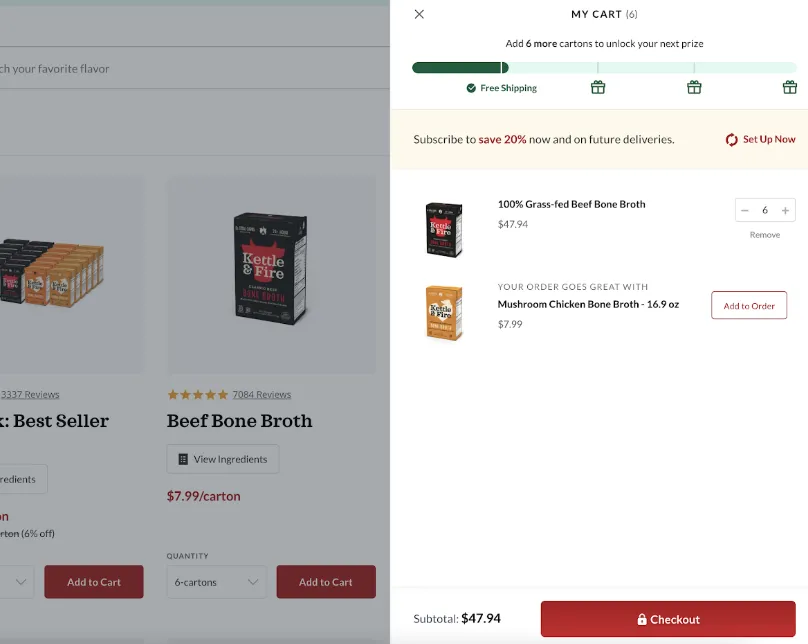
For small businesses, this can reduce unnecessary navigation and make it easier for customers to review their orders before checkout.
Its responsive layout, quantity controls, and visible checkout button keep the next step clear without forcing shoppers to leave the product page.
3. SEOspace
Search engine optimization (SEO) supports broader website promotion by helping potential customers find relevant pages when they search online.
SEOspace helps small businesses identify technical and on-page issues that may limit search visibility.
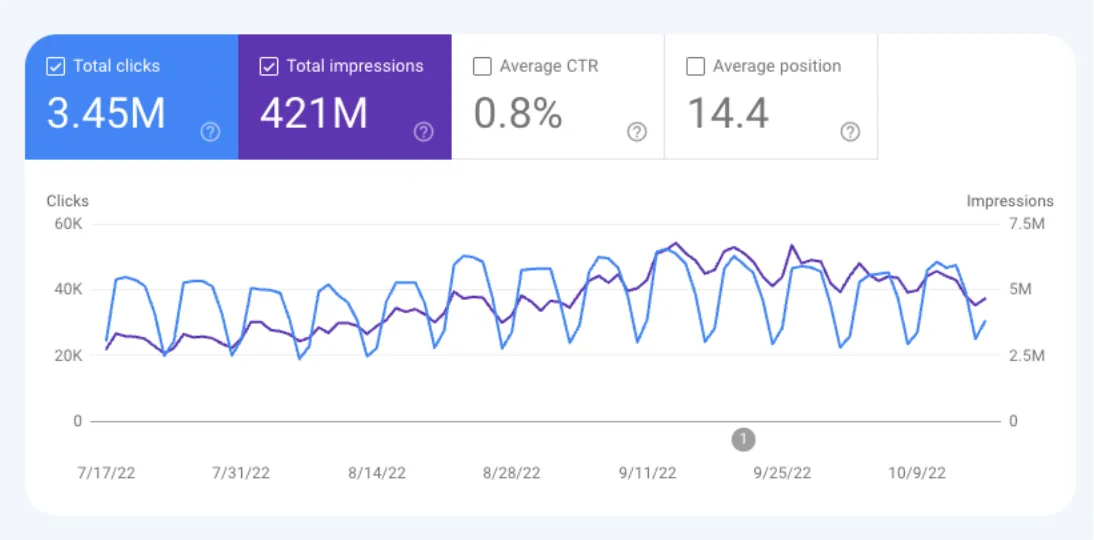
It offers site-wide audits, keyword tracking, and Google Search Console integration, giving business owners a clearer view of what needs attention.
For a small business without an in-house marketing team, these insights can make it easier to prioritize content and technical updates.
Imagine a boutique fitness studio in a competitive city like New York.
To improve visibility, SEOspace could help the studio:
- Flag title tags that are missing key local SEO terms like “yoga in Brooklyn”
- Guide you to optimize image alt text for terms like ‘beginner yoga’
- Suggest adding keywords to class descriptions
- Generate SEO content using AI
Together, these updates could strengthen the studio’s relevance for local searches such as “yoga near me,” increasing its chances of reaching nearby customers.
4. Advanced Map Block
For local businesses, maps are essential to marketing and SEO.
Search engines reward sites that clearly display location data, since it helps confirm your business’s relevance for local searches. Interactive maps strengthen those signals by showing exactly where you operate. This increases the chance that you’ll rank when nearby customers search for services like yours.
But while Squarespace offers a built-in map block, it only allows one marker. That’s fine if you run a single shop. But it quickly falls short for businesses with multiple locations.
Advanced Map Block solves this limitation by letting you add multiple custom markers, display routes, and style the map to match your website.
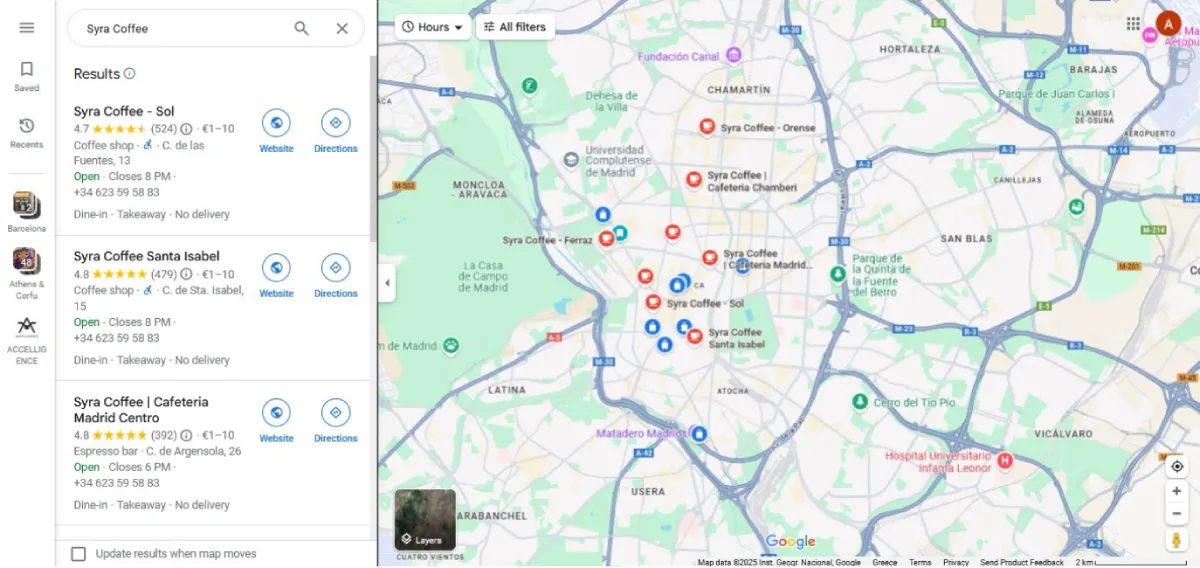
Instead of showing visitors a single static location, it can help them compare branches, understand service areas, and find the most convenient destination.
5. Weglot Translate
Growth doesn’t have to stop at your local market. With Weglot Translate, a small business can instantly offer multilingual versions of its site.
That means more people can read product descriptions, explore galleries, and make confident buying decisions in their own language.
For example, a men’s fashion store selling warm corduroy jackets could use Weglot to adapt automatically:
- Product detail images
- Product options
- Checkout flows
Suddenly, what once was a neighborhood boutique becomes a global brand.
6. Lightbox Anything
Pop-ups are effective marketing tools when used well.
Lightbox Anything lets small businesses display promotions, affiliate links, image galleries, or sign-up forms in sleek, responsive boxes. And you don’t need to code anything.
So a clothing company might use it to display a size guide in a smart-looking pop-up.
Or a gift shop might use it to create a pop-up promotion for seasonal items.
With clean-looking CTAs and conversion-optimized add-ons, it helps small businesses clarify information and run promotions.
7. Lazy Summaries (Lazy Load Summary Block)
When you merchandise products with Squarespace’s Summary Block, the 30-item cap limits the number of products customers can explore.
The Lazy Summaries plugin raises that limit, allowing you to display up to approximately 250 items in one block. With extra visibility, customers are more likely to see products that interest them, increasing the chance of conversion.
Let’s say you have a homeware store with 160 SKUs. With Lazy Summaries, customers can see the entire range on one page.
But this plugin goes beyond scale.
Lazy Summaries layers on marketing-friendly controls, so you can:
- Add a lightbox to stores, blog summaries, and galleries
- Show an alternative image on hover
- Apply custom classes for styling
- Filter items by tag or category
TL;DR: With Lazy Summaries, you can create more effective product showcases that display more items and keep customers browsing longer.
8. Custom Table Block
Small businesses often need to present information in a clear table — whether it’s service packages, product comparisons, or event schedules.
Picture a delivery company that needs to show a comparison of different courier services, with rates, delivery times, and coverage areas side by side. Tables help customers instantly see the best option for their needs, making checkout smoother and encouraging conversions.
Unfortunately, Squarespace doesn’t natively support tables.
The Custom Table Block plugin fixes that by letting you create tables in seconds. You can populate them with text, images, and links.
(You can connect a Google Sheet for automatic syncing, upload a CSV, or add data manually.)
9. Bebe Testimonial Slider
Testimonials are trust signals. And Bebe Testimonial Slider helps you use them to nudge users to conversion.
This plugin displays reviews in a customizable slider with autoplay, styling controls, and mobile-friendly layouts.
So, a florist might use it to automatically show glowing client testimonials and wedding gallery snapshots. Or a SaaS company might use it to show quotes from successful case studies.
Use this slider on your home page and product pages to encourage more sales.
10. Peach’s Plugin
Peach’s makes it easy for small businesses to attract more customers through word of mouth.
Here’s how it works:
- You set up a simple offer, like “Give your friend 10% off and get $10 credit when they buy.”
- Peach’s generates the referral links automatically so that customers can share them via email, social media, or text.
- When a friend clicks the link and makes a purchase, Peach’s tracks the purchase, applies the friend’s discount, and gives the reward to the referrer.
Beyond customer referrals, you can also use Peach’s to create a small affiliate program.
For example, a fitness coach could give local influencers their own unique links. Each time someone signs up for a class through that link, the influencer earns a commission.
Wrap Up
Squarespace plugins transform basic website templates into marketing tools that get results. You can boost SEO and sales, encourage referrals and reviews, and offer the features you need to compete with bigger brands.
But don’t try to install everything at once.
Start with one or two plugins that directly support your business goals, like the Advanced Map Block for local SEO or Peach’s for referrals. Expand once you grow.
Ready to improve your website’s marketing performance? Explore more website design, ecommerce, and plugin resources from Porto Theme.
Author bio:
Ioana Wilkinson
Ioana is a business strategist and content writer for B2B tech and SaaS brands. She also helps aspiring entrepreneurs build remote businesses. Born in Transylvania and raised in Texas, Ioana has been living the digital nomad life since 2016. When she’s not writing, you can catch her snorkeling, exploring, or enjoying a café con leche in Barcelona!


Leave a Reply