
The Backend Engine: Optimizing Internal Workflow With Productivity Tools To Elevate Customer Experience
Customer experience rarely starts with the customer. It begins within the organization and extends to customer support.
Behind every fast reply, accurate delivery, and smooth interaction is an internal customer support workflow that works well. When that workflow breaks, customers notice immediately.
This is why productivity tools to elevate customer experience matter so much. They help teams work with clarity rather than chaos, reduce friction, and make outcomes more predictable.
This article examines how optimizing internal workflows with the right tools can directly enhance the customer experience. We’ll explore practical examples, real data, and proven customer interactions and strategies that have been successfully implemented.
Why internal workflow is the foundation of customer experience
According to Workona, 31% of surveyed companies have automated at least one function within their internal workflow.
Why is this important?
Customer experience is shaped long before a customer reaches out. It is shaped by how customer support teams plan, communicate, and execute work.
If internal workflows are slow, customers wait. If internal workflows are unclear, mistakes are likely to occur. If internal workflows are disconnected, customer behavior changes as they become confused.
Strong workflows create consistency. Consistency builds trust and expands customer relationships.
Companies that prioritize customer experience grow faster. That growth often starts with:
- Internal efficiency;
- Shared knowledge base;
- Positive customer interactions;
- Professional support teams;
- SaaS tools;
- Proper Customer Relationship Management (CRM) tools;
- Ticketing systems;
- Advanced analytics;
- and many others.
Changing those flashy front-end key features won’t help in this case.
What productivity tools to elevate customer experience really mean
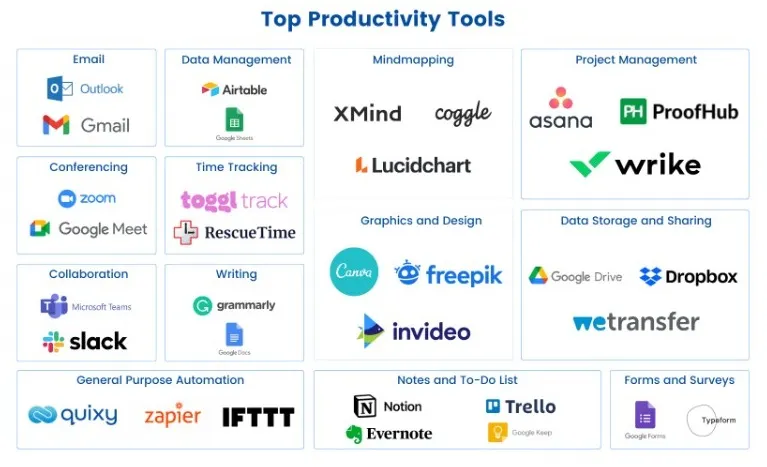
Productivity tools are systems that shape how work moves.
These tools help teams:
- Organize tasks
- Share information clearly
- Reduce repetitive work
- Track progress in real time
- Improve sales productivity
- Enhance customer loyalty
- Plan and execute social media strategies
Common categories include:
- Project management tools
- Communication platforms
- Automation tools
- AI tools (Generative AI and Machine Learning)
- Analytics dashboards
- Knowledge management systems
When these tools work together, teams spend less time managing work and more time delivering value. That shift directly benefits customers.
Project management tools that create clarity and momentum
Project management tools bring structure to complex work. They turn scattered tasks into visible workflows.
Tools like Asana (used by over 150,000 users worldwide), Trello, and Jira are excellent for content management. They help teams visualize key workflow aspects:
- What needs to be done
- Who is responsible
- When it’s due
This visibility reduces confusion and missed deadlines.
Clear ownership leads to faster execution. Faster execution means fewer customer inquiries and higher customer retention.
Teams using structured project tools are more likely to complete work on time and within scope. That reliability is evident in customer interactions through confidence and professionalism.
Using productivity tools to elevate customer experience starts with making work visible and manageable.
Communication tools that keep teams aligned
Poor communication slows everything down. Strong communication accelerates processes and fosters long-lasting customer relationships.
Tools like Slack, Microsoft Teams, and Zoom create shared spaces for conversation. They reduce reliance on long email threads and scattered messages on social media.
For example, Lark serves as unified communication software that bundles core productivity tools including team chat, video meetings and collaborative docs in one platform, keeping all team discussions and work context centralized without switching separate apps.
Real-time communication helps teams:
- Solve issues faster
- Share context instantly
- Make decisions without delay
Remote and hybrid work have made these tools essential. According to Yomly, remote work remains a significant component of modern organizations, with 48% of workers currently working remotely.
Consider the best internal communications platforms for constant messaging or late-night pings. Clear handoff channels, simple forms, and easy access to how-to guides help teams move work along smoothly. This cuts delays and helps support teams serve customers with more confidence.
When teams communicate smoothly internally, the customer journey becomes an experience. They’ll receive faster responses and avoid more misunderstandings.
Automation tools that remove repetitive work
Repetitive tasks drain energy and attention. Workflow automation tools remove that burden.
Tools like Zapier or Power Automate handle routine actions such as updates, notifications, or automated ticket routing. Fewer manual steps mean fewer errors and faster resolution.
This directly improves customer support. When agents aren’t buried in admin work, they respond with more focus and care. Automation doesn’t replace human service, but it serves as an assistant.
Data and analytics tools that guide better decisions
Good decisions require precise data. Data collection and analysis tools provide that clarity.
Platforms like Google Analytics, Tableau, and Power BI turn raw data into insights. They help teams identify delays, bottlenecks, and recurring issues.
With data, teams can answer essential questions:
- Where does work slow down?
- Which issues repeat most often?
- When do customer requests peak?
These insights enable teams to proactively adjust workflows. Proactive changes prevent problems before customers feel them.
Data-driven workflows feel smoother, faster, and more reliable from the customer’s perspective.
Knowledge management tools that keep everyone informed
Knowledge should not live in one person’s head. It should be easy to find and easy to use.
Tools like Notion or Confluence centralize product knowledge, processes, and FAQs. This is especially valuable during onboarding or team changes, where inconsistency can quickly affect service quality.
When teams have instant access to knowledge, they answer questions faster and more accurately. This is especially important during onboarding and team changes.
Strong knowledge systems reduce dependency on individuals. They create consistency in responses. Customers benefit from that consistency immediately.
Customer support tools that bridge internal and external work
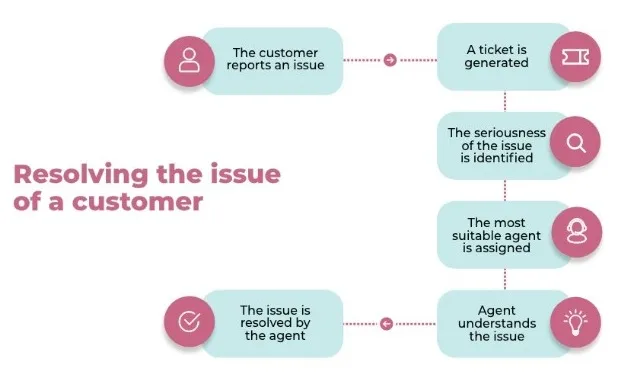
Customer support tools sit at the intersection of internal workflow and customer interaction. They organize requests, track progress, and ensure accountability.
Zendesk, Freshdesk, and Intercom help teams manage conversations at scale. By implementing omnichannel messaging strategies within these platforms, support agents can maintain context seamlessly across email, chat, and social media interactions. They assign ownership, set priorities, and track resolution times.
These platforms also provide performance metrics such as:
- First response time
- Resolution time
- Customer satisfaction scores
These metrics highlight where workflows are successful and where they fall short. Fixing internal issues improves external outcomes.
Support tools are powerful productivity tools to elevate customer experience when paired with strong internal processes.
Integration tools that eliminate silos
Disconnected systems create friction, but integration tools remove it.
When systems automatically share data, teams avoid duplicate work. Sales, support, operations, and delivery stay aligned.
Integration ensures:
- Consistent information across platforms
- Faster handoffs between teams
- Fewer errors caused by manual updates
Tools that integrate well create smoother workflows and cleaner customer experiences. Customers never see the integration, but they feel the efficiency.
How to choose the right tools for workflow optimization
The best tools solve real problems without adding complexity.
Start by identifying where work slows down. Look for repeated delays, errors, or bottlenecks.
Then evaluate tools based on:
- Ease of use
- Integration capabilities
- Reporting features
- Scalability
- Adoption by the team
Avoid adding too many tools at once. Tool overload can harm productivity rather than improve it.
Focus on alignment and simplicity. That is where productivity tools to elevate customer experience deliver the most value.
For example, one of the most significant bottlenecks in internal operations is the constant back-and-forth involved in drafting, reviewing, and approving documents. This delays service delivery to the customer.
To eliminate this friction, businesses must choose productivity tools that simplify document finalization.
For instance, having a robust PDF editor integrated directly into the workflow allows teams—from sales to legal—to instantly finalize contracts, update financial disclosures, and annotate client agreements without converting files or printing documents.
This digital efficiency ensures faster turnaround times on client paperwork, directly elevating the overall customer experience.
Real examples of workflow improvements that help customers
These are some of the key examples of how workflow improvements can benefit both customers and businesses.
Faster responses through unified communication
Teams may use a shared live chat platform instead of emails. Internal response time may drop, and this can easily be seen in the faster replies customers receive.
Fewer errors through automation
Automated ticket routing can help reduce manual assignment errors. As a result, issues may reach the right people faster.
Better planning through analytics
Analyzing ticket data can help ensure that peak times are covered and customer wait times are decreased.
Ecommerce
Fragrance-focused ecommerce stores experience the same thing. Whether they’re offering perfume samples, niche perfumes, or perfume decants, their success depends on smooth backend operations. These are necessary to handle their diverse product catalogs.
Productivity tools that automate inventory updates, track batches, and manage orders help ensure customers receive accurate information and timely deliveries.
For stores featuring top niche perfume brands or running a niche perfume sale, these efficiencies directly translate into a better customer experience and higher satisfaction rates.
Measuring the impact on customer experience
What gets measured improves. Metrics like customer satisfaction, net promoter score, response time, and repeat issues tell part of the story.
When these metrics improve, the customer experience improves as well.
Internal metrics matter as well. Task completion speed, error rates, and automation success provide customer insights into workflow health.
Together, these metrics tell a complete story.
Common mistakes to avoid
Even good tools can fail if used poorly. Pay attention to these key mistakes:
- Adding too many tools can create confusion
- Skipping training can reduce adoption
- Ignoring data wastes insight
- Poor integration breaks workflows
Make sure to focus on clarity, training, and alignment.
Final thoughts
Customer experience is built on internal execution. Strong workflows create strong outcomes.
When teams utilize productivity tools to enhance the customer experience, work becomes clearer, faster, and more reliable. Customers feel the difference in every interaction.
The backend engine matters. When it runs smoothly, customer experience follows naturally.
What’s your productivity stack, and what do you have to say about how it changed your operations so far?
Author bio:

Nikola Pantic is a Partnerships Manager at uSERP, connecting with partners and nurturing those partnerships through mutual collaboration, and a seasonal writer who helps shape various industries through the written word.


Leave a Reply