
Top WordPress Plugins for Your Website in 2026
WordPress plugins allow you to design and develop websites for various purposes, whether creating a travel booking website, an e-commerce store site, a business portfolio, or a personal blog—without any previous knowledge of web development techniques. These templates outsource the need for you to start from scratch, give you the flexibility to make your website more personalized, and simply provide you with lots of opportunity to really make your site come alive.
WP is brilliant; however, for sure, it is not a complete solution. Extra functions, for instance forms for contacts, galleries, stores, etc. likewise are provided by plugins. This article shows three WordPress plugins, which not only increase site SEO and optimize images, but also modify the administration panel URLs To know more about WordPress plugins on the portal Gosta Media. It gives a more detailed breakout of the plugins discussed here taking into consideration different themes and versions. Furthermore, it gives information on and how to use those four useful plugins of WordPress.

Yoast SEO: The Most Popular WordPress SEO Plugin
Yoast SEO plugin is a powerful software that assists you in improving the website search engine optimization. Over 5 million sites are utilizing it already, and it’s one of the most famous SEO plugins so far.
SEO Plugin helps you with all aspects of on-page SEO, including:
- Keyword optimizatio. With Yoast, you will learn how to choose keywords properly, and he guarantees that you will put them in the right places.
- Content analysis. Yoast SEO evaluates your content and informs you on the improvement areas for better SEO rankings.
- Technical SEO. It is able to deal with technical aspects of SEO like making up XML sitemaps and robot.txt files.
- Readability. Using this plugin, you can achieve higher search engine rankings if your content gets more readable that is.

This WordPress SEO Plugin can help you improve your website’s search engine rankings in a number of ways, including:
- You can optimize your web pages to attract more organic traffic to your website.
- Yoast SEO will be your aid to boost brand awareness by maximizing your website’s reach in search engines.
- It provides you with a better chance of getting potential buyers to your website through its search engine optimization tools.
EWWW Image Optimizer: An Efficient Solution for Automatically Optimizing Images
This is a plugin for WordPress sites named EWWW Image Optimizer which optimizes your images for the web, minimizing the size of the files without compromising the quality. This may help to increase your site’s loading speed factor and will make it rank high among the SEO results due to this and the overall comfortable user experience.
It is easy to use and incorporates a great deal of features:
- Automatic image optimization: The plugin runs without you having to do anything with each picture you add to your WordPress Media Library. By the way, you are able to convert files one by one or in batch mode.
- Lossless and lossy compression: Optimizer uses a variety of compression techniques to reduce the file size of your images. Lossless compression reduces file size without sacrificing quality, while lossy compression reduces file size even further by removing some data that is not visible to the human eye.
- Support for multiple image formats: The plugin offers comprehensive conversion including JPEG, PNG, GIF, and WebP.
- Image resizing: It has an inbuilt functionality to let you adjust the size of your images that matches your site’s design. This helps the website to load fast with appropriate size of images so that they can not look stretched or distorted.
- Image watermarking: The WordPress plugincan add watermarks to your images to prevent from copyright infringement. You can also explore different photography watermark ideas to make your branding more creative and unique.
- Lazy loading: It only loads images when they are actually in view. This can give a strong hand to the growth of your site speed.
- CDN integration: EWWW Image Optimizer may be used together with CDN (content delivery network) and thus to use servers that are more close to your visitors for delivering your images. It can make your website load well as expected.
 EmbedPress: Best Content Embedding Plugin for WordPress
 EmbedPress: Best Content Embedding Plugin for WordPress
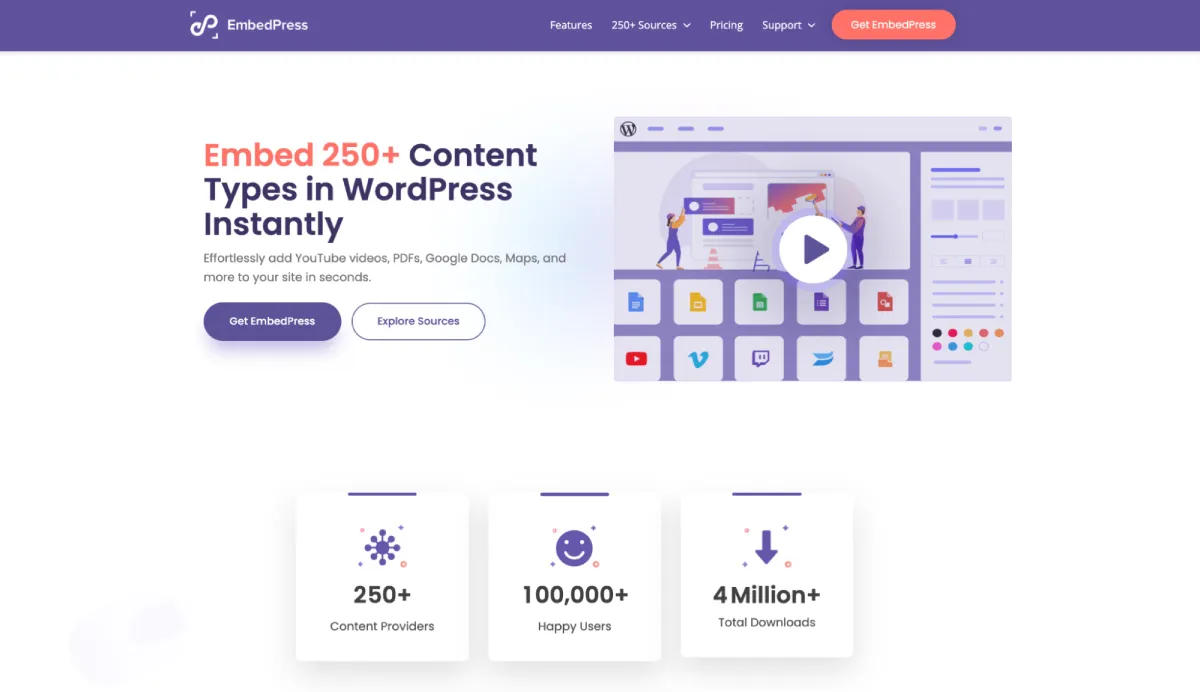
EmbedPress is a powerful all-in-one embedding plugin that lets you embed content from 250+ sources directly into your WordPress site – no coding required.
Whether it’s YouTube videos, Google Docs, PDFs, Spotify tracks, social media posts or interactive maps, EmbedPress handles it all with a simple URL paste. It works with Gutenberg, Elementor, and any other WordPress editor with shortcodes.
EmbedPress incorporates a great deal of features:
- 250+ Embed Sources: Embed PDFs, Docs, audio, videos, social feeds, images, live streams and more from 250+ sources.
- One-Click Embedding: Simply paste the source URL, and EmbedPress automatically detects and embeds the content fully responsively on your page.
- PDF & 3D Flipbook Viewer: Upload PDF documents and convert them into interactive 3D PDF flipbooks with a single click, with options to add a toolbar and sound effects.
- PDF Advanced Controls: Zoom, page navigation, and print/download toggles for embedded PDFs.
- Custom Branding: Set global branding and custom logos across all your content embeds to maintain a consistent brand image.
- Custom Players & Controls of Audio & Videos: Replaces default video and audio players with highly customizable, brandable media interfaces for YouTube, Vimeo, Wistia.
- Lazy Loading: Embrace lazy loading for embedded content to reduce bounce rates and speed up page load times.
- Content Protection: A PRO feature that lets you lock embedded media (such as videos, PDFs, and 3D flipbooks)
- Embedded Content Analytics: Track views, engagement, and click-throughs on your embeds.
- Shortcode Support: Use the shortcode generator to embed content with any preferred WordPress page builder or editor.
- Google Workspace Integration: Embed Google Docs, Sheets, Maps, Forms and Slides directly into your WordPress site without losing any functionality.
- iFrame Customization: Customize the appearance of embedded content by modifying iFrame height, width, padding, margin, and more
- PRO Features: The premium version adds advanced options like content protection, custom ads and analytics.
EmbedPress is available as both free and PRO version.
BetterLinks: Best Link Management & URL Shortener Plugin
BetterLinks is an all-in-one AI link management plugin for WordPress that lets you shorten, track, cloak, and analyze URLs – all from one intuitive dashboard. Whether you’re an affiliate marketer, blogger, or business owner managing multiple websites with a lot of links, BetterLinks makes it easy to take full control of your links without any technical expertise.

BetterLinks Features:
- AI-Powered Link Generation: Generate multiple short links at once, saving time and keeping link management organized.
- Quick Link Shortening: Turn long, unwieldy URLs into clean, branded short links within minutes, and share them instantly with one click directly from the dashboard.
- AI Link Assistant: It analyzes your content directly inside the WordPress editor and suggests the most relevant links for you to insert with a single click.
- Affiliate Link Cloaking: BetterLinks lets you cloak affiliate links – turning long, messy URLs into clean, branded short links that still redirect to the original destination.
- Global UTM Builder: Generates and attaches dynamic tracking parameters to your URLs right from your WordPress dashboard.
- Drag & Drop Link Management: Create, edit, and organize all your links in one place using an intuitive drag-and-drop interface, making link management effortless even at scale.
- Full Site Link Scanner: Scan all the links on your website with a single click and perform in-depth link audits.
- Real-Time Analytics & Reporting: Monitor click-through rates and generate detailed reports covering top referrers, social media clicks, browser data, OS data, and more to measure campaign performance.
- UTM Builder: Add UTM parameters to any URL to track marketing campaigns across platforms without switching tools.
- A/B Split Testing: Run dynamic redirects to split-test multiple destination URLs and find out which links drive better results.
- Link Scheduling: Set links to activate or expire at specific times — ideal for time-sensitive promotions, seasonal campaigns, or product launches.
- Gutenberg & Elementor Integration: Manage and redirect links directly within the Gutenberg block editor and Elementor without leaving your content workflow.
- One-Click Migration: Already using Pretty Links or another link plugin? Migrate all your existing links to BetterLinks in a single click with zero hassle.
BetterLinks is available as a free plugin, with a PRO version starting at $99 per year that includes advanced features such as geotargeting, individual link analytics, custom scripts, and more.
Change WP Admin Login: Security for Your WordPress Site
Change WP Admin Login is a widely used, secure and simple plugin that increases security of your WordPress website. It makes it possible to replace the original WordPress administration URL with a different random and unpredictable one. So hackers and bots have no chance in finding a way to get in.
The Change WP Admin Login plugin raises the bar for the security of your WordPress website. It is definitely worth using it. The protection is straightforward, gives you powerful tools and almost unlimited advantages for the purpose of safeguarding your website from attacks of the bad intention.
- Improved Security. By changing the default login URL to something else you create an additional level of security.
- Easy Customization. You choose a WordPress custom URL for your login page admin to hinder hackers with their guessing game.
- User-Friendly Interface. The best thing about the plugin is that it is super easy and simple to use and even for those people who are newbies.
- Seamless Integration: The change of WP Admin Login is well-designed for use in combination with other plugins and themes, so they work properly without complications.
- Enhanced Protection. Besides this, there are also other security features like IP whitelisting and blacklisting, failed logins attempts monitoring, and password strength checking.
- Regular Updates. The plugin is consistently improved, new features added, security enhanced, and bugs fixed so that the system operates efficiently and works perfectly with others.
In addition to the three important plugins mentioned above, it is crucial to be aware of other essential plugins as outlined below.
EmbedSocial: Best Social Media Plugin for WordPress Website
EmbedSocial is a powerful Instagram feed plugin designed to help you collect and display social media content directly on your WordPress website. It lets you embed feeds from platforms like Instagram, Facebook, TikTok, YouTube, X, and LinkedIn, helping you showcase real-time posts, videos, reviews, and UGC in a visually engaging way.

Features:
- Easy integration: EmbedSocial allows simple WordPress integration with no coding skills needed. You can generate a widget, copy the code, and embed your social media feed on any page.
- Real-time updates: Keep your website fresh with automatically synced content from your connected social media accounts.
- Customizable layouts: Choose from grids, sliders, carousels, masonry layouts, and other widget styles to match your website design.
- Moderation and filters: Control which posts appear on your site by approving, removing, or filtering content before it goes live.
- Multi-platform support: Display content from Instagram, Facebook, TikTok, YouTube, X, LinkedIn, and other major social media platforms.
- Responsive design: EmbedSocial widgets adapt to all screen sizes, so your feeds look clean on desktop and mobile devices.
- UGC and review widgets: Showcase customer posts, testimonials, Google reviews, and social proof in one place.
- Shoppable feeds: Tag products in social media posts and turn your embedded feeds into a shopping experience.
EmbedSocial stands out as one of the best social media plugins for WordPress because it combines social feeds, UGC, reviews, customization, and moderation in one easy-to-use platform.
Tagembed: Best Instagram Feed Plugin for wordpress Website
Tagembed is a leading Instagram feed plugin designed to seamlessly integrate your Instagram content into your WordPress website. This powerful tool enhances your website’s visual appeal and engagement by showcasing real-time Instagram feeds directly on your site. Whether you’re a blogger, business owner, or social media enthusiast, Tagembed offers a user-friendly and efficient solution to display your Instagram posts, stories, and highlights, helping you connect with your audience in a visually dynamic way.

Features
- Easy Integration: Tagembed allows for hassle-free integration with WordPress, requiring no coding skills. With just a few clicks, you can embed your Instagram feed and customize its appearance to match your website’s design.
- Real-Time Updates: Keep your website fresh and engaging with real-time updates from your Instagram account. Tagembed automatically syncs your latest posts, ensuring your feed is always up-to-date.
- Customizable Layouts: Choose from a variety of layout options, including grids, carousels, and sliders, to display your Instagram content in the most appealing way. You can also customize colors, fonts, and other design elements to maintain brand consistency.
- Moderation and Filters: Maintain control over the content displayed on your site with Tagembed’s moderation features. Filter posts by hashtags, exclude specific content, and approve or disapprove posts before they go live.
- Responsive Design: Tagembed’s responsive design ensures that your Instagram feed looks great on all devices, from desktops to smartphones. This mobile-friendly feature enhances user experience and keeps your audience engaged regardless of how they access your site.
- Analytics and Insights: Gain valuable insights into your audience’s interaction with your Instagram feed. Tagembed provides analytics that help you understand user engagement and optimize your content strategy.
- Multi-Account Support: Manage multiple Instagram accounts and showcase feeds from different profiles on your WordPress site. This is particularly useful for businesses with multiple brands or influencers managing various accounts.
- SEO-Friendly: Enhance your website’s SEO with Tagembed by displaying fresh content that keeps users on your site longer. This improved user engagement can contribute to better search engine rankings.
Tagembed stands out as the best Instagram feed plugin for WordPress due to its comprehensive features, ease of use, and ability to enhance your website’s visual appeal and user engagement.
Conclusion
WordPress plugins are the way of plugging extra features and functionality to your website without being bound to write any code. There are thousands of plugins around and one will for sure be for whatever you need it. You can enhance your web page through using the different WordPress plugins that will help to make your site function better, protect it from hackers, and provide a better experience to visitors.


Leave a Reply