
Top 5 Android Data Recovery Software Programs in 2026
Data loss on your Android smartphone can be frustrating, especially if your lost data holds valuable photos, videos, documents, etc. Whether your data is lost accidentally or deleted due to a factory reset, software crash, virus attack, or water damage, there are several Android data recovery programs available to help you restore your lost Android files quickly and safely. Now comes the challenging part – Which Android data recovery software should you opt for?
Don’t worry! In this article, we’ve outlined the top Android data recovery software programs in 2026, which you can use to restore your lost files.
Which Android Data Recovery Software Should You Opt For?
Before you proceed with any Android recovery software, it’s important to check its features. Carefully compare the features of these tools and then opt for the one that best fits your needs. Here are certain features that you must check in your tool:
File Type Support
The primary feature of Android recovery software is the ability to recover deleted data of various file types. Ensure your recovery tool supports recovery of lost photos, videos, documents, and other types of files in various file formats.
Recovery from Internal Storage SD Card
Many Android data recovery software performs scanning of both internal phone memory and external SD or microSD cards. This will help you to recover lost files from multiple storage locations.
WhatsApp Recovery
Ensure your Android recovery tool supports recovery of WhatsApp data. Many tools allow recovery of deleted WhatsApp chats, photos, videos, attachments, and WhatsApp Business data.
Preview Before Recovery
Most Android data recovery programs allow you to preview the recoverable files before saving them on your system. This feature not only helps you to verify recoverable data but also to save storage space and time.
Different Scanning Options
Most advanced Android recovery software offers both Quick Scan and Deep Scan options. Quick scan helps to find recently deleted files quickly, while deep scan performs detailed scanning to recover older or hidden deleted files.
2026 Guide: Which Android Data Recovery Software Should You Use?
Now that you’re familiar with the features to check in any Android data recovery tool, it’s time to explore some best options. Here’s our best pick for the top 5 Android data recovery software programs in 2026:
01: Stellar Data Recovery for Android
02: Tenorshare UltData for Android
03: EaseUS MobiSaver for Android
04: Wondershare Dr Fone – Data Recovery (Android)
05: iMobie PhoneRescue for Android
Let’s explore these tools in detail:
01: Stellar Data Recovery for Android

Stellar Data Recovery for Android is an all-in-one free data recovery software for Android designed to recover deleted or lost data from Android smartphones and tablets. The software performs a thorough scan of your Android devices to find recoverable files. Whether your files are lost due to accidental deletion, formatting, system failures, factory reset, or any other reason, this software works in all data loss scenarios.
The Stellar Data Recovery for Android software is compatible with major Android brands, including Samsung, Xiaomi, Vivo, Oppo, Motorola, OnePlus, and Google Pixel devices. It is also known for its simple and user-friendly interface, which allows data recovery in a few simple clicks. The preview feature of this software lets you preview the recoverable files before saving them on your PC.
Pros
- Supports recovery of photos, videos, contacts, WhatsApp chats, documents, SMS messages, and various other Android file types.
- Supports recovery from both internal Android storage and external SD cards across multiple Android device models efficiently.
- Performs both Quick scanning and Deep scanning to improve recovery chances for deleted, formatted, corrupted, or inaccessible Android files.
- Easy-to-use interface helps beginners recover deleted Android files without requiring advanced technical knowledge or complicated recovery procedures.
Cons
- The free version varies in terms of data recovery size. You need to upgrade to premium versions to enjoy advanced features.
- Deep scanning large Android storage devices may take significant time, depending on storage size and the amount of deleted data.
- Recovery success depends heavily on whether deleted Android data has already been overwritten by newly stored device information.
Best Use Case
Stellar is particularly suitable for users who want a straightforward and secure Android recovery solution without dealing with complicated settings.
02: Tenorshare UltData for Android

Next in our list of the top 05 Android data recovery software programs of 2026 is Tenorshare UltData for Android. It is an all-in-one recovery tool that supports the recovery of files deleted from your Android devices due to various reasons. You can use this tool to easily restore your lost photos, videos, documents, WhatsApp chats, contacts, messages, call logs, etc. from your Android phone. Its simple interface and guided recovery process make it suitable for beginners as well as professional users.
Pros
- Supports data recovery from your Android phone without rooting it, making the recovery process simpler, safer, and more user-friendly overall.
- Compatible with popular Android smartphones, including Samsung, Xiaomi, Oppo, Vivo, Huawei, Motorola, and OnePlus device models globally.
- Supports selective recovery options, reducing scanning time and helping users efficiently manage recovered Android files and storage organisation properly.
Cons
- Full recovery functionality and advanced features are available only in paid versions after limited free scanning and preview access.
- Recovery speed may become slower while scanning large Android storage devices containing extensive multimedia files and application data internally.
- Many users found its customer support and refund experiences inconvenient in different recovery situations.
Best Use Case
Best for recovering deleted WhatsApp chats, photos, videos, and contacts from Android devices without requiring root access in many cases.
03: EaseUS MobiSaver for Android

EaseUS MobiSaver for Android is a reliable Android data recovery software which supports data recovery from popular Android brands such as Samsung, Xiaomi, Oppo, Vivo, Huawei, Motorola, and Google Pixel devices. This software is mainly known for its simple and beginner-friendly interface, which allows you to recover Android data in just a few steps. You can use this software to restore deleted files of various file types, including photos, videos, documents, call logs, and many more. It offers both quick scan and deep scan modes to improve recovery accuracy for recently deleted or permanently lost files.
Pros
- This tool is mainly known for its user-friendly interface that can help you restore deleted files without complicated recovery procedures.
- The preview feature of this software allows you to selectively recover important deleted files while avoiding unnecessary data recovery attempts.
- Quick scan and deep scan modes improve recovery performance for recently deleted and permanently lost Android files successfully.
Cons
- The free version includes limited recovery functionality, and you may have to upgrade to paid versions for complete Android data restoration and advanced recovery features.
- Recovery success rate reduces significantly if the deleted Android data has already been overwritten by new data.
- Certain encrypted, physically damaged, or factory-reset Android devices may provide limited recovery results compared to normal deletion cases.
Best Use Case
Ideal for recovering recently deleted Android files from internal storage or SD cards after accidental deletion or software-related data loss.
04: Wondershare Dr Fone – Data Recovery (Android)
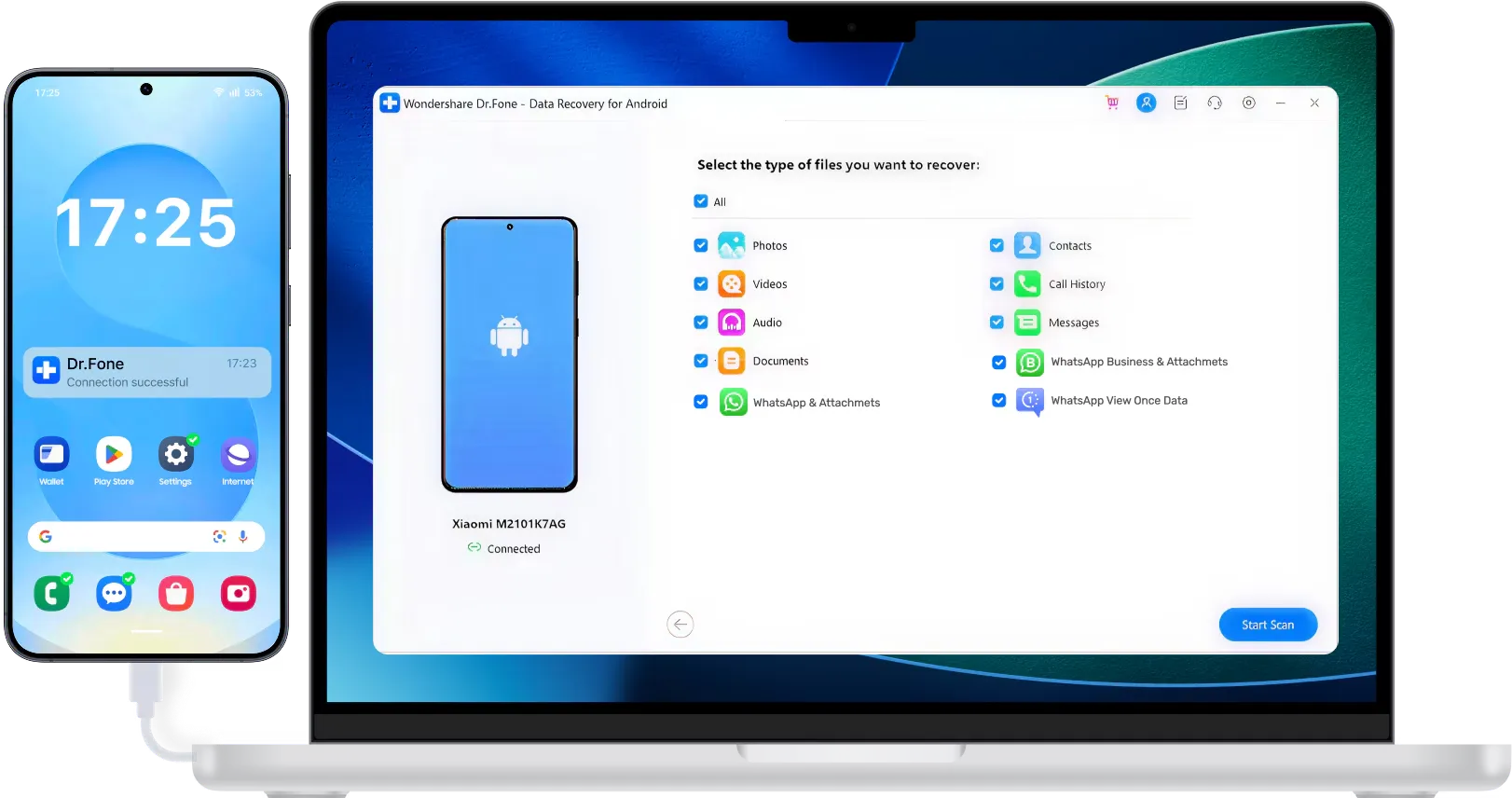
Wondershare Dr Fone is a well-known Android data recovery software that offers quick recovery of files lost due to accidental deletion, factory reset, system crashes, rooting errors, or device damage. The software is known for its ability to recover data from broken or inaccessible Android devices, including phones with damaged screens or system issues. It also provides preview and selective recovery options, allowing you to restore only the required files. With broad compatibility and multiple recovery features, this recovery tool continues to remain one of the most popular Android recovery solutions in 2026.
Pros
- Supports recovery of deleted photos, videos, contacts, WhatsApp chats, messages, documents, and other types of files from your Android phones.
- Includes additional mobile utilities like screen unlock, phone backup, system repair, and Android data transfer management tools together.
- Preview and selective recovery options help you restore only the required Android files while avoiding unnecessary complete data restoration.
Cons
- Premium pricing is comparatively higher than many competing Android data recovery software programs available in the market today.
- Deep scanning large Android devices may require longer processing time, depending on storage capacity and deleted data volume internally.
- Some advanced Android recovery features may not function equally across all smartphone brands and Android OS versions properly.
Best Use Cases
Best for recovering deleted Android data from broken, damaged, locked, or inaccessible smartphones with system-related issues and screen failures.
05: iMobie PhoneRescue for Android

Last in our list of top 5 Android data recovery software programs is iMobie PhoneRescue for Android. This all-in-one Android recovery tool supports recovery of data lost due to accidental deletion, factory reset, software crashes, rooting errors, or malware attacks. The software is known for its easy-to-use interface, which makes the recovery process easier for beginners and non-technical users. It also offers preview and selective recovery options, allowing you to restore only the required files instead of recovering everything.
Pros
- Allows you to recover deleted Android files easily without advanced technical knowledge or software experience required.
- Compatible with major Android smartphone brands, including Samsung, Huawei, Xiaomi, Vivo, Oppo, Motorola, and Google Pixel devices.
- Features like preview functionality and selective recovery allow you to restore only important files while avoiding unnecessary data restoration.
Cons
- Some advanced Android recovery features may require enabling USB debugging permissions.
- Deep scanning your Android storage devices may consume more time.
- Certain encrypted, physically damaged, or factory-reset Android smartphones may provide limited recovery success.
Best Use Case
Best for beginners who need Android data recovery with simple navigation and step-by-step restoration instructions for deleted important files.
Quick Comparison: Top 5 Android Data Recovery Software Programs
Here’s a quick comparison highlighting the features of the above-mentioned top 5 Android recovery tools:
| Tool | Best Feature | Recovery Without Root | Extra Features | Best For |
| Stellar Data Recovery for Android | Deep Android file recovery | Partial Support | SD card recovery | Overall Android data recovery |
| Tenorshare UltData for Android | Strong WhatsApp recovery | Strong Support | Selective recovery | WhatsApp chats and media recovery |
| EaseUS MobiSaver for Android | Beginner-friendly interface | Partial Support | Quick and deep scan | Simple Android file recovery |
| Wondershare Dr.Fone – Data Recovery (Android) | Broken device recovery | Partial Support | Repair, unlock, backup tools | Complete Android management suite |
| iMobie PhoneRescue for Android | Guided recovery workflow | Partial Support | Screen unlock and repair | Easy guided Android recovery |
Wrapping Up
If you encounter data loss on your Android device, use the top 5 Android data recovery software programs in 2026 to recover your files. Whether you accidentally deleted photos, lost WhatsApp chats, or formatted your phone, these tools can help you to restore deleted files easily. Carefully compare the features of these software tools and then choose the one that best fits your needs. Always start the recovery process as soon as possible. The sooner you act, the easier it will be for you to restore deleted files.


Leave a Reply