
Who Secures Your Business Website? Splitting the Job Between Your Developer, Your Host and Your IT Provider
When a small business website gets hacked, the first question is usually “Whose job was that?” The web designer assumed the host handled security. The host assumed the client was updating plugins. The company’s IT provider assumed the website was the agency’s problem. Meanwhile, the site was quietly redirecting visitors to a scam page.
Most website security failures aren’t caused by sophisticated attacks. They happen in the gaps between the people involved. The fix is not necessarily more tools. It is a clear, written split of responsibilities. Here is how to divide the work, whether your site runs on WordPress with a premium theme, a hosted builder or a custom build.
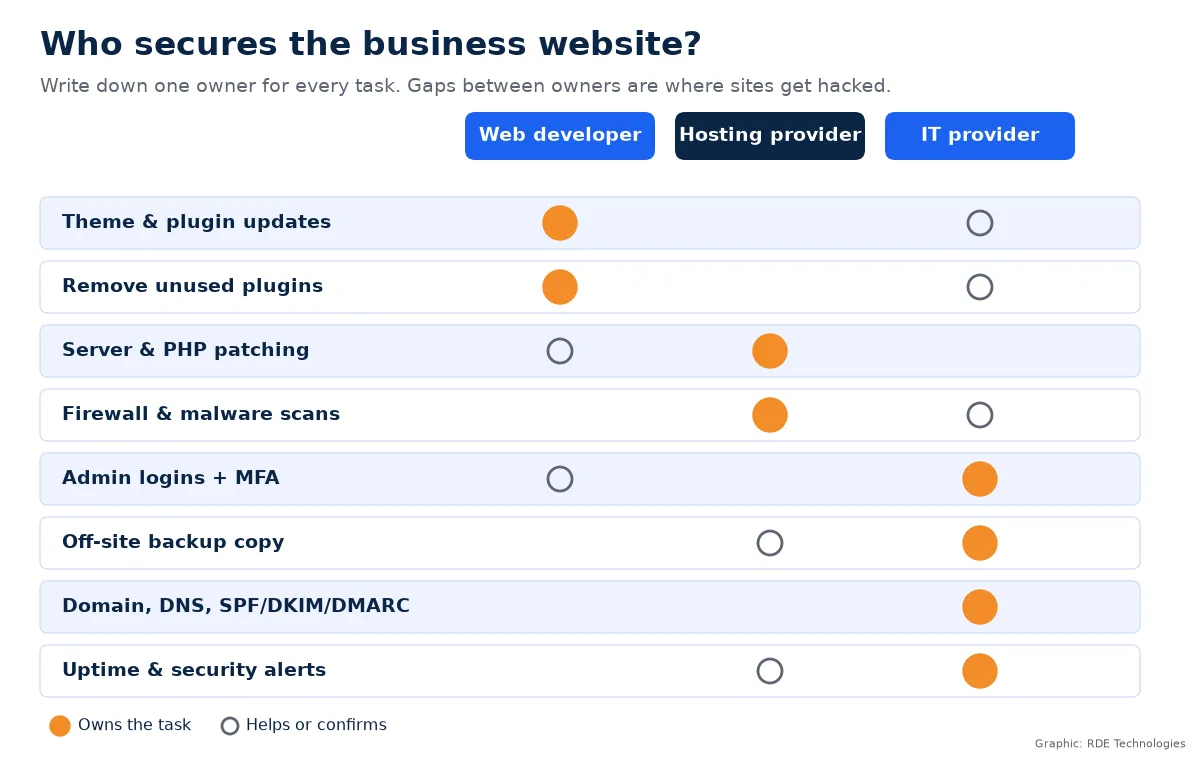
Alt text: Responsibility chart showing which security tasks belong to the web developer, the hosting provider and the IT provider, from theme and plugin updates to server patching, backups, logins, email domain records and monitoring. Image: original graphic created by RDE Technologies for this article. You’re free to publish it with the post.
The three parties, and what each one actually controls
Your web developer or agency built the site. They chose the theme, installed the plugins and wrote any custom code. They understand how the site fits together, which updates might break the layout and which plugins can be removed.
Your hosting provider runs the server. Depending on the plan, they may patch the operating system and web server, provide a firewall, take server-level backups and scan for malware. On cheap shared hosting, they may do very little beyond keeping the server online.
Your IT provider, in-house or outsourced, manages the rest of the business: staff accounts, laptops, email, passwords and security monitoring. They often control the domain’s DNS and email records, and they see the bigger picture when something unusual happens.
Each one controls part of the risk. None of them controls all of it.
Tasks that need an owner
Theme and plugin updates
Outdated plugins and themes are the most common way WordPress sites are compromised. Updates should happen at least monthly, and immediately for security fixes. This usually belongs to the developer, because they can test that an update doesn’t break the site. If you don’t have an ongoing maintenance agreement with them, somebody else must own this explicitly. “We’ll update it when we redesign” is how sites get hacked.
Use only themes and plugins from reputable sources with active development, and remove anything you don’t use. A deactivated plugin can still be a vulnerability if its files are on the server. Never install “nulled” (pirated) premium themes. They often ship with backdoors already built in.
Server patching and the web application firewall
This sits with the host. Ask your host in writing: Do you patch the server and PHP versions? Is there a web application firewall? Do you scan for malware, and what happens if you find some? If the answers are vague, it may be time for a better hosting plan. The savings from cheap hosting disappear quickly after one cleanup bill.
Admin logins
Every person with access to the site’s dashboard, hosting control panel and domain registrar should have their own account with multi-factor authentication. Shared “admin” logins make it impossible to know who changed what. This is a natural task for your IT provider, who already manages staff accounts and can remove access when someone leaves or when the agency relationship ends.
Backups
Backups need to exist in two places: on the host, and somewhere the host doesn’t control. If your hosting account is compromised or cancelled, backups stored only with that host may vanish with it. Agree on who keeps the second copy, how often it runs and who has tested a restore. The developer can confirm the backup includes the database and uploads. The IT provider can make sure it’s stored safely.
Domain, DNS and email records
Your domain is the foundation of both your website and your email. Make sure it’s registered in the company’s name, with registrar lock and MFA on the account, and that renewal notices go to a shared address, not a former employee. SPF, DKIM and DMARC records protect your domain from being used in phishing emails. These are usually best owned by the IT provider, since a mistake affects company email as well as the site.
Monitoring
Someone should notice when the site goes down, when unexpected admin accounts appear or when the site starts appearing in search results with spam pages. Uptime monitoring and security plugins can send alerts, but alerts only help if they reach a person who will act. Decide whose inbox they land in.
Questions to ask before you sign with a developer or host
- Will you keep the theme and plugins updated after launch, and is that in writing?
- Who will own the hosting, domain and admin accounts: you or us? (The answer should be: the business.)
- What backups are included, where are they stored and how fast can you restore the site?
- How will you tell us about a security problem, and how quickly?
- What happens to our access and files if we stop working together?
Clear answers up front prevent most of the finger-pointing later.
Put it on one page
The simplest step is a one-page responsibility chart listing each task, its owner, how often it happens and who to call in an emergency. Share it with your developer, your host and your IT team, and review it once a year or whenever a vendor changes.
Small businesses that work with a managed service provider in Nassau County or anywhere else should ask whether website-adjacent tasks such as DNS, email records, admin access and off-site backups are included in their agreement. Often they are, or can be, and that alone closes several of the gaps described above.
When something goes wrong
If your site is hacked, don’t just restore last week’s backup and move on. Change every password connected to the site and hosting account, find out how the attacker got in, and remove the cause, whether it’s an outdated plugin or a compromised login. Otherwise the same attacker will be back within days. Check whether any customer data, such as contact form submissions or order details, may have been exposed, because that may carry notification obligations.
A website is often the first thing a potential customer sees. Protecting it doesn’t take a large budget. It takes three parties who know exactly which part of the job is theirs.
About the author: Nathan Spitalny is the CEO of RDE Technologies, a managed IT and cybersecurity provider in Oceanside, New York, that has helped businesses run and protect their technology since 2009.


Leave a Reply