
Why a Generic WhatsApp Plugin Isn’t Enough for Private Clinics
When a clinic looks for a floating contact plugin for WordPress, the goal is usually simple: make it easy for patients to get in touch through WhatsApp.
The problem is that many private clinics end up installing plugins designed for generic businesses. And a clinic doesn’t operate like a regular online store or ecommerce website.
There are split schedules, urgent calls, vacation periods, time slots without reception staff, and patients who expect a clear response from the very first interaction.
That’s why a floating WhatsApp button can help, sure. But if it doesn’t adapt to how the clinic actually works, it often creates more friction than solutions.
Why Many Floating WhatsApp Plugins Don’t Really Work for Private Clinics
Most clinics install the first WhatsApp plugin they come across. At first, it seems practical, but in day-to-day use it often creates more issues than expected.
The button displays a contact channel, yes, but it doesn’t understand when the clinic is open, when it’s closed, or when nobody is available to answer. The result is usually the same: unanswered messages, calls outside office hours, and confused patients.
What a Private Clinic Actually Needs
A private clinic doesn’t just need a button. It needs a contact system that fits the way the clinic really operates: split schedules, calls only during business hours, different messages depending on the clinic’s status, temporary holiday closures, and a clear patient experience from the very first click.
When that doesn’t happen, the contact channel ends up creating more problems than solutions.
What Usually Fails in Generic Floating Contact Plugins
Most generic plugins are limited to showing a WhatsApp button and little else. In a clinic environment, that quickly becomes insufficient. That’s where many clinics start noticing the limitations.
For example, many plugins don’t distinguish between open and closed hours, don’t handle morning and afternoon schedules separately, don’t support temporary closures, and can’t automatically hide phone calls outside office hours. In the end, patients may try to contact the clinic when nobody is actually available.
It’s also very common for WhatsApp, phone calls, and Google reviews to feel disconnected from one another, as if they were separate tools instead of part of the same patient experience.
It may seem like a small detail, but in a private clinic these little issues become noticeable very quickly. Patients expect clear communication, accurate schedules, and a real sense of availability from the very first interaction.
How This Affects the Patient Experience
When a patient visits a clinic website and finds a contact button that doesn’t respect real opening hours, the experience often starts with confusion. They may send a message outside office hours, try calling when nobody is at reception, or assume the clinic is still available when it’s actually closed.
And even though it may seem minor, these situations affect the way patients perceive the clinic from the very beginning.
In many private clinics, the patient experience starts long before the first appointment. It starts with that very first click.
A Common Problem in Many Private Clinics
After analyzing 100 dental clinics in Madrid, Frenchy, the creator of this plugin, noticed that one of the most common problems was the lack of visibility of contact channels exactly when patients wanted to request information or book an appointment.
Another recurring issue was that many clinics needed a simple WhatsApp contact solution that was easy to configure and actually adapted to the clinic’s real schedules and workflow.
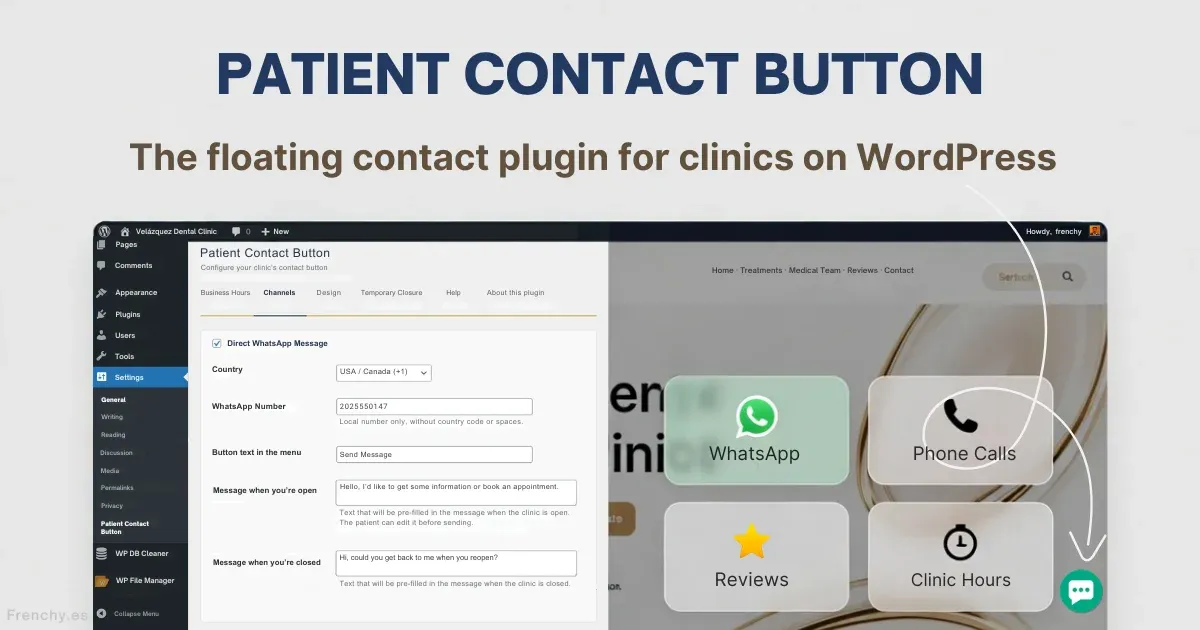
That’s how the idea for the WhatsApp plugin for clinics (Frenchy Patient Contact Button for Medical Clinics) was born: a free WordPress plugin designed specifically to improve WhatsApp communication between private clinics and their patients.
What Makes This Plugin Different
A contact plugin for clinics should adapt to the clinic’s workflow, not the other way around. That’s where a floating WhatsApp button for WordPress can make a real difference in the patient experience.
Patient Contact Button was designed specifically for that:
- Displays different WhatsApp messages depending on whether the clinic is open or closed.
- Enables phone calls only during office hours and automatically hides them outside those hours.
- Supports split schedules with separate morning and afternoon time slots for each day.
- Allows temporary closures or vacation periods without touching code.
- Provides direct access to the clinic’s Google review page.
- Everything can be configured directly from WordPress, in Spanish, without technical knowledge.
When this is implemented properly, the button stops being just another floating element on the website. It becomes a real part of the clinic’s communication process and helps improve patient contact from the very first interaction.
What Types of Clinics Benefit Most from This Kind of Contact Button for WordPress
This type of plugin is especially useful for dental clinics, aesthetic clinics, physiotherapy centers, psychology practices, and in general any private practice where schedules and patient availability change throughout the day.
In these environments, small details like displaying accurate opening hours, hiding calls outside office hours, or making WhatsApp communication easier can have a significant impact on the overall patient experience.
Practical Example
A dental clinic with split office hours may operate from 10:00 AM to 2:00 PM and from 4:00 PM to 8:00 PM. If a patient visits the website at 3:00 PM, the plugin shouldn’t encourage them to call as if somebody were available at reception.
In a situation like this, it makes more sense to display a message explaining that the clinic will reopen later in the afternoon and temporarily hide the call option.
It may seem unimportant at first, but small details like this greatly influence the impression the clinic gives from the very first contact.
How to Tell If It’s Actually Helping
These kinds of improvements usually become noticeable fairly quickly in the clinic’s daily routine. Especially when patients can more easily understand how and when to contact the clinic and avoid trying to reach the staff outside office hours.
In the end, a large part of the patient experience depends on something as simple as showing the right information at the right moment.
Conclusion
A private clinic doesn’t just need a WhatsApp plugin. It needs a contact system that understands how the clinic actually works. Generic plugins don’t respect real office hours, don’t handle vacation periods properly, and often fail to provide a consistent experience for patients.
Patient Contact Button solves exactly that: it improves the first contact experience, adapts to the clinic’s real workflow, and helps clinics manage patient communication more effectively from their WordPress website.
In addition, Frenchy Patient Contact Button for Medical Clinics is completely free and can be downloaded directly from the official WordPress.org repository.
About the Author
Frenchy (José Francisco Ouviña) is a consultant specialized in patient acquisition for private clinics in Spain. His work focuses on local visibility in Google Maps, AI search visibility, and automation systems designed specifically for private healthcare clinics. More information at Frenchy.es


Leave a Reply