
Online AI Video Generators in 2026: The Working Creator’s Review
Look, I’ve written about AI video tools more times this year than I care to admit. Every time I think the dust has settled, another platform ships a feature that reshuffles the deck. But after weeks of testing — and a credit card statement I’d rather not discuss — I’ve put together what I think is the most practical guide yet. If you’re trying to pick an AI video generator for actual paying work in 2026, not just for fun, this one’s for you. Whether you lean toward Text to Video workflows or prefer animating still images, here’s what each platform actually does well — and where they fall short.
TL;DR — Skip to the Verdict
| Platform | Starts At | The One-Line Pitch | Watch Out For |
| DramaPixel | $14.9/mo | Multi-model access in one tab | Credit caps at high tiers |
| Pika | $8/mo | Cheapest paid tier with viral effects | 1080p ceiling |
| Akool | $12/mo | 24 video models and footage editing in one workspace | Free exports are watermarked |
| PicLumen | $7.59/mo | AI-driven visual & marketing video generation made easy | Avoid overly complex prompts |
| PixVerse | $14/mo | Native audio + lip sync done right | Pricing complexity |
| ClipTalk | $19/mo | Mass production for short-form | Recognizable house style |
| Manus | $17/mo | Video inside an agent workflow | Not a dedicated video tool |
| Gemini Omni Video | Free; paid from ~$10/mo | Long-form memory & 4K text rendering | Tied to Google ecosystem |
| Luma Labs | $30/mo | HDR delivery + Ray3 Modify | No native audio |
| Runway | $12/mo | Aleph for editing real footage | Steep learning curve |
1. DramaPixel
Introduction
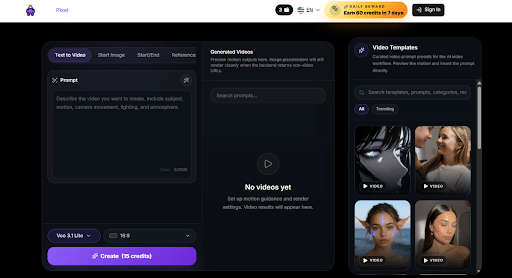
What sold me on DramaPixel wasn’t any single feature — it was the absence of friction. Most platforms force you to pick a side: which model, which workflow, which subscription. DramaPixel just gives you the keys to a toolkit and lets you work. The fact that it bundles multiple frontier models under one subscription is what tipped the scales for me when I was rationalizing my tool stack this quarter.
Features
- Multi-model access including Kling V3, Veo 3.1 (Lite, Fast, Quality), and Hailuo 2.3 under one plan
- Three generation modes: Text to Video, Start Image, and Start/End Image keyframes
- Bundled AI image and AI music generation in the same workspace
- 100+ video templates and effect presets
- Camera motion, style, and duration controls up to 30 seconds
- 16:9, 9:16, and 1:1 aspect ratios with one-click switching
- No watermarks and commercial-use rights starting from the Lite plan
Pros & Cons
Strengths: The economics work. Subscribing to Kling, Veo, and Hailuo separately would run you significantly more than the Pro tier here, and bundling image and music generation removes another two tools from your stack. Templates speed up the boring stuff. Commercial use included on Lite is rare.
Limitations: It’s not built for enterprise-scale automated pipelines pushing thousands of videos through an API. Higher-volume users may bump into credit limits before they’re ready.
Pricing
- Lite: $14.9/mo — 300 credits
- Pro: $29.9/mo — 600 credits with 1080P
- Premium: $149.9/mo — 3,200 credits with priority support
Best For
Indie creators, small marketing teams, and anyone tired of context-switching between three or four subscriptions. If you want one billing line that covers most of your AI video, image, and music needs, this is the cleanest answer.
2. Pika
Introduction
Pika’s reinvention this year has been quiet but real. The Pika 2.5 model, paired with a Studio mode that finally introduced timeline-based editing, turned the platform from a “throw a prompt at it” tool into something closer to a real motion design app. And at $8/month for the paid tier, it remains the most affordable serious entry point in this space.
Features
- Pika 2.5 model with physics-aware motion (gravity, weight, collisions, fluid dynamics)
- Pika 2.5 Studio with timeline and layer-based editing
- Signature creative effects: Pikaffects, Pikascenes, Pikadditions, Pikaswaps, Pikatwists, Pikaformance
- Integrated sound effect generation that matches on-screen action
- Improved lip sync handling complex facial expressions
- Pikaframes for extending clips up to 20–25 seconds
- API access via Fal.ai for developers
Pros & Cons
Strengths: Lowest paid tier on this list at $8/month annual. The Pikaffects library produces content with a visual signature that’s genuinely hard to replicate. Generation is fast and the new Studio mode adds the editing layer that was missing for years.
Limitations: No native dialogue or music generation, only sound effects. Resolution caps at 1080p across all tiers. Default clip length is 3 to 5 seconds, which limits longer narrative use.
Pricing
- Basic: $0 — 80 credits/mo at 480p only
- Standard: $8/mo (yearly) — 700 credits
- Pro: $28/mo — 2,300 credits with faster generation
- Fancy: $76/mo — 6,000 credits with fastest processing
Best For
Social creators, brand marketers running constant short-form campaigns, and hobbyists who want a low-commitment entry into AI video. If your output lives on TikTok, Reels, or Shorts, Pika earns its place in the rotation.
3. Akool
Introduction
Generate Ai Videos from a text prompt, a product photo or footage you already have, using Akool’s workspace of 24 video models. Instead of committing to one engine, you can switch between options like Veo 3.1, Kling 3.0, Sora 2 and Seedance on the same credits and project files. It also goes beyond generation, with tools to edit real footage and add voice, so it works more like a full video workspace than a single model.
Features
- 24 video models in one workspace, including Sora 2, Veo 3.1, Kling 3.0, Seedance, Wan 2.6 and Hailuo 02
- Text to Video, Image to Video, Video to Video, Reference to Video and PPT to Video
- Character consistency tools to keep the same face, outfit or product across shots
- Voice cloning and lip sync in 150+ languages
- Footage editing tools: background swap, object remove, face swap and motion swap
- Export in 16:9, 9:16 and 1:1, up to 4K on paid plans
Pros & Cons
Strengths: One set of credits covers many models, so you can match the model to the shot instead of paying for several subscriptions. Reference tools help with consistency, and the editing tools work on real footage, not only generated clips. Paid plans include a commercial licence.
Limitations: The free plan exports with a watermark at up to 720p, so clean and 4K exports need a paid plan. Character consistency sits on the Pro plan and above. Clip length and audio support differ by model, so check the model before you build a workflow around it.
Pricing
- Basic: Free, watermarked exports, up to 720p
- Starter: $12/seat/mo (limited time offer), no watermark, 4K upscale, commercial licence
- Pro: $21/seat/mo (listed down from $30), adds character consistency, brand kit and batch generation
- Business: $174.3/seat/mo (listed down from $249), adds team seats, SSO and API access
Pricing is as listed on Akool’s page and may change.
Best For
Marketers, creators and e-commerce teams who want several top models plus footage editing in one place. It also suits teams that need the same video with voiceover in many languages.
4. PicLumen
Introduction
PicLumen takes a more creator-friendly approach to AI video generation by combining image and video creation workflows in one platform. The new feature Infinite Canvas creative workflow that helps users combine text, images, and video creation in one workspace. Instead of requiring users to start every project from scratch, it allows creators, marketers, and designers to transform text ideas, existing images, and creative assets into engaging visual content.
What makes PicLumen interesting for working creators is its flexibility. You can experiment with different visual styles, generate marketing assets, animate static images, or create short promotional videos without switching between multiple creative tools. For teams producing social content, product videos, or campaign variations, it provides a faster way to move from concept to finished visuals.
Features
- Text-to-Video and Image-to-Video workflows for turning ideas or existing visuals into dynamic video content.
- AI image generation and editing tools that help creators build visual assets before converting them into videos.
- Marketing-focused video creation templates for promotional clips, social media content, product showcases, and advertising materials.
- Multiple AI models and creative workflows supporting different visual styles and generation needs.
Pros & Cons
Strengths:
- Combines AI image and video generation instead of focusing on only one workflow.
- Beginner-friendly interface with a shorter learning curve compared with professional video production software.
- Useful for marketers and creators who need to produce multiple visual variations quickly.
- Supports both creative experimentation and practical commercial content creation.
Limitations:
- Like most AI video generators, output quality may vary depending on prompts, source images, and generation settings.
Pricing
PicLumen offers a free starting option with daily credits, while users with higher-volume creative needs can upgrade to paid plans for additional generation capacity and advanced features.
Lite: $7.59/mo — 750 Lumens
Standard: $24.99/mo — 1500 Lumens with 1080P
Pro: $49.99/mo — 6000 Lumens with 4K
Elite: $119.99/mo — 15,000 images or 600 videos
Best For
PicLumen is best suited for creators, social media marketers, small businesses, and design teams that need to quickly generate AI-powered images and videos without building a complicated production workflow. It is especially useful for users who want to turn product images, concepts, and creative ideas into promotional videos, social ads, and engaging visual content.
5. PixVerse
Introduction
The thing nobody talks about with most AI video tools is how much time you spend in post-production making the audio match the visuals. PixVerse skips that whole step. The V5.6 model generates dialogue, sound effects, and ambient audio in a single pass alongside the video. For trend-driven content, this is the biggest time-saver in the category.
Features
- PixVerse V5 / V5.6 with native multimodal generation (video plus audio in one pass)
- Native lip sync supporting multi-character dialogue scenes
- 63+ pre-built effect templates and trend-driven viral effects (AI Kiss, Hug, Earth Zoom, Old Photo Revival)
- Over 20 camera control options with first/last frame keyframe support
- Up to 1080p HD output with 5, 8, or 10-second durations
- Vertical, horizontal, and square aspect ratios
- Generation in roughly 30 to 60 seconds in V5 Fast mode
Pros & Cons
Strengths: Native audio is the killer feature here. Voices sound natural, ambient sound makes contextual sense, and lip sync handles multiple speakers without breaking. The viral effect library cuts your trend research and execution time in half.
Limitations: Editing capabilities are limited compared to a full production tool. High-end motion quality still trails Veo 3 and Ray3. The hybrid subscription-plus-credit-pack pricing is confusing for newcomers.
Pricing
- Free: $0
- Standard: $14/mo
- Premium: $34/mo
- Pro: $149/mo
- One-time credit packs available
Best For
Social-first creators chasing trends, viral marketers, and anyone whose engagement depends on dialogue and audio feeling right without a separate sound design pass. If you want to publish straight from the generator, PixVerse is built for you.
6. ClipTalk
Introduction
ClipTalk is built around a single question: how many videos can you ship in a month? Not how cinematic they look, not how creatively unique they are — just throughput. For faceless YouTube channels, short-form content engines, and anyone running a daily publishing schedule, that focus is exactly what they need.
Features
- Idea-to-video automated pipeline (script, visuals, generation in one flow)
- High-quality and Pro-quality AI model tiers
- Built-in AI image generation alongside video
- Unlimited editing on paid plans
- Credit-based system designed around daily and weekly publishing
- 50% discount on yearly billing
Pros & Cons
Strengths: Genuinely fast end-to-end workflow. The yearly discount makes the Pro tier surprisingly affordable for the volume you get. Built-in image generation means you don’t need a separate tool for thumbnails or supporting visuals.
Limitations: Output style is recognizable across the platform — fine for faceless channels, limiting for brand work that needs to look distinct. Not the right tool for long-form cinematic projects.
Pricing
- Basic: $19/mo — 3,000 credits (~15 videos)
- Starter+: $39/mo — 8,000 credits (~40 videos)
- Pro: $59/mo — 18,000 credits (~90 videos)
Best For
Faceless YouTube operators, daily short-form publishers, and anyone running a content engine where consistent output matters more than per-video originality.
7. Manus
Introduction
Manus is the most “this isn’t really a video tool” entry on this list, and I mean that as a compliment. It’s an agentic AI platform with a video generator playbook built in. If your workflow already involves AI agents handling research, content planning, and task automation, having video generation in the same workspace is a meaningful productivity win.
Features
- Video generator playbook inside the broader Manus agent platform
- 300 refresh credits every day, plus a monthly credit allocation
- 20 concurrent tasks and 20 scheduled tasks
- In-depth research and Wide Research capabilities alongside video output
- Professional websites and slide generation in the same workspace
- Early access to beta features on paid plans
Pros & Cons
Strengths: Daily refresh credits are an underrated feature — you almost never run dry unexpectedly. The agentic layer genuinely saves time for multi-step content tasks. Combining video with research and asset generation in one prompt feels like the future.
Limitations: Video isn’t the primary product, so quality and model variety can’t match dedicated tools. Treat it as a productivity hub with video, not a standalone video studio.
Pricing
- Starter: $17/mo — 4,000 credits
- Pro: $34/mo — 8,000 credits (customizable)
- Ultra: $167/mo — 40,000 credits
Best For
Solo operators, founders, and small teams who already use AI agents for the broader work and want video as another callable capability in that workflow.
8. Gemini Omni Video
Introduction
Google’s Gemini Omni is doing something different from everyone else on this list. It’s not a video generator with extras bolted on — it’s a unified multimodal model where video is one output mode among many. Text, image, audio, video, and reasoning all live in the same architecture. The practical result: it’s the only tool that remembers your project across long sessions and can edit clips conversationally.
Features
- Native multimodal architecture (text, image, audio, video, reasoning in one model)
- Conversational in-chat editing — refine clips by chatting rather than re-prompting
- Persistent world-state memory across long sessions and projects
- Director’s Mode for camera, lighting, and motion control via text prompts
- Single-pass audio synthesis with dialogue, SFX, and ambience generated alongside visuals
- Native 4K output up to 30 seconds with industry-leading on-screen text rendering
- Deep integration with the Google ecosystem (Docs, Gmail, Drive, Chrome)
Pros & Cons
Strengths: Persistent memory genuinely changes long-form work — characters, settings, and timelines stay coherent across multiple sessions. On-screen text actually reads correctly, which is still rare. Conversational editing removes the trial-and-error prompting loop most tools force on you.
Limitations: Full access requires a paid Google AI subscription, and regional rollout has been staggered. Granular creative controls trail Runway and Luma for fine-grained VFX work. You’re partly buying into the Google ecosystem.
Pricing
- Free: Limited access through Gemini Free
- Google AI Plus: $7.99/mo — 200 Flow credits
- Google AI Pro: $19.99/mo — 1,000 Flow credits
- Google AI Ultra: From $99.99/mo
- Third-party aggregators offer annual plans from around $10/mo
Best For
Educators, researchers, technical creators, and storytellers working on long-form projects where context persistence, accurate on-screen text, and integrated audio matter more than the latest viral effect.
9. Luma Labs
Introduction
Luma had a quiet but transformative year. Ray3 launched as the first “reasoning” video model — meaning it actually thinks about your prompt and iterates on its own output before delivering — and the Ray3.14 update in early 2026 made the whole thing four times faster and three times cheaper. For working filmmakers, this is the closest thing to a real AI production pipeline that exists today.
Features
- Ray3.14 model with native 1080p, 4x faster generation, 3x lower cost
- World’s first native 16-bit HDR video output (exportable as EXR for pro pipelines)
- Draft Mode — 5x faster and 5x cheaper previews for iteration before Hi-Fi finals
- Ray3 Modify for editing real camera footage (swap wardrobes, change backgrounds, alter lighting while preserving actor performance)
- Character Identity Lock for shot-to-shot consistency
- Storyboard mode for multi-shot sequences with automatic transitions
- Luma Agents for multi-step automated workflows
- Integrations with Adobe Premiere Pro and DaVinci Resolve
Pros & Cons
Strengths: Native HDR is unique on this list and crucial for broadcast and streaming delivery. Draft Mode is the smartest pricing innovation in this space — iterate cheaply, render expensively only at the end. Ray3 Modify, which restyles real footage rather than generating from scratch, is a different category of product.
Limitations: No native audio generation, which is a real gap given competitors are shipping it. Clip length still caps around 10.5 seconds. On-screen text rendering remains unreliable.
Pricing
- Free: Limited daily credits with basic Ray3 access
- Plus: $30/mo — 10,000 credits with 4K up-res, HDR, commercial use
- Pro: $90/mo with 4x Luma Agents usage
- Ultra: $300/mo with 15x Agents usage
Best For
Filmmakers, post-production teams, and brand creators delivering to broadcast or streaming. If your workflow ends in Premiere Pro or DaVinci Resolve, Luma’s HDR pipeline and Draft Mode pricing make it the most cost-effective serious tool on the market.
10. Runway
Introduction
Runway has been quietly turning into the most complete AI production environment available. The Gen-4 family of models handles generation, Aleph handles editing of real footage, and Workflows chain it all together. For studios and serious agencies, this is the platform that’s hardest to replace.
Features
- Gen-4, Gen-4.5, Gen-4 Turbo for high-fidelity generation
- Aleph for AI-powered video editing — relighting, object insertion and removal, generating new camera angles from a single shot
- Veo 3 and Veo 3.1 integration alongside Runway’s own models
- Workflows for chaining multiple AI tasks into automated pipelines
- Act-Two for performance capture (face and body motion transfer)
- Third-party model access including Seedance 2.0 and Kling 3.0 Pro
- Custom voice creation for lip sync and text-to-speech
- Upscaling, watermark removal, generative audio tools
Pros & Cons
Strengths: Aleph alone justifies the subscription — being able to edit existing video with AI (changing lighting, removing objects, generating new angles from one shot) is something no other tool on this list does. Workflows let you automate complex multi-step processes that would otherwise require gluing several tools together.
Limitations: Credit consumption at higher resolutions adds up fast. The learning curve is real — expect to spend several hours getting comfortable with which model and settings to use for which job. The free tier isn’t enough for serious work.
Pricing
- Free: $0 — 125 one-time credits
- Standard: $12/user/mo — 625 credits
- Pro: $28/user/mo — 2,250 credits
- Unlimited: $76/user/mo — Explore mode with unlimited generations at relaxed rate
- Enterprise: Custom pricing
Best For
Professional filmmakers, VFX artists, ad agencies, and studios who need to edit AI video, not just generate it. Aleph and Workflows are the features that put Runway in a different category from everything else here.
Final Thoughts
After putting all eight through real work, I keep coming back to the same conclusion: there is no single best AI video generator in 2026. There’s only the right tool for the job in front of you. DramaPixel wins on consolidated value and multi-model flexibility. Pika is the cheapest paid entry with a creative signature you can’t get elsewhere. PixVerse owns native audio and trend content. ClipTalk is built for throughput. Manus plugs video into agentic workflows. Gemini Omni Video is the long-form and educational champion. Luma leads on cinematic delivery and HDR. Runway remains the studio professional’s choice for editing as well as generation.
Subscribe to the tool that matches the work you actually ship. The hype cycle will keep moving — your output deadlines won’t.


Leave a Reply