Forum Replies Created
-
AuthorPosts
-
Hello, @jeroenvdveer,
Unfortunately, this is not possible with the current functionality of our theme. Achieving this would require additional code customization. If you’re interested in our paid customization services, please fill out the form here: [https://www.portotheme.com/customization/] ( https://www.portotheme.com/customization/ ).
Best Regards,
PThemes Team.Hello, @denys-lvov,
You can upload the screenshot here: https://postimages.org/ and share the uploaded link with me here.
And also please share the URL and Credentials of the site Admin as well.Best Regards,
PThemes Team.Hello, @denys-lvov,
1. Please share the screenshot of the issue along with the site WP Admin URL and Credentials under the private content area of this topic, so that I can have a look into it for you on your site and help you out.
2. Yes you can, our theme is fully compatible with the WPML plugin as well.
3. One single license is for the one single live URL only, this is Envato policy and with all the themes on the ThemeForest, you may wish to confirm this with Envato as well, but our single license is also used on the multisite setup as well, for that please share the license with us under the private content area of this topic so I will allow it.
Best Regards,
PThemes Team.Hello, @macwheelie,
Done, I have again solved your issue, please check back to your site now after clearing the browser cache, please check the result here: https://blacksheepsolutions.co.uk/arix/about-us-2/
Best Regards,
PThemes TeamHello, @macwheelie,
Done, I have solved your about us page banner issue as well, please check back to your site now after clearing the browser cache: https://blacksheepsolutions.co.uk/arix/about-us-2/
Best Regards,
PThemes Team.Hello, @macwheelie,
1. No banner on your home page.
2. The About us page banner issue has been resolved and it has been set: https://blacksheepsolutions.co.uk/arix/about-us-2/
3. The Blog page banner issue has been resolved and it has been set: https://blacksheepsolutions.co.uk/arix/blog/
4. The Contact us page banner issue has been resolved and it has been set: https://blacksheepsolutions.co.uk/arix/contact-us/Please check back to your site now after clearing the browser cache.
Best Regards,
PThemes Team.Hello, @macwheelie,
Please watch and follow the instructions shown in this video: https://uploadnow.io/files/pFsg32w I have captured it for you and hope you will understand the functionality now.
Best Regards,
PThemes Team.Hello, @jeroenvdveer,
In order to achieve your desired result, please copy and paste the below given CSS code to Porto >> Theme Options >> Skin >> Custom CSS and check back to your site after clearing the browser cache.
#header .searchform select option, #header .searchform .autocomplete-suggestion, #header .searchform .autocomplete-suggestions, #header .searchform .selectric-items {
    color: #fff !important;
    background-color: #000 !important;
}
.live-search-list .autocomplete-suggestion .search-price {
    color: #fff !important;
}
Please refer to this screenshot: https://postimg.cc/V5TkL0bD
Best Regards,
PThemes Team.Hello, @macwheelie,
Thanks for providing me the URL and Login.
I have checked the situation on your site and found that in both of those blocks, the sections are Custom created using Custom Code, when you edit the Text Editor element you will find that code: https://postimg.cc/jLB5T172You can simply use your own new element for image and set any image or content as per your requirements, OR import any banner using studio in the same block and change the content and images as per your requirements.
Best Regards,
PThemes Team.Hello, @jeroenvdveer,
Please share the page URL having that search form and also mark on the provided screenshot which exact part you want to change the color so that I can provide you the Custom CSS fix for it.
Best Regards,
PThemes Team.Hello, @macwheelie,
Apologies for the inconvenience. Could you kindly provide the site URL where you’re encountering this issue? It seems the URL was not shared earlier. Once I have it, I’ll be able to check and assist you further.
Best Regards,
PThemes Team.January 8, 2025 at 7:08 am in reply to: Challenges with Porto Theme & Business Consulting 3 Template #25417Hello @barryhynd,
2. I have tried to change that text on your site and it is changing as shown in this screenshot: https://postimg.cc/PPJ4SFhq
Could you please try to change it again?3. Please navigate to Porto >> Template Builder >> Single >> and edit the single service template: https://postimg.cc/4mGGtVTw
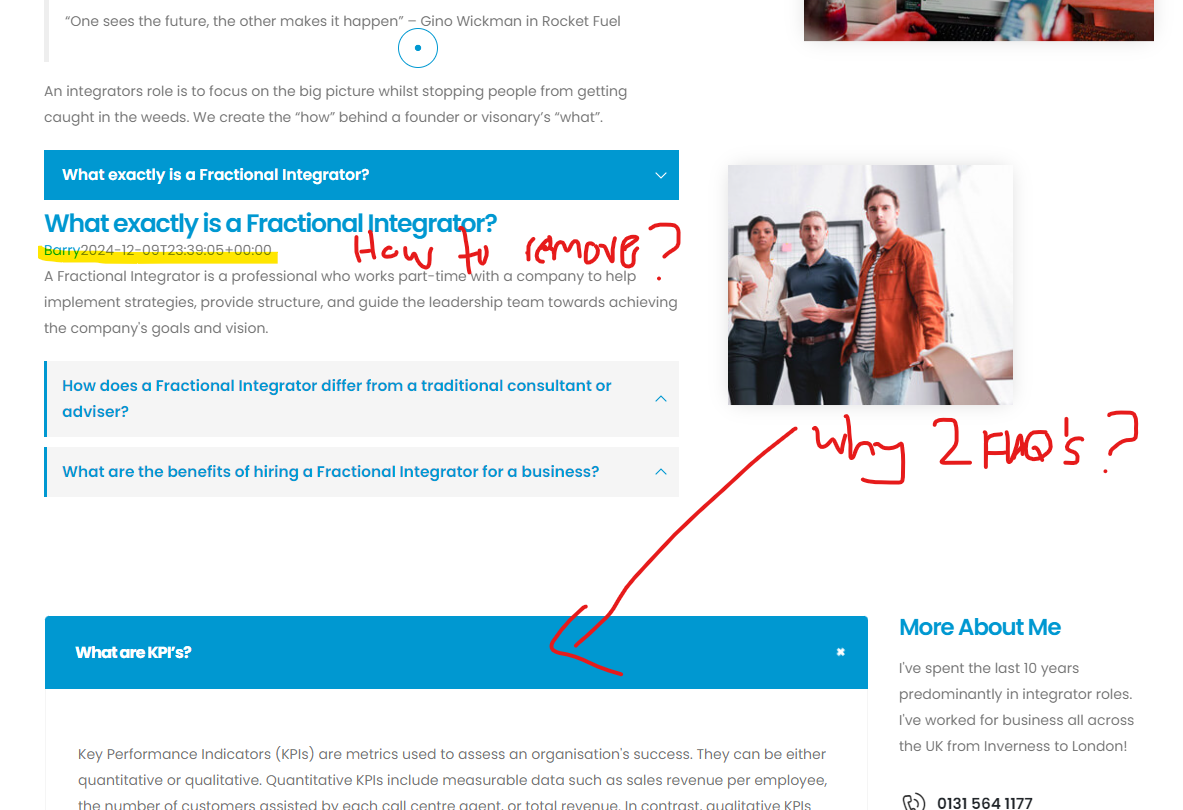
When you edit it, you will find the heading element set and the content of the heading has been set as dynamically for the post and it shows the post content: https://postimg.cc/HV8SpPNh and the seconds Faqs on that page has been created using Porto FAQs element: https://postimg.cc/yJLhhF5RSo you can delete one element from there as per your requirements.
And the date has been removed from that faq on your site please check back again after clearing the cache.
Best Regards,
PThemes Team.Hello, @jeroenvdveer,
1. You’re very welcome! I’m glad to hear that the suggestion worked well and you’re able to edit everything now. I completely understand about the colors – adjusting them in the Elementor blocks/posts should make a big difference. If you need any more help with the color tweaks or anything else, feel free to reach out.
2. where can i edit autocomplete-suggestions style?
Could you please explain this in detail with some helping screenshots, of what you are trying to edit, so that I can check and assist you accordingly?
Best Regards,
PThemes Team.January 7, 2025 at 8:36 am in reply to: Challenges with Porto Theme & Business Consulting 3 Template #25386Hello @barryhynd,
1. Your issue has been solved please check back to your site now after clearing the browser cache, I have changed the CSS background size from 100% to cover to solve your issue: https://postimg.cc/BXDbDknF https://postimg.cc/Wdw4YZrb
2. You can edit/modify the content of the “Our Premium Services” section by editing your home page and editing the particular element, please refer to this screenshot: https://postimg.cc/87xVHPXP
3. Could you please share the page URL of that section so that I can check and help you out accordingly: https://www.portotheme.com/wp-content/uploads/2025/01/Service-FI-page-FAQ-issues.png
Best Regards,
PThemes Team.Hello, @rob-gaffney,
But we have to check with every possible way, it might Elementor does not work with our theme on lower PHP versions, we can change and check it as because it is working fine for me on my test site, Could you please kindly check accordingly and let me know the result, else I will forward this topic to our lead developer for further investigation.
Best Regards,
PThemes Team. -
AuthorPosts