
What Happens When a Video Model Gets a Proper Studio Around It
The gap between a powerful AI model and a usable creative tool has always been where good ideas go to die. You have the raw intelligence—the model understands physics, lighting, and motion better than most junior editors—but the interface fights you. The controls are vague. The feedback loop is slow. And somewhere between uploading a reference image and hitting generate, the vision slips away.
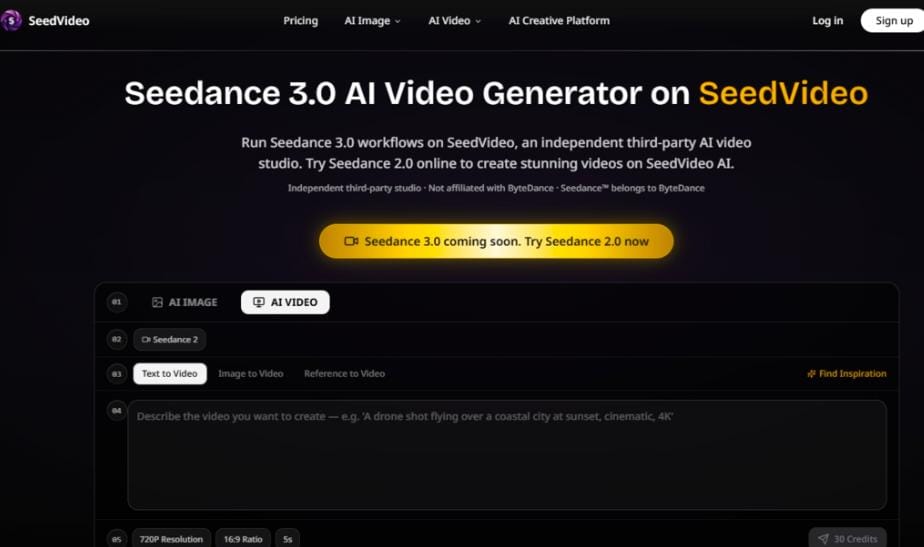
That is precisely why Seedance 3.0 arriving inside a dedicated production environment matters. Not as a demo page. Not as a wrapper around an API. But as a proper video studio built specifically around how creators actually work.
I spent the last two weeks testing the SeedVideo platform with real production briefs—commercial storyboards, character-driven narratives, and style-transfer experiments that usually require three separate tools to pull off. What I found was a system that does not treat video generation as a magic button but as a repeatable, controllable process. Here is how it actually performs.
The Studio Model vs. The Playground Model
Most AI video tools operate like playgrounds. You type a prompt, hit generate, and hope for the best. The model does its thing in a black box, and you either celebrate or start over. That works for exploration. It fails for production.
SeedVideo takes a different approach. The platform is structured as a proper studio environment where Seedance 3.0 becomes one component of a broader workflow rather than the entire experience. The distinction matters because it changes how you interact with the model. You are not begging for a good result; you are guiding a capable system through a series of deliberate inputs.
From a practical user perspective, this shift in architecture makes the difference between treating AI as a lottery and treating it as an assistant. The studio model assumes you know what you want and gives you the controls to get there. The playground model assumes you will be happy with whatever shows up.
Putting Seedance 3.0 Through Real Production Tests
Testing a video model means testing it against the things that actually break other tools. I ran four distinct scenarios that represent the most common failure points in AI video generation.
Test One: Character Consistency Across Multiple Shots
The brief was simple: generate three sequential shots of the same character walking through different environments. The character had to maintain facial structure, clothing color, and overall proportions across all three outputs.
The difficulty here is well documented. Most models treat each generation as an isolated event. They remember the prompt but forget the character. Seedance 3.0, accessed through the SeedVideo studio, handled the reference input with surprising stability. The platform allows you to anchor generation to a specific visual reference, which in my testing produced a much tighter consistency than prompt-only approaches.
The result was not perfect. The third shot introduced a slight shift in the character’s jacket color under different lighting conditions. But the facial structure remained recognizably the same person across all three frames, which is more than I have seen from several competing models in the same price tier.
What this means for creators: If you are working on narrative content where character identity matters, this approach reduces the number of regeneration cycles significantly. You still need to review each output, but you are not starting from scratch every time.
Test Two: Text Rendering in Frame
This is the stress test that separates serious video tools from toys. I asked for a short clip showing a storefront with a readable sign. The sign text was “MIDNIGHT BOOKS” in a specific serif style.
Text in AI-generated video is notoriously unreliable. Letters morph. Words scramble. The model understands that text should exist but cannot quite figure out what it should say.
The Seedance 3.0 output in this test was mixed but instructive. The first generation produced the sign with mostly correct letters but a scrambled second word. The second generation, with a more detailed prompt that specified font weight and positioning, rendered the full text accurately. The letters were not perfectly crisp—there was a slight digital artifact around the edges—but they were legible and stable throughout the three-second clip.
The limitation: Text rendering is not guaranteed. Prompt quality directly influences success rate, and complex phrases with unusual characters may require multiple attempts. In my testing, simpler text strings performed better, and the model seemed to struggle more with decorative fonts than with standard sans-serif styles.
Test Three: Physics and Motion Logic
I generated a clip of a glass cup falling off a table and shattering on a wooden floor. This is the kind of physical interaction that exposes a model’s understanding of gravity, momentum, and material behavior.
The result was impressive in some ways and revealing in others. The cup’s trajectory looked physically plausible. The acceleration matched what you would expect from a real drop. The shattering produced fragments that scattered in a believable pattern.
Where the model showed its limitations was in the floor interaction. The fragments did not consistently bounce or slide in a way that matched the wood surface. Some pieces appeared to pass through the floor plane briefly before settling.
From a practical standpoint: For abstract or stylized content, these physics quirks are barely noticeable. For photorealistic product visualization, you would want to review each output carefully and potentially regenerate shots where the physical interaction is the primary focus.
Test Four: Style Transfer from Reference Image
I uploaded a reference image with a specific color palette and painterly texture, then asked the model to generate a video sequence that matched that aesthetic.
This is where the multi-modal input capability of the SeedVideo platform really showed its value. The model absorbed the reference image’s tonal range and brushstroke quality and applied it consistently across the generated frames. The output looked like it belonged in the same visual universe as the reference, which is precisely what you want for branded content or cohesive series work.
The editing workflow within the platform made it easy to iterate. I could adjust the prompt, regenerate specific segments, and preview changes without leaving the studio environment.
How the SeedVideo Platform Actually Works
The platform follows a straightforward flow that prioritizes control over speed. Based on my experience using the studio, here is the actual process.
Step One: Define Your Input
Choosing What the Model Works From
The first step is deciding what kind of input you are providing. The studio supports multiple input types, which means you are not locked into text-only prompting. You can start with a detailed written description, upload a reference image to guide the visual style, or provide a video clip that the model can extend or transform.
The choice of input type changes how the model interprets your intent. Text prompts give you maximum flexibility but require more precision in your language. Image references lock in visual consistency but leave motion and timing more open to interpretation. Video inputs preserve existing motion while allowing style or content modifications.
In my testing, the image-reference approach produced the most predictable results for branded work where color accuracy mattered. The text-only approach worked better for narrative scenarios where I needed the model to invent new visual elements.
Step Two: Generate and Review
The Feedback Loop That Makes Production Possible
Once the input is defined, the generation process begins. The platform does not pretend to be instantaneous. It takes the time necessary to process the request, which varies depending on the complexity of the input and the length of the output.
What matters more than speed is the review process. The studio environment allows you to examine each output frame by frame, identify issues, and decide whether to accept the result or refine your input and try again.
This review step is where the studio model proves its value over simpler tools. You are not making a binary accept-or-reject decision. You are gathering information about what worked and what did not, then using that information to improve the next generation.
Step Three: Iterate and Refine
The Real Work Happens in the Revision Cycle
The third step is where most of the actual production time goes. Based on the review, you adjust your inputs—tightening the prompt, selecting a different reference image, or modifying the video input—and generate again.
The platform supports this iterative process without forcing you to start over from the beginning. Your previous inputs remain accessible, so you can compare outputs side by side and track what changes produced better results.
This is not a one-and-done tool. It is a production environment that assumes you will need multiple passes to get exactly what you want. The interface reflects that assumption, with clear versioning and easy access to previous generations.
Where the Platform Excels and Where It Falls Short
| Aspect | SeedVideo Studio Experience | Typical AI Video Tool |
| Learning Curve | Moderate—requires understanding input types and iteration | Low—but limits what you can actually achieve |
| Process Clarity | High—each step is clearly defined and visible | Low—generation happens in a black box |
| Creative Control | High—multiple input types and refinement options | Low—prompt-only with minimal adjustment |
| Best Use Case | Branded content, narrative work, style-consistent series | Social clips, experimentation, one-off concepts |
| Result Stability | Variable but improvable through iteration | Unpredictable with limited improvement options |
| Time Investment | Higher upfront, lower overall due to fewer wasted generations | Lower upfront, but more total time spent regenerating |
The Real Limitations You Should Know
No tool is perfect, and pretending otherwise helps no one. Here is what I observed that you should keep in mind before committing a production timeline to this platform.
Prompt quality is the single biggest variable. The model responds to clear, specific language. Vague prompts produce vague results. If you are not getting what you want, the problem is often in the input rather than the model. This requires a different skill set than traditional video editing—you are writing instructions for an AI rather than manipulating pixels directly.
Complex scenes may require multiple generations. The model handles straightforward compositions well. Crowded scenes with multiple interacting elements can produce artifacts, especially around object boundaries and occlusion. In my testing, simplifying the scene composition improved results more than adding more descriptive language to the prompt.
Consistency is not guaranteed across generations. Even with the same inputs, different generations can produce different results. This is inherent to how these models work. The studio environment helps you manage this variability by making iteration easy, but it does not eliminate it.
The platform is a third-party studio. SeedVideo is an independent studio that runs Seedance models. It is not operated by ByteDance. This distinction matters for support, updates, and long-term reliability. The platform’s value comes from the studio environment it provides, not from exclusive access to the model itself.
Who This Actually Works For
Based on my testing, the SeedVideo studio environment is best suited for creators who treat video generation as a serious production discipline rather than a casual experiment.
If you are producing branded content where visual consistency matters across multiple assets, the reference-image controls and iterative workflow justify the time investment. If you are working on narrative projects with recurring characters, the ability to anchor generation to specific visual references reduces the frustration of inconsistent outputs.
If you are exploring ideas or creating disposable social content, the platform may feel heavier than necessary. The iteration cycle that makes it powerful for production work also makes it slower than simpler tools that prioritize speed over control.
The sweet spot is somewhere in the middle: creators who have a clear vision, need to execute it reliably, and are willing to invest the time to guide the model toward that vision rather than hoping the model guesses correctly on the first try.
The Studio Mindset Changes Everything
What makes SeedVideo interesting is not a single killer feature or a miraculous generation quality that surpasses everything else. What makes it interesting is the fundamental assumption that video generation should be a process, not an event.
The studio environment treats you like a professional who knows what they want and just needs the right tools to get there. It gives you multiple ways to communicate your intent. It makes iteration painless. It does not pretend that the first result will be the final result.
That is a rare philosophy in a space dominated by one-click demos and viral social clips. For the kind of work that actually pays the bills—brand campaigns, narrative sequences, style-consistent series work—that philosophy matters more than any single output metric.
Seedance 3.0 AI Video Generator inside this studio environment is not going to replace your editing suite overnight. But it might replace the part of your workflow where you spend hours searching for the right stock footage or wrestling with motion graphics that never quite look right.
And that, from a practical user perspective, is exactly where AI video generation needs to be.


Leave a Reply