
AI Photo Editor for Natural Visual Direction
When image work starts to feel slow, the real problem is often not creativity but translation. People know what they want a picture to become, yet turning that intention into an actual result can still involve too many tools, too many manual steps, and too much technical friction. That is where an AI Photo Editor becomes meaningful. It shifts the process from software-heavy manipulation toward instruction-based editing, which makes visual refinement feel closer to directing than operating.
This matters because many modern workflows do not begin with a blank canvas. They begin with an existing image that is almost right. A portrait may need sharper detail. A product photo may need a cleaner background. A campaign visual may need a different mood, a more polished surface, or a motion version for short-form content. In situations like these, the value of the tool is not that it creates images from nothing, but that it helps users move from “almost usable” to “ready to publish” more quickly.
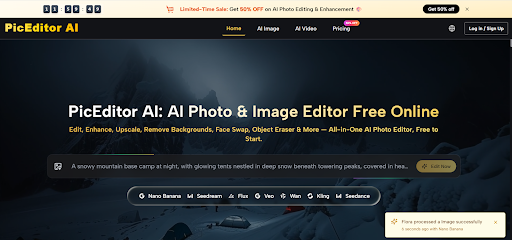
What makes that shift interesting is that the platform does not frame editing as one narrow action. It combines enhancement, object removal, style transformation, upscaling, face swap, and image-to-video generation inside the same environment. That broader setup suggests a different philosophy: instead of separating correction, generation, and animation into isolated tools, it treats them as connected stages of the same visual process.
Why Modern Editing Feels More Like Direction
Traditional software rewards users who know exactly where every control lives. That approach still has value, especially for highly technical retouching, but it can slow down people who are trying to solve practical communication problems rather than perform deep manual edits. A marketer, content creator, founder, or small brand team often needs results faster than they need interface mastery.
PicEditor appears to be built around that reality. Its official workflow is intentionally simple: upload an image, choose a tool or model, describe the change, and let the system generate the edited result. That sounds basic, but the design choice is important. It changes the user’s role from operator to decision-maker. The user spends less energy on mechanics and more energy on judging whether the output matches the intended look.
Editing Becomes an Iteration Loop
This is one of the clearest reasons platforms like this are gaining attention. Visual work increasingly happens in rounds. A first version is created, reviewed, adjusted, restyled, sharpened, reformatted, and sometimes animated. The old model of opening one editor for cleanup, another for generative changes, and another for video experiments creates unnecessary fragmentation.
An AI Image Editor becomes more useful when it reduces those transitions. If a user can start with one source image and move through enhancement, retouching, visual restyling, and short-form animation in one place, the editing process becomes less about switching tools and more about maintaining momentum.
The Interface Hides Model Complexity
Another strength of the platform is that it simplifies access to multiple major models without forcing users to manage each one separately. The site presents a mix of image and video engines, including GPT-4o, Nano Banana, Nano Banana 2, Flux Kontext Pro, Flux Kontext Max, Seedream 4.0, Seedream 5.0 Lite, Qwen Image Edit, and Grok Imagine Image on the image side, as well as Veo 3, Veo 3.1 Basic, Veo 3.1 Premium, Kling 2.5, Kling 2.1 Pro, Kling 2.1 Master, Seedance variants, Wan 2.5, Runway Gen 4, and Grok Imagine Video on the video side.
That matters because most users do not want to spend their time comparing APIs or separate interfaces. They want to know which engine helps them get the right result with the least resistance.
How the Platform Handles Different Creative Needs
A useful part of the site is that it does not treat every model as interchangeable. Instead, it suggests that different engines suit different editing priorities.
Nano Banana for Stable Character Results
Nano Banana is positioned around realism, consistency, and reference-image support. The platform notes support for up to four reference images, which is especially relevant for users trying to preserve identity, styling, or repeatable character design. In practical terms, this is important when a creator is not simply asking for a nice image, but for a reliable image that still looks like the same person or visual concept across multiple outputs.
Flux for More Precise Corrections
Flux is described in terms of context-aware editing, text-in-image control, and object-level precision. That suggests a stronger role in situations where the user needs targeted modifications rather than broad stylistic reinterpretation. For example, replacing embedded text, adjusting a specific object, or refining part of an existing composition often requires more discipline than a purely generative pass.
Seedream for Speed and Volume
Seedream is framed more around quick processing and efficient iteration. That makes sense for high-volume workflows where speed is part of the creative advantage. In real production environments, faster turnaround is not just convenience. It can change how many ideas a team is willing to test before choosing the final direction.
Different Models Support Different Decisions
This is why the platform is easier to understand when viewed as a decision environment rather than a single editor. Users are not only editing pictures. They are deciding whether a job needs realism, precision, speed, or motion. The product becomes useful because it organizes those choices in a single workflow.
What the Official Workflow Actually Looks Like
AI Image Editor keeps the process very simple, which is a large part of the appeal.
Step One Upload the Image
The user starts by uploading an image. This is important because the platform is clearly designed not only for generation but for transformation. It assumes that many users already have a source image and want to improve, restyle, or extend it.
Step Two Select the Editing Path
After upload, the user chooses a modification tool or model. This can include common editing needs such as enhancement or object removal, but it can also mean choosing a more generative model depending on the desired output. That step reveals one of the platform’s core strengths: it connects conventional image improvement with model-based creative variation.
Step Three Describe the Intended Change
The user then describes the edit in words. According to the official explanation, the system analyzes the picture and applies the requested enhancement or transformation. For users, this is the most important moment in the workflow because the quality of direction strongly affects the result. In tools like this, clear prompts usually perform better than vague instructions.
Step Four Review and Regenerate if Needed
Once the edit is applied, the user can assess the output and decide whether it is ready or whether another pass is needed. That last part is worth stating honestly: AI editing is fast, but not always final on the first attempt. A better result may appear after one or two revisions, especially when the goal depends on style, consistency, or subtle visual judgment.
Where This Product Fits Best
The platform makes the most sense in workflows where people need flexible output more than deep manual control.
| Task Type | Traditional Method | Platform Method | Main Advantage |
| Image cleanup | Manual retouching tools | AI enhancement and retouching | Faster polish |
| Background change | Selection and masking work | Background removal and replacement | Less repetitive labor |
| Object removal | Layer-based editing | Object eraser workflow | Simpler cleanup |
| Visual restyling | Rebuild or repaint | Style transfer with model choice | Easier experimentation |
| Character consistency | Recreate look manually | Reference-image support | More stable identity |
| Motion conversion | Separate animation tools | Integrated image-to-video workflow | Fewer production breaks |
This table shows why the product feels broader than a basic editor. It is not just helping users correct flaws. It is helping them reuse and evolve visual assets with less friction.
Why Image-to-Video Changes the Meaning of Editing
One of the more interesting parts of the platform is its video layer. By integrating models like Veo, Kling, Seedance, Wan, and Runway, it turns still imagery into something more reusable. A finished image no longer has to remain static. It can become the first frame of a moving asset.
Static Assets Gain a Second Life
For content teams, this matters a great deal. A product image, portrait, or concept visual can be enhanced and then adapted into a short motion sequence without moving into a separate creative stack. That makes the still image more valuable because it becomes a flexible starting point rather than a final endpoint.
Motion Extends Existing Creative Work
This is especially useful for social content, ad variations, and rapid campaign testing. In my observation, the benefit here is not only novelty. It is asset efficiency. One source image can support multiple output forms, which helps smaller teams do more with less production overhead.
What Users Should Stay Realistic About
The platform clearly lowers the barrier to entry, but it does not eliminate the need for judgment. Results still depend on the starting image, the chosen model, and the clarity of the user’s instruction. Some edits will look strong immediately, while others may need refinement. That is not a flaw unique to this platform. It is a normal part of working with generative systems.
The pricing structure also reflects that this is meant to scale beyond casual use. The site presents a free-to-start model with premium plans offering more credits, lower effective image costs, concurrent generations, no watermark, private generation, priority queue access, commercial license, and unlimited storage at higher tiers. That gives casual users a way to test the system while making it viable for heavier production use.
Why This Editing Direction Matters Now
What stands out most is not a single headline feature, but the broader shift it represents. Editing is moving away from tool memorization and toward intent-driven workflows. PicEditor fits that movement well because it treats image improvement, generative modification, and motion output as parts of the same creative path.
That is why the platform is easier to understand than many fragmented AI toolsets. It does not ask users to become experts in every model. It asks them to start with an image, choose a direction, describe what should change, and keep refining until the result feels usable. In a world where speed, flexibility, and asset reuse matter more than ever, that may be the strongest reason this kind of editor feels increasingly relevant.


Leave a Reply