09Dec
09Dec
How to enable Live Search
Porto provides live ajax search on header search box. To enable Live Search in the Porto theme, follow these steps: Search by Sku: This option allows search products by sku. Search by Product... 09Dec
Filter Products By Price
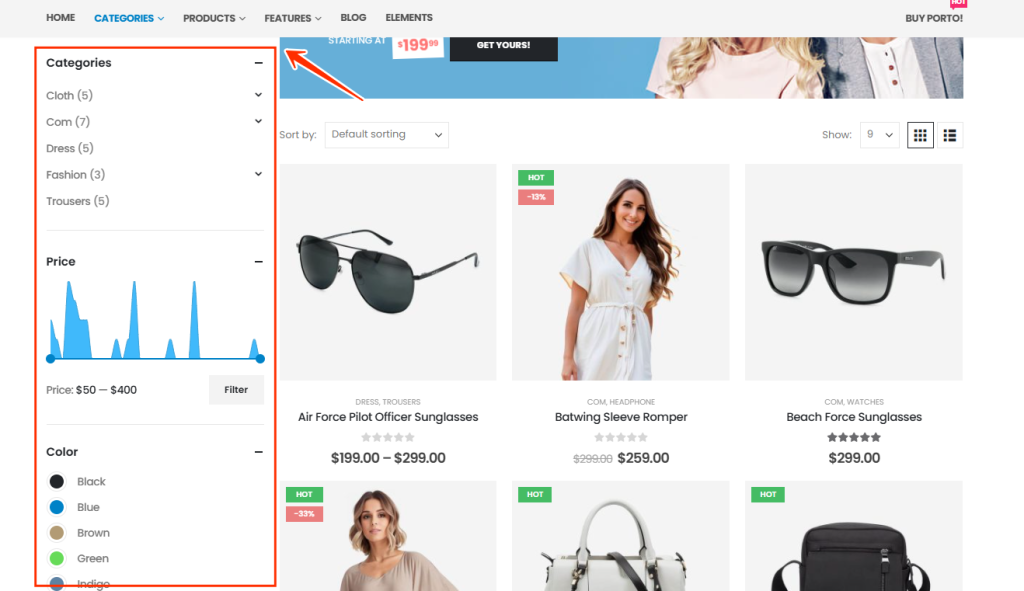
The Filter Products by Price widget allows customers to filter WooCommerce products within a specific price range. This widget is typically used in shop sidebar areas to enhance product discovery and improve user experience. Porto includes an extended version of this widget with optional price chart... 09Dec
Sticky Sidebar
The Sticky Sidebar feature in the Porto WordPress theme allows your sidebar content to remain visible while the user scrolls the page. This improves usability—especially on long product or blog pages—by keeping filters, widgets, or navigation items easily accessible at all times. 08Dec
Variation Swatch
The Variation Swatch feature in the Porto WordPress Theme allows store owners to display product attributes (such as color, size, style, etc.) as visually appealing swatches instead of traditional dropdowns. Swatches enhance user experience and help customers quickly identify variations through colors, images, or labels. This... 05Dec
How to add porto shortcodes in TinyMCE editor
Porto includes a wide collection of shortcodes that let you add styled components, layout structures, and functional elements directly into your content. When using the TinyMCE (Classic) Editor, you can insert these shortcodes in several ways. Below are all available methods, organized for clarity and easy reading. You... 02Dec
Porto Carousel Element
The Porto Carousel Element in the Porto Post Type Builder allows you to display posts or custom content in a responsive carousel with customizable navigation, animations, and device-specific controls. Open the Post Type Builder. Click the “+” Add Block icon in the... 02Dec
Porto Meta Element
The Meta Element in the Porto Post Type Builder allows you to display dynamic metadata for posts, products, and any registered custom post types. It supports WordPress core fields, WooCommerce product attributes, and custom taxonomies created by plugins such as Unlimited Post Types. This element is... 28Nov
Woo Link Element
The Woo Link element in the Porto Post Type Builder allows you to insert dynamic product action buttons or links into your custom post-type layouts. This widget is commonly used inside product grids, carousels, archive item layouts, and custom listing cards. Depending on the selected Link... 28Nov