
WooCommerce normally prevents customers from purchasing products that are out of stock. The Pre-Order feature in Porto removes this limitation by allowing customers to buy items before they become available for shipping.
This is useful when:
- A product is temporarily out of stock
- A product is scheduled for an upcoming release
- You want to measure customer demand early
Enabling Pre-Order can improve sales by letting customers secure items in advance.
Enable Pre-Order (Theme-Level Activation)
- Go to Porto > Theme Options > WooCommerce
- Locate Enable Pre-Order
- Switch the toggle ON
Once enabled, additional global Pre-Order settings will appear:
- Pre-Order Label - Replaces the default "Add to Cart" button text (e.g., Pre-Order Now).
- Pre-Order Availability Date Text - The prefix displayed before the date. (e.g., Available date:
%1$s-%1$sis automatically replaced by the availability date). - Pre-Order No Date Message - Displayed when the product has no assigned availability date (e.g., “Release date coming soon”).
These settings affect all Pre-Order products unless overridden individually.
Enable Pre-Order on a Product
- Edit the desired product in WooCommerce → Products
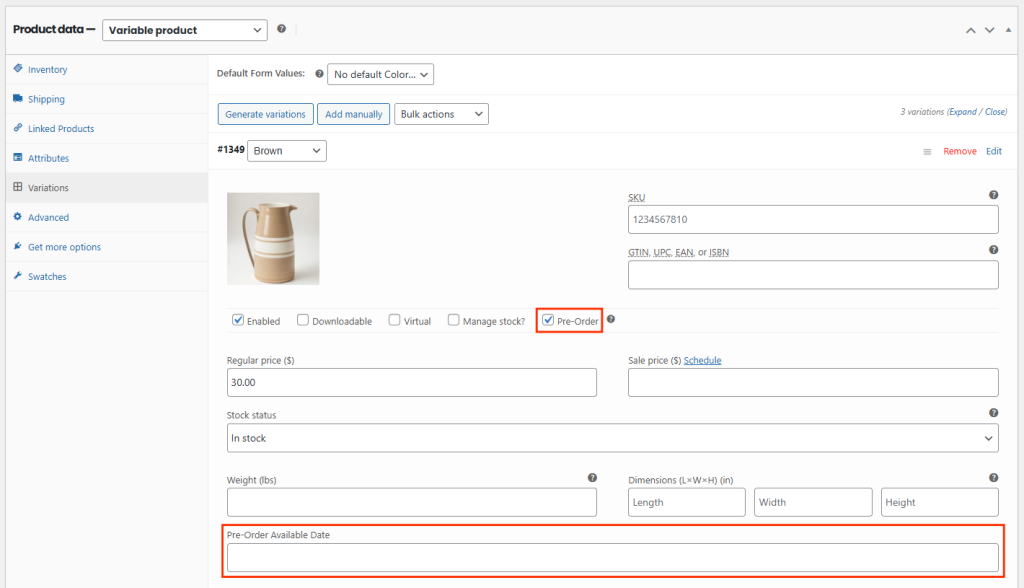
- In the Product Data panel, check Pre-Order
-
(Optional) Set an Available Date
- If a date is set → It appears on the product page
- If no date is set → The availability section stays hidden
Once saved, The product becomes purchasable even if out of stock

Main Features
- Custom Pre-Order Button Text - “Add to Cart” automatically changes to your Pre-Order label defined in Theme Options.
- Available Date Display - If the product has an availability date, it appears on the product page using the date format defined in Theme Options.
- Admin Pre-Order Tracking - Administrators can view all pre-ordered items inside WooCommerce > Orders.
- Customer Pre-Order List - Customers can see which pre-ordered products they have purchased under My Account.
- Admin Email Notifications - When a Pre-Order product is purchased, the store administrator receives an email.
- Customer Notifications - Customers are informed during purchase that the product is a Pre-Order item.

