
Porto Toggle Dropdown Menu Element
The Porto Toggle Dropdown Menu widget allows you to add a compact, stylish dropdown navigation menu to your header or sidebar. It’s especially useful for mobile-friendly layouts or when you want to save space while maintaining full access to your...
Continue Reading Porto Menu Element
The Porto Menu Element allows you to add fully customizable navigation menus anywhere on your site — such as in headers, footers, sidebar or custom page layouts — while maintaining design consistency with your overall Porto theme styling. With this element,...
Continue Reading Footer Setup
The Porto theme provides flexible and robust options to create and customize your website footer setup. You can set up the footer using two methods: the Footer Builder (highly recommended for flexibility and advanced customization) or the Classic Widget Arrangement...
Continue Reading How to set Favicon
Path: Dashboard → Appearance → Customize → Site Identity Steps: Click “Site Identity.” Upload your Site Icon (favicon) — ideally 512×512 px. Click Publish. This icon will appear in: Browser tabs WordPress admin bar Bookmarks (unless overridden by theme or plugin) Path: Dashboard →...
Continue Reading How to enable sticky header
To enable the sticky header in the Porto, follow these steps: Go to WordPress Dashboard > Porto > Theme Options Click Header Scroll to the Sticky Header section Enable: Enable Sticky Header (Optional) Choose whether to show sticky on tablet, mobile Click Save Changes
Continue Reading 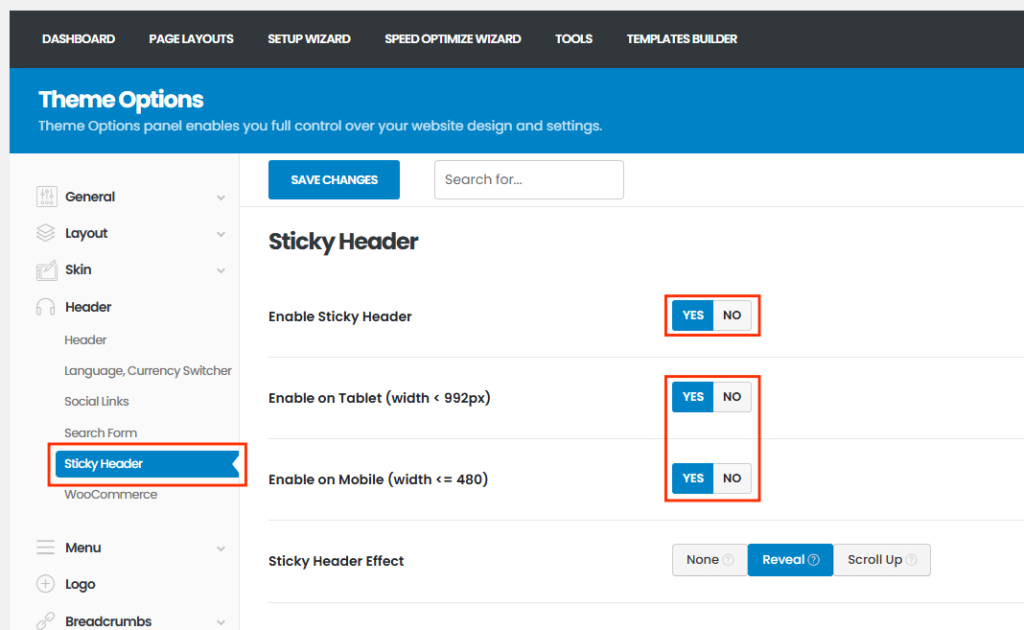
Porto Logo Element
The Logo is one of the most essential elements of any website. It represents your brand’s identity and helps users recognize your business instantly. The Porto Logo Element is designed to display the logo you’ve set in the Theme...
Continue Reading