
For a fully personalized footer design, you can build one from scratch using the Porto Footer Builder. Follow the steps below to create a unique, responsive footer tailored to your website’s layout and branding.
Step 1: Access the Footer Builder
- Navigate to Porto > Template Builder > Footer.
- Click Add New
- Enter a descriptive name for your footer.
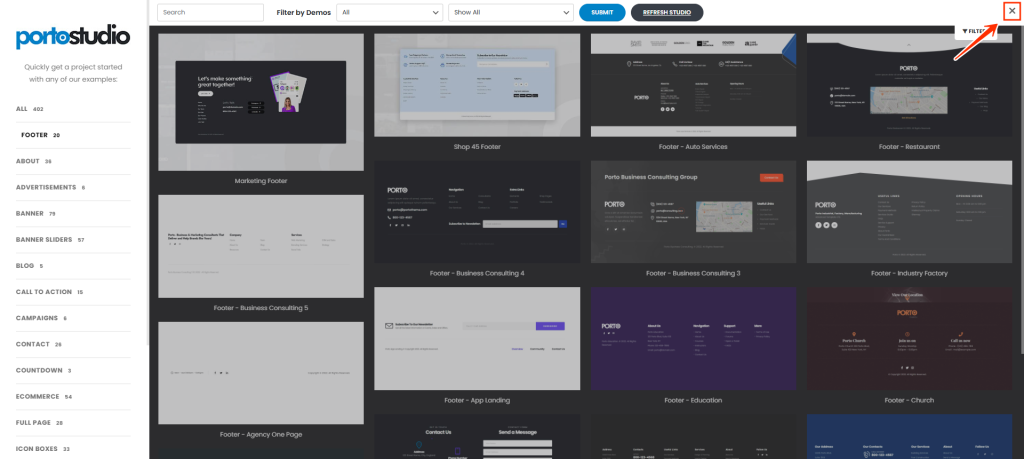
- Close Porto studio block list by clicking "close" button for building your footer from scratch.
Step 2: Add Essential Footer Elements
Using Elementor or WPBakery Page Builder, add key components that best suit your site’s purpose and user experience:
- Logo: Insert your site logo to maintain brand identity. You should use normal image element since Logo element is only rendered in header block.
- Social Media Icons: Link to your social profiles to improve engagement. You can use Social media icons element.
- Contact Information(Porto Info Box): Display essential details like phone number and email for easy access.
- Menu: Use normal Heading or Icon List element for designing useful link lists in your footer.
- Copyright Text: Add copyright information or legal disclaimers at the bottom.
Step 3: Customize the Layout & Design
- Spacing & Alignment: Adjust padding, margins, and positioning for a clean layout.
- Typography & Colors: Use Porto’s styling options to maintain brand consistency.
- Widgets & Columns: Organize footer content using columns.
- Responsive Design: Configure device-specific settings to ensure the footer adapts to mobile, tablet, and desktop screens.
Step 4: Save & Apply Your Footer
- Click Save to store your custom footer.
- Assign Footer to your site at the bottom of footer block edit page.
By following these steps, you can create a fully customized, visually appealing, and functional footer using Porto Footer Builder.
